# Build and label the diagnostic visualization for the Setup section.
from pathlib import Path
import importlib.util
import os
import warnings
os.environ.setdefault("MPLCONFIGDIR", "/tmp/matplotlib-ranking-sys")
warnings.filterwarnings("default")
warnings.filterwarnings("ignore", category=DeprecationWarning)
warnings.filterwarnings("ignore", category=PendingDeprecationWarning)
warnings.filterwarnings("ignore", category=FutureWarning)
warnings.filterwarnings("ignore", message=".*IProgress not found.*")
warnings.filterwarnings("ignore", message=".*setParseAction.*deprecated.*")
warnings.filterwarnings("ignore", message=".*copy keyword is deprecated.*")
warnings.filterwarnings("ignore", message=".*disp.*iprint.*L-BFGS-B.*")
warnings.filterwarnings("ignore", message=".*variables are assumed unobserved.*")
warnings.filterwarnings("ignore", module="dowhy.causal_estimators.regression_estimator")
warnings.filterwarnings("ignore", module="sklearn.linear_model._logistic")
warnings.filterwarnings("ignore", module="seaborn.categorical")
warnings.filterwarnings("ignore", module="pydot.dot_parser")
import dowhy
import matplotlib.pyplot as plt
import networkx as nx
# Compatibility shim for DoWhy versions that expect the older NetworkX d_separated API.
if not hasattr(nx.algorithms, "d_separated"):
    from networkx.algorithms.d_separation import is_d_separator
    nx.algorithms.d_separated = is_d_separator
import numpy as np
import pandas as pd
pd.set_option("display.max_colwidth", None)
pd.set_option("display.max_columns", None)
pd.set_option("display.width", 0)
# Compatibility shim for DoWhy estimators written against older pandas Series integer indexing.
if not getattr(pd.Series, "_dowhy_integer_position_patch", False):
    _original_series_getitem = pd.Series.__getitem__
    def _dowhy_series_getitem_compat(self, key):
        try:
            return _original_series_getitem(self, key)
        except KeyError:
            if isinstance(key, int) and key not in self.index:
                return self.iloc[key]
            raise
    pd.Series.__getitem__ = _dowhy_series_getitem_compat
    pd.Series._dowhy_integer_position_patch = True
import seaborn as sns
import statsmodels.formula.api as smf
from dowhy import CausalModel
from dowhy.utils.cit import partial_corr
from IPython.display import display
from matplotlib.patches import FancyArrowPatch
pd.set_option("display.max_columns", 100)
pd.set_option("display.width", 150)
pd.set_option("display.float_format", "{:.4f}".format)
sns.set_theme(style="whitegrid", context="notebook")
for candidate in [Path.cwd(), *Path.cwd().parents]:
    if (candidate / "notebooks" / "tutorials" / "dowhy").exists():
        PROJECT_ROOT = candidate
        break
else:
    PROJECT_ROOT = Path.cwd()
NOTEBOOK_DIR = PROJECT_ROOT / "notebooks" / "tutorials" / "dowhy"
OUTPUT_DIR = NOTEBOOK_DIR / "outputs"
FIGURE_DIR = OUTPUT_DIR / "figures"
TABLE_DIR = OUTPUT_DIR / "tables"
FIGURE_DIR.mkdir(parents=True, exist_ok=True)
TABLE_DIR.mkdir(parents=True, exist_ok=True)
RNG = np.random.default_rng(909)
print(f"DoWhy version: {dowhy.__version__}")
print(f"Notebook directory: {NOTEBOOK_DIR}")09: Graph Discovery and Graph Refutation
The previous lessons assumed that the analyst had already written a reasonable causal graph. We focus on a different part of the workflow: how do we build, challenge, and refine a graph before trusting an effect estimate?
Causal graph discovery is tempting because it sounds like the data can tell us the graph. In practice, graph discovery is better treated as an assistant, not an oracle. Data can reveal dependencies, suggest candidate edges, and flag graph implications that do not match observed patterns. But causal direction, hidden variables, measurement choices, timing, and domain constraints still need analyst judgment.
We work through a practical graph workflow:
- start from a known simulated causal system,
- inspect correlations and partial correlations,
- build a simple constraint-assisted candidate graph,
- compare candidate edges to the known graph,
- use DoWhy’s graph refuter to test conditional independence implications,
- show how the wrong graph can bias a causal estimate.
Learning Goals
By the end, you should be able to:
- Explain why graph discovery is not the same as causal proof.
- Distinguish marginal dependence from conditional dependence.
- Use domain ordering to orient candidate graph edges.
- Compare discovered candidate edges against a known graph in a simulation.
- Use DoWhy’s
refute_graphAPI for conditional-independence checks. - Understand why missing a confounder-to-outcome edge can bias an effect estimate.
- Explain why passing graph checks does not guarantee that a graph is correct.
Dataset and Experiment Setup
We use mostly simulated or semi-synthetic observational datasets to study Graph Discovery And Graph Refutation. DoWhy is mainly about causal modeling discipline: graph, estimand, estimator, and refuter. A controlled dataset lets us show how a change in assumptions changes the estimand and the credibility of the estimate.
Read each row as an observed unit in a business or policy system. The treatment, outcome, common causes, instruments, mediators, and anomaly indicators are named to mirror applied causal workflows and keep the examples close to realistic analysis language. The experiment is chosen to make the library behavior visible while keeping the causal target, assumptions, and diagnostics easy to audit.
The simulation is designed to make the identifying assumptions and diagnostic checks visible. It is meant to expose the assumptions that would be hidden in real data, where the true counterfactual outcome is unavailable.
Mathematical Foundation
A graph implies conditional independences such as
\[ X_i \perp\!\!\!\perp X_j \mid S. \]
A CPDAG represents a Markov equivalence class, so several DAGs can share the same skeleton and v-structures. Graph recovery is often summarized by
\[ \text{precision}=\frac{\text{true positive edges}}{\text{discovered edges}}, \qquad \text{recall}=\frac{\text{true positive edges}}{\text{true edges}}. \]
This separation matters for learning. Adjacency recovery, direction recovery, and uncertainty about an equivalence class are different claims.
Tutorial Workflow
How to Think About Graph Discovery
A causal graph encodes assumptions. Some assumptions imply conditional independencies in the observed data. For example, if a graph says X -> T -> M, then it often implies that X and M should be independent after conditioning on T, assuming there are no other open paths.
Graph discovery tries to work backward from observed dependence patterns toward graph structure. That is useful, but it has hard limits:
- Dependence does not reveal direction by itself.
- Hidden confounders can create edges that look direct.
- Different graphs can imply the same observed dependencies.
- Conditioning on colliders can create misleading associations.
- Sample noise and model misspecification can make tests unstable.
So the right posture is: use discovery to generate questions, then use graph refutation to challenge assumptions, then use domain knowledge to decide what graph is credible enough for estimation.
Setup
The setup block imports the packages, filters known non-actionable warnings, creates output folders, and sets plotting defaults. The lesson uses only installed dependencies. Optional graph-discovery libraries are checked later rather than required.
The environment is ready once the folders print. All outputs created here use a 09_ prefix.
This reproducibility check keeps the run auditable before causal interpretation begins. It makes the run consistent enough for later graphs, tables, and estimates to be checked against the same environment.
Optional Discovery Backends
DoWhy exposes CausalModel.learn_graph, which can call external discovery libraries such as LiNGAM, CDT, or GES when those packages are installed. This environment does not need those optional packages for the tutorial. Instead, we check availability explicitly and then build an executable constraint-assisted workflow using standard Python tools.
optional_discovery_backends = pd.DataFrame(
    [
        {
            "backend": "lingam",
            "example DoWhy method name": "lingam.DirectLiNGAM",
            "installed": importlib.util.find_spec("lingam") is not None,
            "typical use": "continuous non-Gaussian linear discovery",
        },
        {
            "backend": "cdt",
            "example DoWhy method name": "cdt.causality.graph.LiNGAM",
            "installed": importlib.util.find_spec("cdt") is not None,
            "typical use": "Causal Discovery Toolbox algorithms",
        },
        {
            "backend": "ges",
            "example DoWhy method name": "ges",
            "installed": importlib.util.find_spec("ges") is not None,
            "typical use": "score-based graph search",
        },
    ]
)
optional_discovery_backends.to_csv(TABLE_DIR / "09_optional_discovery_backends.csv", index=False)
display(optional_discovery_backends)| backend | example DoWhy method name | installed | typical use | |
|---|---|---|---|---|
| 0 | lingam | lingam.DirectLiNGAM | False | continuous non-Gaussian linear discovery |
| 1 | cdt | cdt.causality.graph.LiNGAM | False | Causal Discovery Toolbox algorithms |
| 2 | ges | ges | False | score-based graph search |
If one of these backends is installed, DoWhy can delegate graph learning to it. Since they are optional and not present here, the rest of the lesson uses transparent dependency and partial-correlation checks that run with the current environment.
Simulate a Known Causal System
We will simulate a small continuous system with a known graph. The treatment-like variable is recommendation_exposure, the mediator is engagement_depth, and the final outcome is weekly_value.
The true total effect of exposure on weekly value flows through engagement:
\[ recommendation\_exposure \rightarrow engagement\_depth \rightarrow weekly\_value \]
Two pre-treatment variables, pre_activity and seasonality_score, affect both exposure and weekly value. They are confounders for the total exposure effect.
# Define reusable helpers for the Simulate A Known Causal System section.
def make_graph_teaching_data(n=5_000, seed=909):
    """
    Idea: Construct the graph example data used in the Simulate A Known Causal System section, including columns needed for later diagnostics.

    Parameters
    ----------
    n : int
        Number of observations or repetitions to generate.
    seed : int
        Random seed used to make generation or resampling reproducible.

    Returns
    -------
    tuple
        Tuple containing df, true_total_effect.
    """
    local_rng = np.random.default_rng(seed)
    pre_activity = local_rng.normal(loc=0.0, scale=1.0, size=n)
    seasonality_score = local_rng.normal(loc=0.0, scale=1.0, size=n)
    exposure_from_pre = 0.85
    exposure_from_season = 0.60
    exposure_to_engagement = 1.20
    engagement_to_value = 1.40
    recommendation_exposure = (
        exposure_from_pre * pre_activity
        + exposure_from_season * seasonality_score
        + local_rng.normal(scale=1.00, size=n)
    )
    engagement_depth = exposure_to_engagement * recommendation_exposure + local_rng.normal(scale=1.00, size=n)
    weekly_value = (
        engagement_to_value * engagement_depth
        + 0.90 * pre_activity
        + 0.70 * seasonality_score
        + local_rng.normal(scale=1.00, size=n)
    )
    negative_control_metric = (
        0.65 * pre_activity
        + 0.55 * seasonality_score
        + local_rng.normal(scale=1.00, size=n)
    )
    df = pd.DataFrame(
        {
            "pre_activity": pre_activity,
            "seasonality_score": seasonality_score,
            "recommendation_exposure": recommendation_exposure,
            "engagement_depth": engagement_depth,
            "weekly_value": weekly_value,
            "negative_control_metric": negative_control_metric,
        }
    )
    true_total_effect = exposure_to_engagement * engagement_to_value
    return df, true_total_effect
graph_df, true_total_effect = make_graph_teaching_data()
print(f"Rows: {len(graph_df):,}")
print(f"True total effect of recommendation exposure on weekly value: {true_total_effect:.3f}")
display(graph_df.head())
Rows: 5,000
True total effect of recommendation exposure on weekly value: 1.680| pre_activity | seasonality_score | recommendation_exposure | engagement_depth | weekly_value | negative_control_metric | |
|---|---|---|---|---|---|---|
| 0 | -0.7925 | -0.0048 | 0.6276 | 0.9291 | 1.8947 | 0.2889 |
| 1 | 0.6065 | 1.1533 | 2.1557 | 1.6642 | 4.5552 | 1.7108 |
| 2 | -0.6350 | -0.0009 | -0.3334 | -0.2068 | 0.1012 | -0.1707 |
| 3 | -1.1514 | -1.1449 | -0.5104 | 0.3502 | -1.2972 | -0.6475 |
| 4 | 0.4317 | 0.4667 | -0.4992 | 0.2583 | 1.8669 | 0.9448 |
The known truth lets us judge the workflow. In real data, the graph is unknown, so these checks would be evidence about the plausibility of assumptions.
Data Field Guide
The table below describes the columns and their causal roles in the simulation. Graph work benefits from a field guide because causal direction often depends on timing and measurement definitions.
| column | role | description |
|---|---|---|
| pre_activity | source confounder | Pre-treatment activity that affects exposure and weekly value. |
| seasonality_score | source confounder | Pre-treatment timing signal that affects exposure and weekly value. |
| recommendation_exposure | treatment-like exposure | Continuous exposure intensity affected by the source variables. |
| engagement_depth | mediator | Post-exposure engagement depth through which exposure affects weekly value. |
| weekly_value | outcome | Final outcome affected by engagement and the source confounders. |
| negative_control_metric | diagnostic variable | Outcome-like metric driven by source variables but not by exposure in the simulation. |
The source variables come first in time, exposure comes next, engagement follows exposure, and weekly value is last. This time order will be used to orient candidate edges.
Basic Data Checks
Before looking at graph structure, check shape, missingness, and basic distribution summaries. Conditional-independence tests are sensitive to missing values and extreme data problems.
basic_quality = pd.DataFrame(
    {
        "rows": [len(graph_df)],
        "columns": [graph_df.shape[1]],
        "missing_cells": [int(graph_df.isna().sum().sum())],
        "mean_weekly_value": [graph_df["weekly_value"].mean()],
        "true_total_effect": [true_total_effect],
    }
)
numeric_summary = graph_df.describe().T
basic_quality.to_csv(TABLE_DIR / "09_basic_quality.csv", index=False)
numeric_summary.to_csv(TABLE_DIR / "09_numeric_summary.csv")
display(basic_quality)
display(numeric_summary)| rows | columns | missing_cells | mean_weekly_value | true_total_effect | |
|---|---|---|---|---|---|
| 0 | 5000 | 6 | 0 | 0.0850 | 1.6800 |
| count | mean | std | min | 25% | 50% | 75% | max | |
|---|---|---|---|---|---|---|---|---|
| pre_activity | 5000.0000 | 0.0250 | 0.9923 | -3.6408 | -0.6379 | 0.0117 | 0.6817 | 3.7716 |
| seasonality_score | 5000.0000 | 0.0033 | 1.0213 | -3.8524 | -0.6823 | 0.0136 | 0.7005 | 3.2376 |
| recommendation_exposure | 5000.0000 | 0.0295 | 1.4492 | -5.3022 | -0.9453 | 0.0237 | 0.9981 | 5.0033 |
| engagement_depth | 5000.0000 | 0.0332 | 2.0098 | -6.7343 | -1.2859 | 0.0198 | 1.3548 | 8.1351 |
| weekly_value | 5000.0000 | 0.0850 | 3.7680 | -12.8957 | -2.4363 | 0.0720 | 2.5114 | 12.9919 |
| negative_control_metric | 5000.0000 | 0.0072 | 1.3140 | -4.4956 | -0.8623 | 0.0086 | 0.8984 | 5.4819 |
The dataset is complete and continuous, which makes partial-correlation checks appropriate for this worked example.
The later estimates should be read in light of this sample construction, since data quality and composition set the boundary for any causal claim.
Declare the True Graph for the Simulation
This graph is the data-generating graph. In a real application the graph would be unknown. Here it gives the tutorial a benchmark.
TRUE_EDGES = [
    ("pre_activity", "recommendation_exposure"),
    ("seasonality_score", "recommendation_exposure"),
    ("recommendation_exposure", "engagement_depth"),
    ("engagement_depth", "weekly_value"),
    ("pre_activity", "weekly_value"),
    ("seasonality_score", "weekly_value"),
]
NODE_ORDER = [
    "pre_activity",
    "seasonality_score",
    "recommendation_exposure",
    "engagement_depth",
    "weekly_value",
]
TRUE_POSITIONS = {
    "pre_activity": (0.10, 0.72),
    "seasonality_score": (0.10, 0.28),
    "recommendation_exposure": (0.42, 0.50),
    "engagement_depth": (0.67, 0.50),
    "weekly_value": (0.92, 0.50),
}
true_edge_table = pd.DataFrame(TRUE_EDGES, columns=["cause", "effect"])
true_edge_table.to_csv(TABLE_DIR / "09_true_graph_edges.csv", index=False)
display(true_edge_table)| cause | effect | |
|---|---|---|
| 0 | pre_activity | recommendation_exposure |
| 1 | seasonality_score | recommendation_exposure |
| 2 | recommendation_exposure | engagement_depth |
| 3 | engagement_depth | weekly_value |
| 4 | pre_activity | weekly_value |
| 5 | seasonality_score | weekly_value |
The true graph has two source variables, one exposure, one mediator, and one outcome. The exposure has no direct edge to weekly value; its effect is fully mediated by engagement depth in this simulation.
A Graph Drawing Helper
Network diagrams can become hard to read when arrows sit under nodes. This helper draws rounded text boxes and explicit arrow patches with shrink spacing, so arrows remain visible.
# Define reusable helpers for the A Graph Drawing Helper section.
def draw_directed_graph(edges, positions, title, path, node_colors=None):
    """
    Idea: Draw a directed graph from node positions and edge definitions.

    Parameters
    ----------
    edges : object
        Collection of graph edges to draw, compare, or convert into a table.
    positions : object
        Mapping from graph nodes to plotting coordinates.
    title : str
        Title shown on the resulting plot or report.
    path : str or pathlib.Path
        Input or output path.
    node_colors : object
        Mapping from graph nodes or groups to plotting colors.

    Returns
    -------
    None
        Draws the directed graph directly on the Matplotlib axes.
    """
    node_colors = node_colors or {}
    nodes = list(dict.fromkeys([node for edge in edges for node in edge]))
    fig, ax = plt.subplots(figsize=(11, 5.8))
    ax.set_axis_off()
    for left, right in edges:
        start = positions[left]
        end = positions[right]
        arrow = FancyArrowPatch(
            start,
            end,
            arrowstyle="-|>",
            mutation_scale=16,
            linewidth=1.5,
            color="#334155",
            shrinkA=42,
            shrinkB=42,
            connectionstyle="arc3,rad=0.03",
        )
        ax.add_patch(arrow)
    for node in nodes:
        x, y = positions[node]
        label = node.replace("_", "\n")
        ax.text(
            x,
            y,
            label,
            ha="center",
            va="center",
            fontsize=10,
            fontweight="bold",
            bbox=dict(
                boxstyle="round,pad=0.45",
                facecolor=node_colors.get(node, "#e0f2fe"),
                edgecolor="#334155",
                linewidth=1.1,
            ),
        )
    ax.set_xlim(0, 1)
    ax.set_ylim(0, 1)
    ax.set_title(title, pad=18)
    plt.tight_layout()
    fig.savefig(path, dpi=160, bbox_inches="tight")
    plt.show()
node_colors = {
    "pre_activity": "#eef2ff",
    "seasonality_score": "#eef2ff",
    "recommendation_exposure": "#e0f2fe",
    "engagement_depth": "#ecfccb",
    "weekly_value": "#fef3c7",
}
draw_directed_graph(
    TRUE_EDGES,
    TRUE_POSITIONS,
    "True Causal Graph Used By The Simulator",
    FIGURE_DIR / "09_true_causal_graph.png",
    node_colors=node_colors,
)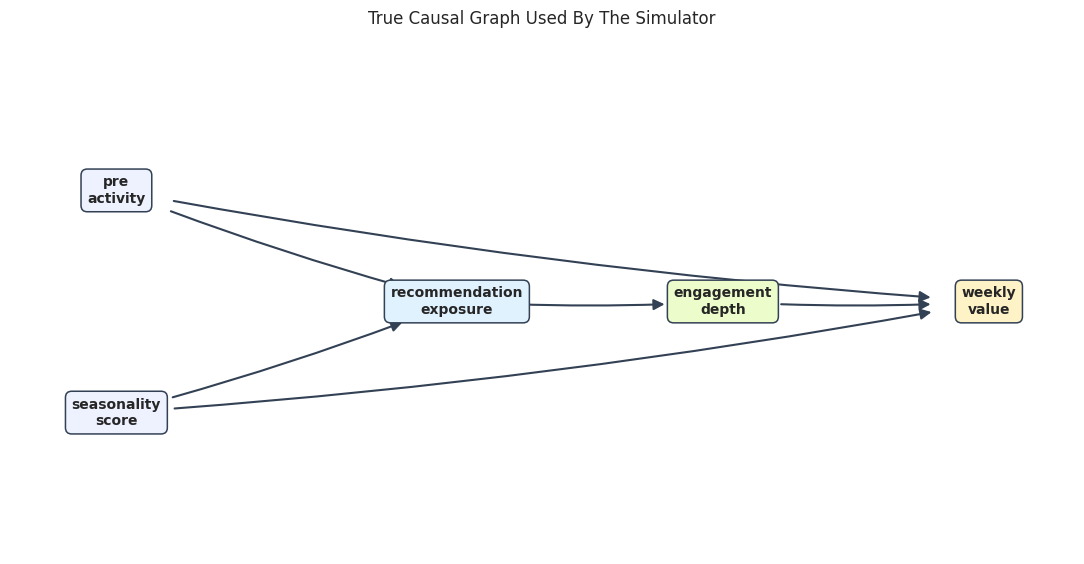
The graph shows why pre_activity and seasonality_score are confounders for the total exposure effect. They affect exposure and the final outcome.
For causal discovery, the result is a statement about recoverable structure under assumptions, not a free-standing proof of cause and effect.
Diagnostics and Interpretation
Marginal Correlation is Not a Causal Graph
A common first step is to inspect correlations. Correlations are useful for finding dependence, but they cannot distinguish direct effects from indirect paths or common causes.
core_graph_df = graph_df[NODE_ORDER]
correlation_matrix = core_graph_df.corr()
correlation_matrix.to_csv(TABLE_DIR / "09_correlation_matrix.csv")
display(correlation_matrix)
fig, ax = plt.subplots(figsize=(8, 6))
sns.heatmap(
    correlation_matrix,
    annot=True,
    fmt=".2f",
    cmap="vlag",
    center=0,
    square=True,
    cbar_kws={"label": "Pearson correlation"},
    ax=ax,
)
ax.set_title("Marginal Correlations Among Graph Variables")
plt.tight_layout()
fig.savefig(FIGURE_DIR / "09_marginal_correlation_heatmap.png", dpi=160, bbox_inches="tight")
plt.show()| pre_activity | seasonality_score | recommendation_exposure | engagement_depth | weekly_value | |
|---|---|---|---|---|---|
| pre_activity | 1.0000 | -0.0019 | 0.5933 | 0.5126 | 0.6138 |
| seasonality_score | -0.0019 | 1.0000 | 0.4197 | 0.3648 | 0.4597 |
| recommendation_exposure | 0.5933 | 0.4197 | 1.0000 | 0.8641 | 0.8634 |
| engagement_depth | 0.5126 | 0.3648 | 0.8641 | 1.0000 | 0.9355 |
| weekly_value | 0.6138 | 0.4597 | 0.8634 | 0.9355 | 1.0000 |
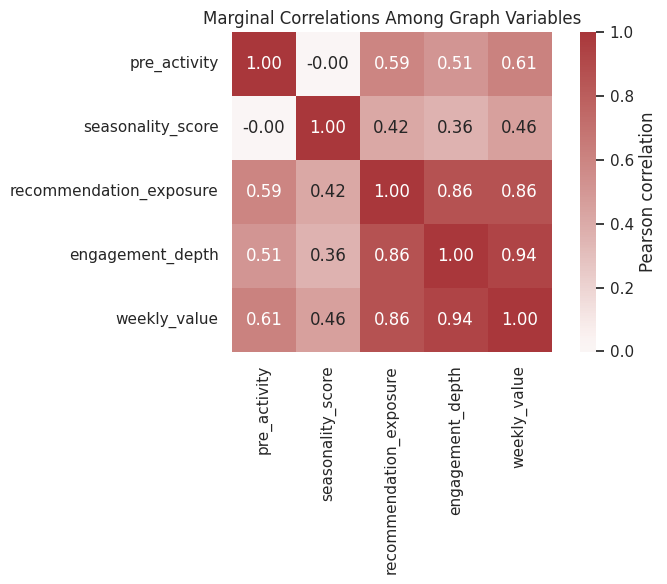
Many variables are correlated because the graph has mediated paths and common causes. A correlation heatmap can suggest candidate relationships, but it will usually overstate the number of direct causal edges.
Naive Correlation-Based Candidate Edges
To make that limitation concrete, we build a naive candidate graph: if two variables have an absolute correlation above a threshold, we draw an edge from the earlier variable to the later variable according to the known time order.
This is not a recommended causal-discovery algorithm. It is a teaching baseline that shows why marginal dependence is not enough.
# Define reusable helpers for the Naive Correlation-Based Candidate Edges section.
def correlation_candidate_edges(data, ordered_nodes, threshold=0.25):
    """
    Idea: Create candidate graph edges from large marginal correlations for exploratory graph checks.

    Parameters
    ----------
    data : array-like or pd.DataFrame
        Data passed into the demonstrated method.
    ordered_nodes : object
        Graph node information used for drawing or graph comparison.
    threshold : float
        Cutoff used to decide whether a signal or edge is retained.

    Returns
    -------
    tuple[list[tuple[str, str]], pd.DataFrame]
        Candidate edges and their correlation-screening evidence table.
    """
    corr = data[ordered_nodes].corr()
    edges = []
    rows = []
    for i, source in enumerate(ordered_nodes):
        for target in ordered_nodes[i + 1 :]:
            value = corr.loc[source, target]
            keep = abs(value) >= threshold
            rows.append(
                {
                    "source": source,
                    "target": target,
                    "correlation": value,
                    "absolute_correlation": abs(value),
                    "selected_as_edge": keep,
                }
            )
            if keep:
                edges.append((source, target))
    return edges, pd.DataFrame(rows)
correlation_edges, correlation_edge_scores = correlation_candidate_edges(core_graph_df, NODE_ORDER, threshold=0.25)
correlation_edge_scores.to_csv(TABLE_DIR / "09_correlation_candidate_edge_scores.csv", index=False)
display(correlation_edge_scores.sort_values("absolute_correlation", ascending=False))
print("Correlation candidate edges:")
print(correlation_edges)| source | target | correlation | absolute_correlation | selected_as_edge | |
|---|---|---|---|---|---|
| 9 | engagement_depth | weekly_value | 0.9355 | 0.9355 | True |
| 7 | recommendation_exposure | engagement_depth | 0.8641 | 0.8641 | True |
| 8 | recommendation_exposure | weekly_value | 0.8634 | 0.8634 | True |
| 3 | pre_activity | weekly_value | 0.6138 | 0.6138 | True |
| 1 | pre_activity | recommendation_exposure | 0.5933 | 0.5933 | True |
| 2 | pre_activity | engagement_depth | 0.5126 | 0.5126 | True |
| 6 | seasonality_score | weekly_value | 0.4597 | 0.4597 | True |
| 4 | seasonality_score | recommendation_exposure | 0.4197 | 0.4197 | True |
| 5 | seasonality_score | engagement_depth | 0.3648 | 0.3648 | True |
| 0 | pre_activity | seasonality_score | -0.0019 | 0.0019 | False |
Correlation candidate edges:
[('pre_activity', 'recommendation_exposure'), ('pre_activity', 'engagement_depth'), ('pre_activity', 'weekly_value'), ('seasonality_score', 'recommendation_exposure'), ('seasonality_score', 'engagement_depth'), ('seasonality_score', 'weekly_value'), ('recommendation_exposure', 'engagement_depth'), ('recommendation_exposure', 'weekly_value'), ('engagement_depth', 'weekly_value')]
The correlation graph usually includes extra edges. For example, recommendation_exposure and weekly_value are correlated even though the true direct path goes through engagement_depth.
Draw the Naive Correlation Graph
The visual below shows what happens when marginal correlations are treated as direct edges. It is dense because it confuses indirect association with direct causal structure.
draw_directed_graph(
    correlation_edges,
    TRUE_POSITIONS,
    "Naive Correlation-Based Candidate Graph",
    FIGURE_DIR / "09_naive_correlation_candidate_graph.png",
    node_colors=node_colors,
)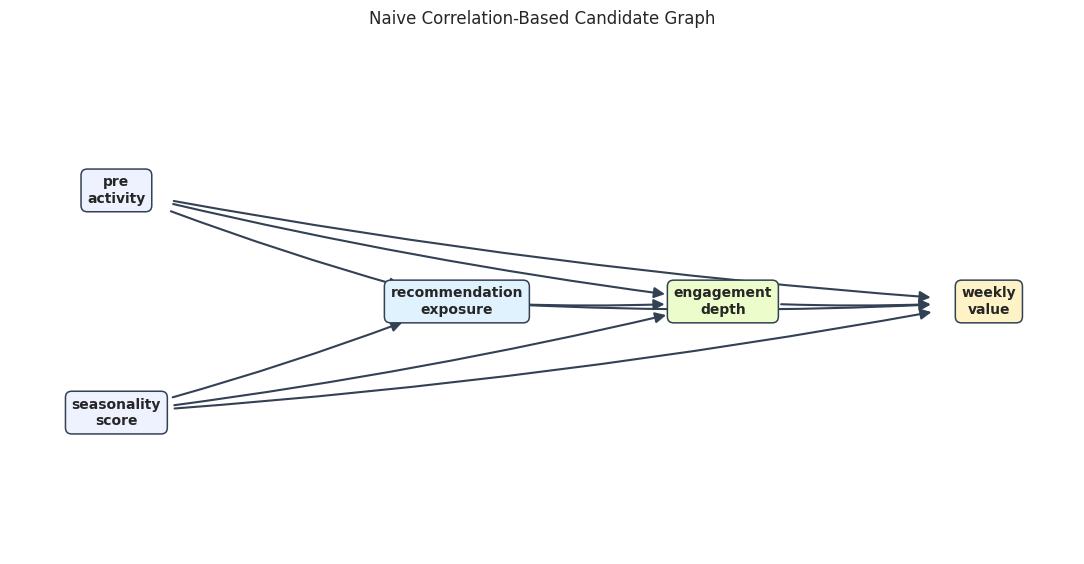
This graph is useful as a warning. It serves a different role than useless. It needs pruning by timing, conditional checks, and domain assumptions.
This matters because the software can only estimate the intended causal quantity when the variables have been assigned to the right design roles.
Constraint-Assisted Discovery with Time Ordering
Now we use a more disciplined candidate-building approach. We assume a time order:
- source variables:
pre_activity,seasonality_score, - exposure:
recommendation_exposure, - mediator:
engagement_depth, - outcome:
weekly_value.
For each target variable, we regress it on all earlier variables and keep edges with small p-values. This remains a transparent screening procedure. It is less ambitious than a complete causal-discovery algorithm, and it combines data with time-order constraints.
# Define reusable helpers for the Constraint-Assisted Discovery With Time Ordering section.
DISCOVERY_TIERS = {
    "pre_activity": 0,
    "seasonality_score": 0,
    "recommendation_exposure": 1,
    "engagement_depth": 2,
    "weekly_value": 3,
}
def tiered_regression_candidate_edges(data, tiers, alpha=0.001):
    """
    Idea: Create candidate graph edges by fitting tier-respecting regressions and keeping strong predictors.

    Parameters
    ----------
    data : array-like or pd.DataFrame
        Data passed into the demonstrated method.
    tiers : object
        Context-specific input used for tiers in this helper.
    alpha : float
        Significance level, transparency value, or tuning parameter used by the diagnostic.

    Returns
    -------
    tuple[list[tuple[str, str]], pd.DataFrame]
        Candidate tier-respecting edges and their regression evidence table.
    """
    edges = []
    rows = []
    ordered_nodes = sorted(tiers, key=lambda node: (tiers[node], node))
    for target in ordered_nodes:
        candidate_parents = [node for node in ordered_nodes if tiers[node] < tiers[target]]
        if not candidate_parents:
            continue
        formula = target + " ~ " + " + ".join(candidate_parents)
        model = smf.ols(formula, data=data).fit()
        for parent in candidate_parents:
            coefficient = model.params[parent]
            p_value = model.pvalues[parent]
            selected = p_value < alpha
            rows.append(
                {
                    "target": target,
                    "candidate_parent": parent,
                    "coefficient": coefficient,
                    "p_value": p_value,
                    "selected_as_edge": selected,
                }
            )
            if selected:
                edges.append((parent, target))
    return edges, pd.DataFrame(rows)
tiered_edges, tiered_edge_scores = tiered_regression_candidate_edges(core_graph_df, DISCOVERY_TIERS, alpha=0.001)
tiered_edge_scores.to_csv(TABLE_DIR / "09_tiered_regression_edge_scores.csv", index=False)
display(tiered_edge_scores.sort_values(["target", "p_value"]))
print("Tiered regression candidate edges:")
print(tiered_edges)| target | candidate_parent | coefficient | p_value | selected_as_edge | |
|---|---|---|---|---|---|
| 4 | engagement_depth | recommendation_exposure | 1.1959 | 0.0000 | True |
| 3 | engagement_depth | seasonality_score | 0.0058 | 0.7262 | False |
| 2 | engagement_depth | pre_activity | 0.0019 | 0.9191 | False |
| 0 | recommendation_exposure | pre_activity | 0.8677 | 0.0000 | True |
| 1 | recommendation_exposure | seasonality_score | 0.5972 | 0.0000 | True |
| 5 | weekly_value | pre_activity | 0.8689 | 0.0000 | True |
| 6 | weekly_value | seasonality_score | 0.6857 | 0.0000 | True |
| 8 | weekly_value | engagement_depth | 1.3995 | 0.0000 | True |
| 7 | weekly_value | recommendation_exposure | 0.0120 | 0.5896 | False |
Tiered regression candidate edges:
[('pre_activity', 'recommendation_exposure'), ('seasonality_score', 'recommendation_exposure'), ('recommendation_exposure', 'engagement_depth'), ('pre_activity', 'weekly_value'), ('seasonality_score', 'weekly_value'), ('engagement_depth', 'weekly_value')]
Conditioning on earlier variables removes several indirect associations. The resulting graph should be much closer to the data-generating graph than the naive correlation graph.
Draw the Constraint-Assisted Candidate Graph
The next graph shows the edges retained by the tiered regression screen. This is the candidate graph we would take into a graph-review conversation.
draw_directed_graph(
    tiered_edges,
    TRUE_POSITIONS,
    "Constraint-Assisted Candidate Graph",
    FIGURE_DIR / "09_constraint_assisted_candidate_graph.png",
    node_colors=node_colors,
)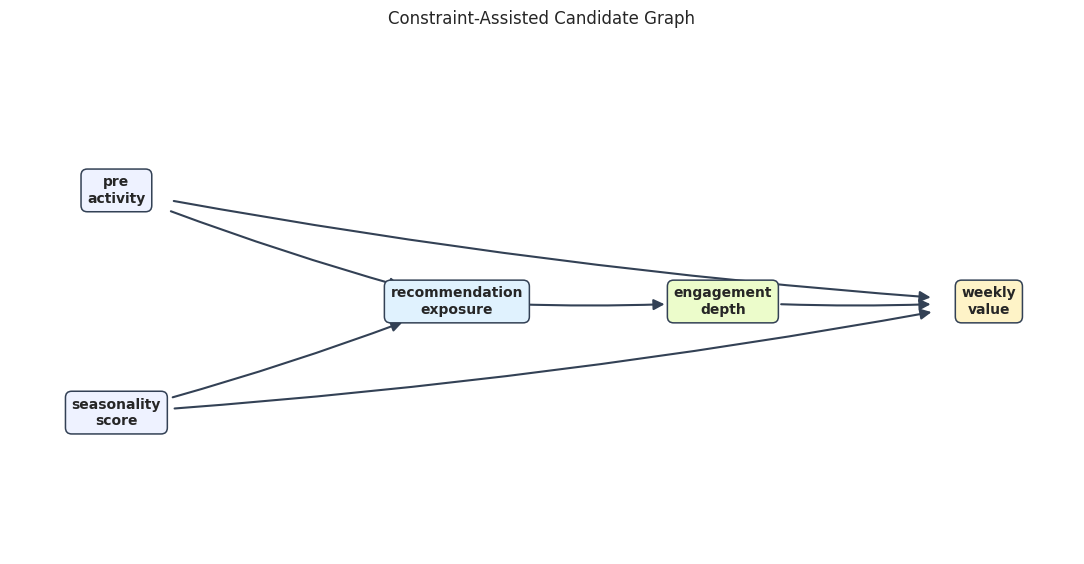
The candidate graph is simpler than the correlation graph because it asks whether a relationship remains after accounting for earlier variables.
For causal discovery, the result is a statement about recoverable structure under assumptions, not a free-standing proof of cause and effect.
Compare Candidate Graphs to the Known Truth
Since this is a simulation, we can score each candidate graph against the true edge list. In real data this table would be unavailable. In simulation, it is excellent for learning what each discovery step is doing.
# Define reusable helpers for the Compare Candidate Graphs To The Known Truth section.
def compare_edges(candidate_edges, true_edges, label):
    """
    Idea: Compare estimated graph edges with known graph truth and report recovery errors.

    Parameters
    ----------
    candidate_edges : pd.DataFrame or collection
        Edges associated with `candidate`.
    true_edges : pd.DataFrame or collection
        Edges associated with `true`.
    label : str
        Short label attached to a scenario, method, or plotted result.

    Returns
    -------
    tuple[pd.DataFrame, dict]
        Edge-level comparison table and aggregate recovery summary.
    """
    candidate_set = set(candidate_edges)
    true_set = set(true_edges)
    rows = []
    for edge in sorted(candidate_set | true_set):
        rows.append(
            {
                "graph": label,
                "edge": f"{edge[0]} -> {edge[1]}",
                "in_candidate": edge in candidate_set,
                "in_truth": edge in true_set,
                "status": (
                    "true positive"
                    if edge in candidate_set and edge in true_set
                    else "false positive"
                    if edge in candidate_set and edge not in true_set
                    else "false negative"
                ),
            }
        )
    summary = {
        "graph": label,
        "true_positives": len(candidate_set & true_set),
        "false_positives": len(candidate_set - true_set),
        "false_negatives": len(true_set - candidate_set),
        "precision": len(candidate_set & true_set) / max(len(candidate_set), 1),
        "recall": len(candidate_set & true_set) / max(len(true_set), 1),
    }
    return pd.DataFrame(rows), summary
correlation_edge_comparison, correlation_summary = compare_edges(correlation_edges, TRUE_EDGES, "correlation screen")
tiered_edge_comparison, tiered_summary = compare_edges(tiered_edges, TRUE_EDGES, "tiered regression screen")
edge_comparison = pd.concat([correlation_edge_comparison, tiered_edge_comparison], ignore_index=True)
edge_summary = pd.DataFrame([correlation_summary, tiered_summary])
edge_comparison.to_csv(TABLE_DIR / "09_candidate_edge_comparison.csv", index=False)
edge_summary.to_csv(TABLE_DIR / "09_candidate_edge_summary.csv", index=False)
display(edge_summary)
display(edge_comparison)| graph | true_positives | false_positives | false_negatives | precision | recall | |
|---|---|---|---|---|---|---|
| 0 | correlation screen | 6 | 3 | 0 | 0.6667 | 1.0000 |
| 1 | tiered regression screen | 6 | 0 | 0 | 1.0000 | 1.0000 |
| graph | edge | in_candidate | in_truth | status | |
|---|---|---|---|---|---|
| 0 | correlation screen | engagement_depth -> weekly_value | True | True | true positive |
| 1 | correlation screen | pre_activity -> engagement_depth | True | False | false positive |
| 2 | correlation screen | pre_activity -> recommendation_exposure | True | True | true positive |
| 3 | correlation screen | pre_activity -> weekly_value | True | True | true positive |
| 4 | correlation screen | recommendation_exposure -> engagement_depth | True | True | true positive |
| 5 | correlation screen | recommendation_exposure -> weekly_value | True | False | false positive |
| 6 | correlation screen | seasonality_score -> engagement_depth | True | False | false positive |
| 7 | correlation screen | seasonality_score -> recommendation_exposure | True | True | true positive |
| 8 | correlation screen | seasonality_score -> weekly_value | True | True | true positive |
| 9 | tiered regression screen | engagement_depth -> weekly_value | True | True | true positive |
| 10 | tiered regression screen | pre_activity -> recommendation_exposure | True | True | true positive |
| 11 | tiered regression screen | pre_activity -> weekly_value | True | True | true positive |
| 12 | tiered regression screen | recommendation_exposure -> engagement_depth | True | True | true positive |
| 13 | tiered regression screen | seasonality_score -> recommendation_exposure | True | True | true positive |
| 14 | tiered regression screen | seasonality_score -> weekly_value | True | True | true positive |
The tiered regression screen should have fewer false positives. The broader lesson is that graph discovery improves when data checks are combined with timing and domain restrictions.
Conditional Independence Checks by Hand
Graph refutation is based on implications such as “these two variables should be independent after conditioning on this set.” We will first compute a few partial correlations manually so the DoWhy graph refuter is easier to understand.
For continuous variables, a small partial correlation with a large p-value is consistent with conditional independence.
CONSTRAINTS_CORRECT_GRAPH = [
    (
        "recommendation_exposure",
        "weekly_value",
        ("engagement_depth", "pre_activity", "seasonality_score"),
        "No direct exposure-to-value edge after mediator and confounders are conditioned on.",
    ),
    (
        "pre_activity",
        "engagement_depth",
        ("recommendation_exposure",),
        "Pre-activity affects engagement through exposure in the true graph.",
    ),
    (
        "seasonality_score",
        "engagement_depth",
        ("recommendation_exposure",),
        "Seasonality affects engagement through exposure in the true graph.",
    ),
    (
        "pre_activity",
        "seasonality_score",
        tuple(),
        "The two source variables were generated independently.",
    ),
]
partial_corr_rows = []
for x, y, z, reason in CONSTRAINTS_CORRECT_GRAPH:
    stats = partial_corr(data=core_graph_df, x=x, y=y, z=list(z))
    partial_corr_rows.append(
        {
            "x": x,
            "y": y,
            "conditioning_set": ", ".join(z) if z else "none",
            "partial_correlation": stats["r"],
            "p_value": stats["p-val"],
            "consistent_with_independence_at_0_05": stats["p-val"] >= 0.05,
            "why_this_constraint_matters": reason,
        }
    )
partial_correlation_table = pd.DataFrame(partial_corr_rows)
partial_correlation_table.to_csv(TABLE_DIR / "09_manual_partial_correlation_checks.csv", index=False)
display(partial_correlation_table)| x | y | conditioning_set | partial_correlation | p_value | consistent_with_independence_at_0_05 | why_this_constraint_matters | |
|---|---|---|---|---|---|---|---|
| 0 | recommendation_exposure | weekly_value | engagement_depth, pre_activity, seasonality_score | 0.0076 | 0.5896 | True | No direct exposure-to-value edge after mediator and confounders are conditioned on. |
| 1 | pre_activity | engagement_depth | recommendation_exposure | -0.0003 | 0.9841 | True | Pre-activity affects engagement through exposure in the true graph. |
| 2 | seasonality_score | engagement_depth | recommendation_exposure | 0.0047 | 0.7370 | True | Seasonality affects engagement through exposure in the true graph. |
| 3 | pre_activity | seasonality_score | none | -0.0019 | 0.8942 | True | The two source variables were generated independently. |
These checks are consistent with the true graph: the tested conditional independencies have small partial correlations and non-small p-values.
For causal discovery, the result is a statement about recoverable structure under assumptions, not a free-standing proof of cause and effect.
Refute the Correct Graph with DoWhy
Now we pass the same conditional-independence constraints to DoWhy’s graph refuter. The refuter counts how many constraints are satisfied by the data.
# Define reusable helpers for the Refute The Correct Graph With DoWhy section.
def edges_to_dot(edges, graph_name="causal_graph"):
    """
    Idea: Convert an edge table into DOT graph syntax for DoWhy or Graphviz-style display.

    Parameters
    ----------
    edges : object
        Collection of graph edges to draw, compare, or convert into a table.
    graph_name : object
        Name used to label the graph in tables, plots, or figures.

    Returns
    -------
    str
        DOT graph string that can be passed to DoWhy or Graphviz-style renderers.
    """
    edge_lines = [f"    {left} -> {right};" for left, right in edges]
    return "digraph " + graph_name + " {\n" + "\n".join(edge_lines) + "\n}"
true_graph_dot = edges_to_dot(TRUE_EDGES, graph_name="true_graph")
graph_model_correct = CausalModel(
    data=core_graph_df,
    treatment="recommendation_exposure",
    outcome="weekly_value",
    graph=true_graph_dot,
)
correct_graph_constraints = [(x, y, z) for x, y, z, _ in CONSTRAINTS_CORRECT_GRAPH]
correct_graph_refutation = graph_model_correct.refute_graph(independence_constraints=correct_graph_constraints)
print(correct_graph_refutation)
Method name for discrete data:conditional_mutual_information
Method name for continuous data:partial_correlation
Number of conditional independencies entailed by model:4
Number of independences satisfied by data:4
Test passed:True
The correct graph should pass these hand-picked constraints. Passing does not prove the graph is true; it only says these particular graph implications were not contradicted by the data.
Build a Plausible But Wrong Graph
Now we create a graph that omits the edge from pre_activity to weekly_value. This is a common applied mistake: a variable is known to affect treatment, but its direct relationship to the outcome is under-modeled.
If that edge is missing, the graph implies a false conditional independence: pre_activity should be independent of weekly_value after conditioning on exposure, engagement, and seasonality. The data should reject that implication.
WRONG_EDGES_MISSING_PRE_TO_VALUE = [
    ("pre_activity", "recommendation_exposure"),
    ("seasonality_score", "recommendation_exposure"),
    ("recommendation_exposure", "engagement_depth"),
    ("engagement_depth", "weekly_value"),
    ("seasonality_score", "weekly_value"),
]
wrong_graph_positions = TRUE_POSITIONS.copy()
draw_directed_graph(
    WRONG_EDGES_MISSING_PRE_TO_VALUE,
    wrong_graph_positions,
    "Wrong Graph: Missing Pre-Activity To Weekly Value Edge",
    FIGURE_DIR / "09_wrong_graph_missing_pre_to_value.png",
    node_colors=node_colors,
)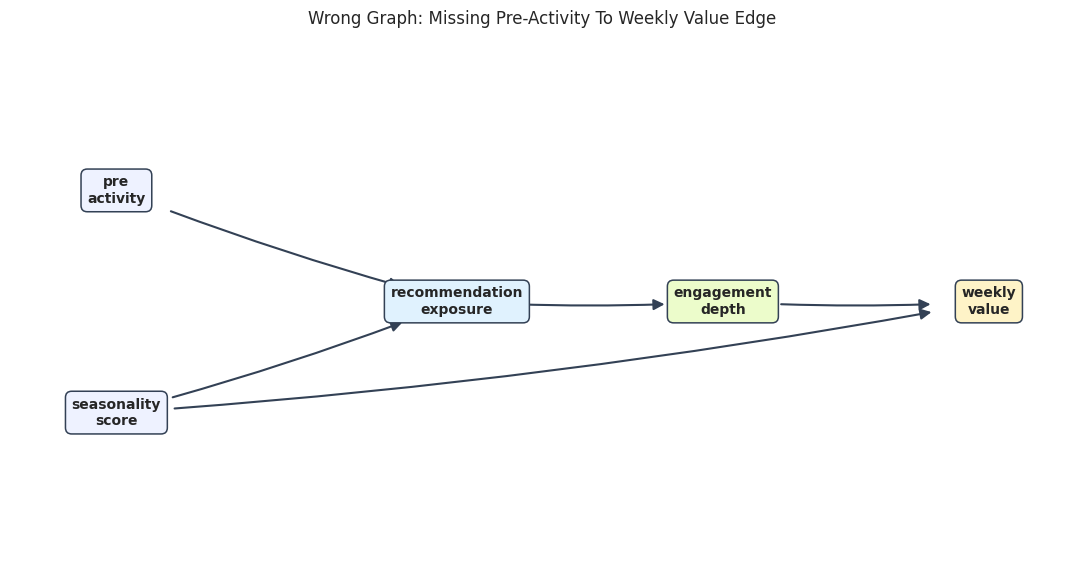
The wrong graph still looks plausible at a glance. That is why graph refutation checks are useful: they can turn a visual assumption into a testable conditional-independence claim.
Refute the Wrong Graph with a Targeted Constraint
This test checks the false implication introduced by omitting the pre_activity -> weekly_value edge.
# Fit or evaluate the model objects used in the Refute The Wrong Graph With A Targeted Constraint section.
wrong_graph_constraint = [
    (
        "pre_activity",
        "weekly_value",
        ("recommendation_exposure", "engagement_depth", "seasonality_score"),
    )
]
wrong_constraint_stats = partial_corr(
    data=core_graph_df,
    x="pre_activity",
    y="weekly_value",
    z=["recommendation_exposure", "engagement_depth", "seasonality_score"],
)
wrong_constraint_table = pd.DataFrame(
    [
        {
            "x": "pre_activity",
            "y": "weekly_value",
            "conditioning_set": "recommendation_exposure, engagement_depth, seasonality_score",
            "partial_correlation": wrong_constraint_stats["r"],
            "p_value": wrong_constraint_stats["p-val"],
            "consistent_with_independence_at_0_05": wrong_constraint_stats["p-val"] >= 0.05,
        }
    ]
)
wrong_graph_model = CausalModel(
    data=core_graph_df,
    treatment="recommendation_exposure",
    outcome="weekly_value",
    graph=edges_to_dot(WRONG_EDGES_MISSING_PRE_TO_VALUE, graph_name="wrong_graph"),
)
wrong_graph_refutation = wrong_graph_model.refute_graph(independence_constraints=wrong_graph_constraint)
wrong_constraint_table.to_csv(TABLE_DIR / "09_wrong_graph_constraint_check.csv", index=False)
display(wrong_constraint_table)
print(wrong_graph_refutation)| x | y | conditioning_set | partial_correlation | p_value | consistent_with_independence_at_0_05 | |
|---|---|---|---|---|---|---|
| 0 | pre_activity | weekly_value | recommendation_exposure, engagement_depth, seasonality_score | 0.5424 | 0.0000 | False |
Method name for discrete data:conditional_mutual_information
Method name for continuous data:partial_correlation
Number of conditional independencies entailed by model:1
Number of independences satisfied by data:0
Test passed:False
The wrong graph should fail because pre_activity remains strongly related to weekly_value even after conditioning on the variables that the wrong graph claims are sufficient.
Compare Graph Refutation Results
This compact table compares the correct graph and the wrong graph. The wrong graph fails because it entails a conditional independence that the data do not support.
graph_refutation_summary = pd.DataFrame(
    [
        {
            "graph": "true graph",
            "constraints_tested": correct_graph_refutation.number_of_constraints_model,
            "constraints_satisfied": correct_graph_refutation.number_of_constraints_satisfied,
            "passed": correct_graph_refutation.refutation_result,
        },
        {
            "graph": "wrong graph missing pre_activity -> weekly_value",
            "constraints_tested": wrong_graph_refutation.number_of_constraints_model,
            "constraints_satisfied": wrong_graph_refutation.number_of_constraints_satisfied,
            "passed": wrong_graph_refutation.refutation_result,
        },
    ]
)
graph_refutation_summary.to_csv(TABLE_DIR / "09_graph_refutation_summary.csv", index=False)
display(graph_refutation_summary)| graph | constraints_tested | constraints_satisfied | passed | |
|---|---|---|---|---|
| 0 | true graph | 4 | 4 | True |
| 1 | wrong graph missing pre_activity -> weekly_value | 1 | 0 | False |
Graph refutation is most useful when it is targeted. A graph can imply many constraints, but the best checks are often the ones tied to the causal risks that would change the estimate.
Graph Choice Changes the Causal Estimate
The previous check showed that the wrong graph is inconsistent with the data. Now we show why that matters: DoWhy uses the graph to decide the adjustment set. If the graph omits a confounder-to-outcome edge, DoWhy may omit that variable from adjustment and produce a biased estimate.
def adjustment_set_text(estimand):
    """Return a readable adjustment set across DoWhy API versions."""
    if hasattr(estimand, "get_adjustment_set"):
        variables = estimand.get_adjustment_set()
    elif hasattr(estimand, "get_backdoor_variables"):
        variables = estimand.get_backdoor_variables()
    else:
        variables = getattr(estimand, "backdoor_variables", [])
    if isinstance(variables, dict):
        variables = next(iter(variables.values()), [])
    if variables is None:
        return "not reported by DoWhy"
    if isinstance(variables, str):
        return variables
    variables = sorted(str(variable) for variable in variables)
    return ", ".join(variables) if variables else "empty set"
correct_estimand = graph_model_correct.identify_effect(proceed_when_unidentifiable=True)
correct_estimate = graph_model_correct.estimate_effect(
    correct_estimand,
    method_name="backdoor.linear_regression",
)
wrong_estimand = wrong_graph_model.identify_effect(proceed_when_unidentifiable=True)
wrong_estimate = wrong_graph_model.estimate_effect(
    wrong_estimand,
    method_name="backdoor.linear_regression",
)
estimate_by_graph = pd.DataFrame(
    [
        {
            "graph": "true graph",
            "adjustment_set": adjustment_set_text(correct_estimand),
            "estimate": correct_estimate.value,
            "target": true_total_effect,
        },
        {
            "graph": "wrong graph missing pre_activity -> weekly_value",
            "adjustment_set": adjustment_set_text(wrong_estimand),
            "estimate": wrong_estimate.value,
            "target": true_total_effect,
        },
    ]
)
estimate_by_graph["error_vs_target"] = estimate_by_graph["estimate"] - estimate_by_graph["target"]
estimate_by_graph.to_csv(TABLE_DIR / "09_effect_estimates_by_graph.csv", index=False)
display(estimate_by_graph)| graph | adjustment_set | estimate | target | error_vs_target | |
|---|---|---|---|---|---|
| 0 | true graph | pre_activity, seasonality_score | 1.6855 | 1.6800 | 0.0055 |
| 1 | wrong graph missing pre_activity -> weekly_value | seasonality_score | 2.1159 | 1.6800 | 0.4359 |
The wrong graph gives a biased estimate because it fails to adjust for pre_activity as a confounder. This is the practical reason graph assumptions matter: graph mistakes flow directly into estimation choices.
Plot Estimates from Different Graphs
The dashed line is the true total effect from the simulator. The correct graph estimate should land near the dashed line, while the wrong graph estimate is pulled upward by omitted confounding.
fig, ax = plt.subplots(figsize=(9, 5))
sns.barplot(
    data=estimate_by_graph,
    x="estimate",
    y="graph",
    hue="graph",
    dodge=False,
    legend=False,
    palette=["#2563eb", "#ef4444"],
    ax=ax,
)
ax.axvline(true_total_effect, color="#111827", linestyle="--", linewidth=1.2, label="true total effect")
ax.set_title("Graph Assumptions Change The Estimated Effect")
ax.set_xlabel("Estimated total effect")
ax.set_ylabel("")
ax.legend()
plt.tight_layout()
fig.savefig(FIGURE_DIR / "09_effect_estimates_by_graph.png", dpi=160, bbox_inches="tight")
plt.show()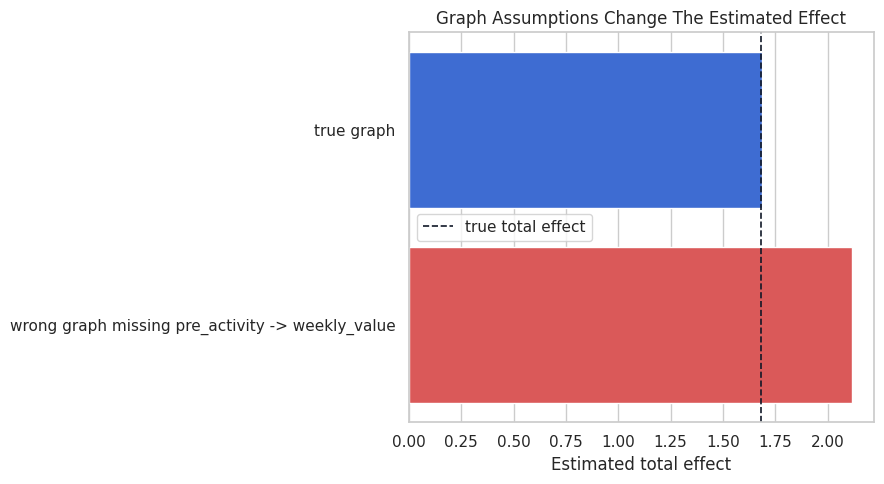
This plot ties graph refutation back to causal estimation. The issue is whether the graph is aesthetically plausible; it changes the numerical answer.
Overcomplete Graphs Can Be Hard to Reject
Graph refutation can often reject graphs that imply false independencies. It is less able to reject graphs that add extra edges. Extra edges remove conditional-independence claims, so there may be fewer testable implications.
The graph below adds a direct edge from exposure to value even though the simulator has no direct edge. This overcomplete graph may pass many checks because it makes fewer independence claims.
OVERCOMPLETE_EDGES = TRUE_EDGES + [("recommendation_exposure", "weekly_value")]
draw_directed_graph(
    OVERCOMPLETE_EDGES,
    TRUE_POSITIONS,
    "Overcomplete Graph: Extra Direct Exposure To Value Edge",
    FIGURE_DIR / "09_overcomplete_graph_extra_edge.png",
    node_colors=node_colors,
)
The extra edge makes the graph more flexible but less informative. This is why graph building should value parsimony and domain logic, more than refutation pass/fail results.
A Small Overcomplete-Graph Check
The overcomplete graph still implies that the two source variables are independent, so it can pass that weak check. But passing one weak check does not establish that the extra direct edge is real.
overcomplete_model = CausalModel(
    data=core_graph_df,
    treatment="recommendation_exposure",
    outcome="weekly_value",
    graph=edges_to_dot(OVERCOMPLETE_EDGES, graph_name="overcomplete_graph"),
)
overcomplete_refutation = overcomplete_model.refute_graph(
    independence_constraints=[("pre_activity", "seasonality_score", tuple())]
)
overcomplete_summary = pd.DataFrame(
    [
        {
            "graph": "overcomplete graph with extra direct edge",
            "constraints_tested": overcomplete_refutation.number_of_constraints_model,
            "constraints_satisfied": overcomplete_refutation.number_of_constraints_satisfied,
            "passed": overcomplete_refutation.refutation_result,
            "main lesson": "Passing a weak implication does not prove every edge is necessary.",
        }
    ]
)
overcomplete_summary.to_csv(TABLE_DIR / "09_overcomplete_graph_refutation.csv", index=False)
display(overcomplete_summary)
print(overcomplete_refutation)| graph | constraints_tested | constraints_satisfied | passed | main lesson | |
|---|---|---|---|---|---|
| 0 | overcomplete graph with extra direct edge | 1 | 1 | True | Passing a weak implication does not prove every edge is necessary. |
Method name for discrete data:conditional_mutual_information
Method name for continuous data:partial_correlation
Number of conditional independencies entailed by model:1
Number of independences satisfied by data:1
Test passed:True
This is a subtle but important lesson: graph refutation is better at finding contradictions than proving completeness. Extra edges can make a graph harder to falsify.
Reporting and Takeaways
Discovery Workflow Summary
Now we collect the main outputs into one table: the naive correlation graph, the constraint-assisted graph, the correct graph refutation, and the wrong graph refutation.
workflow_summary = pd.DataFrame(
    [
        {
            "workflow piece": "naive correlation screen",
            "result": f"{len(correlation_edges)} candidate edges",
            "lesson": "marginal dependence produces false positive direct edges",
        },
        {
            "workflow piece": "tiered regression screen",
            "result": f"{len(tiered_edges)} candidate edges",
            "lesson": "time ordering plus conditioning gives a cleaner candidate graph",
        },
        {
            "workflow piece": "true graph refutation",
            "result": f"{correct_graph_refutation.number_of_constraints_satisfied}/{correct_graph_refutation.number_of_constraints_model} constraints satisfied",
            "lesson": "targeted graph implications are consistent with the data",
        },
        {
            "workflow piece": "wrong graph refutation",
            "result": f"{wrong_graph_refutation.number_of_constraints_satisfied}/{wrong_graph_refutation.number_of_constraints_model} constraints satisfied",
            "lesson": "missing an outcome edge creates a false conditional-independence claim",
        },
        {
            "workflow piece": "effect estimate comparison",
            "result": f"correct {correct_estimate.value:.3f}; wrong {wrong_estimate.value:.3f}; target {true_total_effect:.3f}",
            "lesson": "graph errors can become estimation errors",
        },
    ]
)
workflow_summary.to_csv(TABLE_DIR / "09_workflow_summary.csv", index=False)
display(workflow_summary)| workflow piece | result | lesson | |
|---|---|---|---|
| 0 | naive correlation screen | 9 candidate edges | marginal dependence produces false positive direct edges |
| 1 | tiered regression screen | 6 candidate edges | time ordering plus conditioning gives a cleaner candidate graph |
| 2 | true graph refutation | 4/4 constraints satisfied | targeted graph implications are consistent with the data |
| 3 | wrong graph refutation | 0/1 constraints satisfied | missing an outcome edge creates a false conditional-independence claim |
| 4 | effect estimate comparison | correct 1.686; wrong 2.116; target 1.680 | graph errors can become estimation errors |
The workflow moves from exploratory discovery to graph stress testing to effect estimation. That order is deliberate: we should challenge graph assumptions before presenting a causal effect as credible.
Practical Checklist for Graph Discovery and Refutation
Use this checklist when applying graph discovery ideas to real data:
- Start with measurement timing and domain constraints before looking at algorithms.
- Use marginal dependence as a clue, not as a direct edge list.
- Prefer candidate graphs that are explainable and time-respecting.
- Translate key graph assumptions into conditional-independence checks.
- Test the graph implications that would change the adjustment set or estimand.
- Remember that passing graph checks does not prove the graph; it only removes some contradictions.
- Be especially cautious about hidden confounders and extra edges that reduce testable implications.
Practice Prompts
Try these extensions after running the lesson:
- Add a direct edge from
recommendation_exposuretoweekly_valuein the simulator. Which partial-correlation check changes? - Make
pre_activityandseasonality_scorecorrelated. Which source-variable independence check fails? - Lower the correlation threshold in the naive graph screen. How many false positives appear?
- Remove the time-order constraint from the tiered regression screen. What edge directions become ambiguous?
- Write a short graph-review memo explaining which assumptions are testable and which require domain judgment.
What Comes Next
The sequence next moves from classic DoWhy causal models into graphical causal models. Instead of only identifying and estimating a treatment effect, the workflow models causal mechanisms attached to graph nodes and uses them for richer diagnostic and simulation tasks.
Summary
This lesson connected graph discovery to graph criticism. Data-driven edge suggestions can help organize hypotheses, while timing, domain knowledge, and conditional-independence checks keep the graph review disciplined. The main takeaway is to treat a discovered graph as a candidate design object that still needs causal justification.