# Build and label the diagnostic visualization for the Setup section.
from pathlib import Path
import os
import warnings
os.environ.setdefault("MPLCONFIGDIR", "/tmp/matplotlib-ranking-sys")
warnings.filterwarnings("default")
warnings.filterwarnings("ignore", category=DeprecationWarning)
warnings.filterwarnings("ignore", category=PendingDeprecationWarning)
warnings.filterwarnings("ignore", category=FutureWarning)
warnings.filterwarnings("ignore", message=".*IProgress not found.*")
warnings.filterwarnings("ignore", message=".*setParseAction.*deprecated.*")
warnings.filterwarnings("ignore", message=".*copy keyword is deprecated.*")
warnings.filterwarnings("ignore", message=".*disp.*iprint.*L-BFGS-B.*")
warnings.filterwarnings("ignore", message=".*variables are assumed unobserved.*")
warnings.filterwarnings("ignore", module="dowhy.causal_estimators.regression_estimator")
warnings.filterwarnings("ignore", module="sklearn.linear_model._logistic")
warnings.filterwarnings("ignore", module="seaborn.categorical")
warnings.filterwarnings("ignore", module="pydot.dot_parser")
import dowhy
import matplotlib.pyplot as plt
import numpy as np
import pandas as pd
import networkx as nx
# Compatibility shim for DoWhy versions that expect the older NetworkX d_separated API.
if not hasattr(nx.algorithms, "d_separated"):
    from networkx.algorithms.d_separation import is_d_separator
    nx.algorithms.d_separated = is_d_separator
pd.set_option("display.max_colwidth", None)
pd.set_option("display.max_columns", None)
pd.set_option("display.width", 0)
# Compatibility shim for DoWhy estimators written against older pandas Series integer indexing.
if not getattr(pd.Series, "_dowhy_integer_position_patch", False):
    _original_series_getitem = pd.Series.__getitem__
    def _dowhy_series_getitem_compat(self, key):
        try:
            return _original_series_getitem(self, key)
        except KeyError:
            if isinstance(key, int) and key not in self.index:
                return self.iloc[key]
            raise
    pd.Series.__getitem__ = _dowhy_series_getitem_compat
    pd.Series._dowhy_integer_position_patch = True
import seaborn as sns
import statsmodels.formula.api as smf
from dowhy import CausalModel
from IPython.display import display
pd.set_option("display.max_columns", 100)
pd.set_option("display.width", 150)
pd.set_option("display.float_format", "{:.4f}".format)
sns.set_theme(style="whitegrid", context="notebook")
for candidate in [Path.cwd(), *Path.cwd().parents]:
    if (candidate / "notebooks" / "tutorials" / "dowhy").exists():
        PROJECT_ROOT = candidate
        break
else:
    PROJECT_ROOT = Path.cwd()
NOTEBOOK_DIR = PROJECT_ROOT / "notebooks" / "tutorials" / "dowhy"
OUTPUT_DIR = NOTEBOOK_DIR / "outputs"
FIGURE_DIR = OUTPUT_DIR / "figures"
TABLE_DIR = OUTPUT_DIR / "tables"
FIGURE_DIR.mkdir(parents=True, exist_ok=True)
TABLE_DIR.mkdir(parents=True, exist_ok=True)
RNG = np.random.default_rng(808)
print(f"DoWhy version: {dowhy.__version__}")
print(f"Notebook directory: {NOTEBOOK_DIR}")08: Refuters, Placebos, Negative Controls, and Sensitivity
The earlier tutorials built causal estimates from explicit graphs and estimators. We ask the next question: how hard should we try to break the result?
DoWhy calls many of these checks refuters. A refuter perturbs the analysis in a targeted way and asks whether the original estimate behaves as expected. For example, if we replace the real treatment with a placebo treatment, the estimated effect should move toward zero. If we rerun the analysis on random subsets of the data, the effect should stay reasonably stable.
We combine three kinds of credibility checks:
- DoWhy refuters: random common cause, placebo treatment, data subset, and bootstrap refuters.
- Negative controls: variables that should not be affected by the treatment.
- Sensitivity analysis: hypothetical hidden confounding strong enough to move the estimate.
The important tone is humility. Passing these checks does not prove a causal effect. Failing them tells us where the design needs more work.
Learning Goals
By the end, you should be able to:
- Explain what a causal refuter is and what it is not.
- Run common DoWhy refuters on a fitted causal estimate.
- Convert refuter outputs into a compact comparison table.
- Use negative-control outcomes and placebo exposures as falsification checks.
- Diagnose whether a result is stable to sample perturbations and measurement noise.
- Run a direct unobserved-confounding sensitivity grid.
- Write a short credibility summary that separates evidence, assumptions, and remaining risk.
Dataset and Experiment Setup
We use mostly simulated or semi-synthetic observational datasets to study Refuters, Placebos, Negative Controls, And Sensitivity. DoWhy is mainly about causal modeling discipline: graph, estimand, estimator, and refuter. A controlled dataset lets us show how a change in assumptions changes the estimand and the credibility of the estimate.
Read each row as an observed unit in a business or policy system. The treatment, outcome, common causes, instruments, mediators, and anomaly indicators are named to mirror applied causal workflows and keep the examples close to realistic analysis language. The experiment shows a setting where treatment choice is endogenous and identification must come from a source of quasi-random variation. The experiment uses stress tests to ask whether an estimate behaves like a causal result or like a fragile association.
The simulation is designed to make the identifying assumptions and diagnostic checks visible. It is meant to expose the assumptions that would be hidden in real data, where the true counterfactual outcome is unavailable.
Mathematical Foundation
Refutation asks whether the estimated effect behaves as it should under changes that should remove the signal. For a placebo treatment \(D^{pl}\),
\[ \mathbb{E}\{Y(1;D^{pl})-Y(0;D^{pl})\}=0. \]
For a negative-control outcome \(Y^{nc}\),
\[ \mathbb{E}\{Y^{nc}(1)-Y^{nc}(0)\}=0. \]
A failed refuter is a prompt to inspect graph assumptions, data construction, and estimator choices.
Diagnostics and Interpretation
What Refuters Can and Cannot Do
A refuter is a stress test. It asks whether an estimate behaves sensibly when the analysis is changed in a way that has a known expected pattern.
Examples:
- A placebo treatment should have no effect.
- A random extra common cause should not meaningfully change the estimate.
- A data subset should produce a similar estimate if the result is not driven by a small slice of rows.
- A bootstrap perturbation should produce estimates near the original value if the result is stable.
These checks are valuable because each one probes a different way the causal story can fail. A study can pass several refuters and still be biased by an unmeasured confounder, a bad graph, interference, post-treatment conditioning, measurement error, or poor overlap. Treat refuters as evidence that strengthens or weakens confidence while keeping the final claim tied to design judgment.
Setup
The setup block imports the libraries, applies warning filters, creates output folders, and fixes plotting defaults. The environment variable for Matplotlib keeps execution quiet in shared environments where the default cache directory may not be writable.
The lesson is ready once the DoWhy version check succeeds.
This reproducibility check keeps the run auditable before causal interpretation begins. It makes the run consistent enough for later graphs, tables, and estimates to be checked against the same environment.
Refuter Roadmap
The table below gives a quick map of the checks we will run. Each check has a different purpose, so the final credibility summary should mention the pattern across checks.
| check | question | expected pattern |
|---|---|---|
| Random common cause refuter | Does adding a random covariate leave the estimate mostly unchanged? | The new effect should stay close to the original estimate. |
| Placebo treatment refuter | Does a fake treatment produce a near-zero effect? | The placebo effect should be close to zero. |
| Data subset refuter | Is the estimate stable across random subsets? | The subset estimate should stay close to the original estimate. |
| Bootstrap refuter | Is the estimate stable under resampling and small covariate perturbations? | The bootstrap estimate should stay close to the original estimate. |
| Negative-control outcome | Does treatment appear to affect an outcome it cannot plausibly affect? | The adjusted treatment coefficient should be near zero. |
| Hidden-confounding sensitivity | How strong would an unobserved common cause need to be to move the result? | The estimate should degrade gradually as hypothetical confounding gets stronger. |
The roadmap frames this lesson as a sequence of falsification and stability checks. The best analyses explain why each check is relevant to the causal risk at hand.
Simulate an Example Dataset
We will simulate a clean observational setting where the true treatment effect is known. The treatment is recommendation_exposure, the outcome is weekly_value, and all important confounders are observed.
The dataset also includes a negative_control_outcome. This outcome is affected by the same pre-treatment variables that influence treatment assignment, but it is not affected by the treatment. That makes it useful for detecting residual confounding.
# Define reusable helpers for the Simulate An Example Dataset section.
def make_refuter_teaching_data(n=4_000, seed=808):
    """
    Idea: Construct the refuter example data used in the Simulate An Example Dataset section, including columns needed for later diagnostics.

    Parameters
    ----------
    n : int
        Number of observations or repetitions to generate.
    seed : int
        Random seed used to make generation or resampling reproducible.

    Returns
    -------
    tuple
        Tuple containing pd.DataFrame({'recommendation_exposure': recommendation_exposure, 'weekly_value': weekly_value, 'pre_activity': pre_activity, 'power_segment': power_segment, 'account_age_z': account_age_z, 'seasonality_score': seasonality_score, 'negative_control_outcome': negative_control_outcome, 'treatment_probability': treatment_probability}), true_effect, aligned for the causal estimator.
    """
    local_rng = np.random.default_rng(seed)
    pre_activity = local_rng.normal(loc=0.0, scale=1.0, size=n)
    power_segment = local_rng.binomial(n=1, p=0.40, size=n)
    account_age = local_rng.gamma(shape=4.0, scale=8.0, size=n)
    account_age_z = (account_age - account_age.mean()) / account_age.std()
    seasonality_score = local_rng.normal(loc=0.0, scale=1.0, size=n)
    treatment_logit = (
        -0.25
        + 0.70 * pre_activity
        + 0.45 * power_segment
        + 0.25 * account_age_z
        + 0.30 * seasonality_score
    )
    treatment_probability = 1 / (1 + np.exp(-treatment_logit))
    recommendation_exposure = local_rng.binomial(n=1, p=treatment_probability)
    true_effect = 1.20
    weekly_value = (
        4.00
        + true_effect * recommendation_exposure
        + 0.85 * pre_activity
        + 0.75 * power_segment
        + 0.35 * account_age_z
        + 0.45 * seasonality_score
        + local_rng.normal(scale=1.00, size=n)
    )
    negative_control_outcome = (
        2.00
        + 0.75 * pre_activity
        + 0.55 * power_segment
        + 0.25 * account_age_z
        + 0.30 * seasonality_score
        + local_rng.normal(scale=1.00, size=n)
    )
    return pd.DataFrame(
        {
            "recommendation_exposure": recommendation_exposure,
            "weekly_value": weekly_value,
            "pre_activity": pre_activity,
            "power_segment": power_segment,
            "account_age_z": account_age_z,
            "seasonality_score": seasonality_score,
            "negative_control_outcome": negative_control_outcome,
            "treatment_probability": treatment_probability,
        }
    ), true_effect
refuter_df, true_effect = make_refuter_teaching_data()
print(f"Rows: {len(refuter_df):,}")
print(f"Observed exposure rate: {refuter_df['recommendation_exposure'].mean():.3f}")
print(f"True treatment effect used in the simulation: {true_effect:.2f}")
display(refuter_df.head())
Rows: 4,000
Observed exposure rate: 0.493
True treatment effect used in the simulation: 1.20| recommendation_exposure | weekly_value | pre_activity | power_segment | account_age_z | seasonality_score | negative_control_outcome | treatment_probability | |
|---|---|---|---|---|---|---|---|---|
| 0 | 1 | 4.3964 | -0.9931 | 0 | -0.6166 | -0.7996 | 1.6854 | 0.2076 |
| 1 | 1 | 5.4087 | 0.7585 | 0 | 0.6759 | 0.2998 | 2.6646 | 0.6318 |
| 2 | 1 | 4.8436 | 0.6035 | 0 | 0.2772 | -1.3627 | 2.9589 | 0.4583 |
| 3 | 0 | 1.8962 | -0.9142 | 0 | 0.0959 | -0.5155 | 1.7911 | 0.2649 |
| 4 | 0 | 3.5121 | 0.0254 | 1 | -0.4859 | 0.3905 | 3.4602 | 0.5532 |
The data look like a normal observational dataset, but we also know the truth because the data were simulated. That lets us tell the difference between a refuter that behaves as expected and a refuter that signals trouble.
Data Field Guide
This table documents the columns and their roles. Refuter lessons benefit from explicit field definitions because placebo and negative-control checks are easy to misunderstand if the variable roles are blurry.
| column | role | description |
|---|---|---|
| recommendation_exposure | treatment | Binary indicator for whether the unit received the exposure. |
| weekly_value | outcome | Post-treatment outcome affected by exposure and pre-treatment confounders. |
| pre_activity | confounder | Pre-treatment activity score affecting both exposure and weekly value. |
| power_segment | confounder | Binary segment flag affecting both exposure and weekly value. |
| account_age_z | confounder | Standardized account age affecting both exposure and weekly value. |
| seasonality_score | confounder | Pre-treatment timing score affecting both exposure and weekly value. |
| negative_control_outcome | negative-control outcome | Outcome-like variable affected by confounders but not by the treatment. |
| treatment_probability | simulation diagnostic | True exposure probability used by the simulator; usually unknown in real observational data. |
The negative-control outcome is the special ingredient. If the adjusted treatment coefficient for that outcome is not close to zero, the adjustment strategy may still be leaving confounding behind.
Basic Shape and Missingness
Before stress-testing the causal estimate, check basic data quality. Refuters can produce strange output if the original dataset has missing values, extreme imbalance, or tiny treatment groups.
basic_quality = pd.DataFrame(
    {
        "rows": [len(refuter_df)],
        "columns": [refuter_df.shape[1]],
        "missing_cells": [int(refuter_df.isna().sum().sum())],
        "exposure_rate": [refuter_df["recommendation_exposure"].mean()],
        "mean_weekly_value": [refuter_df["weekly_value"].mean()],
        "mean_negative_control_outcome": [refuter_df["negative_control_outcome"].mean()],
    }
)
numeric_summary = refuter_df.describe().T
basic_quality.to_csv(TABLE_DIR / "08_basic_quality.csv", index=False)
numeric_summary.to_csv(TABLE_DIR / "08_numeric_summary.csv")
display(basic_quality)
display(numeric_summary)| rows | columns | missing_cells | exposure_rate | mean_weekly_value | mean_negative_control_outcome | |
|---|---|---|---|---|---|---|
| 0 | 4000 | 8 | 0 | 0.4930 | 4.8794 | 2.2180 |
| count | mean | std | min | 25% | 50% | 75% | max | |
|---|---|---|---|---|---|---|---|---|
| recommendation_exposure | 4000.0000 | 0.4930 | 0.5000 | 0.0000 | 0.0000 | 0.0000 | 1.0000 | 1.0000 |
| weekly_value | 4000.0000 | 4.8794 | 1.7407 | -0.4230 | 3.6531 | 4.8437 | 6.0929 | 10.3363 |
| pre_activity | 4000.0000 | -0.0022 | 1.0079 | -3.8057 | -0.6738 | -0.0025 | 0.6788 | 3.3738 |
| power_segment | 4000.0000 | 0.4070 | 0.4913 | 0.0000 | 0.0000 | 0.0000 | 1.0000 | 1.0000 |
| account_age_z | 4000.0000 | 0.0000 | 1.0001 | -1.8477 | -0.7378 | -0.1487 | 0.5215 | 5.9303 |
| seasonality_score | 4000.0000 | -0.0114 | 0.9956 | -3.3469 | -0.6574 | -0.0030 | 0.6319 | 3.8362 |
| negative_control_outcome | 4000.0000 | 2.2180 | 1.3426 | -2.5780 | 1.3399 | 2.2320 | 3.1288 | 7.3769 |
| treatment_probability | 4000.0000 | 0.4843 | 0.1816 | 0.0433 | 0.3485 | 0.4803 | 0.6147 | 0.9621 |
The dataset is complete, and both treatment arms have plenty of rows. That makes the refuter examples easier to read because instability is not being driven by tiny sample sizes.
Treatment Balance Check
The treatment is not randomly assigned. This table compares pre-treatment variables between exposed and unexposed units. Large differences here explain why the naive outcome difference is not a causal effect.
balance_table = (
    refuter_df.groupby("recommendation_exposure")
    .agg(
        rows=("weekly_value", "size"),
        mean_weekly_value=("weekly_value", "mean"),
        mean_pre_activity=("pre_activity", "mean"),
        power_segment_rate=("power_segment", "mean"),
        mean_account_age_z=("account_age_z", "mean"),
        mean_seasonality=("seasonality_score", "mean"),
        mean_negative_control_outcome=("negative_control_outcome", "mean"),
    )
    .reset_index()
)
balance_table.to_csv(TABLE_DIR / "08_treatment_balance_table.csv", index=False)
display(balance_table)| recommendation_exposure | rows | mean_weekly_value | mean_pre_activity | power_segment_rate | mean_account_age_z | mean_seasonality | mean_negative_control_outcome | |
|---|---|---|---|---|---|---|---|---|
| 0 | 0 | 2028 | 3.9306 | -0.2823 | 0.3506 | -0.1195 | -0.1319 | 1.8929 |
| 1 | 1 | 1972 | 5.8552 | 0.2858 | 0.4650 | 0.1228 | 0.1126 | 2.5524 |
The exposed group has stronger pre-treatment characteristics. The negative-control outcome is also higher in the exposed group before adjustment, which is exactly the kind of pattern a negative-control check is designed to probe.
Naive versus Adjusted Outcome Estimates
The code below fits two ordinary least-squares models: one unadjusted and one adjusted for the observed confounders. The coefficient on recommendation_exposure is the treatment-effect estimate in each model.
# Define reusable helpers for the Naive Versus Adjusted Outcome Estimates section.
CONFONDER_COLUMNS = ["pre_activity", "power_segment", "account_age_z", "seasonality_score"]
TREATMENT_COLUMN = "recommendation_exposure"
OUTCOME_COLUMN = "weekly_value"
NEGATIVE_CONTROL_OUTCOME = "negative_control_outcome"
naive_outcome_model = smf.ols("weekly_value ~ recommendation_exposure", data=refuter_df).fit(cov_type="HC1")
adjusted_outcome_model = smf.ols(
    "weekly_value ~ recommendation_exposure + pre_activity + power_segment + account_age_z + seasonality_score",
    data=refuter_df,
).fit(cov_type="HC1")
def treatment_coefficient_row(model, label, target=true_effect):
    """
    Idea: Extract coefficient-level evidence for the treatment or model term being interpreted.

    Parameters
    ----------
    model : object
        Fitted model or model specification used by the diagnostic.
    label : str
        Short label attached to a scenario, method, or plotted result.
    target : str or array-like
        Outcome, metric, or variable whose transformed value is needed.

    Returns
    -------
    dict[str, float]
        Treatment coefficient summary row with uncertainty and target-comparison fields.
    """
    coefficient = model.params[TREATMENT_COLUMN]
    conf_int = model.conf_int().loc[TREATMENT_COLUMN]
    return {
        "model": label,
        "estimate": coefficient,
        "std_error": model.bse[TREATMENT_COLUMN],
        "ci_95_lower": conf_int[0],
        "ci_95_upper": conf_int[1],
        "target": target,
        "error_vs_target": coefficient - target,
    }
outcome_model_table = pd.DataFrame(
    [
        treatment_coefficient_row(naive_outcome_model, "naive outcome model"),
        treatment_coefficient_row(adjusted_outcome_model, "adjusted outcome model"),
    ]
)
outcome_model_table.to_csv(TABLE_DIR / "08_naive_vs_adjusted_outcome_models.csv", index=False)
display(outcome_model_table)| model | estimate | std_error | ci_95_lower | ci_95_upper | target | error_vs_target | |
|---|---|---|---|---|---|---|---|
| 0 | naive outcome model | 1.9246 | 0.0459 | 1.8347 | 2.0146 | 1.2000 | 0.7246 |
| 1 | adjusted outcome model | 1.1478 | 0.0338 | 1.0815 | 1.2140 | 1.2000 | -0.0522 |
The naive estimate is too large because exposure is correlated with favorable pre-treatment characteristics. The adjusted estimate is much closer to the true effect, which is the estimate we will stress-test with DoWhy.
Build the Causal Graph
The graph says that each pre-treatment variable affects both exposure and outcome. We will give this graph to DoWhy so the identified estimand and the refuters use the same adjustment logic.
# Define reusable helpers for the Build The Causal Graph section.
def edges_to_dot(edges, graph_name="causal_graph"):
    """
    Idea: Convert an edge table into DOT graph syntax for DoWhy or Graphviz-style display.

    Parameters
    ----------
    edges : object
        Collection of graph edges to draw, compare, or convert into a table.
    graph_name : object
        Name used to label the graph in tables, plots, or figures.

    Returns
    -------
    str
        DOT graph string that can be passed to DoWhy or Graphviz-style renderers.
    """
    edge_lines = [f"    {left} -> {right};" for left, right in edges]
    return "digraph " + graph_name + " {\n" + "\n".join(edge_lines) + "\n}"
refuter_graph = edges_to_dot(
    [
        ("pre_activity", "recommendation_exposure"),
        ("pre_activity", "weekly_value"),
        ("power_segment", "recommendation_exposure"),
        ("power_segment", "weekly_value"),
        ("account_age_z", "recommendation_exposure"),
        ("account_age_z", "weekly_value"),
        ("seasonality_score", "recommendation_exposure"),
        ("seasonality_score", "weekly_value"),
        ("recommendation_exposure", "weekly_value"),
    ],
    graph_name="refuter_causal_graph",
)
print(refuter_graph)
digraph refuter_causal_graph {
pre_activity -> recommendation_exposure;
pre_activity -> weekly_value;
power_segment -> recommendation_exposure;
power_segment -> weekly_value;
account_age_z -> recommendation_exposure;
account_age_z -> weekly_value;
seasonality_score -> recommendation_exposure;
seasonality_score -> weekly_value;
recommendation_exposure -> weekly_value;
}The graph does not include the negative-control outcome because the primary DoWhy model targets weekly_value. We will analyze the negative control separately as a falsification check.
Create the DoWhy Model and Identify the Effect
This is the usual model-identify step. The data passed to DoWhy contain the treatment, outcome, and observed confounders used by the graph.
dowhy_columns = [TREATMENT_COLUMN, OUTCOME_COLUMN, *CONFONDER_COLUMNS]
refuter_model = CausalModel(
    data=refuter_df[dowhy_columns],
    treatment=TREATMENT_COLUMN,
    outcome=OUTCOME_COLUMN,
    graph=refuter_graph,
)
identified_estimand = refuter_model.identify_effect(proceed_when_unidentifiable=True)
print(identified_estimand)
Estimand type: EstimandType.NONPARAMETRIC_ATE
### Estimand : 1
Estimand name: backdoor
Estimand expression:
d ↪
─────────────────────────(E[weekly_value|seasonality_score,account_age_z,pre_a ↪
d[recommendationₑₓₚₒₛᵤᵣₑ] ↪
↪
↪ ctivity,power_segment])
↪
Estimand assumption 1, Unconfoundedness: If U→{recommendation_exposure} and U→weekly_value then P(weekly_value|recommendation_exposure,seasonality_score,account_age_z,pre_activity,power_segment,U) = P(weekly_value|recommendation_exposure,seasonality_score,account_age_z,pre_activity,power_segment)
### Estimand : 2
Estimand name: iv
No such variable(s) found!
### Estimand : 3
Estimand name: frontdoor
No such variable(s) found!
DoWhy identifies a backdoor estimand using the observed confounders. The refuters below will start from this identified estimand and the fitted estimate.
For the broader lesson, the estimate should be interpreted together with the identifying assumptions and diagnostics that make it credible.
Estimate the Baseline DoWhy Effect
Now we estimate the causal effect with DoWhy’s linear regression estimator. This is the baseline estimate that all refuters will try to perturb.
baseline_estimate = refuter_model.estimate_effect(
    identified_estimand,
    method_name="backdoor.linear_regression",
)
baseline_estimate_table = pd.DataFrame(
    [
        {"quantity": "DoWhy adjusted estimate", "value": baseline_estimate.value},
        {"quantity": "true effect from simulation", "value": true_effect},
        {"quantity": "absolute error", "value": abs(baseline_estimate.value - true_effect)},
    ]
)
baseline_estimate_table.to_csv(TABLE_DIR / "08_baseline_dowhy_estimate.csv", index=False)
display(baseline_estimate_table)
print(baseline_estimate)| quantity | value | |
|---|---|---|
| 0 | DoWhy adjusted estimate | 1.1478 |
| 1 | true effect from simulation | 1.2000 |
| 2 | absolute error | 0.0522 |
*** Causal Estimate ***

## Identified estimand
Estimand type: EstimandType.NONPARAMETRIC_ATE

### Estimand : 1
Estimand name: backdoor
Estimand expression:
            d                                                                  ↪
─────────────────────────(E[weekly_value|seasonality_score,account_age_z,pre_a ↪
d[recommendationₑₓₚₒₛᵤᵣₑ]                                                      ↪

↪
↪ ctivity,power_segment])
↪
Estimand assumption 1, Unconfoundedness: If U→{recommendation_exposure} and U→weekly_value then P(weekly_value|recommendation_exposure,seasonality_score,account_age_z,pre_activity,power_segment,U) = P(weekly_value|recommendation_exposure,seasonality_score,account_age_z,pre_activity,power_segment)

## Realized estimand
b: weekly_value~recommendation_exposure+seasonality_score+account_age_z+pre_activity+power_segment
Target units: ate

## Estimate
Mean value: 1.1477596717930858
The baseline DoWhy estimate is close to the simulation truth. That gives the refuter section a clean starting point: the original design is reasonable by construction, so the stress tests should mostly behave well.
A Helper to Tidy Refuter Output
DoWhy refuters return CausalRefutation objects. This helper converts each object into a simple row with the original estimate, the perturbed estimate, the shift, and the p-value when available.
def refutation_to_row(label, refutation, expected_pattern):
    """
    Convert a DoWhy CausalRefutation object into a display-friendly dictionary.

    Parameters
    ----------
    label : str
        Readable label attached to the method, scenario, or output row.
    refutation : object
        DoWhy refutation result being summarized for reporting.
    expected_pattern : object
        Expected diagnostic behavior used to interpret a refuter result.

    Returns
    -------
    dict[str, object]
        Refuter summary row with original effect, refuted effect, absolute shift, and interpretation fields.
    """
    p_value = None
    significant = None
    if getattr(refutation, "refutation_result", None) is not None:
        p_value = float(refutation.refutation_result.get("p_value", np.nan))
        significant = bool(refutation.refutation_result.get("is_statistically_significant", False))
    return {
        "check": label,
        "expected_pattern": expected_pattern,
        "original_effect": float(refutation.estimated_effect),
        "new_effect": float(refutation.new_effect),
        "shift_from_original": float(refutation.new_effect - refutation.estimated_effect),
        "absolute_shift": float(abs(refutation.new_effect - refutation.estimated_effect)),
        "p_value": p_value,
        "statistically_flagged_by_refuter": significant,
    }
print("Helper ready.")
Helper ready.The p-values produced by refuters should be read carefully. In this lesson, the main practical quantity is the direction and size of the new effect compared with the original estimate.
Refuter: Random Common Cause
The random common cause refuter adds a random covariate to the adjustment set. Since the covariate is random noise, it should not materially change the estimated treatment effect.
random_common_cause_refutation = refuter_model.refute_estimate(
    identified_estimand,
    baseline_estimate,
    method_name="random_common_cause",
    num_simulations=20,
    random_state=np.random.RandomState(801),
    n_jobs=1,
)
print(random_common_cause_refutation)
Refute: Add a random common cause
Estimated effect:1.1477596717930858
New effect:1.14780984974364
p value:0.45643858609762444
The new effect should be nearly the same as the original estimate. A large movement would be suspicious because a purely random covariate should not explain the treatment-outcome relationship.
Refuter: Placebo Treatment
The placebo treatment refuter breaks the link between the real treatment and outcome by replacing treatment with a permuted version of itself. The expected effect of that placebo treatment is zero.
placebo_treatment_refutation = refuter_model.refute_estimate(
    identified_estimand,
    baseline_estimate,
    method_name="placebo_treatment_refuter",
    placebo_type="permute",
    num_simulations=20,
    random_state=np.random.RandomState(802),
    n_jobs=1,
)
print(placebo_treatment_refutation)
Refute: Use a Placebo Treatment
Estimated effect:1.1477596717930858
New effect:0.0001238379131919487
p value:0.4984094973352784
The placebo effect should be close to zero. If a fake treatment produces a large effect, the estimator may be picking up outputs rather than the causal treatment contrast.
Refuter: Data Subset
The data subset refuter repeatedly estimates the effect on random subsets of the original data. A stable estimate should remain close to the original value when a moderate fraction of rows is removed.
data_subset_refutation = refuter_model.refute_estimate(
    identified_estimand,
    baseline_estimate,
    method_name="data_subset_refuter",
    subset_fraction=0.80,
    num_simulations=20,
    random_state=np.random.RandomState(803),
    n_jobs=1,
)
print(data_subset_refutation)
Refute: Use a subset of data
Estimated effect:1.1477596717930858
New effect:1.1461476716915453
p value:0.4630750350264512
The subset estimate should remain close to the baseline estimate. This check is useful for spotting effects driven by a small number of influential rows or unstable subpopulations.
Refuter: Bootstrap with Small Covariate Noise
The bootstrap refuter resamples the data and can add small noise to selected covariates. This probes whether the estimate is fragile to sampling variation and mild measurement perturbation.
bootstrap_refutation = refuter_model.refute_estimate(
    identified_estimand,
    baseline_estimate,
    method_name="bootstrap_refuter",
    num_simulations=20,
    sample_size=len(refuter_df),
    required_variables=CONFONDER_COLUMNS,
    noise=0.02,
    random_state=np.random.RandomState(804),
    n_jobs=1,
)
print(bootstrap_refutation)
Refute: Bootstrap Sample Dataset
Estimated effect:1.1477596717930858
New effect:1.1505606407628377
p value:0.4612706998180145
The bootstrap estimate should also stay near the original effect. This is a stability check, not a hidden-confounding check.
The lesson is robustness: a publishable conclusion should not hinge on one arbitrary threshold, one lucky sample split, or one narrow tuning choice.
Summarize the DoWhy Refuters
Now we combine the four DoWhy refuters into one table. This is the table you would usually show in a report or analysis summary.
refutation_summary = pd.DataFrame(
    [
        refutation_to_row(
            "random common cause",
            random_common_cause_refutation,
            "new effect close to original",
        ),
        refutation_to_row(
            "placebo treatment",
            placebo_treatment_refutation,
            "new effect close to zero",
        ),
        refutation_to_row(
            "data subset",
            data_subset_refutation,
            "new effect close to original",
        ),
        refutation_to_row(
            "bootstrap with mild covariate noise",
            bootstrap_refutation,
            "new effect close to original",
        ),
    ]
)
refutation_summary.to_csv(TABLE_DIR / "08_dowhy_refutation_summary.csv", index=False)
display(refutation_summary)| check | expected_pattern | original_effect | new_effect | shift_from_original | absolute_shift | p_value | statistically_flagged_by_refuter | |
|---|---|---|---|---|---|---|---|---|
| 0 | random common cause | new effect close to original | 1.1478 | 1.1478 | 0.0001 | 0.0001 | 0.4564 | False |
| 1 | placebo treatment | new effect close to zero | 1.1478 | 0.0001 | -1.1476 | 1.1476 | 0.4984 | False |
| 2 | data subset | new effect close to original | 1.1478 | 1.1461 | -0.0016 | 0.0016 | 0.4631 | False |
| 3 | bootstrap with mild covariate noise | new effect close to original | 1.1478 | 1.1506 | 0.0028 | 0.0028 | 0.4613 | False |
The pattern is the headline: placebo goes near zero, while stability refuters stay close to the original estimate. That is what we hoped to see for this well-specified example dataset.
Plot the Refuter Effects
A plot makes the expected patterns easier to scan. For stability refuters, compare the marker with the dashed original-effect line. For the placebo refuter, compare the marker with zero.
fig, ax = plt.subplots(figsize=(10, 5))
plot_refuters = refutation_summary.copy()
sns.scatterplot(
    data=plot_refuters,
    x="new_effect",
    y="check",
    s=95,
    color="#2563eb",
    ax=ax,
)
ax.axvline(baseline_estimate.value, color="#111827", linestyle="--", linewidth=1.2, label="original effect")
ax.axvline(0, color="#ef4444", linestyle=":", linewidth=1.3, label="zero effect")
ax.set_title("DoWhy Refuter Results")
ax.set_xlabel("New effect after refutation")
ax.set_ylabel("")
ax.legend()
plt.tight_layout()
fig.savefig(FIGURE_DIR / "08_dowhy_refuter_results.png", dpi=160, bbox_inches="tight")
plt.show()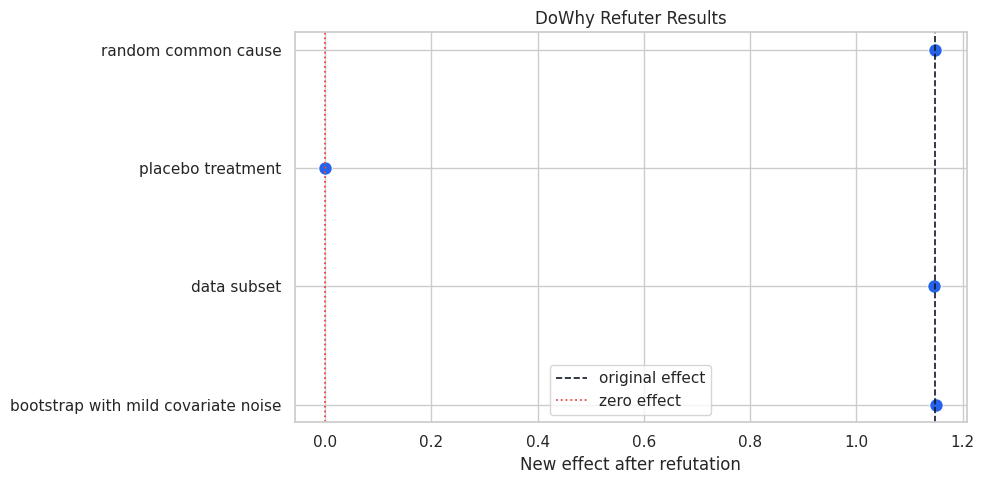
This plot should show three estimates near the original effect and the placebo estimate near zero. That visual separation is a healthy sign.
For the broader lesson, the estimate should be interpreted together with the identifying assumptions and diagnostics that make it credible.
Negative-Control Outcome Check
A negative-control outcome is an outcome where treatment should have no plausible effect. Here, negative_control_outcome is generated from the same confounders as the real outcome, while treatment has no causal effect on it.
If the adjusted treatment coefficient on this negative-control outcome is far from zero, the adjustment set may still be incomplete.
# Fit or evaluate the model objects used in the Negative-Control Outcome Check section.
negative_control_models = {
    "negative control: naive": smf.ols(
        "negative_control_outcome ~ recommendation_exposure",
        data=refuter_df,
    ).fit(cov_type="HC1"),
    "negative control: omit pre_activity": smf.ols(
        "negative_control_outcome ~ recommendation_exposure + power_segment + account_age_z + seasonality_score",
        data=refuter_df,
    ).fit(cov_type="HC1"),
    "negative control: full adjustment": smf.ols(
        "negative_control_outcome ~ recommendation_exposure + pre_activity + power_segment + account_age_z + seasonality_score",
        data=refuter_df,
    ).fit(cov_type="HC1"),
}
negative_control_rows = []
for label, model in negative_control_models.items():
    conf_int = model.conf_int().loc[TREATMENT_COLUMN]
    negative_control_rows.append(
        {
            "model": label,
            "estimate": model.params[TREATMENT_COLUMN],
            "std_error": model.bse[TREATMENT_COLUMN],
            "ci_95_lower": conf_int[0],
            "ci_95_upper": conf_int[1],
            "target": 0.0,
            "absolute_distance_from_zero": abs(model.params[TREATMENT_COLUMN]),
        }
    )
negative_control_table = pd.DataFrame(negative_control_rows)
negative_control_table.to_csv(TABLE_DIR / "08_negative_control_outcome.csv", index=False)
display(negative_control_table)| model | estimate | std_error | ci_95_lower | ci_95_upper | target | absolute_distance_from_zero | |
|---|---|---|---|---|---|---|---|
| 0 | negative control: naive | 0.6596 | 0.0411 | 0.5789 | 0.7402 | 0.0000 | 0.6596 |
| 1 | negative control: omit pre_activity | 0.4809 | 0.0400 | 0.4025 | 0.5593 | 0.0000 | 0.4809 |
| 2 | negative control: full adjustment | 0.0505 | 0.0346 | -0.0173 | 0.1184 | 0.0000 | 0.0505 |
The naive negative-control effect is not near zero because treatment assignment is confounded. Full adjustment should pull it much closer to zero. The omitted-confounder version shows how a negative control can reveal residual confounding.
Plot the Negative-Control Outcome Coefficients
This plot shows the treatment coefficient for the negative-control outcome under different adjustment choices. The target is zero.
fig, ax = plt.subplots(figsize=(10, 5))
plot_nc = negative_control_table.copy()
plot_nc["lower_error"] = plot_nc["estimate"] - plot_nc["ci_95_lower"]
plot_nc["upper_error"] = plot_nc["ci_95_upper"] - plot_nc["estimate"]
ax.errorbar(
    x=plot_nc["estimate"],
    y=plot_nc["model"],
    xerr=[plot_nc["lower_error"], plot_nc["upper_error"]],
    fmt="o",
    color="#2563eb",
    ecolor="#64748b",
    capsize=4,
)
ax.axvline(0, color="#111827", linestyle="--", linewidth=1.2)
ax.set_title("Negative-Control Outcome Should Not Respond To Treatment")
ax.set_xlabel("Treatment coefficient on negative-control outcome")
ax.set_ylabel("")
plt.tight_layout()
fig.savefig(FIGURE_DIR / "08_negative_control_outcome_coefficients.png", dpi=160, bbox_inches="tight")
plt.show()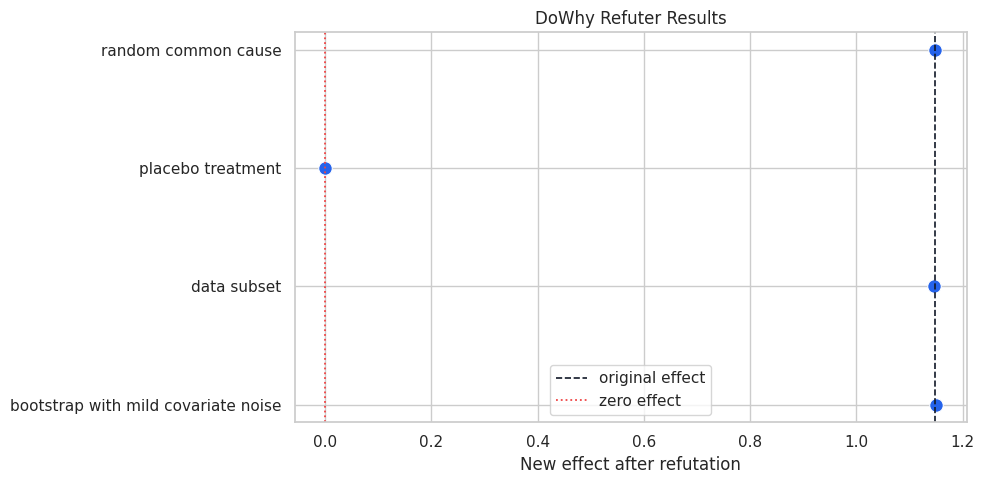
The full-adjustment coefficient should be close to the zero line. The contrast with the naive and omitted-variable checks is the teaching point: negative controls are most useful when they can reveal a broken adjustment strategy.
Placebo Exposure Check Outside DoWhy
The DoWhy placebo refuter already permuted treatment internally. The code below does the same idea manually with an explicit placebo_exposure column, then fits the adjusted outcome regression. The expected treatment coefficient is zero.
placebo_df = refuter_df.copy()
placebo_df["placebo_exposure"] = RNG.permutation(placebo_df[TREATMENT_COLUMN].to_numpy())
placebo_exposure_model = smf.ols(
    "weekly_value ~ placebo_exposure + pre_activity + power_segment + account_age_z + seasonality_score",
    data=placebo_df,
).fit(cov_type="HC1")
placebo_conf_int = placebo_exposure_model.conf_int().loc["placebo_exposure"]
placebo_exposure_table = pd.DataFrame(
    [
        {
            "model": "adjusted outcome model with placebo exposure",
            "estimate": placebo_exposure_model.params["placebo_exposure"],
            "std_error": placebo_exposure_model.bse["placebo_exposure"],
            "ci_95_lower": placebo_conf_int[0],
            "ci_95_upper": placebo_conf_int[1],
            "target": 0.0,
        }
    ]
)
placebo_exposure_table["absolute_distance_from_zero"] = placebo_exposure_table["estimate"].abs()
placebo_exposure_table.to_csv(TABLE_DIR / "08_manual_placebo_exposure.csv", index=False)
display(placebo_exposure_table)| model | estimate | std_error | ci_95_lower | ci_95_upper | target | absolute_distance_from_zero | |
|---|---|---|---|---|---|---|---|
| 0 | adjusted outcome model with placebo exposure | 0.0513 | 0.0360 | -0.0192 | 0.1219 | 0.0000 | 0.0513 |
The manual placebo exposure should have a small adjusted coefficient. This is the same causal idea as the DoWhy placebo refuter, shown in a form that is easy to inspect line by line.
Omitted-Confounder Stress Test
A simple sensitivity check is to remove one observed confounder at a time and re-estimate the effect. This leaves hidden confounding unmodeled directly and shows which observed variables have the most influence on the estimate.
# Define reusable helpers for the Omitted-Confounder Stress Test section.
def adjusted_formula_without(dropped_column=None):
    """
    Idea: Compute the adjusted formula without result after accounting for the specified controls.

    Parameters
    ----------
    dropped_column : object
        DataFrame column or columns selected for this calculation.

    Returns
    -------
    str
        Regression formula after omitting the requested adjustment variable.
    """
    kept_confounders = [col for col in CONFONDER_COLUMNS if col != dropped_column]
    if kept_confounders:
        return "weekly_value ~ recommendation_exposure + " + " + ".join(kept_confounders)
    return "weekly_value ~ recommendation_exposure"
omitted_rows = []
for dropped_column in [None, *CONFONDER_COLUMNS]:
    label = "full adjustment" if dropped_column is None else f"drop {dropped_column}"
    model = smf.ols(adjusted_formula_without(dropped_column), data=refuter_df).fit(cov_type="HC1")
    conf_int = model.conf_int().loc[TREATMENT_COLUMN]
    omitted_rows.append(
        {
            "specification": label,
            "estimate": model.params[TREATMENT_COLUMN],
            "std_error": model.bse[TREATMENT_COLUMN],
            "ci_95_lower": conf_int[0],
            "ci_95_upper": conf_int[1],
            "target": true_effect,
            "error_vs_truth": model.params[TREATMENT_COLUMN] - true_effect,
        }
    )
omitted_confounder_table = pd.DataFrame(omitted_rows)
omitted_confounder_table.to_csv(TABLE_DIR / "08_omitted_confounder_stress_test.csv", index=False)
display(omitted_confounder_table)| specification | estimate | std_error | ci_95_lower | ci_95_upper | target | error_vs_truth | |
|---|---|---|---|---|---|---|---|
| 0 | full adjustment | 1.1478 | 0.0338 | 1.0815 | 1.2140 | 1.2000 | -0.0522 |
| 1 | drop pre_activity | 1.6608 | 0.0424 | 1.5777 | 1.7440 | 1.2000 | 0.4608 |
| 2 | drop power_segment | 1.2379 | 0.0355 | 1.1683 | 1.3075 | 1.2000 | 0.0379 |
| 3 | drop account_age_z | 1.2452 | 0.0360 | 1.1746 | 1.3158 | 1.2000 | 0.0452 |
| 4 | drop seasonality_score | 1.2737 | 0.0370 | 1.2011 | 1.3462 | 1.2000 | 0.0737 |
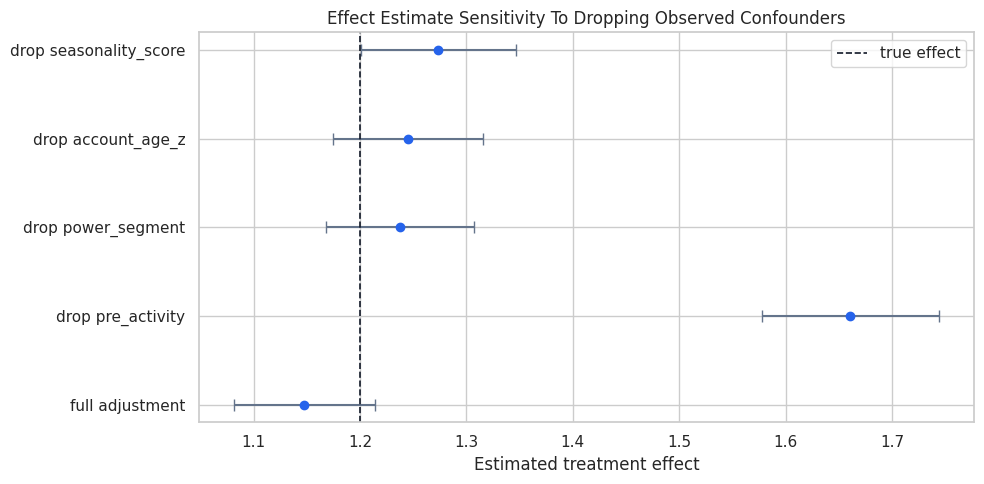
Dropping pre_activity should move the estimate the most because it is a strong driver of treatment and outcome. In real analyses, this style of check helps identify where measurement quality matters most.
Plot the Omitted-Confounder Stress Test
The dashed line is the known true effect. Each point shows the treatment coefficient after dropping a different observed confounder.
fig, ax = plt.subplots(figsize=(10, 5))
plot_omit = omitted_confounder_table.copy()
plot_omit["lower_error"] = plot_omit["estimate"] - plot_omit["ci_95_lower"]
plot_omit["upper_error"] = plot_omit["ci_95_upper"] - plot_omit["estimate"]
ax.errorbar(
    x=plot_omit["estimate"],
    y=plot_omit["specification"],
    xerr=[plot_omit["lower_error"], plot_omit["upper_error"]],
    fmt="o",
    color="#2563eb",
    ecolor="#64748b",
    capsize=4,
)
ax.axvline(true_effect, color="#111827", linestyle="--", linewidth=1.2, label="true effect")
ax.set_title("Effect Estimate Sensitivity To Dropping Observed Confounders")
ax.set_xlabel("Estimated treatment effect")
ax.set_ylabel("")
ax.legend()
plt.tight_layout()
fig.savefig(FIGURE_DIR / "08_omitted_confounder_stress_test.png", dpi=160, bbox_inches="tight")
plt.show()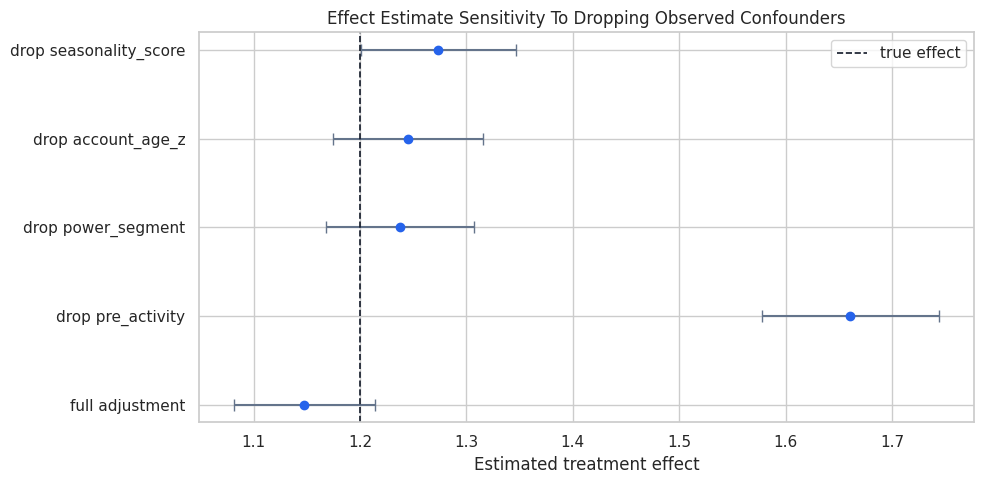
The plot shows which observed variables anchor the adjustment. If a single measured variable strongly changes the result, an unmeasured variable with a similar role could also matter.
Bring All Checks into One Credibility Table
The final summary table combines the core evidence from the lesson. It is written in plain language so it can be reused as a template for applied causal work.
credibility_rows = [
    {
        "check": "baseline adjusted estimate",
        "result": f"estimate {baseline_estimate.value:.3f} versus true effect {true_effect:.3f}",
        "causal reading": "adjustment recovers the known effect reasonably well in the example data",
    },
    {
        "check": "placebo treatment refuter",
        "result": f"placebo effect {placebo_treatment_refutation.new_effect:.3f}",
        "causal reading": "fake treatment does not reproduce the original effect",
    },
    {
        "check": "random common cause refuter",
        "result": f"new effect {random_common_cause_refutation.new_effect:.3f}",
        "causal reading": "adding random noise does not change the estimate materially",
    },
    {
        "check": "subset and bootstrap refuters",
        "result": f"subset {data_subset_refutation.new_effect:.3f}; bootstrap {bootstrap_refutation.new_effect:.3f}",
        "causal reading": "effect is stable under moderate sampling perturbations",
    },
    {
        "check": "negative-control outcome",
        "result": f"full-adjustment coefficient {negative_control_table.loc[negative_control_table['model'] == 'negative control: full adjustment', 'estimate'].iloc[0]:.3f}",
        "causal reading": "adjustment removes most of the treatment association with an outcome treatment should not affect",
    },
    {
        "check": "hidden-confounding sensitivity",
        "result": f"sensitivity range {hidden_confounder_refutation.new_effect[0]:.3f} to {hidden_confounder_refutation.new_effect[1]:.3f}",
        "causal reading": "strong hypothetical confounding could still reduce the estimate substantially",
    },
]
credibility_summary = pd.DataFrame(credibility_rows)
credibility_summary.to_csv(TABLE_DIR / "08_credibility_summary.csv", index=False)
display(credibility_summary)| check | result | causal reading | |
|---|---|---|---|
| 0 | baseline adjusted estimate | estimate 1.148 versus true effect 1.200 | adjustment recovers the known effect reasonably well in the example data |
| 1 | placebo treatment refuter | placebo effect 0.000 | fake treatment does not reproduce the original effect |
| 2 | random common cause refuter | new effect 1.148 | adding random noise does not change the estimate materially |
| 3 | subset and bootstrap refuters | subset 1.146; bootstrap 1.151 | effect is stable under moderate sampling perturbations |
| 4 | negative-control outcome | full-adjustment coefficient 0.051 | adjustment removes most of the treatment association with an outcome treatment should not affect |
| 5 | hidden-confounding sensitivity | sensitivity range 0.320 to 1.114 | strong hypothetical confounding could still reduce the estimate substantially |
The final row is the humility clause. The refuters support the estimate under the stated graph, but hidden confounding remains a design assumption that cannot be eliminated by diagnostics alone.
Reporting and Takeaways
Practical Refuter Checklist
When using these checks in a real analysis, keep the following habits:
- State the original causal estimand before showing refuters.
- Explain what each refuter is expected to do.
- Report the new effect, whether a check “passed.”
- Use negative controls that are substantively meaningful, not convenient random columns.
- Treat sensitivity analysis as a design conversation about plausible hidden causes.
- Remember that refuters cannot rescue a bad graph or post-treatment adjustment.
Practice Prompts
Try these extensions after running the lesson:
- Increase the effect of
pre_activityon treatment assignment. Which checks become more sensitive? - Remove
pre_activityfrom the DoWhy graph and rerun the refuters. Which checks reveal the problem most clearly? - Add a direct treatment effect to the negative-control outcome. What happens to the negative-control check?
- Increase the hidden-confounding grid values. At what point does the estimated effect approach zero?
- Write a short credibility memo with three paragraphs: estimate, refuter evidence, remaining assumptions.
What Comes Next
The sequence next moves to graph discovery and graph-level refutation. Here the graph was specified by the analyst. The next step explores tools that help learn or challenge graph structure from data, while keeping the same skepticism about what data alone can prove.
Summary
This lesson showed how refuters, placebos, negative controls, and sensitivity checks turn a causal estimate into a credibility argument. The original estimate matters, and the surrounding stress tests explain how much confidence a reader should place in it, which assumptions carry the most weight, and where a stronger design would be needed.