# Build and label the diagnostic visualization for the Setup section.
from pathlib import Path
import os
import warnings
# Keep Matplotlib quiet in sandboxed or shared environments where the default cache path may not be writable.
os.environ.setdefault("MPLCONFIGDIR", "/tmp/matplotlib-ranking-sys")
warnings.filterwarnings("default")
warnings.filterwarnings("ignore", category=DeprecationWarning)
warnings.filterwarnings("ignore", category=PendingDeprecationWarning)
warnings.filterwarnings("ignore", category=FutureWarning)
warnings.filterwarnings("ignore", message=".*IProgress not found.*")
warnings.filterwarnings("ignore", message=".*setParseAction.*deprecated.*")
warnings.filterwarnings("ignore", message=".*copy keyword is deprecated.*")
warnings.filterwarnings("ignore", message=".*disp.*iprint.*L-BFGS-B.*")
warnings.filterwarnings("ignore", message=".*variables are assumed unobserved.*")
warnings.filterwarnings("ignore", module="dowhy.causal_estimators.regression_estimator")
warnings.filterwarnings("ignore", module="sklearn.linear_model._logistic")
warnings.filterwarnings("ignore", module="seaborn.categorical")
warnings.filterwarnings("ignore", module="pydot.dot_parser")
warnings.filterwarnings("ignore", module="econml")
import dowhy
import matplotlib.pyplot as plt
import numpy as np
# Compatibility shim for older SHAP/EconML imports under NumPy 2.x.
if not hasattr(np, "bool8"):
    np.bool8 = np.bool_
if not hasattr(np, "obj2sctype"):
    def _numpy_obj2sctype_compat(rep, default=None):
        try:
            return np.dtype(rep).type
        except TypeError:
            return default
    np.obj2sctype = _numpy_obj2sctype_compat
import pandas as pd
import networkx as nx
# Compatibility shim for DoWhy versions that expect the older NetworkX d_separated API.
if not hasattr(nx.algorithms, "d_separated"):
    from networkx.algorithms.d_separation import is_d_separator
    nx.algorithms.d_separated = is_d_separator
pd.set_option("display.max_colwidth", None)
pd.set_option("display.max_columns", None)
pd.set_option("display.width", 0)
# Compatibility shim for DoWhy estimators written against older pandas Series integer indexing.
if not getattr(pd.Series, "_dowhy_integer_position_patch", False):
    _original_series_getitem = pd.Series.__getitem__
    def _dowhy_series_getitem_compat(self, key):
        try:
            return _original_series_getitem(self, key)
        except KeyError:
            if isinstance(key, int) and key not in self.index:
                return self.iloc[key]
            raise
    pd.Series.__getitem__ = _dowhy_series_getitem_compat
    pd.Series._dowhy_integer_position_patch = True
import seaborn as sns
import statsmodels.formula.api as smf
from dowhy import CausalModel
from econml.dml import CausalForestDML
from IPython.display import display
from sklearn.ensemble import RandomForestClassifier, RandomForestRegressor
from sklearn.linear_model import LogisticRegression
from sklearn.metrics import mean_squared_error, roc_auc_score
from sklearn.model_selection import train_test_split
pd.set_option("display.max_columns", 100)
pd.set_option("display.width", 150)
pd.set_option("display.float_format", "{:.4f}".format)
sns.set_theme(style="whitegrid", context="notebook")
for candidate in [Path.cwd(), *Path.cwd().parents]:
    if (candidate / "notebooks" / "tutorials" / "dowhy").exists():
        PROJECT_ROOT = candidate
        break
else:
    PROJECT_ROOT = Path.cwd()
NOTEBOOK_DIR = PROJECT_ROOT / "notebooks" / "tutorials" / "dowhy"
OUTPUT_DIR = NOTEBOOK_DIR / "outputs"
FIGURE_DIR = OUTPUT_DIR / "figures"
TABLE_DIR = OUTPUT_DIR / "tables"
FIGURE_DIR.mkdir(parents=True, exist_ok=True)
TABLE_DIR.mkdir(parents=True, exist_ok=True)
RNG = np.random.default_rng(707)
print(f"DoWhy version: {dowhy.__version__}")
print(f"Notebook directory: {NOTEBOOK_DIR}")07: CATE and Heterogeneous Effects
The previous lessons focused mostly on average treatment effects. An average effect answers a valuable question: “what is the mean causal effect of treatment in this population?” But many practical decisions need a more granular answer: “for which kinds of units is the effect larger, smaller, or possibly harmful?”
That second question is about conditional average treatment effects, usually shortened to CATE. A CATE is an average treatment effect conditional on some unit characteristics, such as baseline intent, history, segment, risk score, geography, or prior engagement.
We work through CATE through a controlled example where the true treatment effect is known. We will use DoWhy for the graph, identification, average effect estimation, treatment-effect modifiers, and an EconML-backed causal forest. Along the way, we will keep the core discipline from earlier lessons: heterogeneous effects are still causal effects, so they only make sense after the causal design is credible.
Learning Goals
By the end, you should be able to:
- Explain the difference between an ATE and a CATE.
- Distinguish confounders from effect modifiers.
- Simulate a setting where treatment effects vary across users.
- Estimate an average effect with DoWhy as the baseline target.
- Add effect modifiers to a DoWhy linear regression estimator.
- Produce segment-level and bucket-level CATE summaries.
- Estimate more flexible CATEs with DoWhy’s EconML integration.
- Evaluate CATE models with calibration-style diagnostics when ground truth is available.
- Explain why overlap and causal identification still matter when modeling heterogeneity.
Dataset and Experiment Setup
We use mostly simulated or semi-synthetic observational datasets to study CATE And Heterogeneous Effects. DoWhy is mainly about causal modeling discipline: graph, estimand, estimator, and refuter. A controlled dataset lets us show how a change in assumptions changes the estimand and the credibility of the estimate.
Read each row as an observed unit in a business or policy system. The treatment, outcome, common causes, instruments, mediators, and anomaly indicators are named to mirror applied causal workflows and keep the examples close to realistic analysis language. The experiment focuses on effect heterogeneity. The target is whether treatment works on average and where it works, but where and for whom it works.
The simulation is designed to make the identifying assumptions and diagnostic checks visible. It is meant to expose the assumptions that would be hidden in real data, where the true counterfactual outcome is unavailable.
Mathematical Foundation
Heterogeneous treatment-effect analysis targets
\[ \tau(x)=\mathbb{E}\{Y(1)-Y(0)\mid X=x\}. \]
A group average treatment effect is
\[ \tau_G=\mathbb{E}\{\tau(X)\mid X\in G\}. \]
The examples estimate and summarize \(\tau(x)\). Segment definitions, overlap, and multiplicity still matter for interpretation.
Tutorial Workflow
ATE versus CATE
The average treatment effect is a population-level summary:
\[ ATE = E[Y(1) - Y(0)] \]
A conditional average treatment effect is the same causal contrast, but averaged inside a subgroup or at a feature value:
\[ CATE(x) = E[Y(1) - Y(0) \mid X=x] \]
The CATE is most useful when heterogeneity changes a decision, targeting rule, or scientific interpretation. It is more detailed, which means it can also be noisier and easier to overfit. The right mental model is:
- ATE: the best single-number causal summary for the population.
- CATE: how that causal effect changes across observed characteristics.
- ITE prediction: an estimated unit-level effect score, usually produced by a model, that should be summarized and validated rather than treated as exact truth.
This lesson moves from the ATE to increasingly detailed CATE views.
Confounders and Effect Modifiers
A variable can play different causal roles.
A confounder affects treatment and outcome. It must be handled for identification. If we ignore an important confounder, the causal effect estimate can be biased.
An effect modifier changes the size of the treatment effect. It helps answer heterogeneity questions. Effect modifiers usually leave average-effect identification unchanged while changing how we model and report the effect.
The same variable can be both. For example, baseline intent can affect whether a user gets exposed to a recommendation and also change how strongly exposure affects future value. In that case, it belongs in the adjustment set and in the heterogeneity model.
Setup
The code below imports the tutorial dependencies, suppresses known non-actionable library warnings, creates output folders, and sets a stable plotting style. The MPLCONFIGDIR setting avoids lesson-execution warnings in environments where the default Matplotlib cache directory is not writable.
The lesson is ready once the package versions and output folders print. All generated outputs from this lesson use a 07_ prefix.
This reproducibility check keeps the run auditable before causal interpretation begins. It makes the run consistent enough for later graphs, tables, and estimates to be checked against the same environment.
Strategy Map for Heterogeneous Effects
CATE analysis is not one estimator. It is a workflow. The table below lays out the sequence we will follow: start with identification, estimate the average effect, then ask how that effect varies across meaningful features.
| step | question | why it matters |
|---|---|---|
| Define the causal target | What treatment and outcome are being contrasted? | Heterogeneity is still about potential outcomes, not prediction alone. |
| Identify the average effect | Which variables block backdoor paths? | CATE modeling cannot repair a broken causal design. |
| Choose effect modifiers | Which pre-treatment features might change the effect size? | Effect modifiers should be known before treatment and meaningful to explain. |
| Estimate subgroup effects | How does the effect differ by segment or feature bucket? | Grouped estimates are easier to audit than individual scores. |
| Fit flexible CATE models | Can a richer model capture nonlinear effect patterns? | Flexible CATE models can help targeting, but they need validation. |
| Check overlap and stability | Do treated and untreated units exist in each subgroup? | No model can estimate a contrast where the data contain no contrast. |
The workflow starts with causal design, not with a model leaderboard. That order keeps the lesson anchored: a sophisticated CATE model is only useful if the effect being modeled is identified.
Simulate a Heterogeneous Treatment Effect Dataset
We will simulate a binary treatment called recommendation_exposure and a continuous outcome called weekly_value. The treatment effect is deliberately heterogeneous:
- higher for users in the
power_segment, - higher for users with stronger
baseline_intent, - mildly nonlinear for very high-intent users.
The treatment assignment is confounded because baseline intent, segment, and seasonality all affect the probability of exposure and the outcome. This lets us practice adjustment and heterogeneity modeling in one example.
# Define reusable helpers for the Simulate A Heterogeneous Treatment Effect Dataset section.
def make_heterogeneous_effect_data(n=5_000, seed=707):
    """
    Idea: Construct the heterogeneous effect data used in the Simulate A Heterogeneous Treatment Effect Dataset section, including columns needed for later diagnostics.

    Parameters
    ----------
    n : int
        Number of observations or repetitions to generate.
    seed : int
        Random seed used to make generation or resampling reproducible.

    Returns
    -------
    pd.DataFrame or dict
        Named df object assembled by make heterogeneous effect data.
    """
    local_rng = np.random.default_rng(seed)
    baseline_intent = local_rng.normal(loc=0.0, scale=1.0, size=n)
    power_segment = local_rng.binomial(n=1, p=0.42, size=n)
    seasonality_score = local_rng.normal(loc=0.0, scale=1.0, size=n)
    prior_value = (
        2.0
        + 0.80 * baseline_intent
        + 0.70 * power_segment
        + 0.35 * seasonality_score
        + local_rng.normal(scale=0.90, size=n)
    )
    treatment_logit = (
        -0.25
        + 0.65 * baseline_intent
        + 0.45 * power_segment
        + 0.30 * seasonality_score
        + 0.18 * prior_value
    )
    treatment_probability = 1 / (1 + np.exp(-treatment_logit))
    recommendation_exposure = local_rng.binomial(n=1, p=treatment_probability)
    true_cate = (
        0.55
        + 0.55 * power_segment
        + 0.45 * baseline_intent
        + 0.25 * np.maximum(baseline_intent, 0)
    )
    weekly_value = (
        3.0
        + 0.65 * baseline_intent
        + 0.85 * power_segment
        + 0.40 * seasonality_score
        + 0.55 * prior_value
        + true_cate * recommendation_exposure
        + local_rng.normal(scale=1.00, size=n)
    )
    df = pd.DataFrame(
        {
            "recommendation_exposure": recommendation_exposure,
            "weekly_value": weekly_value,
            "baseline_intent": baseline_intent,
            "power_segment": power_segment,
            "seasonality_score": seasonality_score,
            "prior_value": prior_value,
            "treatment_probability": treatment_probability,
            "true_cate": true_cate,
        }
    )
    df["segment_label"] = np.where(df["power_segment"] == 1, "power", "standard")
    return df
cate_df = make_heterogeneous_effect_data()
true_ate = cate_df["true_cate"].mean()
print(f"Rows: {len(cate_df):,}")
print(f"Observed exposure rate: {cate_df['recommendation_exposure'].mean():.3f}")
print(f"True ATE from the data-generating process: {true_ate:.3f}")
display(cate_df.head())
Rows: 5,000
Observed exposure rate: 0.575
True ATE from the data-generating process: 0.882| recommendation_exposure | weekly_value | baseline_intent | power_segment | seasonality_score | prior_value | treatment_probability | true_cate | segment_label | |
|---|---|---|---|---|---|---|---|---|---|
| 0 | 0 | 5.1091 | -0.1408 | 1 | -0.6061 | 3.3615 | 0.6299 | 1.0367 | power |
| 1 | 0 | -2.3683 | -2.6585 | 0 | -1.3053 | -2.1878 | 0.0593 | -0.6463 | standard |
| 2 | 0 | 8.5559 | 1.8354 | 0 | 1.5331 | 4.0925 | 0.8947 | 1.8348 | standard |
| 3 | 0 | 6.5446 | -0.6957 | 1 | -0.0646 | 1.6789 | 0.5077 | 0.7869 | power |
| 4 | 0 | 1.6414 | -0.7046 | 0 | -1.2943 | -0.0873 | 0.2475 | 0.2329 | standard |
The dataframe includes true_cate, which is available only because this is a simulation. In a real dataset, that column would not exist. We keep it here so the analysis can evaluate whether the CATE estimates are learning the intended effect pattern.
Data Field Guide
The next table documents every column used in the simulation. This is good practice for CATE work because variables can play more than one role, and confusing a confounder with an effect modifier can lead to muddled analysis.
| column | role | description |
|---|---|---|
| recommendation_exposure | treatment | Binary indicator for whether the unit received the recommendation exposure. |
| weekly_value | outcome | Continuous post-treatment value outcome. |
| baseline_intent | confounder and effect modifier | Pre-treatment intent score that affects exposure, outcome, and treatment-effect size. |
| power_segment | confounder and effect modifier | Binary pre-treatment segment indicator that affects exposure, outcome, and treatment-effect size. |
| seasonality_score | confounder | Pre-treatment timing score that affects exposure and outcome but not the treatment effect directly. |
| prior_value | confounder | Pre-treatment value summary that affects exposure and outcome. |
| treatment_probability | known simulation diagnostic | The true treatment probability used to generate exposure; normally unknown in observational data. |
| true_cate | known simulation diagnostic | The true treatment effect for each row; normally unobserved in real data. |
| segment_label | display label | Human-readable version of the power segment indicator. |
Notice that baseline_intent and power_segment appear as both confounders and effect modifiers. They are needed for adjustment, and they are also useful for understanding where the effect is larger.
Basic Data Checks
Before estimating anything, we inspect shape, missingness, and core distribution summaries. This is more than housekeeping: CATE analysis splits the data into smaller groups, so data quality problems become more painful than they are for a single average effect.
basic_summary = pd.DataFrame(
    {
        "rows": [len(cate_df)],
        "columns": [cate_df.shape[1]],
        "missing_cells": [int(cate_df.isna().sum().sum())],
        "exposure_rate": [cate_df["recommendation_exposure"].mean()],
        "mean_outcome": [cate_df["weekly_value"].mean()],
        "true_ate": [true_ate],
    }
)
numeric_summary = cate_df[
    [
        "weekly_value",
        "baseline_intent",
        "power_segment",
        "seasonality_score",
        "prior_value",
        "treatment_probability",
        "true_cate",
    ]
].describe().T
basic_summary.to_csv(TABLE_DIR / "07_basic_summary.csv", index=False)
numeric_summary.to_csv(TABLE_DIR / "07_numeric_summary.csv")
display(basic_summary)
display(numeric_summary)| rows | columns | missing_cells | exposure_rate | mean_outcome | true_ate | |
|---|---|---|---|---|---|---|
| 0 | 5000 | 9 | 0 | 0.5748 | 5.2456 | 0.8816 |
| count | mean | std | min | 25% | 50% | 75% | max | |
|---|---|---|---|---|---|---|---|---|
| weekly_value | 5000.0000 | 5.2456 | 2.2362 | -2.5421 | 3.6750 | 5.0960 | 6.7371 | 12.6500 |
| baseline_intent | 5000.0000 | 0.0016 | 0.9952 | -3.9531 | -0.6694 | 0.0162 | 0.6739 | 3.6464 |
| power_segment | 5000.0000 | 0.4208 | 0.4937 | 0.0000 | 0.0000 | 0.0000 | 1.0000 | 1.0000 |
| seasonality_score | 5000.0000 | 0.0049 | 1.0034 | -3.9461 | -0.6671 | 0.0129 | 0.6759 | 3.3030 |
| prior_value | 5000.0000 | 2.2980 | 1.2921 | -2.4127 | 1.4188 | 2.3105 | 3.1675 | 7.3677 |
| treatment_probability | 5000.0000 | 0.5747 | 0.1941 | 0.0248 | 0.4335 | 0.5878 | 0.7294 | 0.9650 |
| true_cate | 5000.0000 | 0.8816 | 0.6444 | -1.2289 | 0.4183 | 0.8405 | 1.3007 | 3.2615 |
The data are complete and the exposure rate is not extreme. The true CATE has meaningful spread, which means a single ATE will hide important variation.
Treatment Assignment is Confounded
Treatment exposure is not random in this dataset. The next table compares pre-treatment characteristics between exposed and unexposed units. If the groups differ before treatment, an unadjusted outcome comparison is not a causal estimate.
balance_table = (
    cate_df.groupby("recommendation_exposure")
    .agg(
        rows=("weekly_value", "size"),
        mean_outcome=("weekly_value", "mean"),
        mean_baseline_intent=("baseline_intent", "mean"),
        power_segment_rate=("power_segment", "mean"),
        mean_seasonality=("seasonality_score", "mean"),
        mean_prior_value=("prior_value", "mean"),
        mean_true_cate=("true_cate", "mean"),
    )
    .reset_index()
)
balance_table.to_csv(TABLE_DIR / "07_treatment_balance_table.csv", index=False)
display(balance_table)| recommendation_exposure | rows | mean_outcome | mean_baseline_intent | power_segment_rate | mean_seasonality | mean_prior_value | mean_true_cate | |
|---|---|---|---|---|---|---|---|---|
| 0 | 0 | 2126 | 3.9740 | -0.3831 | 0.3518 | -0.1675 | 1.8189 | 0.6250 |
| 1 | 1 | 2874 | 6.1861 | 0.2863 | 0.4718 | 0.1325 | 2.6524 | 1.0715 |
The exposed group has higher baseline intent, higher prior value, and a different segment mix. It also has a higher average true CATE. That is exactly why adjustment and overlap checks are still necessary before modeling heterogeneity.
Diagnostics and Interpretation
Visualize the True Heterogeneity
Because this is a simulation, we can inspect the true CATE directly. The plot below shows the true effect by baseline intent and segment. In real work, this plot is impossible; we would only have estimates.
fig, ax = plt.subplots(figsize=(9, 5))
sns.scatterplot(
    data=cate_df.sample(1_000, random_state=707),
    x="baseline_intent",
    y="true_cate",
    hue="segment_label",
    alpha=0.55,
    s=24,
    ax=ax,
)
ax.set_title("True Treatment Effects Vary By Intent And Segment")
ax.set_xlabel("Baseline intent")
ax.set_ylabel("True CATE")
plt.tight_layout()
fig.savefig(FIGURE_DIR / "07_true_cate_scatter.png", dpi=160, bbox_inches="tight")
plt.show()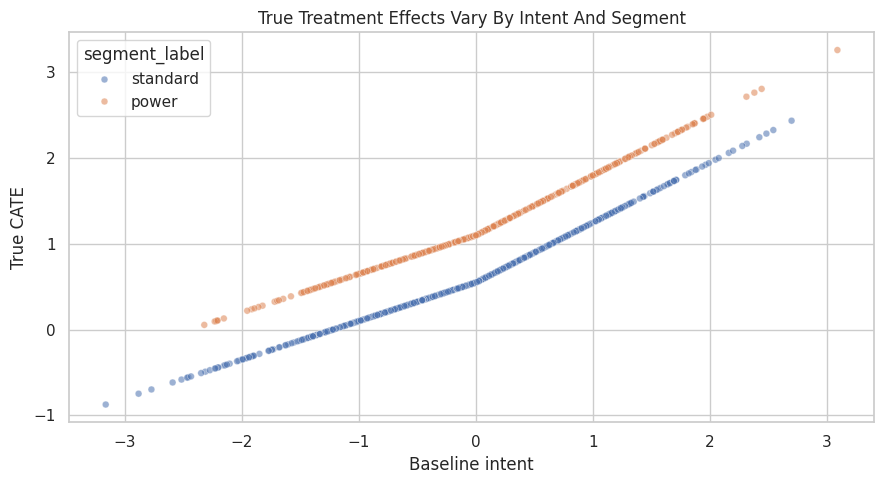
The effect rises with baseline intent, and the power segment sits above the standard segment. This is the pattern our estimators should recover if the model class is appropriate and the adjustment variables are sufficient.
Ground-Truth CATE by Coarse Groups
Before fitting models, we summarize the true effect by segment and baseline-intent bucket. This gives us a simple target table to compare against later.
cate_df = cate_df.assign(
    intent_bucket=pd.qcut(
        cate_df["baseline_intent"],
        q=4,
        labels=["low intent", "mid-low intent", "mid-high intent", "high intent"],
    )
)
true_group_cate = (
    cate_df.groupby(["segment_label", "intent_bucket"], observed=True)
    .agg(
        rows=("weekly_value", "size"),
        exposure_rate=("recommendation_exposure", "mean"),
        mean_true_cate=("true_cate", "mean"),
        mean_outcome=("weekly_value", "mean"),
    )
    .reset_index()
)
true_group_cate.to_csv(TABLE_DIR / "07_true_group_cate.csv", index=False)
display(true_group_cate)| segment_label | intent_bucket | rows | exposure_rate | mean_true_cate | mean_outcome | |
|---|---|---|---|---|---|---|
| 0 | power | low intent | 497 | 0.4245 | 0.5368 | 4.2689 |
| 1 | power | mid-low intent | 516 | 0.5911 | 0.9583 | 5.5047 |
| 2 | power | mid-high intent | 527 | 0.7021 | 1.3251 | 6.6154 |
| 3 | power | high intent | 564 | 0.8333 | 1.9720 | 8.2807 |
| 4 | standard | low intent | 753 | 0.3041 | -0.0268 | 2.7305 |
| 5 | standard | mid-low intent | 734 | 0.4905 | 0.4085 | 4.0134 |
| 6 | standard | mid-high intent | 723 | 0.5878 | 0.7871 | 5.0240 |
| 7 | standard | high intent | 686 | 0.7347 | 1.4398 | 6.5231 |
The grouped truth table is a useful reference. Later, estimated CATE tables should show the same broad ordering: power segment above standard, high intent above low intent.
Build the Causal Graph
The graph encodes the backdoor adjustment problem. Baseline intent, segment, seasonality, and prior value are all pre-treatment common causes of exposure and outcome. The graph does not need a special “effect modification arrow.” Effect modification is represented in the outcome model through treatment interactions.
# Define reusable helpers for the Build The Causal Graph section.
def edges_to_dot(edges, graph_name="causal_graph"):
    """
    Idea: Convert an edge table into DOT graph syntax for DoWhy or Graphviz-style display.

    Parameters
    ----------
    edges : object
        Collection of graph edges to draw, compare, or convert into a table.
    graph_name : object
        Name used to label the graph in tables, plots, or figures.

    Returns
    -------
    str
        DOT graph string that can be passed to DoWhy or Graphviz-style renderers.
    """
    edge_lines = [f"    {left} -> {right};" for left, right in edges]
    return "digraph " + graph_name + " {\n" + "\n".join(edge_lines) + "\n}"
cate_graph = edges_to_dot(
    [
        ("baseline_intent", "recommendation_exposure"),
        ("baseline_intent", "weekly_value"),
        ("power_segment", "recommendation_exposure"),
        ("power_segment", "weekly_value"),
        ("seasonality_score", "recommendation_exposure"),
        ("seasonality_score", "weekly_value"),
        ("prior_value", "recommendation_exposure"),
        ("prior_value", "weekly_value"),
        ("recommendation_exposure", "weekly_value"),
    ],
    graph_name="cate_graph",
)
print(cate_graph)
digraph cate_graph {
baseline_intent -> recommendation_exposure;
baseline_intent -> weekly_value;
power_segment -> recommendation_exposure;
power_segment -> weekly_value;
seasonality_score -> recommendation_exposure;
seasonality_score -> weekly_value;
prior_value -> recommendation_exposure;
prior_value -> weekly_value;
recommendation_exposure -> weekly_value;
}The graph says that the average effect can be identified by adjusting for the observed common causes. The heterogeneity analysis will reuse that same identified causal contrast and then model how the contrast changes across pre-treatment features.
Create the DoWhy Model and Identify the Effect
This is the standard DoWhy workflow from earlier lessons: create a CausalModel, then ask DoWhy to identify the causal effect. The estimand is still an ATE at this stage. CATE comes during estimation and reporting.
dowhy_columns = [
    "recommendation_exposure",
    "weekly_value",
    "baseline_intent",
    "power_segment",
    "seasonality_score",
    "prior_value",
]
cate_model = CausalModel(
    data=cate_df[dowhy_columns],
    treatment="recommendation_exposure",
    outcome="weekly_value",
    graph=cate_graph,
)
identified_estimand = cate_model.identify_effect(proceed_when_unidentifiable=True)
print(identified_estimand)
Estimand type: EstimandType.NONPARAMETRIC_ATE
### Estimand : 1
Estimand name: backdoor
Estimand expression:
d ↪
─────────────────────────(E[weekly_value|seasonality_score,power_segment,prior ↪
d[recommendationₑₓₚₒₛᵤᵣₑ] ↪
↪
↪ _value,baseline_intent])
↪
Estimand assumption 1, Unconfoundedness: If U→{recommendation_exposure} and U→weekly_value then P(weekly_value|recommendation_exposure,seasonality_score,power_segment,prior_value,baseline_intent,U) = P(weekly_value|recommendation_exposure,seasonality_score,power_segment,prior_value,baseline_intent)
### Estimand : 2
Estimand name: iv
No such variable(s) found!
### Estimand : 3
Estimand name: frontdoor
No such variable(s) found!
DoWhy identifies a backdoor estimand using the observed common causes. This is the causal foundation for both the average effect and the heterogeneous effect summaries below.
Estimate the Average Treatment Effect First
Before modeling heterogeneity, estimate the ATE. This gives us a baseline causal summary and a check against the known simulation truth.
ate_estimate = cate_model.estimate_effect(
    identified_estimand,
    method_name="backdoor.linear_regression",
)
naive_difference = (
    cate_df.loc[cate_df["recommendation_exposure"] == 1, "weekly_value"].mean()
    - cate_df.loc[cate_df["recommendation_exposure"] == 0, "weekly_value"].mean()
)
ate_comparison = pd.DataFrame(
    [
        {"quantity": "naive observed mean difference", "estimate": naive_difference},
        {"quantity": "DoWhy adjusted ATE", "estimate": ate_estimate.value},
        {"quantity": "true ATE", "estimate": true_ate},
    ]
)
ate_comparison["error_vs_truth"] = ate_comparison["estimate"] - true_ate
ate_comparison.to_csv(TABLE_DIR / "07_ate_comparison.csv", index=False)
display(ate_comparison)| quantity | estimate | error_vs_truth | |
|---|---|---|---|
| 0 | naive observed mean difference | 2.2121 | 1.3305 |
| 1 | DoWhy adjusted ATE | 0.8391 | -0.0426 |
| 2 | true ATE | 0.8816 | 0.0000 |
The adjusted ATE should be much closer to the true ATE than the naive difference. That gives us confidence that the graph and adjustment variables are doing useful work before we ask a harder heterogeneity question.
Add Effect Modifiers to the DoWhy Linear Estimator
DoWhy’s linear regression estimator can include treatment interactions with effect modifiers. Here we mark baseline_intent and power_segment as effect modifiers. They are also adjustment variables, which is allowed: they help block confounding and help explain variation in effect size.
We turn off automatic conditional estimates in this step because we will compute subgroup effects explicitly. That keeps the grouping logic transparent and avoids hiding important choices about buckets.
linear_cate_estimate = cate_model.estimate_effect(
    identified_estimand,
    method_name="backdoor.linear_regression",
    effect_modifiers=["baseline_intent", "power_segment"],
    method_params={"init_params": {"need_conditional_estimates": False}},
)
linear_cate_summary = pd.DataFrame(
    [
        {"quantity": "DoWhy linear CATE model average effect", "estimate": linear_cate_estimate.value},
        {"quantity": "true ATE", "estimate": true_ate},
    ]
)
linear_cate_summary["error_vs_truth"] = linear_cate_summary["estimate"] - true_ate
print(linear_cate_estimate.realized_estimand_expr)
display(linear_cate_summary)
b: weekly_value~recommendation_exposure+seasonality_score+power_segment+prior_value+baseline_intent+recommendation_exposure*baseline_intent+recommendation_exposure*power_segment| quantity | estimate | error_vs_truth | |
|---|---|---|---|
| 0 | DoWhy linear CATE model average effect | 0.9091 | 0.0274 |
| 1 | true ATE | 0.8816 | 0.0000 |
The realized estimator expression includes treatment interactions. Those interactions are what allow the estimated treatment effect to vary across baseline intent and segment.
For the broader lesson, the estimate should be interpreted together with the identifying assumptions and diagnostics that make it credible.
Helper for Subgroup Effects
The fitted DoWhy estimator can compute the treatment contrast on any subset of rows by comparing predicted outcomes under treatment and control. This helper uses the already-fitted estimator and returns the average contrast for a provided slice.
def estimate_effect_for_slice(estimate, data_slice):
    """
    Use a fitted DoWhy estimator to estimate the average treatment effect inside a slice.

    Parameters
    ----------
    estimate : object
        Estimated effect or prediction vector being summarized or evaluated.
    data_slice : pd.DataFrame
        Subset of rows for which the effect is estimated.

    Returns
    -------
    float
        Estimated treatment effect for the supplied data slice, or NaN if the slice cannot be estimated.
    """
    if len(data_slice) == 0:
        return np.nan
    return estimate.estimator.estimate_effect(
        data_slice[dowhy_columns],
        treatment_value=1,
        control_value=0,
        need_conditional_estimates=False,
    ).value
# Quick smoke test on the full data: this should match the average effect from the fitted linear CATE model.
full_slice_effect = estimate_effect_for_slice(linear_cate_estimate, cate_df)
print(f"Full-sample effect from slice helper: {full_slice_effect:.3f}")
print(f"Stored linear CATE model average effect: {linear_cate_estimate.value:.3f}")
Full-sample effect from slice helper: 0.909
Stored linear CATE model average effect: 0.909The helper returns the same full-sample effect as the stored estimate. Now we can use it for interpretable subgroup summaries.
For the broader lesson, the estimate should be interpreted together with the identifying assumptions and diagnostics that make it credible.
Segment-Level CATE
The first heterogeneity view compares the estimated effect for standard and power users. This is simple. Before showing individual-level scores, it is better to verify that coarse groups move in the expected direction.
segment_effect_rows = []
for segment_label, group in cate_df.groupby("segment_label"):
    segment_effect_rows.append(
        {
            "segment_label": segment_label,
            "rows": len(group),
            "exposure_rate": group["recommendation_exposure"].mean(),
            "estimated_cate": estimate_effect_for_slice(linear_cate_estimate, group),
            "true_cate": group["true_cate"].mean(),
        }
    )
segment_cate_table = pd.DataFrame(segment_effect_rows)
segment_cate_table["error_vs_truth"] = segment_cate_table["estimated_cate"] - segment_cate_table["true_cate"]
segment_cate_table.to_csv(TABLE_DIR / "07_segment_cate_linear.csv", index=False)
display(segment_cate_table)| segment_label | rows | exposure_rate | estimated_cate | true_cate | error_vs_truth | |
|---|---|---|---|---|---|---|
| 0 | power | 2104 | 0.6445 | 1.2207 | 1.2223 | -0.0016 |
| 1 | standard | 2896 | 0.5242 | 0.6826 | 0.6341 | 0.0485 |
The estimated segment effects should preserve the main pattern: power users have a larger treatment effect than standard users. The table also shows exposure rates, because subgroup effects are less credible when one subgroup has little treated or untreated support.
Intent-Bucket CATE
Now we estimate CATE by baseline-intent quartile. Bucketed effects are less granular than individual scores, but they are easier to explain and audit.
intent_effect_rows = []
for intent_bucket, group in cate_df.groupby("intent_bucket", observed=True):
    intent_effect_rows.append(
        {
            "intent_bucket": intent_bucket,
            "rows": len(group),
            "exposure_rate": group["recommendation_exposure"].mean(),
            "estimated_cate": estimate_effect_for_slice(linear_cate_estimate, group),
            "true_cate": group["true_cate"].mean(),
        }
    )
intent_cate_table = pd.DataFrame(intent_effect_rows)
intent_cate_table["error_vs_truth"] = intent_cate_table["estimated_cate"] - intent_cate_table["true_cate"]
intent_cate_table.to_csv(TABLE_DIR / "07_intent_bucket_cate_linear.csv", index=False)
display(intent_cate_table)| intent_bucket | rows | exposure_rate | estimated_cate | true_cate | error_vs_truth | |
|---|---|---|---|---|---|---|
| 0 | low intent | 1250 | 0.3520 | 0.1266 | 0.1972 | -0.0706 |
| 1 | mid-low intent | 1250 | 0.5320 | 0.7133 | 0.6355 | 0.0778 |
| 2 | mid-high intent | 1250 | 0.6360 | 1.1094 | 1.0139 | 0.0955 |
| 3 | high intent | 1250 | 0.7792 | 1.6869 | 1.6799 | 0.0070 |
The estimated CATE should rise from low intent to high intent. This is the first check that the effect-modifier model is learning the intended slope.
Two-Way CATE Table
Many heterogeneity stories are two-dimensional. Here we cross segment with intent bucket. This table is especially useful for communication because it shows both sources of variation at once.
two_way_rows = []
for (segment_label, intent_bucket), group in cate_df.groupby(["segment_label", "intent_bucket"], observed=True):
    two_way_rows.append(
        {
            "segment_label": segment_label,
            "intent_bucket": intent_bucket,
            "rows": len(group),
            "exposure_rate": group["recommendation_exposure"].mean(),
            "estimated_cate": estimate_effect_for_slice(linear_cate_estimate, group),
            "true_cate": group["true_cate"].mean(),
        }
    )
two_way_cate_table = pd.DataFrame(two_way_rows)
two_way_cate_table["error_vs_truth"] = two_way_cate_table["estimated_cate"] - two_way_cate_table["true_cate"]
two_way_cate_table.to_csv(TABLE_DIR / "07_two_way_cate_linear.csv", index=False)
display(two_way_cate_table)| segment_label | intent_bucket | rows | exposure_rate | estimated_cate | true_cate | error_vs_truth | |
|---|---|---|---|---|---|---|---|
| 0 | power | low intent | 497 | 0.4245 | 0.4367 | 0.5368 | -0.1001 |
| 1 | power | mid-low intent | 516 | 0.5911 | 1.0046 | 0.9583 | 0.0463 |
| 2 | power | mid-high intent | 527 | 0.7021 | 1.3905 | 1.3251 | 0.0654 |
| 3 | power | high intent | 564 | 0.8333 | 1.9508 | 1.9720 | -0.0212 |
| 4 | standard | low intent | 753 | 0.3041 | -0.0780 | -0.0268 | -0.0512 |
| 5 | standard | mid-low intent | 734 | 0.4905 | 0.5085 | 0.4085 | 0.1000 |
| 6 | standard | mid-high intent | 723 | 0.5878 | 0.9045 | 0.7871 | 0.1175 |
| 7 | standard | high intent | 686 | 0.7347 | 1.4699 | 1.4398 | 0.0301 |
The two-way view should show a ladder: higher intent increases the effect within each segment, and the power segment is higher within each intent bucket.
Plot Linear CATE by Group
A grouped bar chart makes the two-way CATE pattern easier to scan. We plot estimated and true CATE side by side so the model’s misses are visible.
plot_two_way = two_way_cate_table.melt(
    id_vars=["segment_label", "intent_bucket", "rows", "exposure_rate"],
    value_vars=["estimated_cate", "true_cate"],
    var_name="quantity",
    value_name="cate",
)
plot_two_way["quantity"] = plot_two_way["quantity"].map(
    {"estimated_cate": "estimated", "true_cate": "true"}
)
fig, ax = plt.subplots(figsize=(11, 5.5))
sns.barplot(
    data=plot_two_way,
    x="intent_bucket",
    y="cate",
    hue="quantity",
    ax=ax,
)
ax.set_title("Linear DoWhy CATE By Intent Bucket")
ax.set_xlabel("Baseline-intent bucket")
ax.set_ylabel("CATE")
ax.tick_params(axis="x", rotation=15)
plt.tight_layout()
fig.savefig(FIGURE_DIR / "07_linear_cate_by_intent_bucket.png", dpi=160, bbox_inches="tight")
plt.show()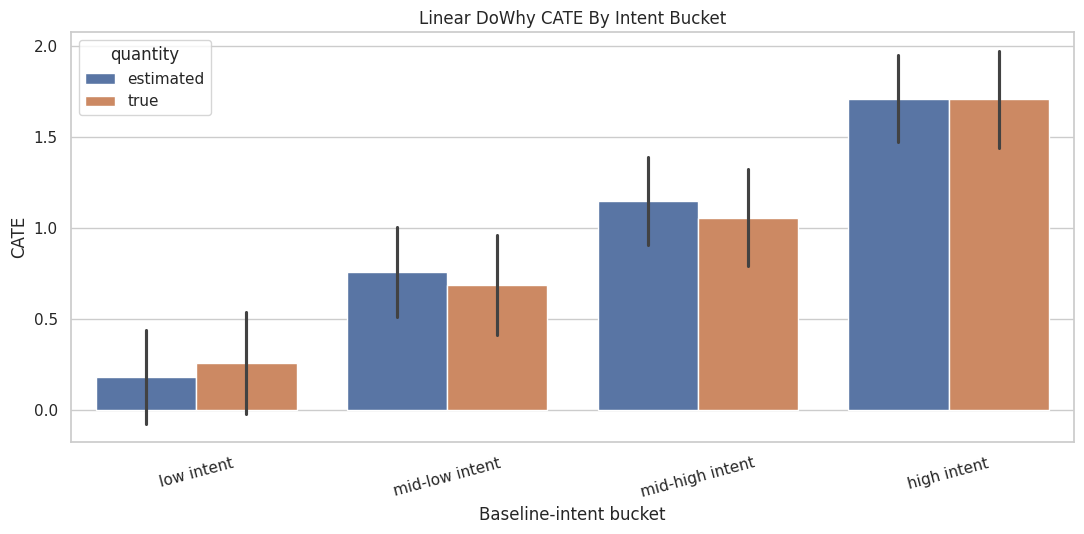
The linear model captures the broad monotonic pattern. It may still miss nonlinear details, especially at high baseline intent where the true effect contains an extra positive bend.
DoWhy’s Built-In Conditional Estimates for a Numeric Modifier
DoWhy can also compute conditional estimates automatically for numeric effect modifiers by splitting them into quantile bins. Here we ask for conditional estimates over baseline_intent only. We keep this example one-dimensional so the output is easy to read.
intent_only_estimate = cate_model.estimate_effect(
    identified_estimand,
    method_name="backdoor.linear_regression",
    effect_modifiers=["baseline_intent"],
    method_params={
        "init_params": {
            "need_conditional_estimates": True,
            "num_quantiles_to_discretize_cont_cols": 4,
        }
    },
)
dowhy_conditional_intent = (
    intent_only_estimate.conditional_estimates
    .rename("dowhy_conditional_estimate")
    .reset_index()
    .rename(columns={"__categorical__baseline_intent": "baseline_intent_bin"})
)
dowhy_conditional_intent.to_csv(TABLE_DIR / "07_dowhy_conditional_intent.csv", index=False)
display(dowhy_conditional_intent)| baseline_intent_bin | dowhy_conditional_estimate | |
|---|---|---|
| 0 | (-3.9539999999999997, -0.669] | 0.1302 |
| 1 | (-0.669, 0.0162] | 0.7072 |
| 2 | (0.0162, 0.674] | 1.0975 |
| 3 | (0.674, 3.646] | 1.6582 |
The automatic conditional estimates are useful for quick exploration. For reporting, it is often better to create named buckets yourself so the table labels are stable and easier to explain.
Individual Effect Scores from the Linear CATE Model
A CATE model can score each row by comparing predicted outcomes under treatment and control. These row-level scores are not observed facts; they are model-based estimates. In this simulation, we can compare them to true_cate to see how well the model is doing.
linear_treated_outcome = linear_cate_estimate.estimator.interventional_outcomes(cate_df[dowhy_columns], 1)
linear_control_outcome = linear_cate_estimate.estimator.interventional_outcomes(cate_df[dowhy_columns], 0)
cate_df["linear_cate_score"] = np.asarray(linear_treated_outcome) - np.asarray(linear_control_outcome)
linear_score_metrics = pd.DataFrame(
    [
        {
            "model": "DoWhy linear effect-modifier model",
            "rmse_vs_true_cate": mean_squared_error(cate_df["true_cate"], cate_df["linear_cate_score"]) ** 0.5,
            "correlation_vs_true_cate": cate_df[["true_cate", "linear_cate_score"]].corr().iloc[0, 1],
            "mean_estimated_cate": cate_df["linear_cate_score"].mean(),
            "mean_true_cate": cate_df["true_cate"].mean(),
        }
    ]
)
linear_score_metrics.to_csv(TABLE_DIR / "07_linear_cate_score_metrics.csv", index=False)
display(linear_score_metrics)| model | rmse_vs_true_cate | correlation_vs_true_cate | mean_estimated_cate | mean_true_cate | |
|---|---|---|---|---|---|
| 0 | DoWhy linear effect-modifier model | 0.0897 | 0.9917 | 0.9091 | 0.8816 |
The correlation and RMSE summarize how well the linear CATE score tracks the true treatment effect. A good average effect can coexist with weaker individual ranking, so both checks are useful.
Linear CATE Calibration Plot
This scatterplot compares estimated and true row-level effects. The diagonal line marks perfect agreement. Because there are many points, we sample a subset for readability.
calibration_sample = cate_df.sample(1_200, random_state=707)
fig, ax = plt.subplots(figsize=(6.5, 6))
sns.scatterplot(
    data=calibration_sample,
    x="true_cate",
    y="linear_cate_score",
    hue="segment_label",
    alpha=0.50,
    s=25,
    ax=ax,
)
lims = [
    min(calibration_sample["true_cate"].min(), calibration_sample["linear_cate_score"].min()),
    max(calibration_sample["true_cate"].max(), calibration_sample["linear_cate_score"].max()),
]
ax.plot(lims, lims, linestyle="--", color="#111827", linewidth=1.2)
ax.set_title("Linear CATE Scores Versus True Effects")
ax.set_xlabel("True CATE")
ax.set_ylabel("Estimated CATE score")
plt.tight_layout()
fig.savefig(FIGURE_DIR / "07_linear_cate_calibration_scatter.png", dpi=160, bbox_inches="tight")
plt.show()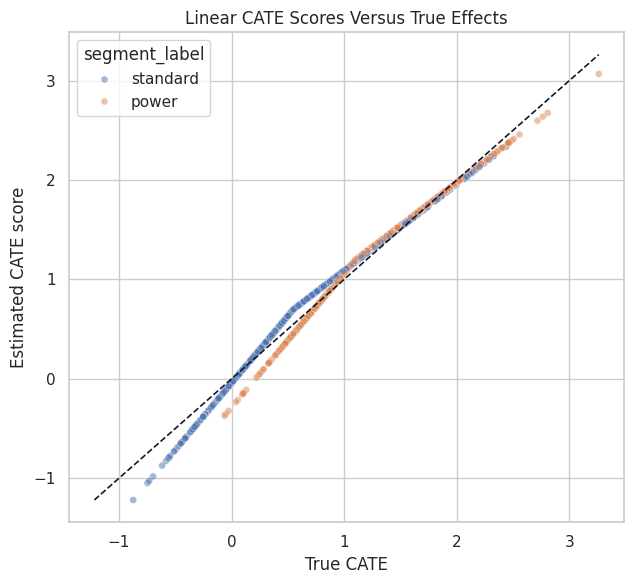
The linear model should rank effects reasonably well, but the shape may be too simple for the nonlinear high-intent region. That motivates trying a more flexible CATE model.
Flexible CATE with DoWhy and EconML
DoWhy can call EconML estimators through method names such as backdoor.econml.dml.CausalForestDML. This keeps the causal graph and identification step in DoWhy while using a flexible estimator for heterogeneous effects.
A causal forest is useful when treatment effects vary nonlinearly or through feature interactions. It is also easier to overfit than a simple linear interaction model, so we will evaluate it rather than assume it is better.
# Fit or evaluate the model objects used in the Flexible CATE With DoWhy And EconML section.
forest_features = ["baseline_intent", "power_segment", "seasonality_score", "prior_value"]
forest_method_params = {
    "init_params": {
        "model_y": RandomForestRegressor(
            n_estimators=80,
            min_samples_leaf=20,
            random_state=711,
            n_jobs=-1,
        ),
        "model_t": RandomForestClassifier(
            n_estimators=80,
            min_samples_leaf=20,
            random_state=712,
            n_jobs=-1,
        ),
        "discrete_treatment": True,
        "n_estimators": 160,
        "min_samples_leaf": 25,
        "max_depth": 8,
        "random_state": 713,
        "n_jobs": -1,
    },
    "fit_params": {},
}
forest_cate_estimate = cate_model.estimate_effect(
    identified_estimand,
    method_name="backdoor.econml.dml.CausalForestDML",
    effect_modifiers=forest_features,
    method_params=forest_method_params,
)
forest_summary = pd.DataFrame(
    [
        {"quantity": "DoWhy + EconML causal forest average effect", "estimate": forest_cate_estimate.value},
        {"quantity": "true ATE", "estimate": true_ate},
    ]
)
forest_summary["error_vs_truth"] = forest_summary["estimate"] - true_ate
display(forest_summary)| quantity | estimate | error_vs_truth | |
|---|---|---|---|
| 0 | DoWhy + EconML causal forest average effect | 0.9082 | 0.0266 |
| 1 | true ATE | 0.8816 | 0.0000 |
The forest average effect should be close to the true ATE. The main reason to fit the forest is not the average, though; it is the possibility of better effect ranking when the true CATE is nonlinear.
Score Rows with the Causal Forest
The fitted EconML estimator exposes an effect method. We pass the same effect-modifier features used during fitting and store the resulting CATE score.
forest_X = cate_df[forest_features]
cate_df["forest_cate_score"] = forest_cate_estimate.estimator.estimator.effect(forest_X)
model_score_metrics = pd.DataFrame(
    [
        {
            "model": "DoWhy linear effect-modifier model",
            "rmse_vs_true_cate": mean_squared_error(cate_df["true_cate"], cate_df["linear_cate_score"]) ** 0.5,
            "correlation_vs_true_cate": cate_df[["true_cate", "linear_cate_score"]].corr().iloc[0, 1],
            "mean_estimated_cate": cate_df["linear_cate_score"].mean(),
            "mean_true_cate": cate_df["true_cate"].mean(),
        },
        {
            "model": "DoWhy + EconML causal forest",
            "rmse_vs_true_cate": mean_squared_error(cate_df["true_cate"], cate_df["forest_cate_score"]) ** 0.5,
            "correlation_vs_true_cate": cate_df[["true_cate", "forest_cate_score"]].corr().iloc[0, 1],
            "mean_estimated_cate": cate_df["forest_cate_score"].mean(),
            "mean_true_cate": cate_df["true_cate"].mean(),
        },
    ]
)
model_score_metrics.to_csv(TABLE_DIR / "07_cate_model_score_metrics.csv", index=False)
display(model_score_metrics)| model | rmse_vs_true_cate | correlation_vs_true_cate | mean_estimated_cate | mean_true_cate | |
|---|---|---|---|---|---|
| 0 | DoWhy linear effect-modifier model | 0.0897 | 0.9917 | 0.9091 | 0.8816 |
| 1 | DoWhy + EconML causal forest | 0.2409 | 0.9448 | 0.9082 | 0.8816 |
The forest usually improves row-level ranking and nonlinear fit, while the linear model remains easier to explain. This is a familiar tradeoff: flexibility can improve CATE scoring, but it also raises the bar for diagnostics.
Compare Linear and Forest CATE Scores
The next plot compares both model scores against the true CATE. It is a compact way to see whether the flexible model is adding useful signal.
# Build and label the diagnostic visualization for the Compare Linear And Forest CATE Scores section.
score_plot = cate_df.sample(1_400, random_state=717).melt(
    id_vars=["true_cate", "segment_label"],
    value_vars=["linear_cate_score", "forest_cate_score"],
    var_name="model",
    value_name="estimated_cate",
)
score_plot["model"] = score_plot["model"].map(
    {
        "linear_cate_score": "Linear interactions",
        "forest_cate_score": "Causal forest",
    }
)
g = sns.FacetGrid(score_plot, col="model", hue="segment_label", height=5, aspect=1.0, sharex=True, sharey=True)
g.map_dataframe(sns.scatterplot, x="true_cate", y="estimated_cate", alpha=0.45, s=22)
for ax in g.axes.flat:
    xlim = ax.get_xlim()
    ylim = ax.get_ylim()
    low = min(xlim[0], ylim[0])
    high = max(xlim[1], ylim[1])
    ax.plot([low, high], [low, high], linestyle="--", color="#111827", linewidth=1.1)
    ax.set_xlim(low, high)
    ax.set_ylim(low, high)
g.add_legend(title="Segment")
g.set_axis_labels("True CATE", "Estimated CATE")
g.fig.suptitle("CATE Score Calibration By Model", y=1.05)
plt.tight_layout()
g.fig.savefig(FIGURE_DIR / "07_linear_vs_forest_cate_calibration.png", dpi=160, bbox_inches="tight")
plt.show()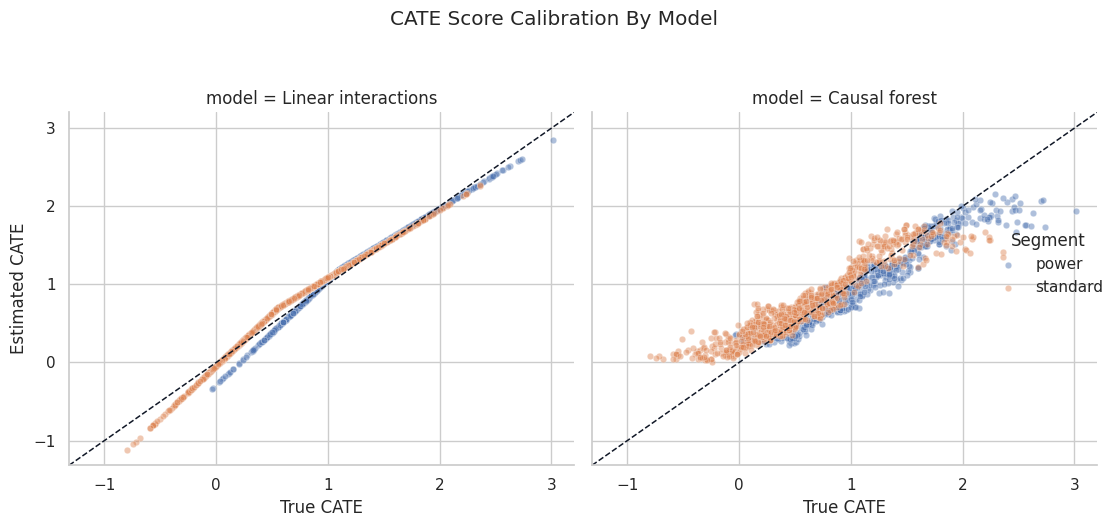
The diagonal reference line makes underestimation and overestimation visible. The forest can bend with the nonlinear region, while the linear model is constrained to a simpler shape.
CATE Ranking and Targeting Diagnostics
A common use of CATE models is prioritization: focus treatment where the expected causal gain is largest. In this simulation, we can check whether higher predicted-effect groups truly have higher effects.
We will create quintiles based on each model’s estimated CATE score and compare the average true CATE inside each quintile.
# Define reusable helpers for the CATE Ranking And Targeting Diagnostics section.
def make_score_quintile_table(data, score_col, label):
    """
    Idea: Construct the score quintile table used in the CATE Ranking And Targeting Diagnostics section, including columns needed for later diagnostics.

    Parameters
    ----------
    data : array-like or pd.DataFrame
        Data passed into the demonstrated method.
    score_col : object
        Column containing the ranking score or benefit signal.
    label : str
        Short label attached to a scenario, method, or plotted result.

    Returns
    -------
    pd.DataFrame
        Quintile table showing score ranges, sample sizes, and treatment-effect summaries by score group.
    """
    temp = data.copy()
    temp["score_quintile"] = pd.qcut(
        temp[score_col],
        q=5,
        labels=["Q1 lowest", "Q2", "Q3", "Q4", "Q5 highest"],
        duplicates="drop",
    )
    out = (
        temp.groupby("score_quintile", observed=True)
        .agg(
            rows=("weekly_value", "size"),
            mean_score=(score_col, "mean"),
            mean_true_cate=("true_cate", "mean"),
            exposure_rate=("recommendation_exposure", "mean"),
        )
        .reset_index()
    )
    out["model"] = label
    return out
ranking_table = pd.concat(
    [
        make_score_quintile_table(cate_df, "linear_cate_score", "Linear interactions"),
        make_score_quintile_table(cate_df, "forest_cate_score", "Causal forest"),
    ],
    ignore_index=True,
)
ranking_table.to_csv(TABLE_DIR / "07_cate_ranking_by_quintile.csv", index=False)
display(ranking_table)| score_quintile | rows | mean_score | mean_true_cate | exposure_rate | model | |
|---|---|---|---|---|---|---|
| 0 | Q1 lowest | 1000 | -0.0148 | 0.0472 | 0.3240 | Linear interactions |
| 1 | Q2 | 1000 | 0.5562 | 0.4997 | 0.4810 | Linear interactions |
| 2 | Q3 | 1000 | 0.9101 | 0.8293 | 0.5750 | Linear interactions |
| 3 | Q4 | 1000 | 1.2632 | 1.1922 | 0.6870 | Linear interactions |
| 4 | Q5 highest | 1000 | 1.8306 | 1.8398 | 0.8070 | Linear interactions |
| 5 | Q1 lowest | 1000 | 0.2810 | 0.0978 | 0.3140 | Causal forest |
| 6 | Q2 | 1000 | 0.5776 | 0.4866 | 0.4860 | Causal forest |
| 7 | Q3 | 1000 | 0.8379 | 0.8173 | 0.5820 | Causal forest |
| 8 | Q4 | 1000 | 1.1744 | 1.2129 | 0.7040 | Causal forest |
| 9 | Q5 highest | 1000 | 1.6701 | 1.7936 | 0.7880 | Causal forest |
A useful CATE model should produce a rising mean_true_cate from the lowest to highest score quintile. This targeting diagnostic is very helpful when ground truth or experimental validation is available.
Plot CATE Ranking Quality
The line chart below shows whether higher predicted CATE buckets correspond to higher true effects. This is often easier to communicate than a dense individual-level scatterplot.
fig, ax = plt.subplots(figsize=(9.5, 5))
sns.lineplot(
    data=ranking_table,
    x="score_quintile",
    y="mean_true_cate",
    hue="model",
    marker="o",
    linewidth=2,
    ax=ax,
)
ax.set_title("Do Higher Predicted CATE Groups Have Higher True Effects?")
ax.set_xlabel("Predicted CATE quintile")
ax.set_ylabel("Mean true CATE")
ax.tick_params(axis="x", rotation=20)
plt.tight_layout()
fig.savefig(FIGURE_DIR / "07_cate_ranking_quality.png", dpi=160, bbox_inches="tight")
plt.show()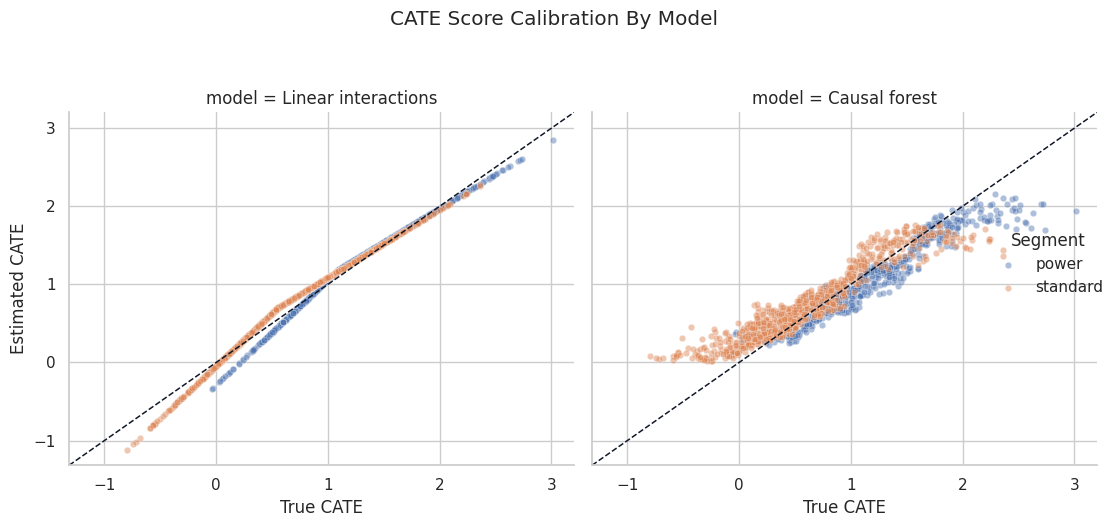
The best pattern is a clear upward slope. If the line is flat, the model may estimate the average effect well but fail to rank units by treatment-effect size.
Overlap by Predicted CATE Group
CATE models can create confident-looking scores in regions with poor treatment overlap. The next diagnostic estimates a simple propensity model, then summarizes propensity and exposure rates by predicted CATE quintile.
This complements the causal graph and helps reveal whether the highest-score groups have both treated and untreated examples.
# Fit or evaluate the model objects used in the Overlap By Predicted CATE Group section.
propensity_features = ["baseline_intent", "power_segment", "seasonality_score", "prior_value"]
propensity_model = LogisticRegression(max_iter=1_000)
propensity_model.fit(cate_df[propensity_features], cate_df["recommendation_exposure"])
cate_df["estimated_propensity"] = propensity_model.predict_proba(cate_df[propensity_features])[:, 1]
propensity_auc = roc_auc_score(cate_df["recommendation_exposure"], cate_df["estimated_propensity"])
cate_df["forest_score_quintile"] = pd.qcut(
    cate_df["forest_cate_score"],
    q=5,
    labels=["Q1 lowest", "Q2", "Q3", "Q4", "Q5 highest"],
    duplicates="drop",
)
overlap_by_cate_group = (
    cate_df.groupby("forest_score_quintile", observed=True)
    .agg(
        rows=("weekly_value", "size"),
        exposure_rate=("recommendation_exposure", "mean"),
        mean_propensity=("estimated_propensity", "mean"),
        min_propensity=("estimated_propensity", "min"),
        max_propensity=("estimated_propensity", "max"),
        mean_forest_cate=("forest_cate_score", "mean"),
        mean_true_cate=("true_cate", "mean"),
    )
    .reset_index()
)
overlap_by_cate_group.to_csv(TABLE_DIR / "07_overlap_by_forest_cate_group.csv", index=False)
print(f"Simple propensity model AUC: {propensity_auc:.3f}")
display(overlap_by_cate_group)
Simple propensity model AUC: 0.726| forest_score_quintile | rows | exposure_rate | mean_propensity | min_propensity | max_propensity | mean_forest_cate | mean_true_cate | |
|---|---|---|---|---|---|---|---|---|
| 0 | Q1 lowest | 1000 | 0.3140 | 0.3105 | 0.0252 | 0.5575 | 0.2810 | 0.0978 |
| 1 | Q2 | 1000 | 0.4860 | 0.4717 | 0.2145 | 0.7203 | 0.5776 | 0.4866 |
| 2 | Q3 | 1000 | 0.5820 | 0.5947 | 0.3421 | 0.8415 | 0.8379 | 0.8173 |
| 3 | Q4 | 1000 | 0.7040 | 0.7057 | 0.3267 | 0.9239 | 1.1744 | 1.2129 |
| 4 | Q5 highest | 1000 | 0.7880 | 0.7913 | 0.4858 | 0.9643 | 1.6701 | 1.7936 |
The table checks whether the highest predicted-effect group still has real treatment variation. If a group is almost entirely treated or untreated, its CATE estimate leans heavily on extrapolation.
Plot Propensity Distributions Across Forest CATE Groups
The boxplot below shows estimated propensity by CATE quintile. It helps catch a common problem: the model’s “best treatment group” may also be a group where treatment assignment was nearly deterministic.
fig, ax = plt.subplots(figsize=(10, 5))
sns.boxplot(
    data=cate_df,
    x="forest_score_quintile",
    y="estimated_propensity",
    color="#bfdbfe",
    ax=ax,
)
ax.axhline(0.05, color="#ef4444", linestyle="--", linewidth=1.1)
ax.axhline(0.95, color="#ef4444", linestyle="--", linewidth=1.1)
ax.set_title("Estimated Propensity By Predicted CATE Quintile")
ax.set_xlabel("Causal forest CATE quintile")
ax.set_ylabel("Estimated treatment propensity")
ax.tick_params(axis="x", rotation=20)
plt.tight_layout()
fig.savefig(FIGURE_DIR / "07_propensity_by_cate_quintile.png", dpi=160, bbox_inches="tight")
plt.show()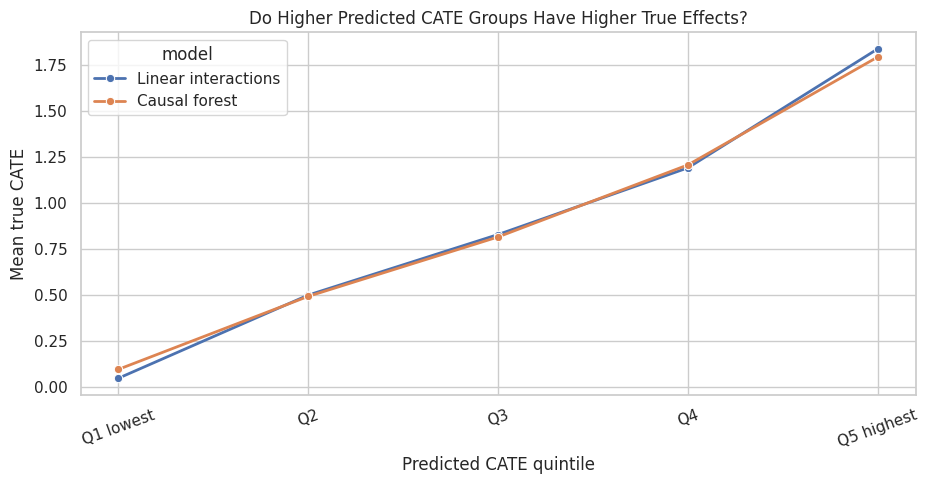
The dashed lines mark very rough danger zones. In real work, poor overlap should trigger trimming, redesigned analysis, or more cautious claims about the affected region.
Reporting and Takeaways
Model Comparison Summary
This final table compares the average effect, row-level score quality, and targeting quality for the linear and forest CATE approaches. The targeting lift here is computed as the true CATE in the highest score quintile minus the population true ATE.
# Define reusable helpers for the Model Comparison Summary section.
def targeting_lift(data, score_col):
    """
    Idea: Measure how much a targeting rule improves value relative to a baseline rule.

    Parameters
    ----------
    data : array-like or pd.DataFrame
        Data passed into the demonstrated method.
    score_col : object
        Column containing the ranking score or benefit signal.

    Returns
    -------
    float
        Mean true CATE lift for the targeted group relative to the full sample.
    """
    quintile = pd.qcut(
        data[score_col],
        q=5,
        labels=["Q1 lowest", "Q2", "Q3", "Q4", "Q5 highest"],
        duplicates="drop",
    )
    top_group = data.loc[quintile == "Q5 highest"]
    return top_group["true_cate"].mean() - data["true_cate"].mean()
final_model_comparison = pd.DataFrame(
    [
        {
            "model": "Linear interactions",
            "average_effect_estimate": linear_cate_estimate.value,
            "rmse_vs_true_cate": mean_squared_error(cate_df["true_cate"], cate_df["linear_cate_score"]) ** 0.5,
            "correlation_vs_true_cate": cate_df[["true_cate", "linear_cate_score"]].corr().iloc[0, 1],
            "top_quintile_true_cate_lift": targeting_lift(cate_df, "linear_cate_score"),
        },
        {
            "model": "Causal forest",
            "average_effect_estimate": forest_cate_estimate.value,
            "rmse_vs_true_cate": mean_squared_error(cate_df["true_cate"], cate_df["forest_cate_score"]) ** 0.5,
            "correlation_vs_true_cate": cate_df[["true_cate", "forest_cate_score"]].corr().iloc[0, 1],
            "top_quintile_true_cate_lift": targeting_lift(cate_df, "forest_cate_score"),
        },
    ]
)
final_model_comparison["true_ate"] = true_ate
final_model_comparison["average_effect_error"] = final_model_comparison["average_effect_estimate"] - true_ate
final_model_comparison.to_csv(TABLE_DIR / "07_final_cate_model_comparison.csv", index=False)
display(final_model_comparison)| model | average_effect_estimate | rmse_vs_true_cate | correlation_vs_true_cate | top_quintile_true_cate_lift | true_ate | average_effect_error | |
|---|---|---|---|---|---|---|---|
| 0 | Linear interactions | 0.9091 | 0.0897 | 0.9917 | 0.9582 | 0.8816 | 0.0274 |
| 1 | Causal forest | 0.9082 | 0.2409 | 0.9448 | 0.9120 | 0.8816 | 0.0266 |
The better CATE model is the one that supports useful heterogeneity ranking, calibration, and decision behavior. For heterogeneity work, ranking and subgroup calibration matter because the model may be used to decide where treatment is most valuable.
Practical CATE Checklist
Use this checklist when moving from tutorial data to real data:
- Make the causal graph and adjustment set explicit before modeling heterogeneity.
- Use only pre-treatment variables as effect modifiers.
- Start with interpretable subgroup CATE tables before showing individual scores.
- Check treatment overlap inside the subgroups that drive the story.
- Compare simple and flexible CATE models; do not assume complexity wins.
- Validate CATE ranking with experiments, holdout randomized data, or domain-specific stress tests whenever possible.
- Report uncertainty and limitations, especially for small or poorly supported subgroups.
Practice Prompts
Try these extensions after running the lesson:
- Remove
baseline_intentfrom the adjustment set but keep it as an effect modifier. How do the ATE and CATE summaries change? - Increase the nonlinear term in
true_cate. Does the causal forest pull farther ahead of the linear model? - Make treatment assignment nearly deterministic for high-intent users. What happens to the overlap diagnostics?
- Replace quintiles with deciles. Which CATE summaries become noisier?
- Create a final one-page stakeholder summary that reports the ATE, two subgroup effects, and the main overlap limitation.
What Comes Next
The sequence next focuses on refuters, placebos, negative controls, and sensitivity checks. Once an effect or heterogeneous-effect pattern has been estimated, the next question is how fragile the result is to alternative explanations.
Summary
This lesson moved from average effects to effect heterogeneity. Linear and forest-style CATE models are useful when they explain where treatment value changes across units and when those patterns survive overlap, uncertainty, and subgroup-support checks. The practical takeaway is to use heterogeneity as evidence for follow-up targeting or experiments, with support diagnostics shown alongside the estimated effects.