DoubleML Tutorial 16: Custom Scores And Advanced API
This notebook teaches the part of DoubleML that sits closest to the estimating equation. Earlier notebooks used built-in model classes and built-in scores. That is the right default. Most practical causal projects should first try the standard classes, diagnose them well, and only then reach for custom score functions.
A custom score becomes useful when you can state a causal estimand through a Neyman-orthogonal moment condition that DoubleML does not already expose directly. In DoubleML’s linear-score classes, each observation contributes a score of the form:
where \(W_i\) is the observed row, \(\theta\) is the causal target, and \(\eta\) collects the nuisance functions estimated by machine learning. DoubleML solves the empirical moment condition:
The key phrase is Neyman-orthogonal. Informally, orthogonality means that small first-stage nuisance-model errors do not create first-order bias in the final causal estimate. A compact way to write this condition is:
That condition is the reason DoubleML can combine flexible machine learning with valid causal inference. If we write a custom score that is not orthogonal, cross-fitting alone does not rescue the causal claim.
This notebook covers four advanced workflows:
Reading and reconstructing DoubleML score elements.
Writing an equivalent callable score for PLR.
Writing a priority-weighted callable score.
Using advanced APIs: custom sample splits, external nuisance predictions, stored fold models, and score diagnostics.
Setup
This setup cell prepares the shared tutorial output folders and imports the libraries used throughout the notebook. The warning filters are intentionally narrow. They remove notebook-environment noise and the expected DoubleML warning that sensitivity analysis is not implemented for callable scores in this installed version.
from pathlib import Pathimport osimport warnings# Find the repository root from wherever the notebook is executed.PROJECT_ROOT = Path.cwd().resolve()whilenot (PROJECT_ROOT /"pyproject.toml").exists() and PROJECT_ROOT != PROJECT_ROOT.parent: PROJECT_ROOT = PROJECT_ROOT.parentOUTPUT_DIR = PROJECT_ROOT /"notebooks"/"tutorials"/"doubleml"/"outputs"DATASET_DIR = OUTPUT_DIR /"datasets"FIGURE_DIR = OUTPUT_DIR /"figures"TABLE_DIR = OUTPUT_DIR /"tables"REPORT_DIR = OUTPUT_DIR /"reports"MATPLOTLIB_CACHE_DIR = OUTPUT_DIR /"matplotlib_cache"for directory in [DATASET_DIR, FIGURE_DIR, TABLE_DIR, REPORT_DIR, MATPLOTLIB_CACHE_DIR]: directory.mkdir(parents=True, exist_ok=True)# Set Matplotlib's cache before importing pyplot so notebook execution stays quiet.os.environ.setdefault("MPLCONFIGDIR", str(MATPLOTLIB_CACHE_DIR))warnings.filterwarnings("ignore", category=FutureWarning)warnings.filterwarnings("ignore", message="IProgress not found.*")warnings.filterwarnings("ignore", message="X does not have valid feature names.*")warnings.filterwarnings("ignore", message="Sensitivity analysis not implemented for callable scores.*")import numpy as npimport pandas as pdimport matplotlib.pyplot as pltimport seaborn as snsfrom IPython.display import displayfrom matplotlib.patches import FancyArrowPatch, FancyBboxPatchfrom sklearn.base import clonefrom sklearn.ensemble import RandomForestRegressorfrom sklearn.metrics import mean_absolute_error, mean_squared_errorfrom sklearn.model_selection import KFoldimport doubleml as dmlfrom doubleml import DoubleMLData, DoubleMLPLRNOTEBOOK_PREFIX ="16"RANDOM_SEED =160TRUE_THETA =1.25sns.set_theme(style="whitegrid", context="talk")pd.set_option("display.max_columns", 80)pd.set_option("display.float_format", "{:.4f}".format)print(f"Project root: {PROJECT_ROOT}")print(f"DoubleML version: {dml.__version__}")print(f"Outputs will be written to: {OUTPUT_DIR}")
Project root: /home/apex/Documents/ranking_sys
DoubleML version: 0.11.2
Outputs will be written to: /home/apex/Documents/ranking_sys/notebooks/tutorials/doubleml/outputs
The setup confirms the local DoubleML version and output location. Every artifact created by this notebook uses prefix 16.
Helper Functions
The helper functions below keep the notebook focused on score logic. The most important helper is fit_plr(), which lets us reuse the same sample split across built-in and callable scores. Without a shared split, two estimates can differ simply because the nuisance models were trained on different folds.
These helpers make two advanced ideas explicit: the coefficient comes from psi_a and psi_b, and external nuisance predictions must respect the same row order as the original data.
Advanced API Vocabulary
The table below names the DoubleML features used in this notebook. These are extension tools, not replacements for identification work.
advanced_api_vocabulary = pd.DataFrame( [ {"concept": "Linear score elements","meaning": "DoubleML stores score pieces psi_a and psi_b for linear scores.","why_it_matters": "They allow direct inspection of the estimating equation.", }, {"concept": "Callable score","meaning": "A user-supplied function that returns psi_a and psi_b.","why_it_matters": "Useful for valid custom moments when built-in scores are not enough.", }, {"concept": "set_sample_splitting()","meaning": "A method for passing analyst-defined train/test folds.","why_it_matters": "Needed for reproducible comparisons, grouped splits, or temporal splits.", }, {"concept": "external_predictions","meaning": "A nested dictionary of user-supplied nuisance predictions.","why_it_matters": "Lets teams use external ML pipelines while still using DoubleML for score estimation.", }, {"concept": "store_models=True","meaning": "Stores fitted fold-level nuisance models.","why_it_matters": "Useful for auditing model behavior such as feature importance.", }, {"concept": "evaluate_learners()","meaning": "Reports out-of-fold nuisance losses.","why_it_matters": "A model-quality diagnostic before trusting score-based estimates.", }, ])save_table(advanced_api_vocabulary, f"{NOTEBOOK_PREFIX}_advanced_api_vocabulary.csv")display(advanced_api_vocabulary)
concept
meaning
why_it_matters
0
Linear score elements
DoubleML stores score pieces psi_a and psi_b f...
They allow direct inspection of the estimating...
1
Callable score
A user-supplied function that returns psi_a an...
Useful for valid custom moments when built-in ...
2
set_sample_splitting()
A method for passing analyst-defined train/tes...
Needed for reproducible comparisons, grouped s...
3
external_predictions
A nested dictionary of user-supplied nuisance ...
Lets teams use external ML pipelines while sti...
4
store_models=True
Stores fitted fold-level nuisance models.
Useful for auditing model behavior such as fea...
5
evaluate_learners()
Reports out-of-fold nuisance losses.
A model-quality diagnostic before trusting sco...
The vocabulary table separates score customization from pipeline customization. Custom scores change the estimating equation; external predictions and stored models change how nuisance functions are supplied or audited.
Synthetic PLR Design
We use a partially linear regression design with known constant treatment effect. The data-generating process is:
with \(\theta_0 = 1.25\), \(\mathbb{E}[V_i \mid X_i] = 0\), and outcome noise generated independently of the treatment residual. The nuisance functions are:
The true effect is TRUE_THETA = 1.25. Because the true effect is constant, the custom weighted score below should still target the same causal parameter. This makes the notebook a clean API tutorial: if estimates differ meaningfully, we can attribute the difference to score construction, nuisance quality, or finite-sample noise rather than a genuinely different heterogeneous target.
The first rows show observed controls, oracle nuisance functions, treatment, outcome, and a priority segment. DoubleML will not use true_m or true_g; they are present only for diagnostics.
Field Dictionary
This field dictionary documents the role of every column. It is especially important in advanced API tutorials because external predictions and custom score closures can accidentally use columns that should not enter the estimator.
field_dictionary = pd.DataFrame( [ {"column": "x00-x07", "role": "Observed controls", "description": "Pre-treatment covariates used by nuisance learners."}, {"column": "priority_score", "role": "Pre-treatment priority signal", "description": "Used to define priority weights for a custom score example."}, {"column": "priority_segment", "role": "Reporting group", "description": "High-priority vs standard group based on priority_score."}, {"column": "true_m", "role": "Oracle diagnostic", "description": "True treatment nuisance E[D|X]; unavailable in real data."}, {"column": "true_g", "role": "Oracle diagnostic", "description": "True baseline outcome nuisance g0(X); unavailable in real data."}, {"column": "treatment", "role": "Treatment", "description": "Continuous treatment variable D."}, {"column": "outcome", "role": "Outcome", "description": "Observed continuous outcome Y."}, ])save_table(field_dictionary, f"{NOTEBOOK_PREFIX}_field_dictionary.csv")display(field_dictionary)
column
role
description
0
x00-x07
Observed controls
Pre-treatment covariates used by nuisance lear...
1
priority_score
Pre-treatment priority signal
Used to define priority weights for a custom s...
2
priority_segment
Reporting group
High-priority vs standard group based on prior...
3
true_m
Oracle diagnostic
True treatment nuisance E[D|X]; unavailable in...
4
true_g
Oracle diagnostic
True baseline outcome nuisance g0(X); unavaila...
5
treatment
Treatment
Continuous treatment variable D.
6
outcome
Outcome
Observed continuous outcome Y.
The priority variables are pre-treatment signals. That matters because custom weighting based on post-treatment variables would change the causal question and usually break identification.
Data Audit
The audit below checks sample size, treatment scale, outcome scale, priority-group size, and the true causal effect.
The high-priority segment is about 30% of the data by construction. That gives enough rows for the weighted-score example without making the target population too small.
Score Design Diagram
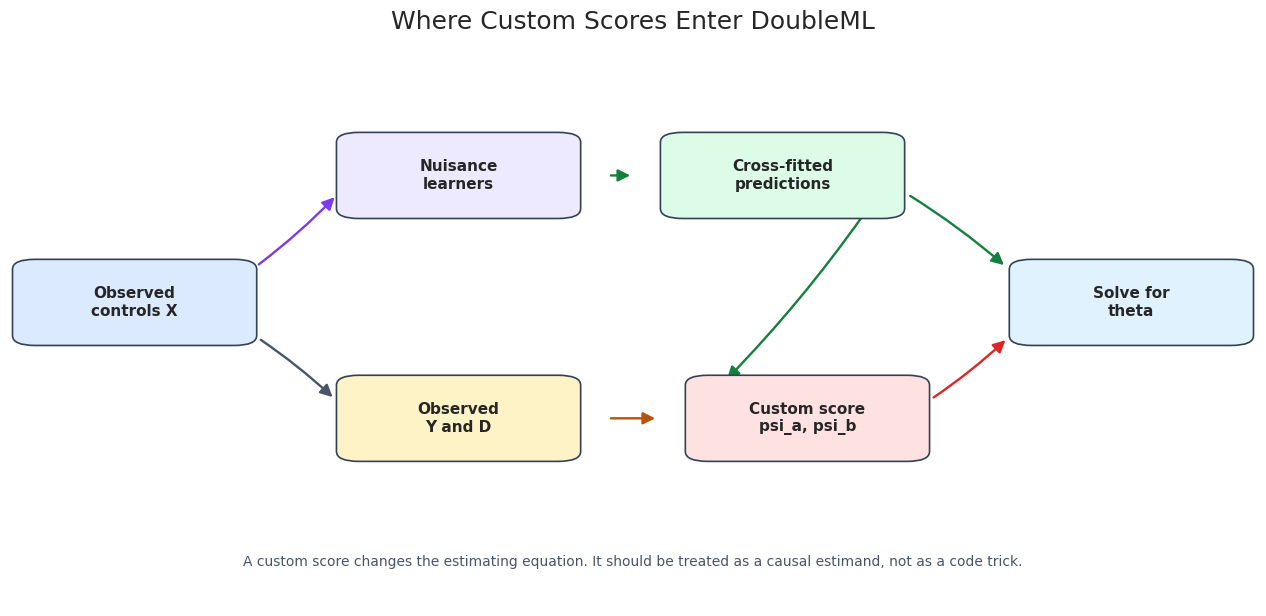
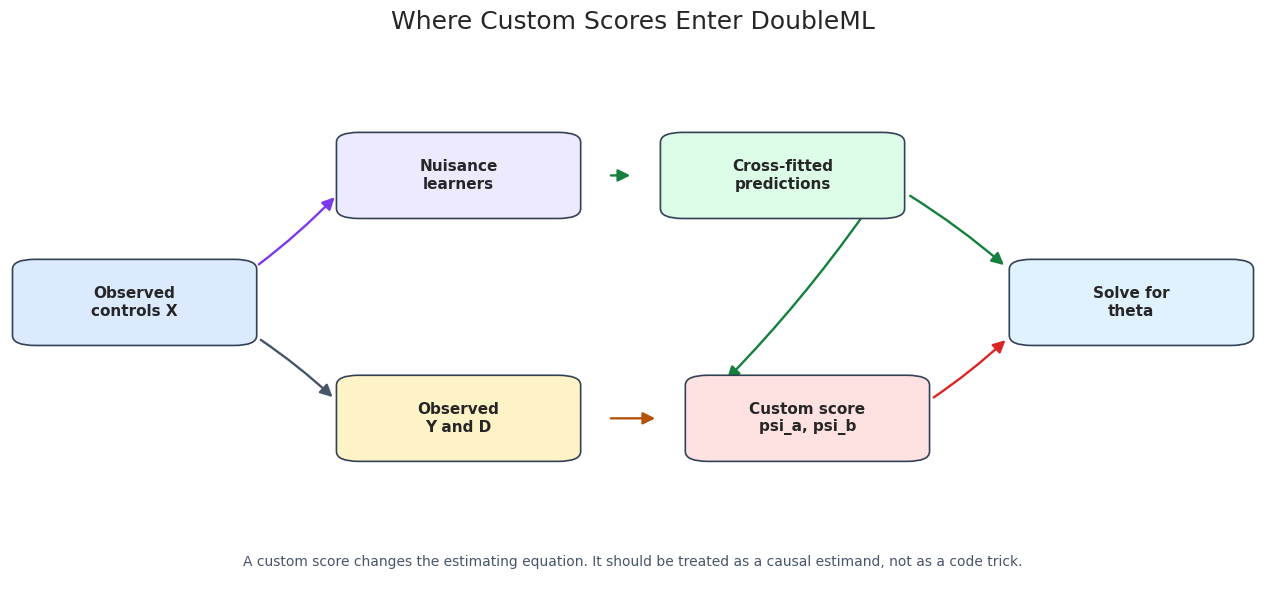
The diagram below shows where a custom score enters DoubleML. Nuisance learners produce cross-fitted predictions. The score function turns observed data and nuisance predictions into psi_a and psi_b. DoubleML then solves the empirical score equation.
The score function is downstream of nuisance prediction but upstream of the final coefficient. This is why custom-score work needs both statistical theory and software testing.
External Sample Splits
For a fair comparison between built-in and custom scores, we fix the sample split. This makes the nuisance predictions comparable across model variants.
sample_splits =list(KFold(n_splits=5, shuffle=True, random_state=RANDOM_SEED +2).split(plr_df))fold_id = np.full(len(plr_df), -1)for fold_number, (_, test_index) inenumerate(sample_splits): fold_id[test_index] = fold_numbersplit_summary = pd.DataFrame( {"fold": np.arange(len(sample_splits)),"test_rows": [len(test_index) for _, test_index in sample_splits],"train_rows": [len(train_index) for train_index, _ in sample_splits], })save_table(split_summary, f"{NOTEBOOK_PREFIX}_sample_split_summary.csv")display(split_summary)
fold
test_rows
train_rows
0
0
180
720
1
1
180
720
2
2
180
720
3
3
180
720
4
4
180
720
Every row appears in exactly one test fold. This is the cross-fitting structure that lets each score contribution use nuisance predictions from a model that did not train on that row.
Plot Fold Assignments
The plot below is a simple audit of the external fold assignment. It is not mathematically necessary, but it makes the custom split visible.
The fold sizes are balanced. If the split were grouped or temporal, this same table and plot would be useful for checking whether the split design matches the causal setting.
Fit The Built-In PLR Score
We first fit the standard partialling out PLR score. This is the reference model for the custom score examples.
This cell reconstructs the coefficient directly from the stored score elements. It is a useful sanity check before writing a custom score because it confirms that the notebook is reading DoubleML’s internal score representation correctly.
The first two rows match because the linear score equation is exactly how the coefficient is obtained. This is the mental model needed before writing a custom score.
Nuisance-Model Diagnostics
Before changing the score, we check the nuisance learners. Bad nuisance predictions can make even a valid score unstable in finite samples.
The nuisance metrics are not causal proof, but they tell us whether the first-stage models are at least numerically plausible before score-level work begins.
Callable Score Equivalent To Built-In Partialling Out
Now we write the PLR partialling-out score by hand. The callable signature for DoubleMLPLR is still a Python API contract:
The callable score reproduces the built-in estimate. This is the safest first custom-score test: before extending a score, verify that you can recreate a known one.
Priority-Weighted Callable Score
This example multiplies the score contributions by a pre-treatment priority weight. The weighted score is:
Because the true effect is constant in this simulator, the causal parameter remains TRUE_THETA; the weighting changes finite-sample influence rather than creating a different heterogeneous estimand. In a real analysis, the weight definition should be pre-specified and justified. Weighting is not a free way to find a more convenient answer.
The weighted estimate stays close to the true constant effect. A large shift would not automatically be wrong, but it would require a clear explanation of what target changed and why.
Plot Priority Weights
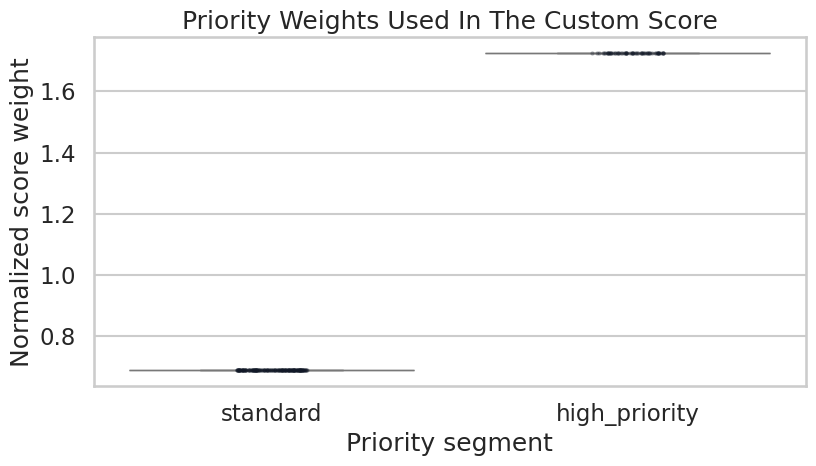
The plot below documents the weighting rule. Showing the weight distribution is a simple way to make custom scores less mysterious.
weight_plot_df = plr_df[["priority_segment"]].assign(priority_weight=priority_weights)fig, ax = plt.subplots(figsize=(8.5, 5))sns.boxplot(data=weight_plot_df, x="priority_segment", y="priority_weight", color="#93c5fd", ax=ax)sns.stripplot(data=weight_plot_df.sample(250, random_state=RANDOM_SEED), x="priority_segment", y="priority_weight", color="#111827", alpha=0.35, size=3, ax=ax)ax.set_title("Priority Weights Used In The Custom Score")ax.set_xlabel("Priority segment")ax.set_ylabel("Normalized score weight")plt.tight_layout()fig.savefig(FIGURE_DIR /f"{NOTEBOOK_PREFIX}_priority_weights.png", dpi=160, bbox_inches="tight")plt.show()
The high-priority group receives larger score weight by design. Since the weights are normalized, the average weight is one.
A Deliberately Bad Score As A Caution
This cell fits a non-orthogonal raw score that ignores the treatment nuisance model and does not residualize the treatment. The goal is not to recommend this score. The goal is to show that DoubleML will execute a callable score if it has the right shape, but it cannot prove that the score is a valid causal moment.
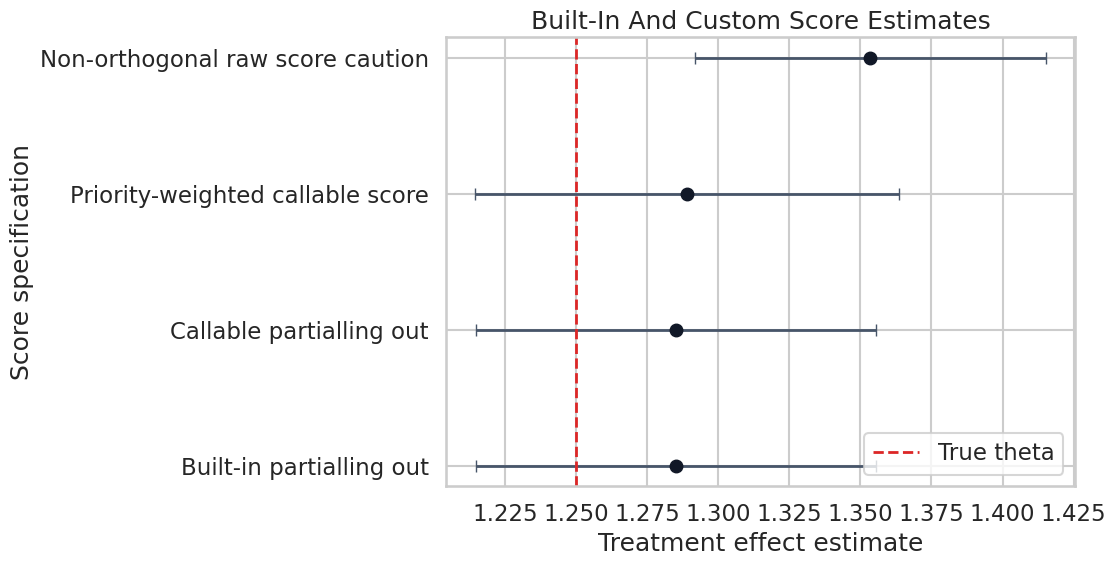
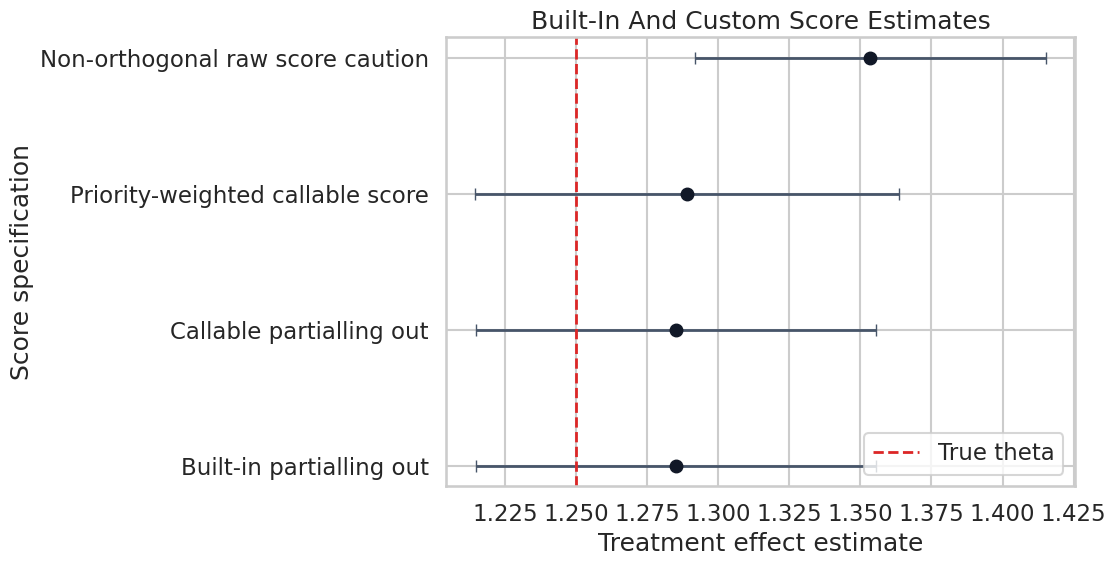
The built-in and equivalent callable scores match. The priority-weighted score remains close. The raw non-orthogonal score is a useful warning about custom-score responsibility.
Plot Score Variant Estimates
The estimate plot makes the custom-score comparison easier to scan. The vertical line marks the true effect in the simulation.
The plot helps separate extension from experimentation. A custom score should be expected to behave in a known way; surprising movement is a reason to inspect the score, not a reason to celebrate.
Score Contribution Diagnostics
The next cell extracts score contributions from the built-in and custom models. After plugging in the fitted coefficient, the final score contribution is:
We compare the score-implied coefficient and the spread of \(\hat{\psi}_i\). The mean checks whether the moment equation was solved; the spread and tails help identify unstable score behavior.
The mean final score is near zero because the estimate solves the empirical moment equation. The spread and tails help identify unstable score behavior.
Plot Score Contributions
The histogram below compares final score contributions after plugging in each model’s estimated coefficient.
Score distributions with extreme tails deserve attention. In applied work, this can point to overlap problems, unstable residualized treatment, or a score that is not well matched to the design.
External Nuisance Predictions
DoubleML can accept nuisance predictions from an external ML pipeline. For PLR, the nested dictionary shape is:
Here we create the external predictions manually using the same folds. This mirrors how a production ML team might supply predictions while the causal analysis team uses DoubleML for score estimation and inference.
The external-prediction estimate matches the built-in pipeline because the same folds and same learners generated the predictions. This is the desired smoke test before connecting a more complex external pipeline.
Compare Internal And External Predictions
This cell checks that the manually supplied external predictions match the predictions stored by the built-in DoubleML fit.
The differences are zero or numerically tiny. This confirms the dictionary shape and row order are correct.
Stored Fold Models And Feature Importance
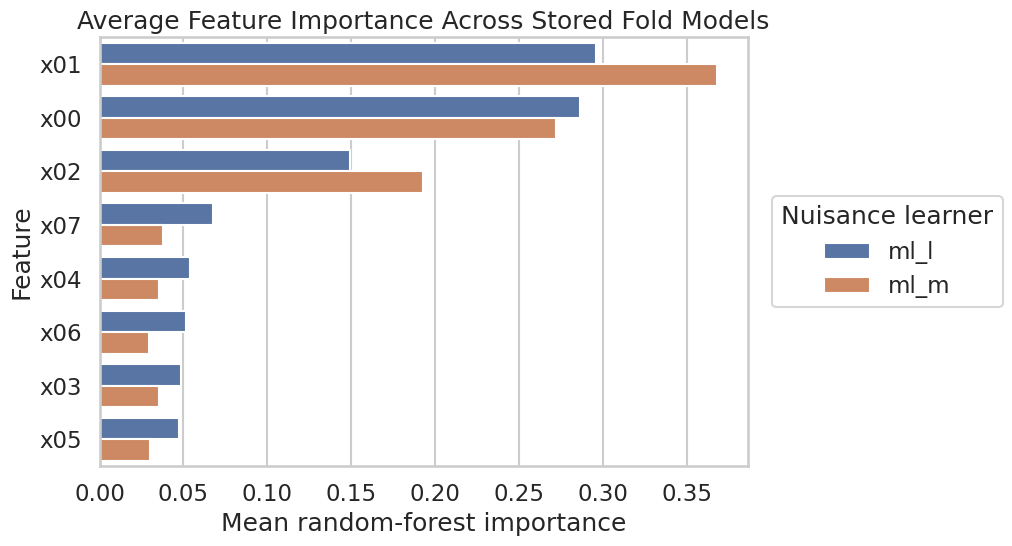
With store_models=True, DoubleML keeps the fold-level nuisance models. This cell extracts average random-forest feature importance across the stored ml_l and ml_m models.
Stored fold models are useful for auditing, but feature importance is still an ML diagnostic. It does not prove causal importance of a covariate.
Plot Stored-Model Feature Importance
The plot below compares the nuisance models for outcome and treatment. Different important features are expected because ml_l predicts Y and ml_m predicts D.
The treatment model emphasizes features involved in true_m, while the outcome model emphasizes features involved in both outcome prediction and treatment-related variation. This is a useful sanity check against the simulator.
Custom Score Validation Checklist
The table below converts the notebook into a checklist. A custom score should not be merged into a serious analysis until it passes checks like these.
custom_score_checklist = pd.DataFrame( [ {"check": "Known-score recreation", "guidance": "First recreate a built-in score exactly using the callable interface."}, {"check": "Shape check", "guidance": "Confirm psi_a and psi_b are finite arrays aligned with the original row order."}, {"check": "Moment check", "guidance": "Verify that mean(psi_a * theta_hat + psi_b) is approximately zero."}, {"check": "Orthogonality argument", "guidance": "Write the mathematical reason why nuisance errors have only second-order impact."}, {"check": "Split reproducibility", "guidance": "Use fixed sample splits when comparing scores or external predictions."}, {"check": "External prediction audit", "guidance": "Check row order, shape, and fold origin of external nuisance predictions."}, {"check": "Unsupported features", "guidance": "Document DoubleML features unavailable for callable scores, such as sensitivity analysis in this version."}, {"check": "Simulation test", "guidance": "Test the score on data where the truth is known before using it on real data."}, ])save_table(custom_score_checklist, f"{NOTEBOOK_PREFIX}_custom_score_validation_checklist.csv")display(custom_score_checklist)
check
guidance
0
Known-score recreation
First recreate a built-in score exactly using ...
1
Shape check
Confirm psi_a and psi_b are finite arrays alig...
2
Moment check
Verify that mean(psi_a * theta_hat + psi_b) is...
3
Orthogonality argument
Write the mathematical reason why nuisance err...
4
Split reproducibility
Use fixed sample splits when comparing scores ...
5
External prediction audit
Check row order, shape, and fold origin of ext...
6
Unsupported features
Document DoubleML features unavailable for cal...
7
Simulation test
Test the score on data where the truth is know...
The checklist is deliberately stricter than merely running without errors. Custom scores are extension points, so the burden of proof moves to the analyst.
Advanced API Summary
This table summarizes the advanced APIs used in the notebook and the caution attached to each.
advanced_api_summary = pd.DataFrame( [ {"api": "score=callable", "used_for": "Custom score elements", "main_caution": "DoubleML checks shape and execution, not causal validity."}, {"api": "set_sample_splitting()", "used_for": "Reproducible fold assignment", "main_caution": "The split must match the data design; random folds are not always appropriate."}, {"api": "external_predictions", "used_for": "Supplying nuisance predictions", "main_caution": "Predictions must be cross-fitted, row-aligned, and shaped as (n_obs, n_rep)."}, {"api": "store_models=True", "used_for": "Auditing fitted nuisance models", "main_caution": "Model diagnostics are not causal evidence."}, {"api": "psi_elements", "used_for": "Score reconstruction and diagnostics", "main_caution": "Score diagnostics can reveal instability but do not replace identification assumptions."}, {"api": "evaluate_learners()", "used_for": "Out-of-fold nuisance loss", "main_caution": "Low predictive loss is helpful but not sufficient for causal credibility."}, ])save_table(advanced_api_summary, f"{NOTEBOOK_PREFIX}_advanced_api_summary.csv")display(advanced_api_summary)
api
used_for
main_caution
0
score=callable
Custom score elements
DoubleML checks shape and execution, not causa...
1
set_sample_splitting()
Reproducible fold assignment
The split must match the data design; random f...
2
external_predictions
Supplying nuisance predictions
Predictions must be cross-fitted, row-aligned,...
3
store_models=True
Auditing fitted nuisance models
Model diagnostics are not causal evidence.
4
psi_elements
Score reconstruction and diagnostics
Score diagnostics can reveal instability but d...
5
evaluate_learners()
Out-of-fold nuisance loss
Low predictive loss is helpful but not suffici...
The advanced API is powerful because it lets DoubleML interoperate with custom ML and custom moments. That same flexibility is why documentation and testing are part of the analysis, not an afterthought.
Write A Reusable Report Template
This report template captures how a custom-score analysis should be documented.
report_template =rf"""# Custom Score And Advanced DoubleML API Report Template## Causal EstimandState the target parameter and the model assumptions. Explain why a built-in DoubleML score is or is not sufficient.## Score DefinitionWrite the score as $\psi(W; \theta, \eta) = \psi_a(W; \eta)\theta +\psi_b(W; \eta)$. Include the callable function signature and all nuisance inputs.## Orthogonality ArgumentExplain why the score is Neyman-orthogonal. If the score is not orthogonal, do not present it as a DoubleML-style robust estimator.## Reproducibility ChecksDocument sample splitting, random seeds, learner settings, and whether external nuisance predictions were supplied.## Validation ResultsReport known-score recreation, score reconstruction, final score mean, nuisance diagnostics, and any simulation checks with known truth.## Unsupported Or Limited FeaturesDocument any DoubleML features that are unavailable for callable scores in the installed version.## Decision BoundaryState what the custom score supports and what still needs theory, robustness checks, or experimental validation.Key estimate from this notebook:- Built-in PLR estimate: {float(builtin_plr.coef[0]):.4f}- Callable equivalent estimate: {float(callable_plr.coef[0]):.4f}- Priority-weighted callable estimate: {float(weighted_plr.coef[0]):.4f}- True $\theta_0$ in simulation: {TRUE_THETA:.4f}"""report_path = REPORT_DIR /f"{NOTEBOOK_PREFIX}_custom_score_report_template.md"report_path.write_text(report_template)print(f"Wrote report template to: {report_path}")
Wrote report template to: /home/apex/Documents/ranking_sys/notebooks/tutorials/doubleml/outputs/reports/16_custom_score_report_template.md
The template forces the custom score to be documented mathematically and operationally. That is exactly the habit this notebook is trying to build.
Artifact Manifest
The manifest below lists the main artifacts written by this notebook.
The artifacts make the notebook reviewable as a small extension package: data, score comparisons, diagnostics, figures, and a report template are all saved.
What Comes Next
The next tutorial covers common pitfalls, diagnostics, and reporting. That is the natural follow-up because custom scores make good reporting even more important.
The main lesson from this notebook is that DoubleML’s advanced API gives you access to the estimating equation. That is powerful, but it shifts responsibility toward the analyst. A valid custom score needs a clear estimand, an orthogonality argument, reproducible nuisance predictions, and simulation tests before it belongs in a real causal analysis.