# Build and label the diagnostic visualization for the Setup section.
from pathlib import Path
import os
import time
import warnings
PROJECT_ROOT = Path.cwd().resolve()
if PROJECT_ROOT.name == "doubleml":
    PROJECT_ROOT = PROJECT_ROOT.parents[2]
OUTPUT_DIR = PROJECT_ROOT / "notebooks" / "tutorials" / "doubleml" / "outputs"
DATASET_DIR = OUTPUT_DIR / "datasets"
FIGURE_DIR = OUTPUT_DIR / "figures"
TABLE_DIR = OUTPUT_DIR / "tables"
MATPLOTLIB_CACHE_DIR = OUTPUT_DIR / "matplotlib_cache"
for directory in [DATASET_DIR, FIGURE_DIR, TABLE_DIR, MATPLOTLIB_CACHE_DIR]:
    directory.mkdir(parents=True, exist_ok=True)
os.environ.setdefault("MPLCONFIGDIR", str(MATPLOTLIB_CACHE_DIR))
warnings.filterwarnings("ignore", category=FutureWarning)
warnings.filterwarnings("ignore", message="X does not have valid feature names.*")
warnings.filterwarnings("ignore", message="IProgress not found.*")
import numpy as np
import pandas as pd
pd.set_option("display.max_colwidth", None)
pd.set_option("display.max_columns", None)
pd.set_option("display.width", 0)
import matplotlib.pyplot as plt
import seaborn as sns
from IPython.display import Markdown, display
import doubleml as dml
from doubleml import DoubleMLData, DoubleMLPLR
from sklearn.base import clone
from sklearn.ensemble import ExtraTreesRegressor, HistGradientBoostingRegressor
from sklearn.linear_model import LinearRegression
from sklearn.metrics import mean_absolute_error, mean_squared_error, r2_score
from sklearn.model_selection import GroupKFold, KFold
NOTEBOOK_PREFIX = "11"
RANDOM_SEED = 42
TRUE_THETA = 1.00
sns.set_theme(style="whitegrid", context="notebook")
plt.rcParams.update({"figure.dpi": 120, "savefig.dpi": 160})
print(f"DoubleML version: {dml.__version__}")11: Sample Splitting, Cross-Fitting, and Repeated Cross-Fitting
This lesson is about the machinery that makes double machine learning more than “fit a flexible model and regress residuals.” The key idea is cross-fitting: nuisance models are trained on one part of the data and used to predict nuisance quantities on held-out rows. Those held-out nuisance predictions are then used inside an orthogonal score for the treatment effect.
Why does this matter?
Flexible learners can overfit. If a nuisance model predicts the same rows it was trained on, the residuals can become artificially small or distorted. In ordinary prediction work, that is a validation problem. In causal estimation, it is worse: distorted residuals can distort the orthogonal score itself.
A PLR score can be written informally as residualizing both outcome and treatment:
\[ \tilde{Y}_i = Y_i - \hat{\ell}(X_i), \quad \tilde{D}_i = D_i - \hat{m}(X_i), \]
and then estimating the treatment effect from the relationship between \(\tilde{Y}_i\) and \(\tilde{D}_i\). Cross-fitting asks for \(\hat{\ell}(X_i)\) and \(\hat{m}(X_i)\) to be predictions from models that did not train on row \(i\).
This lesson covers five practical topics:
- What K-fold cross-fitting is doing.
- How fold count changes training/validation trade-offs.
- How repeated cross-fitting reduces dependence on one random split.
- How to set external splits for grouped data.
- Why in-sample nuisance residualization can fail with very flexible learners.
Expected runtime: about 30-60 seconds on a laptop. The lesson fits several DoubleML models and a few manual cross-fitting models, but all learners are configured to stay tutorial-friendly.
Dataset and Experiment Setup
We use controlled semi-synthetic datasets with known nuisance functions or known treatment effects to study Sample Splitting, Cross-Fitting, And Repeated Cross-Fitting. Double machine learning is easiest to understand when the data contain realistic nuisance structure but still give us a benchmark for the target parameter. That lets the lesson separate estimation error from identification failure.
Read each row as a unit with pre-treatment covariates, a treatment or instrument, and an outcome. The learner comparisons are experiments about orthogonalization, cross-fitting, overlap, sample splitting, and decision targets. The experiment shows why sample splitting matters. The same observations should not be used to both learn nuisance functions and evaluate orthogonal scores.
The estimators are causal only under the stated design assumptions. Flexible machine-learning nuisance models help with prediction bias, but they do not replace causal identification.
Mathematical Foundation
The partially linear regression model writes
\[ Y=\theta_0D+g_0(X)+\varepsilon, \qquad \mathbb{E}(\varepsilon\mid D,X)=0, \]
with treatment nuisance function
\[ D=m_0(X)+V, \qquad \mathbb{E}(V\mid X)=0. \]
DoubleML estimates \(g_0\) and \(m_0\), forms residuals \(\widetilde Y=Y-\widehat g(X)\) and \(\widetilde D=D-\widehat m(X)\), then estimates \(\theta_0\) from the residualized relationship.
Tutorial Workflow
Setup
The setup block follows the same pattern as the earlier DoubleML tutorials. It creates output folders, sets a local Matplotlib cache, imports DoubleML and sklearn tools, and fixes global plotting defaults.
The setup output confirms the package version and the output location. The lesson uses only local synthetic data, so every result should be reproducible from the cells below.
Helper Functions
These helpers handle repeated lesson chores: saving tables, building DoubleMLData, computing nuisance metrics, creating sample splits, and fitting a PLR model with a specified split design.
The most important helper is fit_plr_with_splits(). It lets us compare DoubleML models while controlling whether the sample splitting is drawn internally or provided externally.
# Define reusable helpers for the Helper Functions section.
def save_table(df, filename):
    """
    Idea: Save a result table to the notebook table directory and return the same DataFrame for display.

    Parameters
    ----------
    df : pd.DataFrame
        Rows used by this helper.
    filename : str
        Output filename used by the helper.

    Returns
    -------
    pd.DataFrame
        Same table after writing it to the tutorial table directory.
    """
    path = TABLE_DIR / filename
    df.to_csv(path, index=False)
    return path
def save_dataset(df, filename):
    """
    Idea: Write the constructed dataset to the tutorial output folder so later notebooks or cells can reuse it.

    Parameters
    ----------
    df : pd.DataFrame
        Rows used by this helper.
    filename : str
        Output filename used by the helper.

    Returns
    -------
    pd.DataFrame
        Same dataset after writing it to the tutorial dataset directory.
    """
    path = DATASET_DIR / filename
    df.to_csv(path, index=False)
    return path
def rmse_metric(y_true, y_pred):
    """
    Idea: Compute an RMSE value from a fitted learner and evaluation data.

    Parameters
    ----------
    y_true : array-like
        Reference outcome, oracle value, or known target used for evaluation.
    y_pred : array-like
        Predicted outcome or estimated value being evaluated.

    Returns
    -------
    float
        Root mean squared prediction error for the fitted learner on evaluation data.
    """
    mask = ~np.isnan(y_true)
    return mean_squared_error(y_true[mask], y_pred[mask]) ** 0.5
def mae_metric(y_true, y_pred):
    """
    Idea: Compute mean absolute error from a fitted learner and evaluation data.

    Parameters
    ----------
    y_true : array-like
        Reference outcome, oracle value, or known target used for evaluation.
    y_pred : array-like
        Predicted outcome or estimated value being evaluated.

    Returns
    -------
    float
        Mean absolute prediction error for the fitted learner on evaluation data.
    """
    mask = ~np.isnan(y_true)
    return mean_absolute_error(y_true[mask], y_pred[mask])
def model_x_cols(df):
    """
    Idea: Select the covariate columns used by the model while excluding treatment, outcome, and oracle columns.

    Parameters
    ----------
    df : pd.DataFrame
        Rows used by this helper.

    Returns
    -------
    list[str]
        Covariate column names used as model inputs after excluding treatment, outcome, and oracle fields.
    """
    excluded = {"unit_id", "user_id", "outcome", "treatment", "true_g", "true_m", "user_effect"}
    return [col for col in df.columns if col not in excluded]
def make_plr_data(df):
    """
    Idea: Construct the partially linear regression data used in the Helper Functions section, including columns needed for later diagnostics.

    Parameters
    ----------
    df : pd.DataFrame
        Rows used by this helper.

    Returns
    -------
    DoubleMLData
        DoubleMLData object configured with the PLR outcome, treatment, and covariates.
    """
    return DoubleMLData(df, y_col="outcome", d_cols="treatment", x_cols=model_x_cols(df))
def make_kfold_splits(df, n_folds, seed):
    """
    Idea: Construct the K-fold splits used in the Helper Functions section, including columns needed for later diagnostics.

    Parameters
    ----------
    df : pd.DataFrame
        Rows used by this helper.
    n_folds : int
        Number of folds used for cross-fitting or validation.
    seed : int
        Random seed used to make generation or resampling reproducible.

    Returns
    -------
    list[tuple[np.ndarray, np.ndarray]]
        Train-test fold index pairs for cross-fitting.
    """
    splitter = KFold(n_splits=n_folds, shuffle=True, random_state=seed)
    return list(splitter.split(df))
def make_repeated_kfold_splits(df, n_folds, n_rep, seed):
    """
    Idea: Construct the repeated K-fold splits used in the Helper Functions section, including columns needed for later diagnostics.

    Parameters
    ----------
    df : pd.DataFrame
        Rows used by this helper.
    n_folds : int
        Number of folds used for cross-fitting or validation.
    n_rep : object
        Number of repeated sample-splitting or simulation repetitions.
    seed : int
        Random seed used to make generation or resampling reproducible.

    Returns
    -------
    list[list[tuple[np.ndarray, np.ndarray]]]
        Repeated cross-fitting splits, grouped by repetition.
    """
    return [make_kfold_splits(df, n_folds=n_folds, seed=seed + rep) for rep in range(n_rep)]
def fit_plr_with_splits(df, learner, label, n_folds=5, n_rep=1, all_smpls=None, seed=RANDOM_SEED):
    """
    Idea: Fit the partially linear regression with splits model and return the fitted object or summary needed for interpretation.

    Parameters
    ----------
    df : pd.DataFrame
        Rows used by this helper.
    learner : object
        Machine-learning learner used as a nuisance model or comparison model.
    label : str
        Short label attached to a scenario, method, or plotted result.
    n_folds : int
        Number of folds used for cross-fitting or validation.
    n_rep : object
        Number of repeated sample-splitting or simulation repetitions.
    all_smpls : object
        Collection of sample splits used across repeated cross-fitting runs.
    seed : int
        Random seed used to make generation or resampling reproducible.

    Returns
    -------
    tuple[DoubleMLPLR, dict]
        Fitted PLR model and one summary row for the supplied sample splits.
    """
    dml_data = make_plr_data(df)
    plr = DoubleMLPLR(
        dml_data,
        ml_l=clone(learner),
        ml_m=clone(learner),
        n_folds=n_folds,
        n_rep=n_rep,
        draw_sample_splitting=all_smpls is None,
    )
    if all_smpls is not None:
        plr.set_sample_splitting(all_smpls)
    start = time.perf_counter()
    plr.fit()
    runtime_seconds = time.perf_counter() - start
    rmse = plr.evaluate_learners(metric=rmse_metric)
    mae = plr.evaluate_learners(metric=mae_metric)
    row = {
        "label": label,
        "n_folds": n_folds,
        "n_rep": n_rep,
        "theta_hat": float(plr.coef[0]),
        "se": float(plr.se[0]),
        "ci_95_lower": float(plr.confint().iloc[0, 0]),
        "ci_95_upper": float(plr.confint().iloc[0, 1]),
        "bias_vs_true": float(plr.coef[0] - TRUE_THETA),
        "abs_bias_vs_true": float(abs(plr.coef[0] - TRUE_THETA)),
        "rmse_ml_l": float(rmse["ml_l"][0, 0]),
        "rmse_ml_m": float(rmse["ml_m"][0, 0]),
        "mae_ml_l": float(mae["ml_l"][0, 0]),
        "mae_ml_m": float(mae["ml_m"][0, 0]),
        "runtime_seconds": runtime_seconds,
    }
    return plr, row
def fold_assignment_frame(all_smpls, n_obs, n_rep_to_show=1):
    """
    Idea: Compute the fold assignment frame needed in the Helper Functions section and return it in a form the next cells can inspect.

    Parameters
    ----------
    all_smpls : object
        Collection of sample splits used across repeated cross-fitting runs.
    n_obs : int
        Number of observations generated for the experiment.
    n_rep_to_show : object
        Number of repeated estimates displayed in the diagnostic plot.

    Returns
    -------
    pd.DataFrame
        Row-to-fold assignment table used to audit sample splitting.
    """
    rows = []
    for rep_id, rep_splits in enumerate(all_smpls[:n_rep_to_show], start=1):
        assignment = np.full(n_obs, -1)
        for fold_id, (_, test_idx) in enumerate(rep_splits, start=1):
            assignment[test_idx] = fold_id
        for row_id, fold_id in enumerate(assignment):
            rows.append({"rep": rep_id, "row_id": row_id, "fold": fold_id})
    return pd.DataFrame(rows)
def group_overlap_audit(df, splits, group_col="user_id"):
    """
    Idea: Audit the group overlap audit and return checks that reveal design or data-quality problems.

    Parameters
    ----------
    df : pd.DataFrame
        Rows used by this helper.
    splits : object
        Train-test or cross-fitting splits used by the analysis.
    group_col : object
        Column defining groups or segments for the diagnostic.

    Returns
    -------
    pd.DataFrame
        Group-level overlap summary for propensity and treatment support.
    """
    rows = []
    for fold_id, (train_idx, test_idx) in enumerate(splits, start=1):
        train_groups = set(df.iloc[train_idx][group_col])
        test_groups = set(df.iloc[test_idx][group_col])
        overlap = train_groups.intersection(test_groups)
        rows.append(
            {
                "fold": fold_id,
                "train_rows": len(train_idx),
                "test_rows": len(test_idx),
                "train_groups": len(train_groups),
                "test_groups": len(test_groups),
                "overlap_groups": len(overlap),
            }
        )
    return pd.DataFrame(rows)
The helpers make the split structure explicit. A DoubleML repeated split is represented as a list of repetitions, where each repetition is itself a list of train/test index pairs.
Split Vocabulary
This table defines the terms used throughout the lesson. The distinction between sample splitting, cross-fitting, and repeated cross-fitting is subtle but important.
| term | meaning | why it matters |
|---|---|---|
| Sample splitting | Partition rows into training and held-out pieces for nuisance prediction. | Prevents nuisance predictions for a row from being trained on that same row. |
| K-fold cross-fitting | Split data into K folds; train nuisances on K-1 folds and predict the held-out fold, repeated for every fold. | Every row gets an out-of-fold nuisance prediction while still using most data for training. |
| Repeated cross-fitting | Draw multiple K-fold splits and aggregate the resulting DoubleML estimates. | Reduces dependence on one random partition of the sample. |
| External sample splits | User-supplied train/test fold indices passed into DoubleML. | Needed for grouped, temporal, clustered, or otherwise constrained validation designs. |
| In-sample residualization | Fit nuisances and predict on the same rows used for fitting. | Can badly distort residuals with flexible learners; useful here only as a cautionary comparison. |
The vocabulary separates concepts that often get compressed into one phrase. DoubleML automates a lot of this, but the analyst still needs to know what split design is being used.
Synthetic Panel-Like PLR Data
We simulate a small panel-like dataset with repeated observations per user. The user identifier is excluded from the model controls, but a noisy user-level proxy is included. This lets us demonstrate both ordinary random folds and group-aware external folds.
The true treatment effect is TRUE_THETA = 1.00. The treatment and outcome both depend on nonlinear functions of observed controls, so cross-fitting with a nonlinear learner is useful.
rng = np.random.default_rng(RANDOM_SEED)
n_users = 240
observations_per_user = 4
n_obs = n_users * observations_per_user
n_features = 10
user_id = np.repeat(np.arange(n_users), observations_per_user)
user_effect = rng.normal(size=n_users)
feature_array = rng.normal(size=(n_obs, n_features))
plr_df = pd.DataFrame(feature_array, columns=[f"x{i:02d}" for i in range(n_features)])
plr_df.insert(0, "unit_id", np.arange(n_obs))
plr_df["user_id"] = user_id
plr_df["user_effect"] = np.repeat(user_effect, observations_per_user)
plr_df["user_effect_proxy"] = plr_df["user_effect"] + 0.30 * rng.normal(size=n_obs)
plr_df["true_m"] = (
    0.50 * np.sin(plr_df["x00"])
    + 0.35 * plr_df["x01"] ** 2
    - 0.35 * plr_df["x02"]
    + 0.35 * plr_df["user_effect_proxy"]
    + 0.25 * plr_df["x03"] * plr_df["x04"]
)
plr_df["true_g"] = (
    0.80 * np.cos(plr_df["x00"])
    + 0.35 * plr_df["x05"] * plr_df["x06"]
    + 0.35 * plr_df["user_effect_proxy"]
    + 0.20 * plr_df["x07"] ** 2
)
plr_df["treatment"] = plr_df["true_m"] + rng.normal(scale=1.00, size=n_obs)
plr_df["outcome"] = TRUE_THETA * plr_df["treatment"] + plr_df["true_g"] + rng.normal(scale=1.00, size=n_obs)
save_dataset(plr_df, f"{NOTEBOOK_PREFIX}_synthetic_panel_like_plr_data.csv")
plr_df.head()| unit_id | x00 | x01 | x02 | x03 | x04 | x05 | x06 | x07 | x08 | x09 | user_id | user_effect | user_effect_proxy | true_m | true_g | treatment | outcome | |
|---|---|---|---|---|---|---|---|---|---|---|---|---|---|---|---|---|---|---|
| 0 | 0 | -0.876861 | -0.094263 | -1.757728 | -1.467045 | 2.129247 | -1.287423 | -1.096786 | 1.836914 | 2.905067 | -1.171567 | 0 | 0.304717 | 0.234338 | -0.464960 | 1.762732 | -0.438308 | 2.294601 |
| 1 | 1 | -0.368249 | 0.341556 | 1.728698 | -0.986857 | -0.245278 | 0.777338 | 0.434766 | -0.376156 | -0.133823 | -1.374896 | 0 | 0.304717 | 0.229064 | -0.603518 | 0.973124 | -1.159085 | -0.983254 |
| 2 | 2 | -0.238174 | -0.266387 | 0.232170 | -0.555327 | 0.471539 | 1.012716 | 0.155429 | 0.351756 | 0.053155 | 0.000084 | 0 | 0.304717 | -0.211527 | -0.313886 | 0.783220 | -0.831732 | -0.594069 |
| 3 | 3 | -0.721558 | 0.316494 | -0.097287 | 2.093168 | 1.573355 | 0.385847 | -0.763057 | -1.112411 | 1.191143 | 0.262749 | 0 | 0.304717 | 0.466637 | 0.725479 | 0.908389 | 0.162252 | 0.081954 |
| 4 | 4 | 0.480143 | -1.744586 | 0.927438 | 0.454420 | -1.110431 | -0.471525 | 0.263717 | 0.052467 | -0.292171 | -0.103488 | 1 | -1.039984 | -1.248753 | 0.408389 | 0.229508 | -0.065415 | -0.492320 |
The first rows show a dataset with repeated users and known oracle nuisance functions. The oracle columns help us evaluate the simulation but are excluded from the DoubleML controls.
Diagnostics and Interpretation
Data Audit
The audit records the sample size, number of groups, missingness, and the strength of confounding. A split tutorial still needs a design audit: cross-fitting helps with overfitting, not with a wrong treatment definition or missing confounders.
field_dictionary = pd.DataFrame(
    [
        {"column": "unit_id", "role": "identifier", "description": "Synthetic row identifier; excluded from modeling."},
        {"column": "user_id", "role": "group identifier", "description": "Repeated-observation group id; used only for external GroupKFold splits."},
        {"column": "x00-x09", "role": "observed controls", "description": "Numeric pre-treatment controls."},
        {"column": "user_effect_proxy", "role": "observed control", "description": "Noisy pre-treatment proxy for user-level heterogeneity."},
        {"column": "user_effect", "role": "oracle only", "description": "Latent user effect used only in simulation diagnostics."},
        {"column": "true_m", "role": "oracle only", "description": "True treatment nuisance E[D|X] used only for simulation diagnostics."},
        {"column": "true_g", "role": "oracle only", "description": "True outcome nuisance component g0(X) used only for simulation diagnostics."},
        {"column": "treatment", "role": "treatment", "description": "Continuous treatment D."},
        {"column": "outcome", "role": "outcome", "description": "Continuous outcome Y."},
    ]
)
data_audit = pd.DataFrame(
    {
        "n_rows": [len(plr_df)],
        "n_users": [plr_df["user_id"].nunique()],
        "observations_per_user": [observations_per_user],
        "model_controls": [len(model_x_cols(plr_df))],
        "missing_cells": [int(plr_df.isna().sum().sum())],
        "true_theta": [TRUE_THETA],
        "corr_treatment_true_m": [plr_df["treatment"].corr(plr_df["true_m"])],
        "corr_treatment_true_g": [plr_df["treatment"].corr(plr_df["true_g"])],
    }
)
save_table(field_dictionary, f"{NOTEBOOK_PREFIX}_field_dictionary.csv")
save_table(data_audit, f"{NOTEBOOK_PREFIX}_data_audit.csv")
display(field_dictionary)
display(data_audit)| column | role | description | |
|---|---|---|---|
| 0 | unit_id | identifier | Synthetic row identifier; excluded from modeling. |
| 1 | user_id | group identifier | Repeated-observation group id; used only for external GroupKFold splits. |
| 2 | x00-x09 | observed controls | Numeric pre-treatment controls. |
| 3 | user_effect_proxy | observed control | Noisy pre-treatment proxy for user-level heterogeneity. |
| 4 | user_effect | oracle only | Latent user effect used only in simulation diagnostics. |
| 5 | true_m | oracle only | True treatment nuisance E[D|X] used only for simulation diagnostics. |
| 6 | true_g | oracle only | True outcome nuisance component g0(X) used only for simulation diagnostics. |
| 7 | treatment | treatment | Continuous treatment D. |
| 8 | outcome | outcome | Continuous outcome Y. |
| n_rows | n_users | observations_per_user | model_controls | missing_cells | true_theta | corr_treatment_true_m | corr_treatment_true_g | |
|---|---|---|---|---|---|---|---|---|
| 0 | 960 | 240 | 4 | 11 | 0 | 1.0 | 0.649431 | 0.1303 |
The treatment is related to both the treatment nuisance and outcome-relevant control structure. That is the confounding pattern the PLR score is designed to address.
Cross-Fitting Design Diagram
The diagram below shows why a row’s nuisance prediction is out-of-fold. A fold’s held-out rows are predicted by a model trained on the other folds. After all folds are predicted, DoubleML has one out-of-fold nuisance prediction per row.
# Define reusable helpers for the Cross-Fitting Design Diagram section.
from matplotlib.patches import FancyArrowPatch, FancyBboxPatch
nodes = {
    "split": {"xy": (0.10, 0.62), "label": "Split rows\ninto folds", "color": "#dbeafe"},
    "train": {"xy": (0.34, 0.72), "label": "Train nuisance\non K-1 folds", "color": "#dcfce7"},
    "predict": {"xy": (0.58, 0.72), "label": "Predict held-out\nfold", "color": "#fef3c7"},
    "stack": {"xy": (0.82, 0.62), "label": "Stack out-of-fold\npredictions", "color": "#fee2e2"},
    "repeat": {"xy": (0.46, 0.35), "label": "Repeat over\nall folds", "color": "#e0f2fe"},
}
fig, ax = plt.subplots(figsize=(12, 5.2))
ax.set_axis_off()
ax.set_xlim(0.0, 0.95)
ax.set_ylim(0.15, 0.92)
box_w, box_h = 0.15, 0.13
def box_anchor(name, side):
    """
    Idea: Return the edge point of a diagram box so arrows meet the box boundary cleanly.

    Parameters
    ----------
    name : str
        Short name used for the scenario label.
    side : object
        Endpoint side used to place an arrow or edge on the correct part of a node.

    Returns
    -------
    tuple[float, float]
        Coordinate where an arrow should touch a node box.
    """
    x, y = nodes[name]["xy"]
    offsets = {"left": (-box_w / 2, 0), "right": (box_w / 2, 0), "top": (0, box_h / 2), "bottom": (0, -box_h / 2)}
    dx, dy = offsets[side]
    return (x + dx, y + dy)
def draw_arrow(start, end, color="#334155", style="solid", rad=0.0):
    """
    Idea: Draw a routed arrow between diagram nodes while keeping the arrowhead visible.

    Parameters
    ----------
    start : tuple[float, float]
        Starting coordinate for a plotted element.
    end : tuple[float, float]
        Ending coordinate for a plotted element.
    color : str
        Plot color used to identify this element.
    style : object
        Plotting style that determines how the curve, marker, or annotation is drawn.
    rad : float
        Curvature parameter for the plotted arrow.

    Returns
    -------
    None
        Adds an arrow annotation directly to the supplied Matplotlib axes.
    """
    arrow = FancyArrowPatch(
        start,
        end,
        arrowstyle="-|>",
        mutation_scale=18,
        linewidth=1.7,
        color=color,
        linestyle=style,
        connectionstyle=f"arc3,rad={rad}",
        shrinkA=8,
        shrinkB=8,
        zorder=5,
    )
    ax.add_patch(arrow)
for spec in nodes.values():
    x, y = spec["xy"]
    rect = FancyBboxPatch(
        (x - box_w / 2, y - box_h / 2),
        box_w,
        box_h,
        boxstyle="round,pad=0.018",
        facecolor=spec["color"],
        edgecolor="#334155",
        linewidth=1.2,
        zorder=3,
    )
    ax.add_patch(rect)
    ax.text(x, y, spec["label"], ha="center", va="center", fontsize=10.5, fontweight="bold", zorder=4)
draw_arrow(box_anchor("split", "right"), box_anchor("train", "left"))
draw_arrow(box_anchor("train", "right"), box_anchor("predict", "left"))
draw_arrow(box_anchor("predict", "right"), box_anchor("stack", "left"))
draw_arrow(box_anchor("predict", "bottom"), box_anchor("repeat", "top"), color="#475569", style="dashed", rad=0.0)
draw_arrow(box_anchor("repeat", "left"), box_anchor("train", "bottom"), color="#475569", style="dashed", rad=-0.22)
ax.text(
    0.48,
    0.20,
    "Cross-fitting turns each row into a held-out row for its own nuisance prediction.",
    ha="center",
    va="center",
    fontsize=10,
    color="#475569",
)
ax.set_title("K-Fold Cross-Fitting Workflow", pad=14)
plt.tight_layout()
fig.savefig(FIGURE_DIR / f"{NOTEBOOK_PREFIX}_cross_fitting_workflow.png", bbox_inches="tight")
plt.show()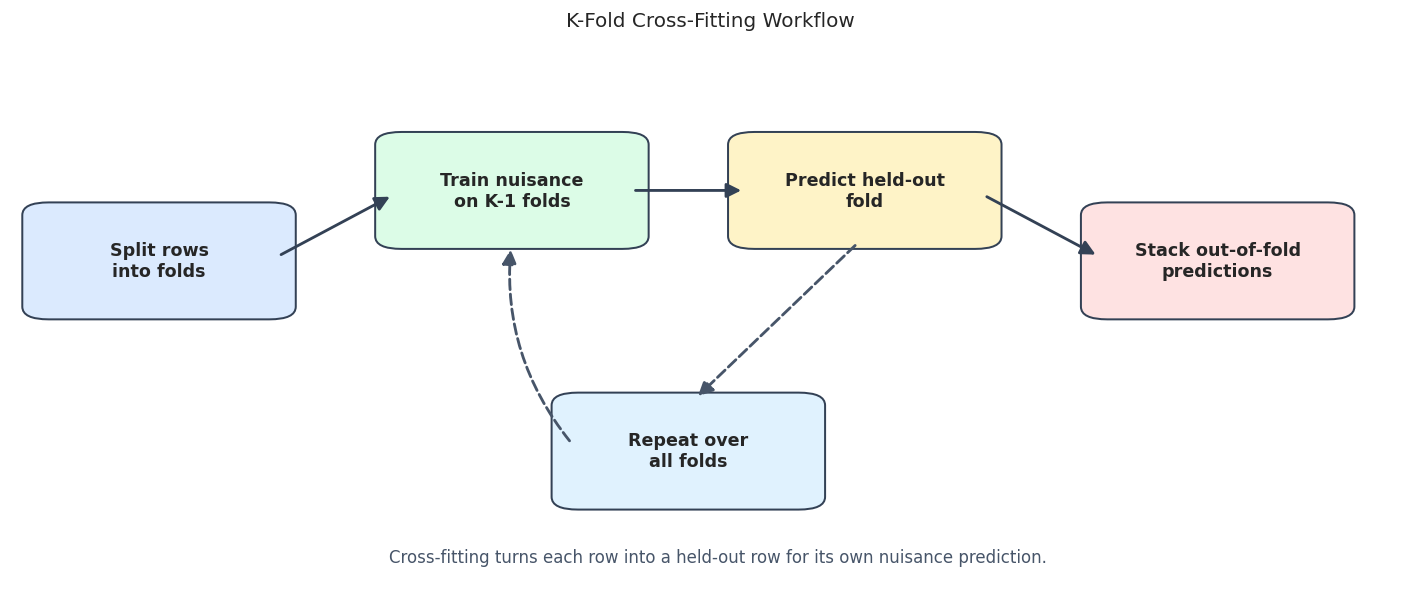
The workflow is simple but powerful. We are more than validating a predictive model; we are constructing the nuisance predictions that enter the final causal score.
Visualizing Fold Assignments
The code below creates a 5-fold split and displays the fold assignment for the first rows. The heatmap is a compact way to see that every row belongs to exactly one held-out fold in each repetition.
base_splits = make_kfold_splits(plr_df, n_folds=5, seed=RANDOM_SEED)
fold_assignments = fold_assignment_frame([base_splits], n_obs=len(plr_df), n_rep_to_show=1)
fold_preview = fold_assignments.query("row_id < 120").pivot(index="rep", columns="row_id", values="fold")
fold_size_table = (
    fold_assignments.groupby(["rep", "fold"])
    .size()
    .reset_index(name="heldout_rows")
)
save_table(fold_assignments, f"{NOTEBOOK_PREFIX}_fold_assignments.csv")
save_table(fold_size_table, f"{NOTEBOOK_PREFIX}_fold_size_table.csv")
display(fold_size_table)
fig, ax = plt.subplots(figsize=(13, 2.4))
sns.heatmap(fold_preview, cmap="viridis", cbar_kws={"label": "Held-out fold"}, ax=ax)
ax.set_title("Held-Out Fold Assignment For First 120 Rows")
ax.set_xlabel("Row id")
ax.set_ylabel("Repetition")
plt.tight_layout()
fig.savefig(FIGURE_DIR / f"{NOTEBOOK_PREFIX}_fold_assignment_heatmap.png", bbox_inches="tight")
plt.show()| rep | fold | heldout_rows | |
|---|---|---|---|
| 0 | 1 | 1 | 192 |
| 1 | 1 | 2 | 192 |
| 2 | 1 | 3 | 192 |
| 3 | 1 | 4 | 192 |
| 4 | 1 | 5 | 192 |

The fold sizes are balanced, and the heatmap shows one held-out fold label per row. DoubleML uses this structure to fit nuisance models and assemble out-of-fold predictions.
Choosing the Number of Folds
The number of folds controls a trade-off. More folds mean each nuisance model trains on more rows, but there are more nuisance fits. Fewer folds run faster, but each nuisance model trains on less data.
This section compares 2, 3, 5, and 8 folds using the same learner family. The goal is to understand sensitivity, not to find a universally best fold count.
base_learner = HistGradientBoostingRegressor(
    max_iter=80,
    max_leaf_nodes=13,
    min_samples_leaf=20,
    learning_rate=0.06,
    random_state=RANDOM_SEED,
)
fold_rows = []
fold_models = {}
for n_folds in [2, 3, 5, 8]:
    splits = make_kfold_splits(plr_df, n_folds=n_folds, seed=RANDOM_SEED)
    model, row = fit_plr_with_splits(
        plr_df,
        learner=base_learner,
        label=f"{n_folds}-fold cross-fitting",
        n_folds=n_folds,
        n_rep=1,
        all_smpls=splits,
    )
    fold_models[n_folds] = model
    fold_rows.append(row)
fold_comparison = pd.DataFrame(fold_rows)
save_table(fold_comparison, f"{NOTEBOOK_PREFIX}_fold_count_comparison.csv")
display(fold_comparison)| label | n_folds | n_rep | theta_hat | se | ci_95_lower | ci_95_upper | bias_vs_true | abs_bias_vs_true | rmse_ml_l | rmse_ml_m | mae_ml_l | mae_ml_m | runtime_seconds | |
|---|---|---|---|---|---|---|---|---|---|---|---|---|---|---|
| 0 | 2-fold cross-fitting | 2 | 1 | 0.954285 | 0.031404 | 0.892734 | 1.015836 | -0.045715 | 0.045715 | 1.594533 | 1.156154 | 1.265187 | 0.924849 | 0.536372 |
| 1 | 3-fold cross-fitting | 3 | 1 | 0.959661 | 0.031427 | 0.898066 | 1.021257 | -0.040339 | 0.040339 | 1.580797 | 1.137801 | 1.278498 | 0.909595 | 0.746205 |
| 2 | 5-fold cross-fitting | 5 | 1 | 0.978898 | 0.031306 | 0.917539 | 1.040257 | -0.021102 | 0.021102 | 1.563875 | 1.108685 | 1.242786 | 0.888654 | 1.284547 |
| 3 | 8-fold cross-fitting | 8 | 1 | 0.971195 | 0.032106 | 0.908268 | 1.034121 | -0.028805 | 0.028805 | 1.562304 | 1.097198 | 1.244168 | 0.873190 | 2.057918 |
The estimates move modestly across fold counts. That movement is part of split sensitivity. In real work, large swings across reasonable fold counts would be a reason to slow down and inspect nuisance quality, overlap, and sample size.
Fold Count Plot
The next plot shows point estimates, confidence intervals, and nuisance RMSE side by side. This keeps the fold-count choice tied to both causal uncertainty and nuisance prediction quality.
# Build and label the diagnostic visualization for the Fold Count Plot section.
fig, axes = plt.subplots(1, 2, figsize=(13, 5))
axes[0].errorbar(
    x=fold_comparison["theta_hat"],
    y=fold_comparison["label"],
    xerr=1.96 * fold_comparison["se"],
    fmt="o",
    color="#111827",
    ecolor="#475569",
    capsize=4,
)
axes[0].axvline(TRUE_THETA, color="#dc2626", linestyle="--", linewidth=1.5, label="True effect")
axes[0].set_title("Effect Estimates By Fold Count")
axes[0].set_xlabel("Estimated treatment effect")
axes[0].set_ylabel("")
axes[0].legend(loc="best")
rmse_plot = fold_comparison.melt(
    id_vars="label",
    value_vars=["rmse_ml_l", "rmse_ml_m"],
    var_name="nuisance",
    value_name="rmse",
)
sns.barplot(data=rmse_plot, x="rmse", y="label", hue="nuisance", palette=["#2563eb", "#059669"], ax=axes[1])
axes[1].set_title("Cross-Fitted Nuisance RMSE")
axes[1].set_xlabel("RMSE")
axes[1].set_ylabel("")
axes[1].legend(title="Nuisance")
plt.tight_layout()
fig.savefig(FIGURE_DIR / f"{NOTEBOOK_PREFIX}_fold_count_comparison.png", bbox_inches="tight")
plt.show()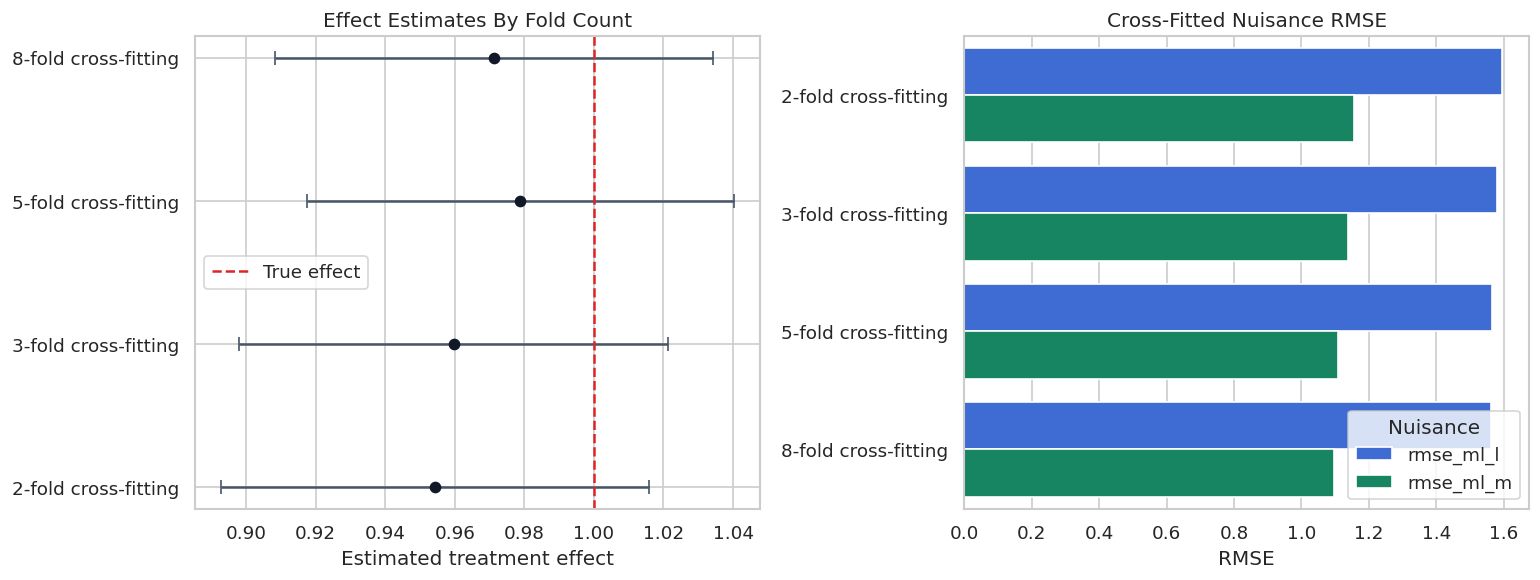
The RMSE panel shows that nuisance quality changes with fold count, with some variation across folds and samples. Fold choice is a practical design choice, so reporting it is part of reproducibility.
Repeated Cross-Fitting
Repeated cross-fitting draws multiple K-fold partitions and aggregates the resulting estimates. This helps because a single random partition can be lucky or unlucky, especially in smaller samples or when learners are unstable.
DoubleML stores the per-repetition estimates in all_coef and all_se. The aggregate estimate is available as coef and se.
repetition_rows = []
repetition_detail_rows = []
repetition_models = {}
for n_rep in [1, 3, 8]:
    model, row = fit_plr_with_splits(
        plr_df,
        learner=base_learner,
        label=f"5-fold x {n_rep} repetition(s)",
        n_folds=5,
        n_rep=n_rep,
        all_smpls=None,
        seed=RANDOM_SEED,
    )
    repetition_models[n_rep] = model
    repetition_rows.append(row)
    for rep_id, (coef, se) in enumerate(zip(model.all_coef[0], model.all_se[0]), start=1):
        repetition_detail_rows.append(
            {
                "n_rep_setting": n_rep,
                "rep_id": rep_id,
                "theta_hat_rep": float(coef),
                "se_rep": float(se),
                "bias_vs_true": float(coef - TRUE_THETA),
            }
        )
repetition_summary = pd.DataFrame(repetition_rows)
repetition_detail = pd.DataFrame(repetition_detail_rows)
save_table(repetition_summary, f"{NOTEBOOK_PREFIX}_repeated_cross_fitting_summary.csv")
save_table(repetition_detail, f"{NOTEBOOK_PREFIX}_repeated_cross_fitting_detail.csv")
display(repetition_summary)
display(repetition_detail.head(12))| label | n_folds | n_rep | theta_hat | se | ci_95_lower | ci_95_upper | bias_vs_true | abs_bias_vs_true | rmse_ml_l | rmse_ml_m | mae_ml_l | mae_ml_m | runtime_seconds | |
|---|---|---|---|---|---|---|---|---|---|---|---|---|---|---|
| 0 | 5-fold x 1 repetition(s) | 5 | 1 | 0.979103 | 0.031751 | 0.916872 | 1.041335 | -0.020897 | 0.020897 | 1.576238 | 1.122647 | 1.257170 | 0.900120 | 1.275171 |
| 1 | 5-fold x 3 repetition(s) | 5 | 3 | 0.995036 | 0.032417 | 0.931500 | 1.058572 | -0.004964 | 0.004964 | 1.576174 | 1.105793 | 1.258029 | 0.890411 | 3.835393 |
| 2 | 5-fold x 8 repetition(s) | 5 | 8 | 0.987674 | 0.033327 | 0.923887 | 1.052994 | -0.012326 | 0.012326 | 1.566702 | 1.095018 | 1.248726 | 0.876689 | 10.339458 |
| n_rep_setting | rep_id | theta_hat_rep | se_rep | bias_vs_true | |
|---|---|---|---|---|---|
| 0 | 1 | 1 | 0.979103 | 0.031751 | -0.020897 |
| 1 | 3 | 1 | 1.003808 | 0.032013 | 0.003808 |
| 2 | 3 | 2 | 0.995036 | 0.032417 | -0.004964 |
| 3 | 3 | 3 | 0.963178 | 0.031496 | -0.036822 |
| 4 | 8 | 1 | 0.991448 | 0.032478 | -0.008552 |
| 5 | 8 | 2 | 0.986578 | 0.034208 | -0.013422 |
| 6 | 8 | 3 | 0.987936 | 0.031952 | -0.012064 |
| 7 | 8 | 4 | 0.997794 | 0.031847 | -0.002206 |
| 8 | 8 | 5 | 0.987413 | 0.033139 | -0.012587 |
| 9 | 8 | 6 | 0.991768 | 0.032349 | -0.008232 |
| 10 | 8 | 7 | 0.977661 | 0.032552 | -0.022339 |
| 11 | 8 | 8 | 0.985011 | 0.034330 | -0.014989 |
The detail table shows the estimates from individual repetitions. The aggregate row becomes less dependent on one particular split as the number of repetitions grows.
Repeated Split Distribution
A plot makes repeated cross-fitting easier to understand. Each point below is one repetition-specific estimate; the dashed vertical line is the known true effect.
fig, ax = plt.subplots(figsize=(10, 5.5))
sns.stripplot(
    data=repetition_detail,
    x="theta_hat_rep",
    y="n_rep_setting",
    orient="h",
    size=8,
    jitter=0.16,
    color="#2563eb",
    ax=ax,
)
ax.axvline(TRUE_THETA, color="#dc2626", linestyle="--", linewidth=1.5, label="True effect")
ax.set_title("Repetition-Specific Estimates From Repeated Cross-Fitting")
ax.set_xlabel("Repetition-specific treatment effect estimate")
ax.set_ylabel("Configured number of repetitions")
ax.legend(loc="best")
plt.tight_layout()
fig.savefig(FIGURE_DIR / f"{NOTEBOOK_PREFIX}_repeated_cross_fitting_distribution.png", bbox_inches="tight")
plt.show()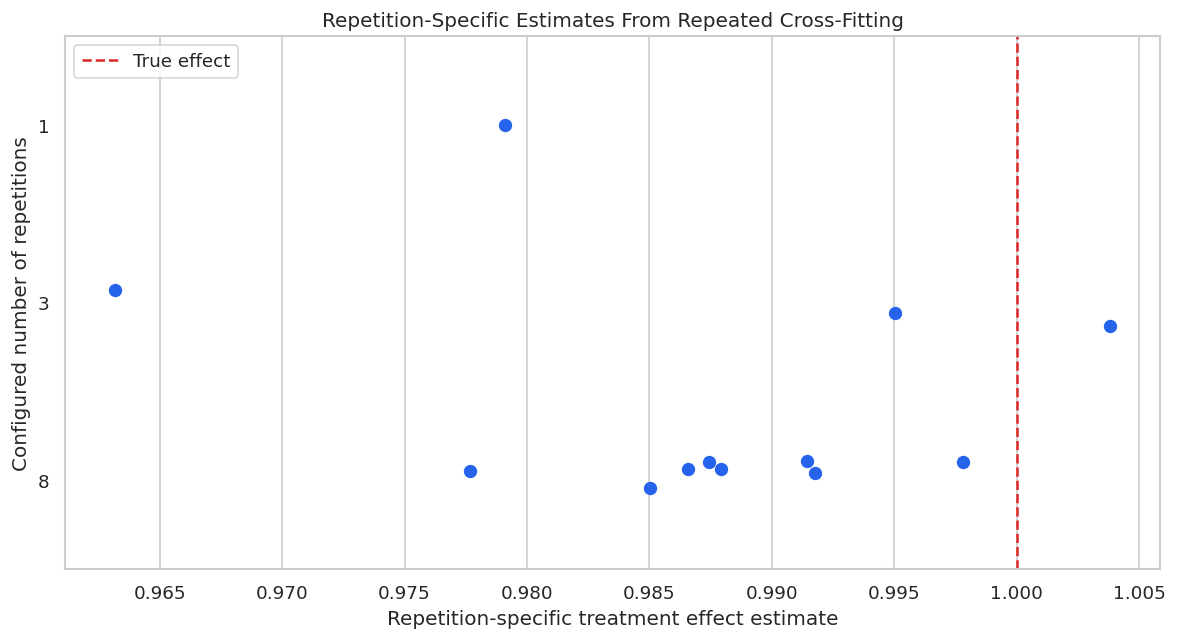
The individual points vary because each repetition uses a different random partition. Repeated cross-fitting is useful when that variation is nontrivial and the extra runtime is acceptable.
External Sample Splits
Sometimes random K-fold splitting is not the right design. If observations are grouped by user, household, region, device, school, or time period, the held-out fold may need to respect that structure.
This section compares ordinary random K-fold splits with GroupKFold splits by user_id. The model controls still exclude user_id; the group is used only to define fold boundaries.
random_group_audit = group_overlap_audit(plr_df, base_splits, group_col="user_id")
group_splits = list(GroupKFold(n_splits=5).split(plr_df, groups=plr_df["user_id"]))
group_split_audit = group_overlap_audit(plr_df, group_splits, group_col="user_id")
random_group_audit["split_type"] = "Random KFold"
group_split_audit["split_type"] = "GroupKFold by user_id"
split_group_audit = pd.concat([random_group_audit, group_split_audit], ignore_index=True)
save_table(split_group_audit, f"{NOTEBOOK_PREFIX}_external_split_group_audit.csv")
display(split_group_audit)| fold | train_rows | test_rows | train_groups | test_groups | overlap_groups | split_type | |
|---|---|---|---|---|---|---|---|
| 0 | 1 | 768 | 192 | 239 | 150 | 149 | Random KFold |
| 1 | 2 | 768 | 192 | 240 | 143 | 143 | Random KFold |
| 2 | 3 | 768 | 192 | 238 | 141 | 139 | Random KFold |
| 3 | 4 | 768 | 192 | 238 | 138 | 136 | Random KFold |
| 4 | 5 | 768 | 192 | 237 | 133 | 130 | Random KFold |
| 5 | 1 | 768 | 192 | 192 | 48 | 0 | GroupKFold by user_id |
| 6 | 2 | 768 | 192 | 192 | 48 | 0 | GroupKFold by user_id |
| 7 | 3 | 768 | 192 | 192 | 48 | 0 | GroupKFold by user_id |
| 8 | 4 | 768 | 192 | 192 | 48 | 0 | GroupKFold by user_id |
| 9 | 5 | 768 | 192 | 192 | 48 | 0 | GroupKFold by user_id |
Random K-fold splits can place the same user in both training and held-out folds. GroupKFold prevents group overlap, which is often the right validation logic when rows from the same group are closely related.
Random versus Group-Aware Splits
Now we fit DoubleML with random K-fold splits and with external GroupKFold splits. The comparison shows how to pass a custom split list into DoubleML with set_sample_splitting().
random_split_model, random_split_row = fit_plr_with_splits(
    plr_df,
    learner=base_learner,
    label="External random KFold",
    n_folds=5,
    n_rep=1,
    all_smpls=base_splits,
)
group_split_model, group_split_row = fit_plr_with_splits(
    plr_df,
    learner=base_learner,
    label="External GroupKFold by user_id",
    n_folds=5,
    n_rep=1,
    all_smpls=group_splits,
)
external_split_comparison = pd.DataFrame([random_split_row, group_split_row])
save_table(external_split_comparison, f"{NOTEBOOK_PREFIX}_external_split_comparison.csv")
display(external_split_comparison)| label | n_folds | n_rep | theta_hat | se | ci_95_lower | ci_95_upper | bias_vs_true | abs_bias_vs_true | rmse_ml_l | rmse_ml_m | mae_ml_l | mae_ml_m | runtime_seconds | |
|---|---|---|---|---|---|---|---|---|---|---|---|---|---|---|
| 0 | External random KFold | 5 | 1 | 0.978898 | 0.031306 | 0.917539 | 1.040257 | -0.021102 | 0.021102 | 1.563875 | 1.108685 | 1.242786 | 0.888654 | 1.272751 |
| 1 | External GroupKFold by user_id | 5 | 1 | 0.986529 | 0.031902 | 0.924002 | 1.049056 | -0.013471 | 0.013471 | 1.583457 | 1.121916 | 1.258856 | 0.894433 | 1.276532 |
The group-aware estimate is similar in this synthetic data, but the split audit still matters. In real grouped data, preventing group leakage can be more important than a small change in point estimates.
Group Overlap Plot
This plot visualizes the split audit. The goal of GroupKFold is not to change the estimate mechanically; the goal is to enforce a design rule that no user appears in both training and held-out rows for a fold.
fig, ax = plt.subplots(figsize=(10, 5))
sns.barplot(data=split_group_audit, x="fold", y="overlap_groups", hue="split_type", ax=ax, palette=["#2563eb", "#059669"])
ax.set_title("Group Overlap Between Train And Held-Out Rows")
ax.set_xlabel("Fold")
ax.set_ylabel("Number of overlapping user groups")
ax.legend(title="Split type")
plt.tight_layout()
fig.savefig(FIGURE_DIR / f"{NOTEBOOK_PREFIX}_group_overlap_audit.png", bbox_inches="tight")
plt.show()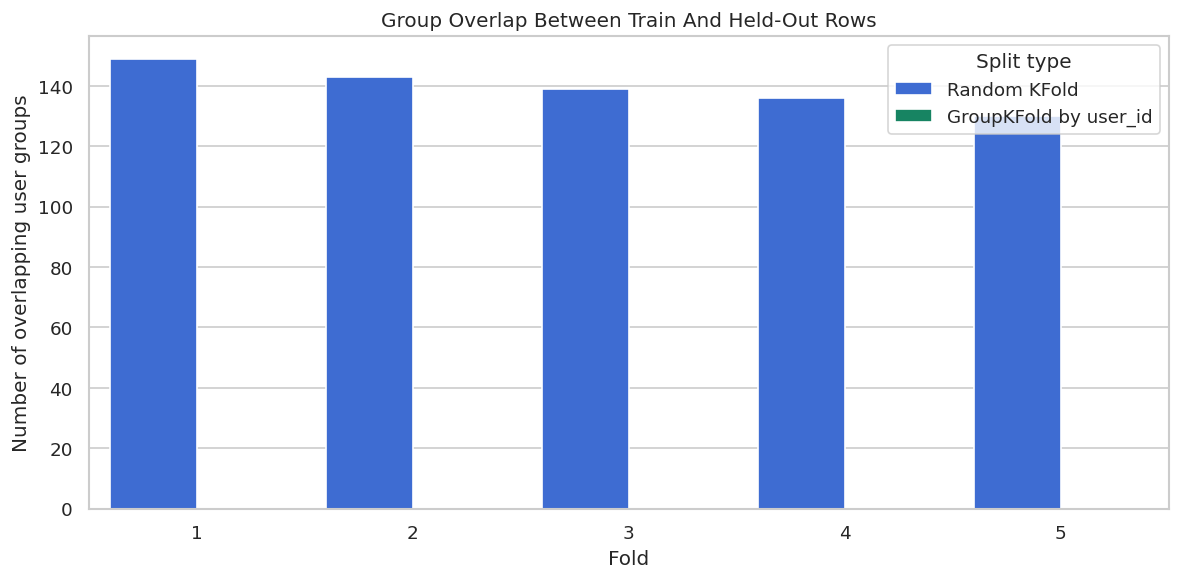
The GroupKFold bars are zero because each user is held out as a whole unit. That is the central reason to use external splits: they let the analyst encode validation constraints that the default random splitter cannot know.
Manual No-Cross-Fitting Caution
DoubleML is designed around out-of-fold nuisance predictions. To see why, we now construct a manual cautionary example with an extremely flexible ExtraTreesRegressor.
The in-sample version fits nuisance models on all rows and predicts those same rows. The cross-fitted version trains on K-1 folds and predicts the held-out fold. Both then run the same residual-on-residual regression.
This mirrors the logic behind DoubleML’s implementation so the mechanics are easier to inspect. It is a visual caution about why in-sample residualization is dangerous.
overfit_learner = ExtraTreesRegressor(
    n_estimators=200,
    min_samples_leaf=1,
    max_features=1.0,
    random_state=RANDOM_SEED,
    n_jobs=1,
)
no_cross_df = plr_df.sample(n=600, random_state=RANDOM_SEED).reset_index(drop=True)
no_cross_x_cols = model_x_cols(no_cross_df)
# In-sample residualization: fit and predict on the same rows.
insample_l = clone(overfit_learner).fit(no_cross_df[no_cross_x_cols], no_cross_df["outcome"])
insample_m = clone(overfit_learner).fit(no_cross_df[no_cross_x_cols], no_cross_df["treatment"])
insample_y_hat = insample_l.predict(no_cross_df[no_cross_x_cols])
insample_d_hat = insample_m.predict(no_cross_df[no_cross_x_cols])
insample_y_res = no_cross_df["outcome"].to_numpy() - insample_y_hat
insample_d_res = no_cross_df["treatment"].to_numpy() - insample_d_hat
insample_theta = LinearRegression(fit_intercept=False).fit(insample_d_res.reshape(-1, 1), insample_y_res).coef_[0]
# Manual cross-fitting: held-out predictions for every row.
cf_y_hat = np.zeros(len(no_cross_df))
cf_d_hat = np.zeros(len(no_cross_df))
manual_splits = make_kfold_splits(no_cross_df, n_folds=5, seed=RANDOM_SEED)
for train_idx, test_idx in manual_splits:
    fold_l = clone(overfit_learner).fit(no_cross_df.iloc[train_idx][no_cross_x_cols], no_cross_df.iloc[train_idx]["outcome"])
    fold_m = clone(overfit_learner).fit(no_cross_df.iloc[train_idx][no_cross_x_cols], no_cross_df.iloc[train_idx]["treatment"])
    cf_y_hat[test_idx] = fold_l.predict(no_cross_df.iloc[test_idx][no_cross_x_cols])
    cf_d_hat[test_idx] = fold_m.predict(no_cross_df.iloc[test_idx][no_cross_x_cols])
cf_y_res = no_cross_df["outcome"].to_numpy() - cf_y_hat
cf_d_res = no_cross_df["treatment"].to_numpy() - cf_d_hat
cf_theta = LinearRegression(fit_intercept=False).fit(cf_d_res.reshape(-1, 1), cf_y_res).coef_[0]
manual_crossfit_comparison = pd.DataFrame(
    [
        {
            "method": "In-sample nuisance residualization",
            "theta_hat": insample_theta,
            "bias_vs_true": insample_theta - TRUE_THETA,
            "outcome_nuisance_rmse": mean_squared_error(no_cross_df["outcome"], insample_y_hat) ** 0.5,
            "treatment_nuisance_rmse": mean_squared_error(no_cross_df["treatment"], insample_d_hat) ** 0.5,
            "treatment_residual_sd": np.std(insample_d_res),
        },
        {
            "method": "Manual 5-fold cross-fitting",
            "theta_hat": cf_theta,
            "bias_vs_true": cf_theta - TRUE_THETA,
            "outcome_nuisance_rmse": mean_squared_error(no_cross_df["outcome"], cf_y_hat) ** 0.5,
            "treatment_nuisance_rmse": mean_squared_error(no_cross_df["treatment"], cf_d_hat) ** 0.5,
            "treatment_residual_sd": np.std(cf_d_res),
        },
    ]
)
save_table(manual_crossfit_comparison, f"{NOTEBOOK_PREFIX}_manual_no_cross_fit_caution.csv")
display(manual_crossfit_comparison)| method | theta_hat | bias_vs_true | outcome_nuisance_rmse | treatment_nuisance_rmse | treatment_residual_sd | |
|---|---|---|---|---|---|---|
| 0 | In-sample nuisance residualization | -0.049285 | -1.049285 | 5.766047e-15 | 3.803450e-15 | 3.802177e-15 |
| 1 | Manual 5-fold cross-fitting | 1.000418 | 0.000418 | 1.627348e+00 | 1.114617e+00 | 1.114522e+00 |
The in-sample nuisance RMSE is almost zero because the flexible trees can interpolate the training rows. That looks excellent as prediction output, but it destroys the residual structure needed for causal estimation. The cross-fitted residuals are noisier in a healthy way: they are honest held-out residuals.
No-Cross-Fitting Caution Plot
The plot below puts the cautionary comparison on two panels: effect estimate and treatment-residual standard deviation. The in-sample residual standard deviation can become tiny when the learner memorizes the training data.
fig, axes = plt.subplots(1, 2, figsize=(13, 5))
sns.scatterplot(
    data=manual_crossfit_comparison,
    x="theta_hat",
    y="method",
    s=90,
    color="#111827",
    ax=axes[0],
)
axes[0].axvline(TRUE_THETA, color="#dc2626", linestyle="--", linewidth=1.5, label="True effect")
axes[0].set_title("Manual Residualized Estimate")
axes[0].set_xlabel("Estimated treatment effect")
axes[0].set_ylabel("")
axes[0].legend(loc="best")
sns.barplot(data=manual_crossfit_comparison, x="treatment_residual_sd", y="method", color="#2563eb", ax=axes[1])
axes[1].set_title("Treatment Residual Standard Deviation")
axes[1].set_xlabel("Residual standard deviation")
axes[1].set_ylabel("")
plt.tight_layout()
fig.savefig(FIGURE_DIR / f"{NOTEBOOK_PREFIX}_manual_no_cross_fit_caution.png", bbox_inches="tight")
plt.show()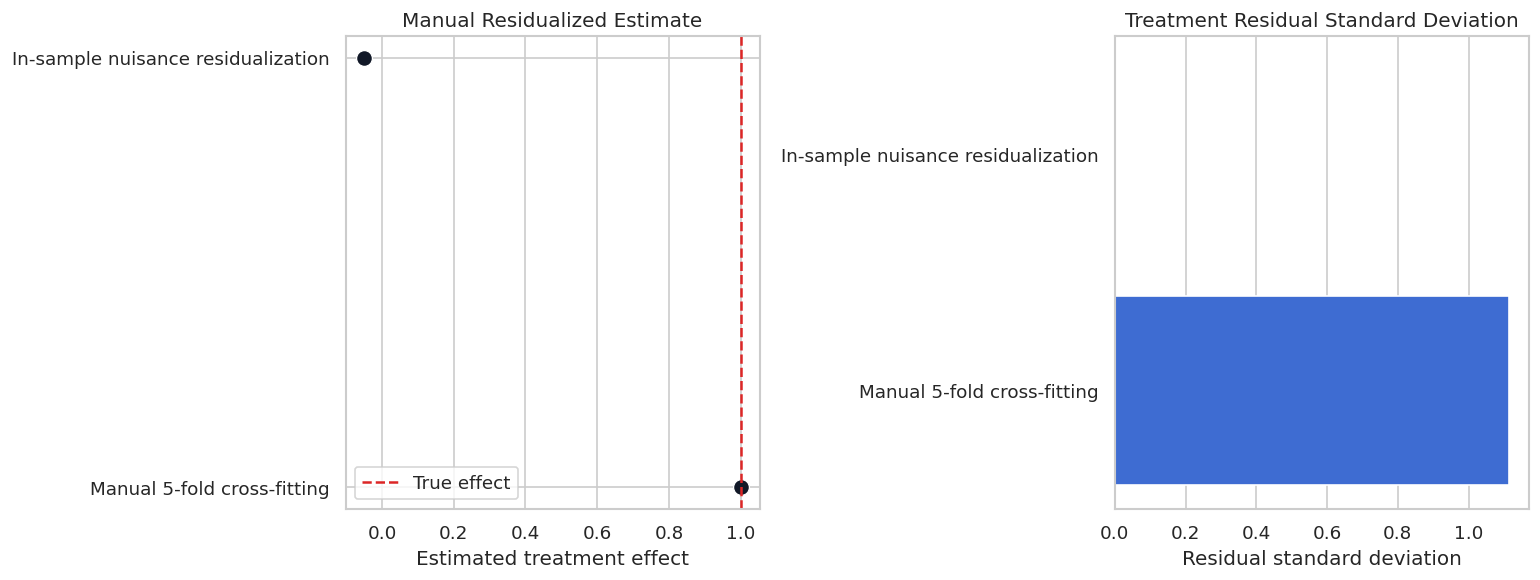
This is the clearest practical reason for cross-fitting: training-set predictions can be too good to be useful. The causal score needs held-out nuisance predictions, not memorized training residuals.
Reporting and Takeaways
Split Reporting Checklist
A reproducible DoubleML analysis should document its split design. This checklist can be copied into applied lessons and reports.
| item | why |
|---|---|
| State number of folds | Fold count changes training size and number of nuisance fits. |
| State number of repetitions | Repeated cross-fitting affects split stability and runtime. |
| Record random seeds | Random sample splits should be reproducible. |
| Explain external split constraints | Grouped, clustered, or temporal data often require custom split logic. |
| Report nuisance prediction diagnostics | Split design should be assessed with held-out nuisance performance. |
| Show split sensitivity when material | Large changes across reasonable splits weaken confidence in one estimate. |
| Avoid in-sample nuisance residualization | Flexible learners can memorize rows and distort the orthogonal score. |
The checklist makes split design part of the causal audit trail. It also helps separate honest split sensitivity from casual rerunning until a pleasing estimate appears.
Reporting and Takeaways
A finished analysis should be easy for another careful reader to review. It should state the causal question, target estimand, identification assumptions, main estimate, diagnostics, sensitivity checks, and remaining limitations in plain language. The goal is a clear analytical conclusion supported by the tables and figures already shown in the lesson.
The lesson now has a full split-design workflow: theory, API mechanics, fold-count sensitivity, repeated cross-fitting, external group splits, and a concrete warning against in-sample residualization.
What Comes Next
The sequence next moves to inference, including standard errors, confidence intervals, bootstrap options, joint inference, and communication of uncertainty from DoubleML estimates.