10: LiNGAM and Linear Non-Gaussian Models

LiNGAM stands for linear non-Gaussian acyclic model. It is a causal discovery family for settings where each variable is generated as a linear function of earlier variables plus an independent non-Gaussian error term. That extra non-Gaussianity assumption is the important part: ordinary constraint-based and score-based methods often identify only a Markov equivalence class, while LiNGAM can sometimes orient directions that would otherwise remain ambiguous.

This lesson treats LiNGAM as a practical modeling tool with assumptions that can be checked and reported. We will build a small synthetic system where the assumptions are true by construction, check the distributional assumptions, run DirectLiNGAM and ICA-LiNGAM, inspect coefficient matrices, evaluate graph recovery, compare against PC and GES, and stress-test what happens when the non-Gaussian assumption is weakened.

Expected runtime: usually under 1-2 minutes on a laptop. The bootstrap section is the slowest part, but it uses a small number of resamples so the lesson stays interactive.

Learning Goals

By the end, you should be able to:

  • Explain what LiNGAM assumes and why non-Gaussian noise helps with orientation.
  • Fit DirectLiNGAM and ICALiNGAM from causal-learn.
  • Read the LiNGAM adjacency matrix correctly: rows are children and columns are parents.
  • Turn coefficient matrices into tidy edge tables and graph visualizations.
  • Compare LiNGAM results with PC and GES on the same data.
  • Use bootstrap probabilities and total effects as reliability diagnostics.
  • Recognize when LiNGAM is being used outside its comfort zone.

Dataset and Experiment Setup

We use synthetic graph-discovery datasets with known structural equations and known graph truth to study LiNGAM And Linear Non-Gaussian Models. Known graph truth lets us see when an algorithm recovers edges, misses edges, or invents edges under violated assumptions.

Read each row as a draw from a structural causal system. Columns are observed variables, and in some lessons omitted latent variables, environments, time ordering, or non-Gaussian mechanisms are deliberately introduced. The experiment uses non-Gaussian noise so direction can sometimes be learned from distributional asymmetry rather than only conditional independences.

The goal is to learn what each discovery method assumes and how its output should be audited.

Mathematical Foundation

LiNGAM uses a linear structural model with non-Gaussian independent noise,

\[ X = BX + \varepsilon, \qquad \varepsilon_1,\ldots,\varepsilon_p \text{ mutually independent and non-Gaussian}. \]

Equivalently,

\[ X=(I-B)^{-1}\varepsilon. \]

The non-Gaussianity assumption supplies directional information beyond covariance. If the data are close to linear Gaussian, the direction signal becomes weak.

We will follow the same pattern used in the earlier causal-learn tutorials. First we set up the environment and output folders. Then we create a example dataset with known causal structure. After that we check whether the data looks plausibly non-Gaussian, fit LiNGAM models, evaluate the learned graph, compare against other discovery families, and close with reporting guidance.

The most important conceptual difference from PC and GES is that LiNGAM estimates a directed weighted structural equation model. The edge output is more than adjacency; it also gives a signed coefficient for each direct parent-child relationship.

Tutorial Workflow

LiNGAM Theory

LiNGAM is easiest to understand as a structural equation model. Suppose we observe a vector of variables \(x = (x_1, x_2, \ldots, x_p)\). A linear acyclic causal model writes each variable as a weighted sum of its direct causes plus an error term:

\[ x_i = \sum_{j \in \mathrm{Pa}(i)} b_{ij} x_j + e_i \]

Stacking all variables together gives the matrix form:

\[ x = Bx + e \]

Here, \(B\) is the direct causal coefficient matrix and \(e\) is the vector of disturbance terms. In the causal-learn LiNGAM implementation, the fitted adjacency matrix follows this same child-row, parent-column convention: \(B_{ij}\) is the coefficient from parent variable \(x_j\) into child variable \(x_i\).

This orientation matters. If row match and column need has value 0.75, the statement is need -> match, not match -> need.

Why Acyclicity Matters

The word acyclic means that the graph has no directed feedback loops inside the same time slice. If the variables can be ordered so that causes always come before effects, then the coefficient matrix \(B\) can be permuted into a strictly triangular matrix. In plain language: after the right variable ordering is found, every variable only depends on variables earlier in the order.

This is why LiNGAM talks about a causal order. The order is more than a presentation detail; it is part of the model. Once a plausible order is found, the direct coefficients can be estimated by regressing each variable on variables that appear before it.

Acyclicity is also a limitation. Basic LiNGAM is not the right model for instantaneous feedback systems such as price -> demand -> price within the same measurement window. For feedback, time-lagged models or other structural assumptions are needed.

Why Gaussian Linear Models Cannot Usually Orient Directions

In a two-variable linear Gaussian system, both directions can often explain the same joint distribution. If \(Y = aX + e_Y\) with Gaussian noise, the reverse regression \(X = cY + e_X\) can also have Gaussian residuals with no obvious distributional contradiction. That is why purely Gaussian linear data often leaves direction ambiguous unless the graph has extra structure such as colliders, time order, interventions, or strong background knowledge.

LiNGAM changes the problem by assuming the error terms are independent and non-Gaussian. Under the LiNGAM assumptions, the correct causal direction tends to produce independent residuals, while the wrong direction tends to leave dependence between the residual and the proposed cause. This asymmetry is the source of LiNGAM’s extra orienting power.

The key message is not that non-Gaussian variables automatically imply causality. The key message is narrower: in a linear acyclic system with independent non-Gaussian disturbances and no hidden confounding, the direction can become identifiable from observational data.

ICA-LiNGAM versus DirectLiNGAM

The original ICA-LiNGAM view starts from the matrix equation:

\[ x = Bx + e \quad \Rightarrow \quad x = (I - B)^{-1}e \]

This looks like an independent component analysis problem: observed variables are mixtures of independent non-Gaussian components. ICA-LiNGAM estimates the mixing/unmixing structure and then converts it into a causal ordering and coefficient matrix.

DirectLiNGAM takes a different route. Instead of solving the whole problem through ICA, it searches for exogenous variables one by one. An exogenous variable has no parents, so it should be independent of residuals from other variables after removing its effect. DirectLiNGAM repeatedly finds such variables, removes their influence, and builds the causal order.

In practice, DirectLiNGAM is often easier to use as a default teaching model because its causal-order logic is direct and stable on small examples. ICA-LiNGAM remains useful historically and conceptually because it shows the connection between non-Gaussian causal discovery and independent component analysis.

What LiNGAM Can and Cannot Claim

When its assumptions are credible, LiNGAM can provide three useful outputs:

  • A causal ordering of variables.
  • A directed graph after thresholding small coefficients.
  • Signed direct-effect coefficients for each parent-child relationship.

Those outputs are still conditional on the model assumptions. LiNGAM still needs checks for hidden confounding, selection bias, measurement error, nonlinear effects, cycles, and misspecified variable sets. A clean LiNGAM graph should be read as a structured causal hypothesis supported by the assumptions and diagnostics.

That is why this lesson pairs LiNGAM estimates with distribution checks, residual independence checks, bootstrap stability, threshold sensitivity, and comparison against PC/GES. The goal is to make the assumptions visible enough that a reader can judge the result and understand the graph.

Setup

The code below imports the scientific Python stack, the causal-learn algorithms used in this lesson, and a small compatibility wrapper for GES scoring under recent NumPy behavior. The GES wrapper is included only for the comparison section; the LiNGAM models themselves do not depend on it.

The output folders are created up front so every table and figure produced later has a stable path under lessons/tutorials/causal_learn/outputs/.

from pathlib import Path
from importlib.metadata import PackageNotFoundError, version
import contextlib
import io
import itertools
import os
import time
import warnings
# Resolve paths before importing matplotlib so the cache directory is writable in restricted environments.
CWD = Path.cwd()
if CWD.name == "causal_learn" and (CWD / "outputs").exists():
    NOTEBOOK_DIR = CWD
else:
    NOTEBOOK_DIR = (CWD / "notebooks" / "tutorials" / "causal_learn").resolve()
OUTPUT_DIR = NOTEBOOK_DIR / "outputs"
DATASET_DIR = OUTPUT_DIR / "datasets"
TABLE_DIR = OUTPUT_DIR / "tables"
FIGURE_DIR = OUTPUT_DIR / "figures"
for directory in [OUTPUT_DIR, DATASET_DIR, TABLE_DIR, FIGURE_DIR, OUTPUT_DIR / "matplotlib_cache"]:
    directory.mkdir(parents=True, exist_ok=True)
os.environ.setdefault("MPLCONFIGDIR", str(OUTPUT_DIR / "matplotlib_cache"))
warnings.filterwarnings("ignore", message="IProgress not found.*")
warnings.filterwarnings("ignore", message=".*pkg_resources is deprecated.*")
import numpy as np
import pandas as pd
pd.set_option("display.max_colwidth", None)
pd.set_option("display.max_columns", None)
pd.set_option("display.width", 0)
import matplotlib.pyplot as plt
import seaborn as sns
from IPython.display import display
from matplotlib.patches import FancyArrowPatch, FancyBboxPatch
from scipy import stats
from sklearn.exceptions import ConvergenceWarning
from causallearn.search.ConstraintBased.PC import pc
import causallearn.search.ScoreBased.GES as ges_module
from causallearn.search.ScoreBased.GES import ges
from causallearn.search.FCMBased.lingam import DirectLiNGAM, ICALiNGAM
warnings.filterwarnings("ignore", category=ConvergenceWarning)
NOTEBOOK_PREFIX = "10"
sns.set_theme(style="whitegrid", context="notebook")
plt.rcParams["figure.dpi"] = 120
plt.rcParams["savefig.facecolor"] = "white"
def local_score_BIC_from_cov(Data, i, PAi, parameters=None):
    """
    Compatibility wrapper for causal-learn GES BIC scoring under recent NumPy scalar behavior.
    
    Parameters
    ----------
    Data : array-like
        Data matrix passed by causal-learn into the local score function.
    i : int
        Target variable index for the local score calculation.
    PAi : list[int]
        Parent indices proposed for the target variable in the local score.
    parameters : dict
        Score-function parameters supplied by causal-learn.
    
    Returns
    -------
    float
        BIC-style local score for one target variable and candidate parent set.
    """
    cov, n = Data
    lambda_value = 0.5 if parameters is None else parameters.get("lambda_value", 0.5)
    sigma = float(cov[i, i])
    if len(PAi) > 0:
        yX = cov[np.ix_([i], PAi)]
        XX = cov[np.ix_(PAi, PAi)]
        try:
            XX_inv = np.linalg.inv(XX)
        except np.linalg.LinAlgError:
            XX_inv = np.linalg.pinv(XX)
        sigma = float(cov[i, i] - (yX @ XX_inv @ yX.T).item())
    sigma = max(sigma, 1e-12)
    return -0.5 * n * (1 + np.log(sigma)) - lambda_value * (len(PAi) + 1) * np.log(n)
# Patch only the module object used by GES during this lesson session.
ges_module.local_score_BIC_from_cov = local_score_BIC_from_cov
packages = ["causal-learn", "numpy", "pandas", "scipy", "scikit-learn", "matplotlib", "seaborn"]
version_rows = []
for package in packages:
    try:
        package_version = version(package)
    except PackageNotFoundError:
        package_version = "not installed"
    version_rows.append({"package": package, "version": package_version})
package_versions = pd.DataFrame(version_rows)
package_versions.to_csv(TABLE_DIR / f"{NOTEBOOK_PREFIX}_package_versions.csv", index=False)
display(package_versions)
package version
0 causal-learn 0.1.4.5
1 numpy 2.4.4
2 pandas 3.0.2
3 scipy 1.17.1
4 scikit-learn 1.6.1
5 matplotlib 3.10.9
6 seaborn 0.13.2

The version table is useful for reproducibility. Causal discovery libraries can change defaults across releases, so saving package versions next to the analysis outputs makes later reruns easier to explain.

Concept Map

Before fitting models, we make the assumptions explicit. LiNGAM is a strong-assumption method: when those assumptions are reasonable, it can produce more directional information than methods that rely only on conditional independence or decomposable scores. When those assumptions are not reasonable, the extra directionality can become misleading.

concept meaning why_it_matters
linear structural equations Each variable is modeled as a weighted sum of earlier variables plus an error term. The learned adjacency matrix can be read as direct linear effects.
non-Gaussian independent errors Noise terms are independent and not normally distributed. This breaks some direction symmetries that remain under Gaussian linear models.
acyclicity The causal graph has no directed feedback loops within the same time slice. LiNGAM estimates a causal order, so cycles are outside the basic model.
causal order An ordering where parents appear before children. DirectLiNGAM estimates this order before estimating edge coefficients.
coefficient threshold Small estimated coefficients are often treated as absent edges for reporting. Threshold choice affects precision, recall, and graph readability.
bootstrap probability The frequency with which an edge appears across resampled datasets. It gives a practical stability check, not a proof of causality.

The map highlights the tradeoff. LiNGAM can be more informative than PC or GES about direction, but only because it uses more assumptions. The rest of the lesson keeps checking those assumptions while interpreting the directed output as a candidate causal structure.

Example Data Design

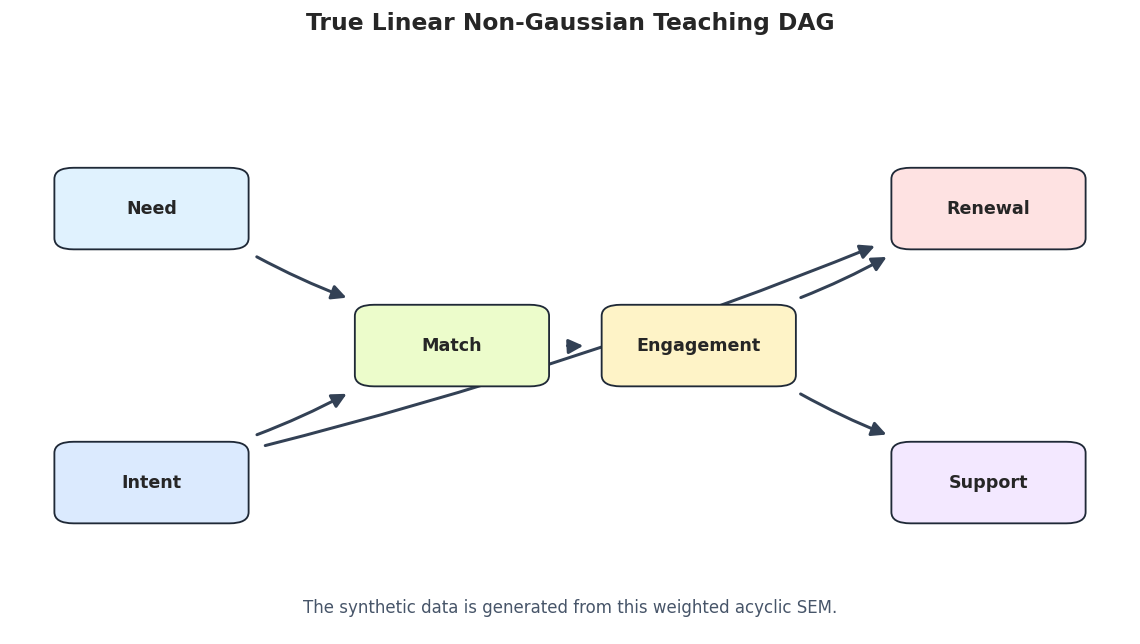
We will use six variables from the same teaching universe as the earlier causal-learn lessons. The graph is simple enough to inspect by eye, while still having multiple parents, a mediated path, and a downstream branch.

The data-generating system is:

  • need and intent are exogenous drivers.
  • match depends on need and intent.
  • engagement depends on match.
  • renewal depends on intent and engagement.
  • support depends on engagement.

For the main LiNGAM example, every error term is sampled from a Laplace distribution. Laplace noise is symmetric but heavier-tailed than Gaussian noise, so it is a clean way to create non-Gaussian errors without adding unnecessary complexity.

VARIABLES = ["need", "intent", "match", "engagement", "renewal", "support"]
TRUE_EDGES = [
    ("need", "match", 0.75),
    ("intent", "match", 0.70),
    ("match", "engagement", 0.85),
    ("intent", "renewal", 0.30),
    ("engagement", "renewal", 0.65),
    ("engagement", "support", 0.55),
]
variable_guide = pd.DataFrame(
    [
        {"variable": "need", "role": "root cause", "description": "Baseline level of user need or demand."},
        {"variable": "intent", "role": "root cause", "description": "Goal-directed intent that also affects later renewal value."},
        {"variable": "match", "role": "mediator", "description": "Quality of matching need and intent to available options."},
        {"variable": "engagement", "role": "mediator", "description": "Observed engagement generated by match quality."},
        {"variable": "renewal", "role": "outcome", "description": "Future value that depends on engagement and intent."},
        {"variable": "support", "role": "downstream outcome", "description": "Support burden or service need driven by engagement."},
    ]
)
true_edge_table = pd.DataFrame(TRUE_EDGES, columns=["source", "target", "true_coefficient"])
true_edge_table.insert(0, "run", "truth")
true_edge_table["edge_type"] = "-->"
true_edge_table = true_edge_table[["run", "source", "edge_type", "target", "true_coefficient"]]
true_coefficient_matrix = pd.DataFrame(0.0, index=VARIABLES, columns=VARIABLES)
for source, target, coefficient in TRUE_EDGES:
    true_coefficient_matrix.loc[target, source] = coefficient
variable_guide.to_csv(TABLE_DIR / f"{NOTEBOOK_PREFIX}_variable_guide.csv", index=False)
true_edge_table.to_csv(TABLE_DIR / f"{NOTEBOOK_PREFIX}_true_edges.csv", index=False)
true_coefficient_matrix.to_csv(TABLE_DIR / f"{NOTEBOOK_PREFIX}_true_coefficient_matrix.csv")
display(variable_guide)
display(true_edge_table)
variable role description
0 need root cause Baseline level of user need or demand.
1 intent root cause Goal-directed intent that also affects later renewal value.
2 match mediator Quality of matching need and intent to available options.
3 engagement mediator Observed engagement generated by match quality.
4 renewal outcome Future value that depends on engagement and intent.
5 support downstream outcome Support burden or service need driven by engagement.
run source edge_type target true_coefficient
0 truth need --> match 0.75
1 truth intent --> match 0.70
2 truth match --> engagement 0.85
3 truth intent --> renewal 0.30
4 truth engagement --> renewal 0.65
5 truth engagement --> support 0.55

The coefficient matrix uses the same orientation as causal-learn LiNGAM: row equals child, column equals parent. For example, the value in row match and column need is the direct effect of need on match.

Generate Linear Non-Gaussian Data

The code below creates the main dataset and a Gaussian-control version with the same structural coefficients. The non-Gaussian dataset is the one LiNGAM is designed for. The Gaussian version is saved for a later stress test where the structural graph is unchanged but the key LiNGAM distributional assumption is weakened.

# Define reusable helpers for the Generate Linear Non-Gaussian Data section.
def simulate_linear_system(n_samples=1_200, noise="laplace", seed=10):
    """
    Simulate the six-variable teaching SEM with either Laplace or Gaussian errors.
    
    Parameters
    ----------
    n_samples : int
        Number of observations generated, sampled, or evaluated.
    noise : object
        Noise vector or noise level used in the structural equation.
    seed : int
        Random seed for reproducible simulation or resampling.
    
    Returns
    -------
    pd.DataFrame
        Dataset table for simulate linear system, with the variables needed by the tutorial design.
    """
    rng = np.random.default_rng(seed)
    if noise == "laplace":
        errors = rng.laplace(loc=0.0, scale=1.0, size=(n_samples, len(VARIABLES)))
    elif noise == "gaussian":
        errors = rng.normal(loc=0.0, scale=1.0, size=(n_samples, len(VARIABLES)))
    else:
        raise ValueError("noise must be either 'laplace' or 'gaussian'")
    data = np.zeros((n_samples, len(VARIABLES)))
    data[:, 0] = errors[:, 0]
    data[:, 1] = errors[:, 1]
    data[:, 2] = 0.75 * data[:, 0] + 0.70 * data[:, 1] + errors[:, 2]
    data[:, 3] = 0.85 * data[:, 2] + errors[:, 3]
    data[:, 4] = 0.30 * data[:, 1] + 0.65 * data[:, 3] + errors[:, 4]
    data[:, 5] = 0.55 * data[:, 3] + errors[:, 5]
    return pd.DataFrame(data, columns=VARIABLES)
nongaussian_df = simulate_linear_system(n_samples=1_200, noise="laplace", seed=10)
gaussian_df = simulate_linear_system(n_samples=1_200, noise="gaussian", seed=11)
nongaussian_df.to_csv(DATASET_DIR / f"{NOTEBOOK_PREFIX}_linear_nongaussian.csv", index=False)
gaussian_df.to_csv(DATASET_DIR / f"{NOTEBOOK_PREFIX}_linear_gaussian_control.csv", index=False)
data_summary = pd.DataFrame(
    [
        {
            "dataset": "linear_nongaussian",
            "rows": len(nongaussian_df),
            "columns": nongaussian_df.shape[1],
            "noise_family": "Laplace",
            "purpose": "Main LiNGAM example where assumptions are aligned with the method.",
        },
        {
            "dataset": "linear_gaussian_control",
            "rows": len(gaussian_df),
            "columns": gaussian_df.shape[1],
            "noise_family": "Gaussian",
            "purpose": "Stress test where the graph is the same but non-Gaussianity is weakened.",
        },
    ]
)
data_summary.to_csv(TABLE_DIR / f"{NOTEBOOK_PREFIX}_dataset_summary.csv", index=False)
display(data_summary)
display(nongaussian_df.head())
dataset rows columns noise_family purpose
0 linear_nongaussian 1200 6 Laplace Main LiNGAM example where assumptions are aligned with the method.
1 linear_gaussian_control 1200 6 Gaussian Stress test where the graph is the same but non-Gaussianity is weakened.
need intent match engagement renewal support
0 2.430457 -0.878601 2.277526 0.727127 0.234995 -0.902625
1 0.474932 1.150418 1.000170 3.301833 3.543043 1.425083
2 0.164310 0.706443 1.679660 3.444192 1.212747 2.569928
3 -1.277609 1.676954 -0.577906 0.734588 0.490584 3.211796
4 0.036320 -0.438584 -0.850934 -0.485379 -0.851244 0.175115

The generated rows are ordinary tabular observations. In a real discovery task the graph would be unknown, but here we keep the true edges so every algorithm can be evaluated against known structure.

Diagnostics and Interpretation

Distribution Diagnostics

LiNGAM needs independent non-Gaussian errors, more than non-Gaussian observed variables. Since true errors are usually unavailable in real data, analysts often start with observable diagnostics: skewness, excess kurtosis, histograms, and normality tests. These checks cannot prove the LiNGAM assumptions. They can reveal whether the dataset is obviously incompatible with the story.

# Define reusable helpers for the Distribution Diagnostics section.
def distribution_diagnostics(data_df, dataset_label):
    """
    Compute compact distribution diagnostics for each observed variable.
    
    Parameters
    ----------
    data_df : pd.DataFrame
        Dataset for the current simulated or observed experiment.
    dataset_label : str
        Readable label for `dataset`.
    
    Returns
    -------
    pd.DataFrame
        Summary table for distribution diagnostics, with one row per method, scenario, group, or diagnostic check.
    """
    rows = []
    for column in data_df.columns:
        values = data_df[column].to_numpy()
        jb = stats.jarque_bera(values)
        rows.append(
            {
                "dataset": dataset_label,
                "variable": column,
                "mean": values.mean(),
                "std": values.std(ddof=1),
                "skew": stats.skew(values, bias=False),
                "excess_kurtosis": stats.kurtosis(values, fisher=True, bias=False),
                "jarque_bera_stat": float(jb.statistic),
                "jarque_bera_p_value": float(jb.pvalue),
            }
        )
    return pd.DataFrame(rows)
distribution_table = pd.concat(
    [
        distribution_diagnostics(nongaussian_df, "linear_nongaussian"),
        distribution_diagnostics(gaussian_df, "linear_gaussian_control"),
    ],
    ignore_index=True,
)
distribution_table.to_csv(TABLE_DIR / f"{NOTEBOOK_PREFIX}_distribution_diagnostics.csv", index=False)
display(distribution_table.round(4))
dataset variable mean std skew excess_kurtosis jarque_bera_stat jarque_bera_p_value
0 linear_nongaussian need 0.0393 1.4587 -0.0474 3.6549 660.9974 0.0000
1 linear_nongaussian intent -0.0023 1.3499 -0.2794 3.1530 506.9457 0.0000
2 linear_nongaussian match 0.0774 2.0697 -0.0193 1.0985 59.3632 0.0000
3 linear_nongaussian engagement 0.0981 2.2427 -0.1119 0.5645 18.0202 0.0001
4 linear_nongaussian renewal 0.0819 2.1460 -0.0364 0.2266 2.7003 0.2592
5 linear_nongaussian support 0.0413 1.9045 -0.1306 1.0599 58.5807 0.0000
6 linear_gaussian_control need 0.0780 1.0127 -0.0273 0.0005 0.1493 0.9281
7 linear_gaussian_control intent 0.0383 0.9930 -0.1184 0.0812 3.0835 0.2140
8 linear_gaussian_control match 0.0697 1.4647 0.0239 -0.0104 0.1258 0.9390
9 linear_gaussian_control engagement 0.0083 1.5835 -0.0131 -0.0694 0.3092 0.8567
10 linear_gaussian_control renewal 0.0531 1.6118 0.0016 -0.2424 3.0365 0.2191
11 linear_gaussian_control support 0.0194 1.2984 -0.0156 0.2181 2.2992 0.3168

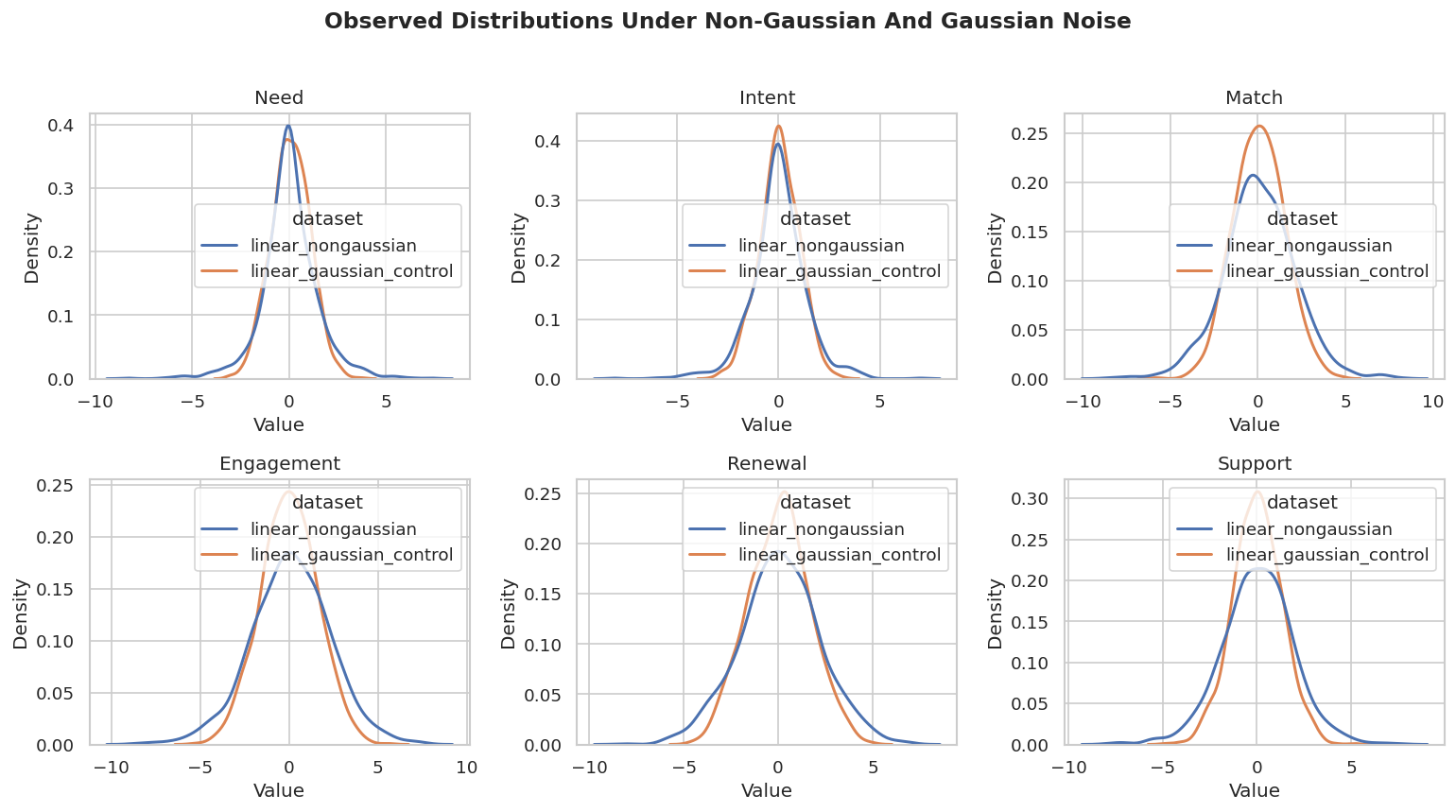
The non-Gaussian dataset should show heavier tails than the Gaussian-control dataset, especially through positive excess kurtosis and small Jarque-Bera p-values. This serves a different role than a full assumption check. It confirms that the main example has the distributional signal LiNGAM expects.

Visual Distribution Check

The table above is compact, but plots make the difference easier to see. The code below overlays the observed distributions from the non-Gaussian and Gaussian-control datasets variable by variable.

# Build and label the diagnostic visualization for the Visual Distribution Check section.
plot_df = pd.concat(
    [
        nongaussian_df.assign(dataset="linear_nongaussian"),
        gaussian_df.assign(dataset="linear_gaussian_control"),
    ],
    ignore_index=True,
).melt(id_vars="dataset", var_name="variable", value_name="value")
fig, axes = plt.subplots(2, 3, figsize=(13, 7), sharey=False)
for ax, variable in zip(axes.flat, VARIABLES):
    sns.kdeplot(
        data=plot_df[plot_df["variable"] == variable],
        x="value",
        hue="dataset",
        common_norm=False,
        fill=False,
        linewidth=1.8,
        ax=ax,
    )
    ax.set_title(variable.title())
    ax.set_xlabel("Value")
    ax.set_ylabel("Density")
fig.suptitle("Observed Distributions Under Non-Gaussian And Gaussian Noise", y=1.02, fontsize=14, fontweight="bold")
plt.tight_layout()
fig.savefig(FIGURE_DIR / f"{NOTEBOOK_PREFIX}_observed_distribution_check.png", dpi=160, bbox_inches="tight")
plt.show()

The curves are limited as standalone diagnostics. They give useful context. If every variable looked perfectly Gaussian and the domain gave no reason to expect non-Gaussian errors, LiNGAM would be a harder sell as the primary discovery method.

Helper Functions

This lesson needs three kinds of helpers: graph parsing, graph scoring, and graph drawing. The most important helper is lingam_adjacency_to_edge_table, which converts a LiNGAM coefficient matrix into a standard source -> target edge table. Remember that the raw LiNGAM matrix is indexed as child rows and parent columns.

# Define reusable helpers for the Helper Functions section.
def lingam_adjacency_to_edge_table(adjacency_matrix, variables, label, threshold=0.15):
    """
    Convert a LiNGAM child-row, parent-column matrix into a tidy directed edge table.
    
    Parameters
    ----------
    adjacency_matrix : np.ndarray
        Matrix representation of `adjacency`.
    variables : list[str]
        Variables included in the graph, lag frame, or diagnostic.
    label : str
        Readable label attached to the method, scenario, or output row.
    threshold : object
        Cutoff used to retain coefficients, edges, or decisions.
    
    Returns
    -------
    pd.DataFrame
        Graph edge table for LiNGAM adjacency to edge table, including node names and edge-orientation information where available.
    """
    rows = []
    for child_idx, parent_idx in zip(*np.where(np.abs(adjacency_matrix) >= threshold)):
        rows.append(
            {
                "run": label,
                "source": variables[int(parent_idx)],
                "edge_type": "-->",
                "target": variables[int(child_idx)],
                "coefficient": float(adjacency_matrix[child_idx, parent_idx]),
                "abs_coefficient": float(abs(adjacency_matrix[child_idx, parent_idx])),
            }
        )
    columns = ["run", "source", "edge_type", "target", "coefficient", "abs_coefficient"]
    return pd.DataFrame(rows, columns=columns).sort_values(["source", "target"]).reset_index(drop=True)
def parse_causallearn_edge(edge):
    """
    Convert a causal-learn edge object into source, endpoint pattern, and target strings.
    
    Parameters
    ----------
    edge : object
        Graph edge object or edge row being parsed, classified, or drawn.
    
    Returns
    -------
    tuple[str, str, str]
        Source node, endpoint mark, and target node parsed from a causal-learn edge.
    """
    parts = str(edge).strip().split()
    if len(parts) != 3:
        return {"source": str(edge), "edge_type": "unknown", "target": "unknown"}
    return {"source": parts[0], "edge_type": parts[1], "target": parts[2]}
def graph_to_edge_table(graph, label):
    """
    Return a tidy edge table from a causal-learn graph object.
    
    Parameters
    ----------
    graph : object
        Graph object returned by causal-learn or constructed from the edge table.
    label : str
        Readable label attached to the method, scenario, or output row.
    
    Returns
    -------
    pd.DataFrame
        Edge table with source, target, edge mark, and method metadata.
    """
    rows = [parse_causallearn_edge(edge) for edge in graph.get_graph_edges()]
    edge_df = pd.DataFrame(rows, columns=["source", "edge_type", "target"])
    if edge_df.empty:
        edge_df = pd.DataFrame(columns=["source", "edge_type", "target"])
    edge_df.insert(0, "run", label)
    return edge_df
def directed_pairs(edge_df):
    """
    Extract definite directed pairs from an edge table.
    
    Parameters
    ----------
    edge_df : pd.DataFrame
        Learned or oracle edge table being summarized or drawn.
    
    Returns
    -------
    set[tuple[str, str]]
        Ordered source-target pairs representing directed learned edges.
    """
    pairs = set()
    for row in edge_df.itertuples(index=False):
        if row.edge_type == "-->":
            pairs.add((row.source, row.target))
        elif row.edge_type == "<--":
            pairs.add((row.target, row.source))
    return pairs
def skeleton_pairs(edge_df):
    """
    Extract adjacencies while ignoring direction.
    
    Parameters
    ----------
    edge_df : pd.DataFrame
        Learned or oracle edge table being summarized or drawn.
    
    Returns
    -------
    set[tuple[str, str]]
        Unordered node pairs representing the learned graph skeleton.
    """
    pairs = set()
    for row in edge_df.itertuples(index=False):
        if row.target != "unknown":
            pairs.add(frozenset([row.source, row.target]))
    return pairs
def summarize_against_truth(edge_df, truth_df, label):
    """
    Compute graph-recovery metrics against a directed truth table.
    
    Parameters
    ----------
    edge_df : pd.DataFrame
        Learned or oracle edge table being summarized or drawn.
    truth_df : pd.DataFrame
        Oracle edge table used as the synthetic ground-truth benchmark.
    label : str
        Readable label attached to the method, scenario, or output row.
    
    Returns
    -------
    pd.DataFrame
        Graph-recovery summary table with edge counts, precision, recall, missing edges, and extra edges.
    """
    true_directed = set(zip(truth_df["source"], truth_df["target"]))
    true_skeleton = {frozenset(edge) for edge in true_directed}
    learned_directed = directed_pairs(edge_df)
    learned_skeleton = skeleton_pairs(edge_df)
    correct_directed = learned_directed & true_directed
    reversed_true = {(src, dst) for src, dst in true_directed if (dst, src) in learned_directed}
    missing_skeleton = true_skeleton - learned_skeleton
    extra_skeleton = learned_skeleton - true_skeleton
    unresolved_true = 0
    for src, dst in true_directed:
        pair = frozenset([src, dst])
        if pair in learned_skeleton and (src, dst) not in learned_directed and (dst, src) not in learned_directed:
            unresolved_true += 1
    directed_count = len(learned_directed)
    return pd.DataFrame(
        [
            {
                "run": label,
                "learned_edges_total": len(edge_df),
                "definite_directed_edges": directed_count,
                "true_edges": len(true_directed),
                "correct_directed_edges": len(correct_directed),
                "directed_precision": len(correct_directed) / directed_count if directed_count else np.nan,
                "directed_recall": len(correct_directed) / len(true_directed) if true_directed else np.nan,
                "reversed_true_edges": len(reversed_true),
                "unresolved_true_adjacencies": unresolved_true,
                "missing_true_adjacencies": len(missing_skeleton),
                "extra_adjacencies": len(extra_skeleton),
            }
        ]
    )
def run_pc_fisherz(data_df, label, alpha=0.01):
    """
    Run PC quietly with Fisher-Z tests.
    
    Parameters
    ----------
    data_df : pd.DataFrame
        Dataset for the current simulated or observed experiment.
    label : str
        Readable label attached to the method, scenario, or output row.
    alpha : float
        Significance level for an independence test or transparency level for plotting.
    
    Returns
    -------
    tuple
        Tuple containing result, graph_to_edge_table(result.G, label=label).
    """
    with warnings.catch_warnings():
        warnings.simplefilter("ignore")
        result = pc(
            data_df.to_numpy(),
            alpha=alpha,
            indep_test="fisherz",
            stable=True,
            verbose=False,
            show_progress=False,
            node_names=list(data_df.columns),
        )
    return result, graph_to_edge_table(result.G, label=label)
def run_ges_bic(data_df, label):
    """
    Run BIC-GES quietly for comparison.
    
    Parameters
    ----------
    data_df : pd.DataFrame
        Dataset for the current simulated or observed experiment.
    label : str
        Readable label attached to the method, scenario, or output row.
    
    Returns
    -------
    tuple
        Tuple containing record, graph_to_edge_table(record['G'], label=label).
    """
    buffer = io.StringIO()
    with contextlib.redirect_stdout(buffer):
        record = ges(
            data_df.to_numpy(),
            score_func="local_score_BIC",
            node_names=list(data_df.columns),
            lambda_value=0.5,
        )
    return record, graph_to_edge_table(record["G"], label=label)
GRAPH_POSITIONS = {
    "need": (0.11, 0.72),
    "intent": (0.11, 0.28),
    "match": (0.39, 0.50),
    "engagement": (0.62, 0.50),
    "renewal": (0.89, 0.72),
    "support": (0.89, 0.28),
}
NODE_LABELS = {name: name.title() for name in GRAPH_POSITIONS}
NODE_COLORS = {
    "need": "#e0f2fe",
    "intent": "#dbeafe",
    "match": "#ecfccb",
    "engagement": "#fef3c7",
    "renewal": "#fee2e2",
    "support": "#f3e8ff",
}
def trim_edge_to_box(start, end, box_w=0.145, box_h=0.095, gap=0.012):
    """
    Return edge endpoints that stop just outside source and target boxes.
    
    Parameters
    ----------
    start : tuple[float, float]
        Starting coordinate of the arrow or edge segment.
    end : tuple[float, float]
        Ending coordinate of the arrow or edge segment.
    box_w : float
        Width of the node box used to trim edge endpoints.
    box_h : float
        Height of the node box used to trim edge endpoints.
    gap : float
        Extra spacing between an edge endpoint and a node boundary.
    
    Returns
    -------
    tuple[tuple[float, float], tuple[float, float]]
        Start and end coordinates trimmed so the edge stops at box boundaries.
    """
    x0, y0 = start
    x1, y1 = end
    dx = x1 - x0
    dy = y1 - y0
    length = float(np.hypot(dx, dy))
    if length == 0:
        return start, end
    effective_w = box_w + 0.04
    effective_h = box_h + 0.04
    x_limit = (effective_w / 2) / abs(dx) if dx else np.inf
    y_limit = (effective_h / 2) / abs(dy) if dy else np.inf
    t = min(x_limit, y_limit) + gap / length
    return (x0 + dx * t, y0 + dy * t), (x1 - dx * t, y1 - dy * t)
def draw_box_graph(edge_df, title, path, note=None):
    """
    Draw a DAG-style graph with rounded boxes and visible arrowheads.
    
    Parameters
    ----------
    edge_df : pd.DataFrame
        Learned or oracle edge table being summarized or drawn.
    title : str
        Title shown above the plot.
    path : str or pathlib.Path
        Optional output path for the figure.
    note : str or None
        Optional explanatory note shown in the plot.
    
    Returns
    -------
    None
        Draws the graph diagram directly on the Matplotlib axes and saves it when requested.
    """
    fig, ax = plt.subplots(figsize=(12, 6.2))
    ax.set_axis_off()
    ax.set_xlim(-0.02, 1.02)
    ax.set_ylim(0.04, 0.96)
    box_w, box_h = 0.145, 0.095
    for row in edge_df.itertuples(index=False):
        if row.source not in GRAPH_POSITIONS or row.target not in GRAPH_POSITIONS:
            continue
        raw_start = GRAPH_POSITIONS[row.source]
        raw_end = GRAPH_POSITIONS[row.target]
        if row.edge_type == "<--":
            raw_start, raw_end = raw_end, raw_start
        start, end = trim_edge_to_box(raw_start, raw_end, box_w=box_w, box_h=box_h)
        if row.edge_type in {"-->", "<--"}:
            arrowstyle = "-|>"
            mutation_scale = 18
            linewidth = 1.8
            color = "#334155"
        else:
            arrowstyle = "-"
            mutation_scale = 1
            linewidth = 1.5
            color = "#64748b"
        arrow = FancyArrowPatch(
            start,
            end,
            arrowstyle=arrowstyle,
            mutation_scale=mutation_scale,
            linewidth=linewidth,
            color=color,
            connectionstyle="arc3,rad=0.035",
            zorder=2,
        )
        ax.add_patch(arrow)
    for node, (x, y) in GRAPH_POSITIONS.items():
        rect = FancyBboxPatch(
            (x - box_w / 2, y - box_h / 2),
            box_w,
            box_h,
            boxstyle="round,pad=0.018",
            facecolor=NODE_COLORS[node],
            edgecolor="#1f2937",
            linewidth=1.1,
            zorder=5,
        )
        ax.add_patch(rect)
        ax.text(x, y, NODE_LABELS[node], ha="center", va="center", fontsize=10.5, fontweight="bold", zorder=6)
    if note:
        ax.text(0.50, 0.08, note, ha="center", va="center", fontsize=10, color="#475569")
    ax.set_title(title, pad=18, fontsize=14, fontweight="bold")
    fig.savefig(path, dpi=160, bbox_inches="tight")
    plt.show()
def truth_as_edge_table(truth_df, label="truth"):
    """
    Convert the truth table into a plotting-ready edge table.
    
    Parameters
    ----------
    truth_df : pd.DataFrame
        Oracle edge table used as the synthetic ground-truth benchmark.
    label : str
        Readable label attached to the method, scenario, or output row.
    
    Returns
    -------
    pd.DataFrame
        Oracle graph edge table with run label and directed-edge marks.
    """
    return truth_df.assign(run=label, edge_type="-->")[["run", "source", "edge_type", "target"]]
These helpers make the rest of the lesson easier to read. The same metric definitions are used for LiNGAM, PC, and GES so the comparison stays apples-to-apples.

Draw the True DAG

Before looking at learned graphs, we draw the true graph used to create the data. This anchors the rest of the lesson: every learned edge table and metric table will be compared back to this DAG.

true_plot_edges = truth_as_edge_table(true_edge_table)
draw_box_graph(
    true_plot_edges,
    title="True Linear Non-Gaussian Teaching DAG",
    path=FIGURE_DIR / f"{NOTEBOOK_PREFIX}_true_lingam_dag.png",
    note="The synthetic data is generated from this weighted acyclic SEM.",
)

The graph has six directed edges and no cycles. LiNGAM will try to recover both this ordering and the direct linear coefficients from the observed data alone.

A Tiny Directionality Demo

A two-variable system is the cleanest way to see why LiNGAM is useful. If cause and effect are merely dependent, PC and GES have no collider or larger graph pattern that forces an orientation. With non-Gaussian linear noise, LiNGAM can use distributional asymmetry to choose a direction.

# Fit or evaluate the model objects used in the A Tiny Directionality Demo section.
rng = np.random.default_rng(101)
pair_n = 1_000
cause = rng.laplace(size=pair_n)
effect = 0.90 * cause + rng.laplace(size=pair_n)
pair_df = pd.DataFrame({"cause": cause, "effect": effect})
pair_lingam = DirectLiNGAM(random_state=101)
pair_lingam.fit(pair_df.to_numpy())
pair_lingam_edges = lingam_adjacency_to_edge_table(
    pair_lingam.adjacency_matrix_,
    list(pair_df.columns),
    label="DirectLiNGAM_pair",
    threshold=0.15,
)
pair_pc, pair_pc_edges = run_pc_fisherz(pair_df, label="PC_pair", alpha=0.01)
pair_ges, pair_ges_edges = run_ges_bic(pair_df, label="GES_pair")
pair_demo = pd.concat(
    [
        pair_lingam_edges[["run", "source", "edge_type", "target"]],
        pair_pc_edges,
        pair_ges_edges,
    ],
    ignore_index=True,
)
pair_demo.to_csv(TABLE_DIR / f"{NOTEBOOK_PREFIX}_two_variable_direction_demo.csv", index=False)
display(pair_demo)
run source edge_type target
0 DirectLiNGAM_pair cause --> effect
1 PC_pair cause --- effect
2 GES_pair cause --- effect

In this two-variable example, PC and GES usually report an unoriented adjacency because both directions fit the same conditional independence pattern. DirectLiNGAM can orient the edge because the data was generated by a linear model with independent non-Gaussian errors.

Fit DirectLiNGAM and ICA-LiNGAM

Now we fit the two core LiNGAM estimators available in causal-learn. DirectLiNGAM estimates the causal order directly through independence comparisons. ICALiNGAM uses independent component analysis and then searches for a causal ordering compatible with the estimated mixing structure.

We use a coefficient threshold of 0.15 for graph reporting. The raw coefficient matrices are saved separately, so the threshold is only a reporting choice, not a hidden model change.

# Fit or evaluate the model objects used in the Fit DirectLiNGAM And ICA-LiNGAM section.
EDGE_THRESHOLD = 0.15
model_specs = [
    ("DirectLiNGAM", DirectLiNGAM(random_state=42)),
    ("ICALiNGAM", ICALiNGAM(random_state=42, max_iter=3_000)),
]
lingam_rows = []
lingam_edges = []
lingam_metrics = []
lingam_matrices = {}
for label, model in model_specs:
    start = time.perf_counter()
    model.fit(nongaussian_df.to_numpy())
    elapsed = time.perf_counter() - start
    edge_table = lingam_adjacency_to_edge_table(
        model.adjacency_matrix_,
        VARIABLES,
        label=label,
        threshold=EDGE_THRESHOLD,
    )
    metric_table = summarize_against_truth(edge_table, true_edge_table, label=label)
    metric_table["elapsed_seconds"] = elapsed
    lingam_rows.append(
        {
            "model": label,
            "elapsed_seconds": elapsed,
            "causal_order": " -> ".join(VARIABLES[int(idx)] for idx in model.causal_order_),
            "reported_edges": len(edge_table),
            "threshold": EDGE_THRESHOLD,
        }
    )
    lingam_edges.append(edge_table)
    lingam_metrics.append(metric_table)
    lingam_matrices[label] = pd.DataFrame(model.adjacency_matrix_, index=VARIABLES, columns=VARIABLES)
lingam_model_summary = pd.DataFrame(lingam_rows)
lingam_edge_table = pd.concat(lingam_edges, ignore_index=True)
lingam_metric_table = pd.concat(lingam_metrics, ignore_index=True)
lingam_model_summary.to_csv(TABLE_DIR / f"{NOTEBOOK_PREFIX}_lingam_model_summary.csv", index=False)
lingam_edge_table.to_csv(TABLE_DIR / f"{NOTEBOOK_PREFIX}_lingam_edges.csv", index=False)
lingam_metric_table.to_csv(TABLE_DIR / f"{NOTEBOOK_PREFIX}_lingam_metrics.csv", index=False)
for label, matrix in lingam_matrices.items():
    matrix.to_csv(TABLE_DIR / f"{NOTEBOOK_PREFIX}_{label.lower()}_coefficient_matrix.csv")
display(lingam_model_summary.round(4))
display(lingam_edge_table.round(4))
display(lingam_metric_table.round(4))
model elapsed_seconds causal_order reported_edges threshold
0 DirectLiNGAM 0.0266 need -> intent -> match -> engagement -> support -> renewal 6 0.15
1 ICALiNGAM 0.0102 need -> intent -> match -> engagement -> renewal -> support 6 0.15
run source edge_type target coefficient abs_coefficient
0 DirectLiNGAM engagement --> renewal 0.6423 0.6423
1 DirectLiNGAM engagement --> support 0.5742 0.5742
2 DirectLiNGAM intent --> match 0.7007 0.7007
3 DirectLiNGAM intent --> renewal 0.3031 0.3031
4 DirectLiNGAM match --> engagement 0.8487 0.8487
5 DirectLiNGAM need --> match 0.7745 0.7745
6 ICALiNGAM engagement --> renewal 0.6418 0.6418
7 ICALiNGAM engagement --> support 0.5739 0.5739
8 ICALiNGAM intent --> match 0.7007 0.7007
9 ICALiNGAM intent --> renewal 0.3142 0.3142
10 ICALiNGAM match --> engagement 0.8487 0.8487
11 ICALiNGAM need --> match 0.7745 0.7745
run learned_edges_total definite_directed_edges true_edges correct_directed_edges directed_precision directed_recall reversed_true_edges unresolved_true_adjacencies missing_true_adjacencies extra_adjacencies elapsed_seconds
0 DirectLiNGAM 6 6 6 6 1.0 1.0 0 0 0 0 0.0266
1 ICALiNGAM 6 6 6 6 1.0 1.0 0 0 0 0 0.0102

On this aligned synthetic example, both LiNGAM estimators should recover the main direct edges with coefficients close to the data-generating values. Small ordering differences among downstream variables can happen when those variables are not direct ancestors of each other.

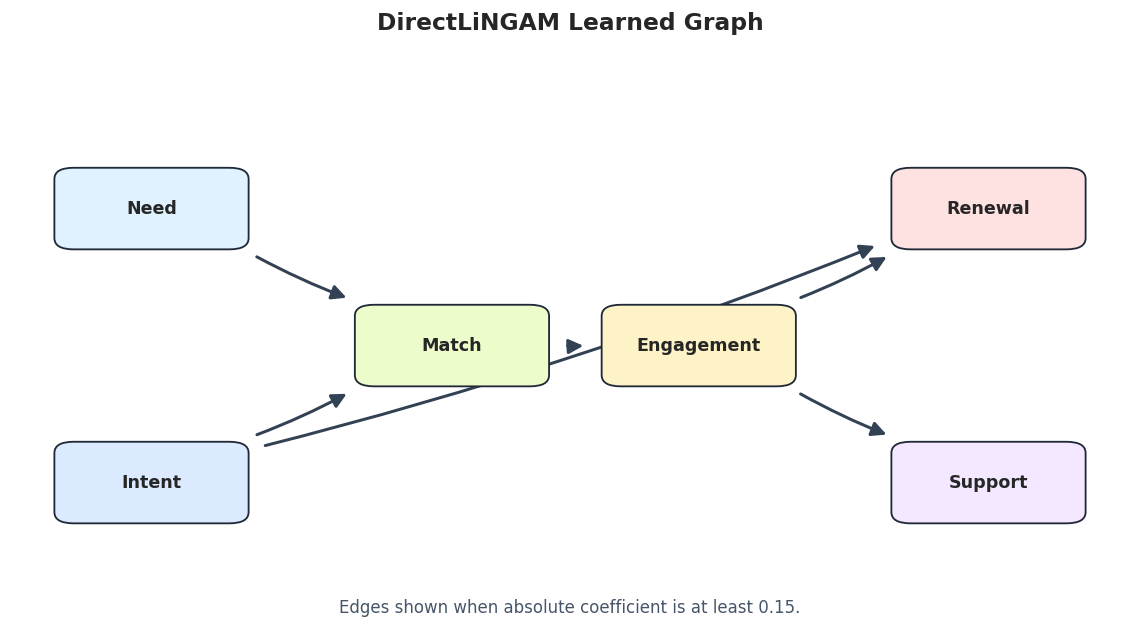
Learned DirectLiNGAM Graph

The edge table is precise, but a graph is easier to scan. This figure shows the thresholded DirectLiNGAM graph using the same visual style as the rest of the tutorial series.

direct_lingam_edges = lingam_edge_table[lingam_edge_table["run"] == "DirectLiNGAM"].copy()
draw_box_graph(
    direct_lingam_edges,
    title="DirectLiNGAM Learned Graph",
    path=FIGURE_DIR / f"{NOTEBOOK_PREFIX}_direct_lingam_graph.png",
    note=f"Edges shown when absolute coefficient is at least {EDGE_THRESHOLD}.",
)

The graph should line up closely with the true DAG. The plot is thresholded for readability, while the coefficient matrices below retain the full numerical output.

Compare Estimated Coefficients to True Coefficients

LiNGAM gives signed direct-effect coefficients, which is one reason it is useful in linear systems. Here we stack the true matrix, DirectLiNGAM matrix, and ICA-LiNGAM matrix into one tidy table and a heatmap.

# Build and label the diagnostic visualization for the Compare Estimated Coefficients To True Coefficients section.
coefficient_long = []
for matrix_label, matrix in [("truth", true_coefficient_matrix), *lingam_matrices.items()]:
    matrix_df = pd.DataFrame(matrix, index=VARIABLES, columns=VARIABLES)
    for child in VARIABLES:
        for parent in VARIABLES:
            coefficient_long.append(
                {
                    "matrix": matrix_label,
                    "parent": parent,
                    "child": child,
                    "coefficient": float(matrix_df.loc[child, parent]),
                }
            )
coefficient_long = pd.DataFrame(coefficient_long)
coefficient_long.to_csv(TABLE_DIR / f"{NOTEBOOK_PREFIX}_coefficient_long.csv", index=False)
fig, axes = plt.subplots(1, 3, figsize=(15, 4.6), sharex=True, sharey=True)
for ax, matrix_label in zip(axes, ["truth", "DirectLiNGAM", "ICALiNGAM"]):
    heatmap_data = coefficient_long[coefficient_long["matrix"] == matrix_label].pivot(
        index="child", columns="parent", values="coefficient"
    ).loc[VARIABLES, VARIABLES]
    sns.heatmap(
        heatmap_data,
        cmap="vlag",
        center=0,
        annot=True,
        fmt=".2f",
        linewidths=0.5,
        cbar=ax is axes[-1],
        ax=ax,
    )
    ax.set_title(matrix_label)
    ax.set_xlabel("Parent")
    ax.set_ylabel("Child")
fig.suptitle("LiNGAM Coefficient Matrices", y=1.03, fontsize=14, fontweight="bold")
plt.tight_layout()
fig.savefig(FIGURE_DIR / f"{NOTEBOOK_PREFIX}_coefficient_matrices.png", dpi=160, bbox_inches="tight")
plt.show()

The heatmap is the safest way to read LiNGAM coefficients because it preserves orientation: parent variables are columns and child variables are rows. The strongest learned coefficients should sit in the same cells as the true nonzero coefficients.

Causal Order Check

LiNGAM estimates a causal order as part of the model. Exact order is stricter than edge recovery: two variables that are not ancestors of each other can swap without changing the direct edge graph. This table compares the true order ranks with the estimated order ranks.

true_order = ["need", "intent", "match", "engagement", "renewal", "support"]
order_rows = []
for model_label, model in model_specs:
    estimated_order = [VARIABLES[int(idx)] for idx in model.causal_order_]
    for variable in VARIABLES:
        order_rows.append(
            {
                "model": model_label,
                "variable": variable,
                "true_rank": true_order.index(variable) + 1,
                "estimated_rank": estimated_order.index(variable) + 1,
                "rank_difference": (estimated_order.index(variable) + 1) - (true_order.index(variable) + 1),
            }
        )
order_table = pd.DataFrame(order_rows)
order_table.to_csv(TABLE_DIR / f"{NOTEBOOK_PREFIX}_causal_order_comparison.csv", index=False)
display(order_table)
model variable true_rank estimated_rank rank_difference
0 DirectLiNGAM need 1 1 0
1 DirectLiNGAM intent 2 2 0
2 DirectLiNGAM match 3 3 0
3 DirectLiNGAM engagement 4 4 0
4 DirectLiNGAM renewal 5 6 1
5 DirectLiNGAM support 6 5 -1
6 ICALiNGAM need 1 1 0
7 ICALiNGAM intent 2 2 0
8 ICALiNGAM match 3 3 0
9 ICALiNGAM engagement 4 4 0
10 ICALiNGAM renewal 5 5 0
11 ICALiNGAM support 6 6 0

The order table should be read with nuance. Getting a root before its descendants matters; swapping two unrelated downstream variables is usually less important than reversing a true parent-child relationship.

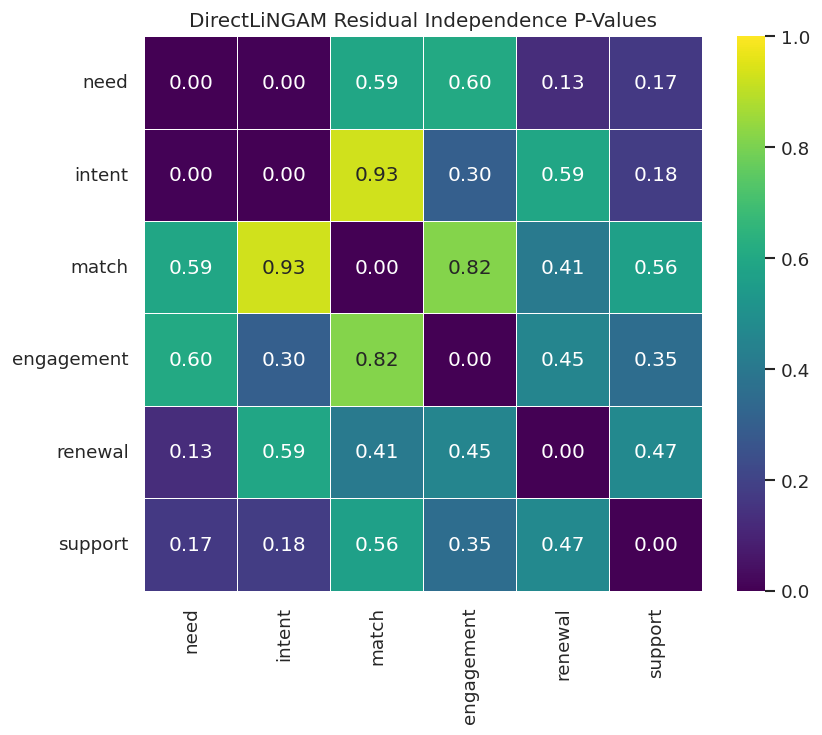
Residual Independence Check

After fitting a LiNGAM model, we can compute residuals implied by the learned structural equations and test whether those residuals look mutually independent. This is closer to the actual LiNGAM assumption than checking observed-variable distributions, while still serving as a diagnostic.

direct_model = model_specs[0][1]
residual_p_values = pd.DataFrame(
    direct_model.get_error_independence_p_values(nongaussian_df.to_numpy()),
    index=VARIABLES,
    columns=VARIABLES,
)
residual_p_values.to_csv(TABLE_DIR / f"{NOTEBOOK_PREFIX}_direct_lingam_residual_independence_p_values.csv")
display(residual_p_values.round(4))
fig, ax = plt.subplots(figsize=(7.5, 6))
sns.heatmap(
    residual_p_values,
    cmap="viridis",
    vmin=0,
    vmax=1,
    annot=True,
    fmt=".2f",
    linewidths=0.5,
    ax=ax,
)
ax.set_title("DirectLiNGAM Residual Independence P-Values")
fig.savefig(FIGURE_DIR / f"{NOTEBOOK_PREFIX}_residual_independence_heatmap.png", dpi=160, bbox_inches="tight")
plt.show()
need intent match engagement renewal support
need 0.0000 0.0043 0.5934 0.6026 0.1266 0.1675
intent 0.0043 0.0000 0.9262 0.2998 0.5931 0.1790
match 0.5934 0.9262 0.0000 0.8151 0.4098 0.5645
engagement 0.6026 0.2998 0.8151 0.0000 0.4542 0.3548
renewal 0.1266 0.5931 0.4098 0.4542 0.0000 0.4698
support 0.1675 0.1790 0.5645 0.3548 0.4698 0.0000

Large off-diagonal p-values are more comfortable for the LiNGAM story because they suggest the fitted residuals are not obviously dependent. Isolated small p-values are a cue to inspect model fit, omitted variables, nonlinearities, or threshold choices.

Bootstrap Edge Stability

A single fitted graph can look cleaner than the uncertainty behind it. Bootstrap resampling repeatedly refits DirectLiNGAM on resampled rows and records how often each edge appears. This is a practical stability check for the discovered directions.

BOOTSTRAP_SAMPLES = 25
bootstrap_start = time.perf_counter()
bootstrap_result = DirectLiNGAM(random_state=42).bootstrap(nongaussian_df.to_numpy(), BOOTSTRAP_SAMPLES)
bootstrap_elapsed = time.perf_counter() - bootstrap_start
bootstrap_probability_matrix = bootstrap_result.get_probabilities(min_causal_effect=EDGE_THRESHOLD)
bootstrap_probability_df = pd.DataFrame(bootstrap_probability_matrix, index=VARIABLES, columns=VARIABLES)
bootstrap_probability_df.to_csv(TABLE_DIR / f"{NOTEBOOK_PREFIX}_bootstrap_probability_matrix.csv")
direction_counts = bootstrap_result.get_causal_direction_counts(
    n_directions=12,
    min_causal_effect=EDGE_THRESHOLD,
    split_by_causal_effect_sign=False,
)
direction_count_table = pd.DataFrame(direction_counts)
direction_count_table["from"] = direction_count_table["from"].map(lambda idx: VARIABLES[int(idx)])
direction_count_table["to"] = direction_count_table["to"].map(lambda idx: VARIABLES[int(idx)])
direction_count_table["probability"] = direction_count_table["count"] / BOOTSTRAP_SAMPLES
direction_count_table.to_csv(TABLE_DIR / f"{NOTEBOOK_PREFIX}_bootstrap_direction_counts.csv", index=False)
bootstrap_summary = pd.DataFrame(
    [
        {
            "bootstrap_samples": BOOTSTRAP_SAMPLES,
            "elapsed_seconds": bootstrap_elapsed,
            "coefficient_threshold": EDGE_THRESHOLD,
        }
    ]
)
bootstrap_summary.to_csv(TABLE_DIR / f"{NOTEBOOK_PREFIX}_bootstrap_summary.csv", index=False)
display(bootstrap_summary.round(4))
display(direction_count_table)
bootstrap_samples elapsed_seconds coefficient_threshold
0 25 1.1808 0.15
from to count probability
0 need match 25 1.00
1 intent match 25 1.00
2 match engagement 25 1.00
3 intent renewal 25 1.00
4 engagement support 25 1.00
5 engagement renewal 25 1.00
6 intent engagement 1 0.04

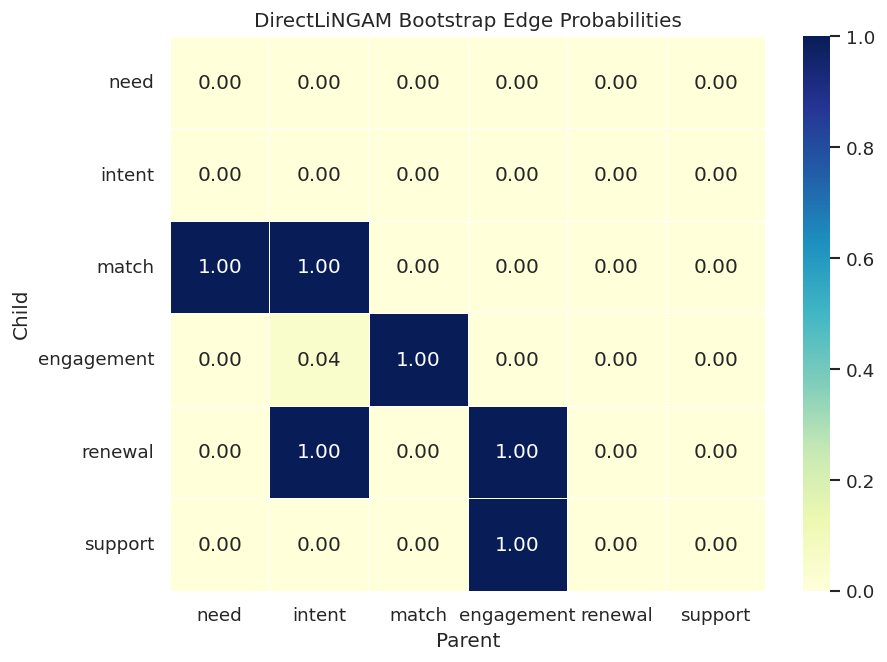
Edges with high bootstrap probability are more stable under row resampling. Low-probability edges should not be promoted to strong causal claims, even when they appear in one fitted graph.

Bootstrap Probability Heatmap

The bootstrap matrix has the same child-row, parent-column orientation as the coefficient matrix. Bright cells mean that a parent-child direction appeared in many bootstrap runs.

fig, ax = plt.subplots(figsize=(8, 6))
sns.heatmap(
    bootstrap_probability_df.loc[VARIABLES, VARIABLES],
    cmap="YlGnBu",
    vmin=0,
    vmax=1,
    annot=True,
    fmt=".2f",
    linewidths=0.5,
    ax=ax,
)
ax.set_title("DirectLiNGAM Bootstrap Edge Probabilities")
ax.set_xlabel("Parent")
ax.set_ylabel("Child")
fig.savefig(FIGURE_DIR / f"{NOTEBOOK_PREFIX}_bootstrap_edge_probabilities.png", dpi=160, bbox_inches="tight")
plt.show()

The true direct edges should have high probability in this controlled example. Any nonzero probability on a false edge is useful too: it tells us where the estimator occasionally sees a weak alternative explanation.

Total Effects and Paths

Direct coefficients describe immediate parent-child effects. LiNGAM can also estimate total effects along directed paths. Here we inspect total effects and the paths from need to renewal, where the true main route is need -> match -> engagement -> renewal.

total_effects = bootstrap_result.get_total_causal_effects(min_causal_effect=EDGE_THRESHOLD)
total_effect_table = pd.DataFrame(total_effects)
if not total_effect_table.empty:
    total_effect_table["from"] = total_effect_table["from"].map(lambda idx: VARIABLES[int(idx)])
    total_effect_table["to"] = total_effect_table["to"].map(lambda idx: VARIABLES[int(idx)])
total_effect_table.to_csv(TABLE_DIR / f"{NOTEBOOK_PREFIX}_bootstrap_total_effects.csv", index=False)
paths = bootstrap_result.get_paths(
    from_index=VARIABLES.index("need"),
    to_index=VARIABLES.index("renewal"),
    min_causal_effect=0.25,
)
path_table = pd.DataFrame(paths)
if not path_table.empty:
    path_table["path_labels"] = path_table["path"].apply(lambda path: " -> ".join(VARIABLES[int(idx)] for idx in path))
path_table.to_csv(TABLE_DIR / f"{NOTEBOOK_PREFIX}_need_to_renewal_paths.csv", index=False)
display(total_effect_table.head(12).round(4))
display(path_table.round(4))
from to effect probability
0 need match 0.7724 1.0
1 intent match 0.6980 1.0
2 need engagement 0.6504 1.0
3 intent engagement 0.6454 1.0
4 match engagement 0.8487 1.0
5 need renewal 0.4282 1.0
6 intent renewal 0.7289 1.0
7 match renewal 0.5403 1.0
8 engagement renewal 0.6469 1.0
9 need support 0.3438 1.0
10 intent support 0.3915 1.0
11 match support 0.5067 1.0
path effect probability path_labels
0 [0, 2, 3, 4] 0.4115 1.00 need -> match -> engagement -> renewal
1 [0, 2, 3, 5, 4] 0.0312 0.16 need -> match -> engagement -> support -> renewal
2 [0, 2, 5, 4] 0.0047 0.04 need -> match -> support -> renewal

Total effects can be helpful for decision questions, but they inherit every assumption behind the learned graph. In this lesson they are diagnostics; in real work they should be paired with domain review and robustness checks.

Compare LiNGAM with PC and GES

PC, GES, and LiNGAM answer related but different discovery questions. PC searches for conditional independence structure. GES searches over graph scores. LiNGAM uses a linear non-Gaussian structural model. Running them side by side helps separate discoveries that are robust across families from discoveries that depend heavily on one assumption set.

pc_result, pc_edges = run_pc_fisherz(nongaussian_df, label="PC_FisherZ", alpha=0.01)
ges_result, ges_edges = run_ges_bic(nongaussian_df, label="GES_BIC")
comparison_edges = pd.concat(
    [
        direct_lingam_edges[["run", "source", "edge_type", "target"]],
        pc_edges,
        ges_edges,
    ],
    ignore_index=True,
)
comparison_metrics = pd.concat(
    [
        summarize_against_truth(direct_lingam_edges, true_edge_table, "DirectLiNGAM"),
        summarize_against_truth(pc_edges, true_edge_table, "PC_FisherZ"),
        summarize_against_truth(ges_edges, true_edge_table, "GES_BIC"),
    ],
    ignore_index=True,
)
comparison_edges.to_csv(TABLE_DIR / f"{NOTEBOOK_PREFIX}_lingam_pc_ges_edges.csv", index=False)
comparison_metrics.to_csv(TABLE_DIR / f"{NOTEBOOK_PREFIX}_lingam_pc_ges_metrics.csv", index=False)
display(comparison_edges)
display(comparison_metrics.round(4))
run source edge_type target
0 DirectLiNGAM engagement --> renewal
1 DirectLiNGAM engagement --> support
2 DirectLiNGAM intent --> match
3 DirectLiNGAM intent --> renewal
4 DirectLiNGAM match --> engagement
5 DirectLiNGAM need --> match
6 PC_FisherZ need --> match
7 PC_FisherZ intent --> match
8 PC_FisherZ intent --> renewal
9 PC_FisherZ match --> engagement
10 PC_FisherZ engagement --> renewal
11 PC_FisherZ engagement --> support
12 GES_BIC need --> match
13 GES_BIC intent --> match
14 GES_BIC intent --> renewal
15 GES_BIC match --> engagement
16 GES_BIC engagement --> renewal
17 GES_BIC engagement --> support
run learned_edges_total definite_directed_edges true_edges correct_directed_edges directed_precision directed_recall reversed_true_edges unresolved_true_adjacencies missing_true_adjacencies extra_adjacencies
0 DirectLiNGAM 6 6 6 6 1.0 1.0 0 0 0 0
1 PC_FisherZ 6 6 6 6 1.0 1.0 0 0 0 0
2 GES_BIC 6 6 6 6 1.0 1.0 0 0 0 0

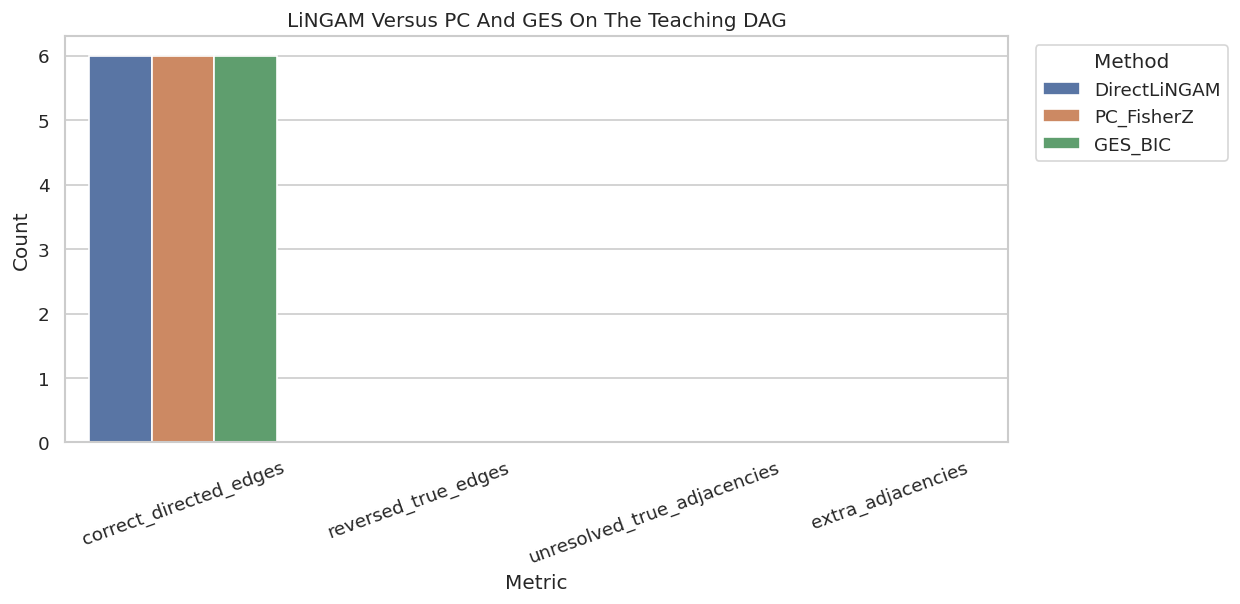
On this clean six-variable system, all three methods may do well because the graph has enough structure to orient the key edges. The two-variable demo above is the sharper example of LiNGAM’s directional advantage.

Plot Method-Level Metrics

A compact metric plot makes it easier to compare recovery patterns across algorithm families. The bars focus on directed recovery and adjacency mistakes rather than coefficient accuracy.

metric_plot_df = comparison_metrics.melt(
    id_vars="run",
    value_vars=["correct_directed_edges", "reversed_true_edges", "unresolved_true_adjacencies", "extra_adjacencies"],
    var_name="metric",
    value_name="count",
)
fig, ax = plt.subplots(figsize=(10.5, 5.2))
sns.barplot(data=metric_plot_df, x="metric", y="count", hue="run", ax=ax)
ax.set_title("LiNGAM Versus PC And GES On The Teaching DAG")
ax.set_xlabel("Metric")
ax.set_ylabel("Count")
ax.tick_params(axis="x", rotation=20)
ax.legend(title="Method", bbox_to_anchor=(1.02, 1), loc="upper left")
plt.tight_layout()
fig.savefig(FIGURE_DIR / f"{NOTEBOOK_PREFIX}_method_comparison_metrics.png", dpi=160, bbox_inches="tight")
plt.show()

When several methods agree, the edge is easier to trust as a structural hypothesis. When they disagree, the next step is not to vote blindly; it is to ask which assumptions are most credible for the domain and dataset.

Threshold Sensitivity

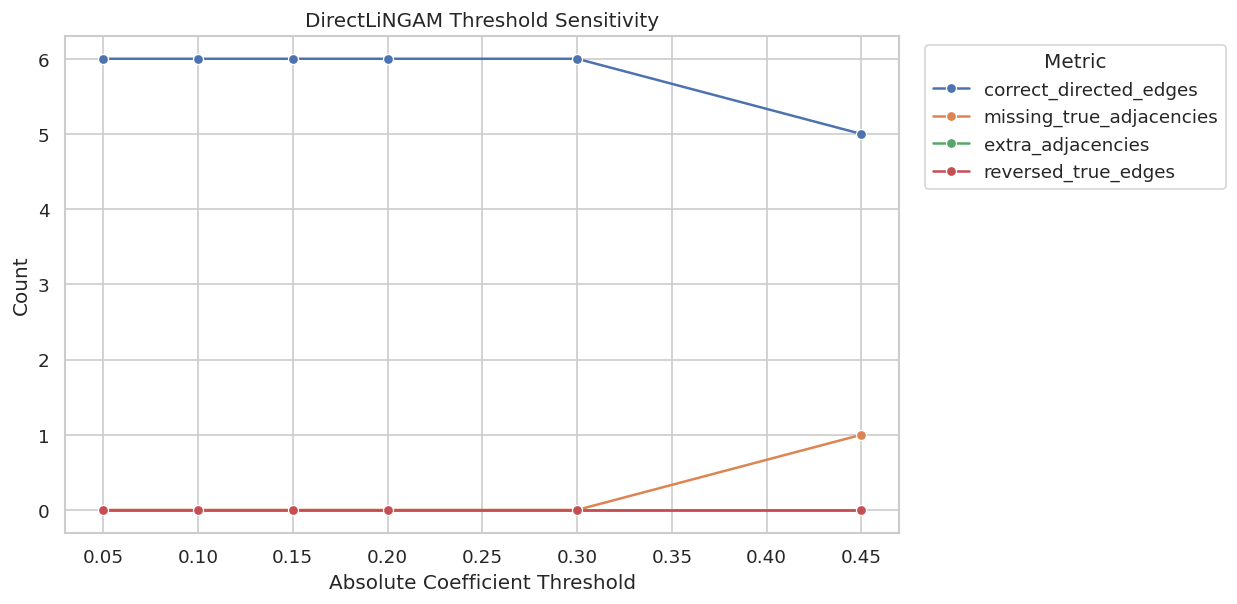
LiNGAM returns dense numerical coefficient matrices. Reporting requires a threshold, and thresholds can change the edge set. The code below reruns the graph metrics across several absolute-coefficient thresholds for DirectLiNGAM.

threshold_rows = []
threshold_edges = []
for threshold in [0.05, 0.10, 0.15, 0.20, 0.30, 0.45]:
    edge_table = lingam_adjacency_to_edge_table(
        direct_model.adjacency_matrix_,
        VARIABLES,
        label=f"threshold_{threshold:.2f}",
        threshold=threshold,
    )
    metric_table = summarize_against_truth(edge_table, true_edge_table, label=f"threshold_{threshold:.2f}")
    metric_table["threshold"] = threshold
    threshold_rows.append(metric_table)
    edge_table["threshold"] = threshold
    threshold_edges.append(edge_table)
threshold_metrics = pd.concat(threshold_rows, ignore_index=True)
threshold_edge_table = pd.concat(threshold_edges, ignore_index=True)
threshold_metrics.to_csv(TABLE_DIR / f"{NOTEBOOK_PREFIX}_threshold_sensitivity_metrics.csv", index=False)
threshold_edge_table.to_csv(TABLE_DIR / f"{NOTEBOOK_PREFIX}_threshold_sensitivity_edges.csv", index=False)
display(threshold_metrics.round(4))
run learned_edges_total definite_directed_edges true_edges correct_directed_edges directed_precision directed_recall reversed_true_edges unresolved_true_adjacencies missing_true_adjacencies extra_adjacencies threshold
0 threshold_0.05 6 6 6 6 1.0 1.0000 0 0 0 0 0.05
1 threshold_0.10 6 6 6 6 1.0 1.0000 0 0 0 0 0.10
2 threshold_0.15 6 6 6 6 1.0 1.0000 0 0 0 0 0.15
3 threshold_0.20 6 6 6 6 1.0 1.0000 0 0 0 0 0.20
4 threshold_0.30 6 6 6 6 1.0 1.0000 0 0 0 0 0.30
5 threshold_0.45 5 5 6 5 1.0 0.8333 0 0 1 0 0.45

A good threshold should remove tiny unstable coefficients without deleting meaningful true edges. In real data, this table should be shown alongside bootstrap probabilities rather than used as a standalone tuning exercise.

Plot Threshold Sensitivity

This plot shows how the reported graph changes as the coefficient threshold becomes more conservative.

threshold_plot_df = threshold_metrics.melt(
    id_vars=["run", "threshold"],
    value_vars=["correct_directed_edges", "missing_true_adjacencies", "extra_adjacencies", "reversed_true_edges"],
    var_name="metric",
    value_name="count",
)
fig, ax = plt.subplots(figsize=(10.5, 5.2))
sns.lineplot(data=threshold_plot_df, x="threshold", y="count", hue="metric", marker="o", ax=ax)
ax.set_title("DirectLiNGAM Threshold Sensitivity")
ax.set_xlabel("Absolute Coefficient Threshold")
ax.set_ylabel("Count")
ax.legend(title="Metric", bbox_to_anchor=(1.02, 1), loc="upper left")
plt.tight_layout()
fig.savefig(FIGURE_DIR / f"{NOTEBOOK_PREFIX}_threshold_sensitivity.png", dpi=160, bbox_inches="tight")
plt.show()

The curve helps expose brittle conclusions. If one edge appears only at a very permissive threshold and has low bootstrap probability, it should be labeled exploratory.

Gaussian Control Stress Test

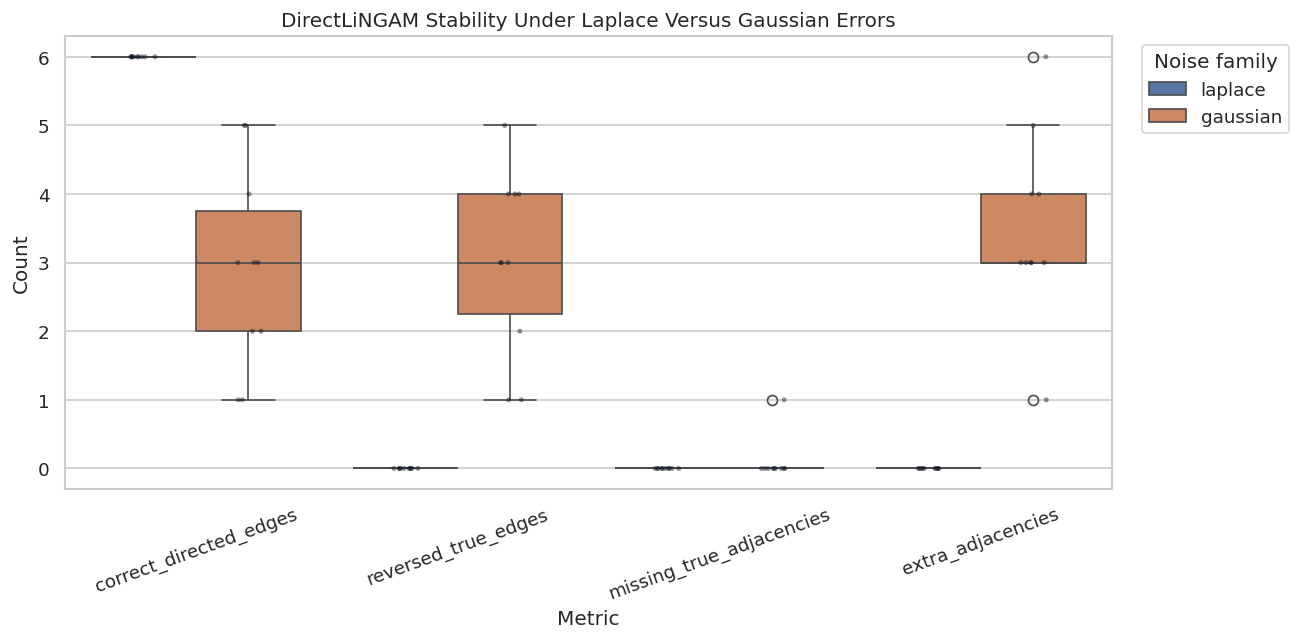
LiNGAM is designed for non-Gaussian errors. To see why that matters, we repeatedly simulate the same structural graph under Laplace and Gaussian errors, fit DirectLiNGAM, and compare recovery metrics. The coefficient structure is unchanged; only the noise family changes.

# Fit or evaluate the model objects used in the Gaussian Control Stress Test section.
stress_rows = []
for noise_family in ["laplace", "gaussian"]:
    for seed in range(20, 30):
        simulated_df = simulate_linear_system(n_samples=800, noise=noise_family, seed=seed)
        model = DirectLiNGAM(random_state=seed)
        model.fit(simulated_df.to_numpy())
        edge_table = lingam_adjacency_to_edge_table(
            model.adjacency_matrix_,
            VARIABLES,
            label=f"{noise_family}_{seed}",
            threshold=EDGE_THRESHOLD,
        )
        metrics = summarize_against_truth(edge_table, true_edge_table, label=f"{noise_family}_{seed}")
        metrics["noise_family"] = noise_family
        metrics["seed"] = seed
        stress_rows.append(metrics)
noise_stress_metrics = pd.concat(stress_rows, ignore_index=True)
noise_stress_metrics.to_csv(TABLE_DIR / f"{NOTEBOOK_PREFIX}_noise_family_stress_metrics.csv", index=False)
display(
    noise_stress_metrics.groupby("noise_family")[[
        "correct_directed_edges",
        "reversed_true_edges",
        "missing_true_adjacencies",
        "extra_adjacencies",
    ]]
    .agg(["mean", "min", "max"])
    .round(3)
)
correct_directed_edges reversed_true_edges missing_true_adjacencies extra_adjacencies
mean min max mean min max mean min max mean min max
noise_family
gaussian 2.9 1 5 3.0 1 5 0.1 0 1 3.5 1 6
laplace 6.0 6 6 0.0 0 0 0.0 0 0 0.0 0 0

The stress test is small, but it makes the assumption visible. If the Gaussian-control results are less stable, that is not a bug in LiNGAM; it is the model telling us that its identifying information has been weakened.

Plot the Noise-Family Stress Test

The grouped summary above is useful, but a plot shows the run-to-run spread more clearly.

# Build and label the diagnostic visualization for the Plot The Noise-Family Stress Test section.
noise_plot_df = noise_stress_metrics.melt(
    id_vars=["run", "noise_family", "seed"],
    value_vars=["correct_directed_edges", "reversed_true_edges", "missing_true_adjacencies", "extra_adjacencies"],
    var_name="metric",
    value_name="count",
)
fig, ax = plt.subplots(figsize=(11, 5.5))
sns.boxplot(data=noise_plot_df, x="metric", y="count", hue="noise_family", ax=ax)
sns.stripplot(
    data=noise_plot_df,
    x="metric",
    y="count",
    hue="noise_family",
    dodge=True,
    palette={"laplace": "#111827", "gaussian": "#111827"},
    alpha=0.45,
    size=3,
    legend=False,
    ax=ax,
)
ax.set_title("DirectLiNGAM Stability Under Laplace Versus Gaussian Errors")
ax.set_xlabel("Metric")
ax.set_ylabel("Count")
ax.tick_params(axis="x", rotation=20)
ax.legend(title="Noise family", bbox_to_anchor=(1.02, 1), loc="upper left")
plt.tight_layout()
fig.savefig(FIGURE_DIR / f"{NOTEBOOK_PREFIX}_noise_family_stress_test.png", dpi=160, bbox_inches="tight")
plt.show()

This is the practical habit to build: whenever a method depends on a strong assumption, create a stress test that changes that assumption while holding the structural story fixed. It makes the model’s comfort zone concrete.

Reporting and Takeaways

Practical Reporting Checklist

A LiNGAM report should be more than a graph screenshot. This checklist records the minimum context needed for a reader to understand what was estimated, why the method was plausible, and where the result is fragile.

item what_to_report why_it_matters
State the structural assumptions Linearity, acyclicity, independent errors, and non-Gaussianity. These assumptions are what allow LiNGAM to orient edges beyond Markov equivalence.
Show distribution diagnostics Skewness, excess kurtosis, normality checks, and domain reasons for non-Gaussian errors. Observed diagnostics reveal obvious mismatch and help decide whether the assumption is plausible enough to use.
Report matrix orientation Rows are children and columns are parents in the LiNGAM adjacency matrix. Misreading matrix orientation reverses causal stories.
Save threshold sensitivity Edge sets and metrics under multiple coefficient thresholds. Small coefficients should not quietly drive major claims.
Use stability diagnostics Bootstrap edge probabilities, path probabilities, and method comparisons. Stable edges are more credible than one-run results.
Compare with other discovery families Agreement and disagreement with PC, GES, or domain-constrained alternatives. Disagreement reveals assumption-sensitive conclusions.

The checklist is deliberately practical. In a portfolio or production-style analysis, the graph is only one output; the assumption audit and stability checks are what make the graph defensible.

Summary

This section now gives a complete LiNGAM workflow covering assumption framing, synthetic data with known truth, model fitting, graph recovery metrics, coefficient review, bootstrap stability, comparison with PC/GES, assumption stress testing, and reporting guidance.

The sequence next moves from linear non-Gaussian models to nonlinear functional causal models, where the direction signal comes from asymmetric regression residuals rather than linear ICA structure.