causal-learn Tutorial 08: Score-Based Discovery With GES
The earlier causal-learn notebooks focused mostly on constraint-based discovery: PC, FCI, and CD-NOD search for graphs by asking many conditional independence questions. This notebook switches to a different family: score-based discovery.
Score-based discovery assigns each candidate graph a numerical score and searches for a graph that improves that score. The central algorithm here is GES, or Greedy Equivalence Search. GES does not test one conditional independence statement at a time. Instead, it searches over graph structures, adding and deleting edges when those operations improve a decomposable score such as BIC or BDeu.
The practical goals are:
understand what GES is optimizing;
run GES with a BIC-style score on continuous data;
compare GES with PC on the same synthetic graph;
study how penalty strength, sample size, and model mismatch affect score-based discovery;
run a small BDeu example for discrete data;
practice careful reporting for score-based graph search.
Runtime Note
This notebook is designed to execute quickly by default, usually in about 1-3 minutes on the current dataset and environment. It runs BIC-style GES and a small BDeu example.
causal-learn also exposes kernel/RKHS-style scores such as local_score_CV_general and local_score_marginal_general. Those can be useful for nonlinear settings, but on this 2,500-row teaching dataset they can take 5-15+ minutes depending on the machine and may emit numerical warnings. For a tutorial notebook, that is too much waiting for the main path, so those slower score families are discussed as optional extensions rather than executed by default.
Notebook Flow
We will work through score-based discovery in this order:
Set up imports, paths, GES, PC, and reusable graph helpers.
Load the synthetic datasets created earlier in the tutorial series.
Explain GES, BIC, BDeu, and the forward/backward greedy search idea.
Run BIC-GES on the linear Gaussian dataset.
Compare GES with PC on the same data.
Inspect GES update history, penalty sensitivity, and sample-size sensitivity.
Stress-test BIC-GES on non-Gaussian and nonlinear data.
Run BDeu-GES on the discrete teaching dataset.
Save a reporting checklist and artifact manifest.
As in the previous notebooks, every code cell has explanation before it and a short discussion after it.
GES Theory
GES, or Greedy Equivalence Search, is a score-based causal discovery algorithm. Instead of asking many conditional independence questions directly, it searches for a graph that optimizes a numerical score.
The score typically rewards goodness of fit and penalizes complexity. For continuous linear Gaussian data, BIC-style scores are common. A graph with more parents can fit the data better, but the penalty discourages adding edges that do not improve the model enough.
GES is greedy: it follows local score-improving moves. This makes it much more scalable than exact search, but it also means the path through graph space matters.
Decomposable Scores
GES works efficiently because many graph scores are decomposable. A decomposable score can be written as a sum of local node scores:
\[
S(G) = \sum_i S_i(\mathrm{Pa}(X_i))
\]
This means the contribution for X_i depends only on the parent set of X_i. If a proposed move changes only the parents of one node, the algorithm can update only that local score rather than refitting the entire graph from scratch.
Decomposability is one reason score-based discovery can be practical. It is also why parent-set assumptions and score choice matter so much.
BIC And Complexity Penalties
BIC balances model fit against model complexity. In causal discovery, adding an edge usually adds a parameter because the child variable gets another parent. More parameters can improve fit, but they can also overfit sample noise.
A BIC-style score therefore asks: does the improvement in likelihood justify the extra complexity? If yes, the edge may be added. If no, the penalty wins and the simpler graph is preferred.
The penalty strength is not just a technicality. Stronger penalties produce sparser graphs; weaker penalties allow denser graphs. This is why the GES notebook includes penalty sensitivity.
Equivalence Classes Rather Than Single DAGs
GES searches over Markov equivalence classes rather than treating every DAG orientation as uniquely identifiable. Multiple DAGs can imply the same conditional independence structure and receive equivalent scores under common assumptions.
The output is often represented as a CPDAG-like graph. Directed edges are compelled across the equivalence class; undirected edges are not uniquely oriented by the score and assumptions.
This is conceptually similar to PC’s CPDAG output. Both methods can leave edges unoriented when observational information does not compel a direction.
Forward And Backward Phases
GES usually has two main phases.
The forward phase starts from an empty graph and greedily adds edges or edge patterns that improve the score. This phase increases model complexity when the fit improvement is worthwhile.
The backward phase starts from the forward result and greedily deletes edges when removal improves the score. This phase corrects some over-addition from the forward phase and searches for a better sparse explanation.
Some implementations also include turning or refinement steps. The key idea remains the same: local moves are accepted when they improve the score.
Score Assumptions And Model Mismatch
A score is not neutral. A linear Gaussian BIC score is most appropriate when the data are reasonably modeled by linear relationships with Gaussian residuals. If the true mechanisms are nonlinear, discrete, heavy-tailed, or heteroskedastic, the score may prefer a graph that is statistically convenient rather than causally correct.
This is why a score-based workflow should include mechanism checks and alternative scores when appropriate. For discrete data, a BDeu-style score may be more natural than a continuous BIC score.
The graph should be interpreted as the best explanation under the chosen score, penalty, and search procedure, not as a score-free causal truth.
What GES Can And Cannot Claim
GES can efficiently search large graph spaces and often performs well when its score assumptions match the data. It is useful as a complement to PC because it approaches discovery through model fit rather than direct independence testing.
GES cannot guarantee a global optimum. It is greedy, so local decisions can affect the final graph. It also cannot identify directions that are not identifiable under the observational equivalence class without additional assumptions.
A good GES report documents the score, penalty, data type, search settings, sample-size sensitivity, and any comparison to constraint-based or exact-search results.
Setup
This setup cell imports the scientific stack, GES, PC, and plotting utilities. It also applies a small local compatibility wrapper for causal-learn’s BIC score in this Python/NumPy environment. The wrapper fixes scalar extraction from a one-element matrix and does not edit the installed package on disk.
from pathlib import Pathfrom importlib.metadata import PackageNotFoundError, versionimport contextlibimport ioimport osimport warnings# Keep matplotlib cache writes inside the repository so notebook execution works in restricted environments.os.environ.setdefault("MPLCONFIGDIR", str(Path.cwd() /".matplotlib_cache"))warnings.filterwarnings("ignore", message="IProgress not found.*")warnings.filterwarnings("ignore", message=".*pkg_resources is deprecated.*")import numpy as npimport pandas as pdimport matplotlib.pyplot as pltimport seaborn as snsfrom IPython.display import displayfrom matplotlib.patches import FancyArrowPatch, FancyBboxPatchimport causallearn.search.ScoreBased.GES as ges_modulefrom causallearn.search.ScoreBased.GES import gesfrom causallearn.search.ConstraintBased.PC import pc# Resolve paths whether the notebook is run from the repository root or from this notebook folder.CWD = Path.cwd()if CWD.name =="causal_learn"and (CWD /"outputs").exists(): NOTEBOOK_DIR = CWDelse: NOTEBOOK_DIR = (CWD /"notebooks"/"tutorials"/"causal_learn").resolve()OUTPUT_DIR = NOTEBOOK_DIR /"outputs"DATASET_DIR = OUTPUT_DIR /"datasets"TABLE_DIR = OUTPUT_DIR /"tables"FIGURE_DIR = OUTPUT_DIR /"figures"for directory in [OUTPUT_DIR, DATASET_DIR, TABLE_DIR, FIGURE_DIR]: directory.mkdir(parents=True, exist_ok=True)NOTEBOOK_PREFIX ="08"sns.set_theme(style="whitegrid", context="notebook")plt.rcParams["figure.dpi"] =120plt.rcParams["savefig.facecolor"] ="white"def local_score_BIC_from_cov(Data, i, PAi, parameters=None):"""Compatibility wrapper for causal-learn BIC score under recent NumPy scalar behavior.""" cov, n = Data lambda_value =0.5if parameters isNoneelse parameters.get("lambda_value", 0.5) sigma =float(cov[i, i])iflen(PAi) >0: yX = cov[np.ix_([i], PAi)] XX = cov[np.ix_(PAi, PAi)]try: XX_inv = np.linalg.inv(XX)except np.linalg.LinAlgError: XX_inv = np.linalg.pinv(XX) sigma =float(cov[i, i] - (yX @ XX_inv @ yX.T).item()) sigma =max(sigma, 1e-12)return-0.5* n * (1+ np.log(sigma)) - lambda_value * (len(PAi) +1) * np.log(n)# Patch only the imported module object used during this notebook session.ges_module.local_score_BIC_from_cov = local_score_BIC_from_covpackages = ["causal-learn", "numpy", "pandas", "matplotlib", "seaborn"]version_rows = []for package in packages:try: package_version = version(package)except PackageNotFoundError: package_version ="not installed" version_rows.append({"package": package, "version": package_version})package_versions = pd.DataFrame(version_rows)package_versions.to_csv(TABLE_DIR /f"{NOTEBOOK_PREFIX}_package_versions.csv", index=False)display(package_versions)
package
version
0
causal-learn
0.1.4.5
1
numpy
2.4.4
2
pandas
3.0.2
3
matplotlib
3.10.9
4
seaborn
0.13.2
The version table and compatibility wrapper make the notebook reproducible in this environment. The wrapper preserves the same BIC formula; it only converts a one-element NumPy result into a Python scalar before scoring.
Load Teaching Datasets
We use four datasets from the synthetic data factory:
02_linear_gaussian.csv: the best match for BIC-GES because the score assumes linear Gaussian local regressions;
02_linear_nongaussian.csv: same broad graph family but with non-Gaussian noise;
02_nonlinear_continuous.csv: a deliberate mismatch for linear Gaussian BIC;
02_discrete_mixed.csv: a small discrete example for BDeu-GES.
The true edge tables are loaded only for tutorial evaluation. Real causal discovery work would not know the true graph.
# Load datasets and true edge lists created by tutorial notebook 02.dataset_paths = {"linear_gaussian": DATASET_DIR /"02_linear_gaussian.csv","linear_nongaussian": DATASET_DIR /"02_linear_nongaussian.csv","nonlinear_continuous": DATASET_DIR /"02_nonlinear_continuous.csv","discrete_mixed": DATASET_DIR /"02_discrete_mixed.csv",}true_edge_path = TABLE_DIR /"02_base_true_dag_edges.csv"discrete_true_edge_path = TABLE_DIR /"02_discrete_mixed_true_edges.csv"required_paths =list(dataset_paths.values()) + [true_edge_path, discrete_true_edge_path]missing_paths = [str(path) for path in required_paths ifnot path.exists()]if missing_paths:raiseFileNotFoundError("Run tutorial notebook 02 first. Missing files: "+", ".join(missing_paths))datasets = {name: pd.read_csv(path) for name, path in dataset_paths.items()}true_edges = pd.read_csv(true_edge_path)discrete_true_edges = pd.read_csv(discrete_true_edge_path)VARIABLES =list(datasets["linear_gaussian"].columns)loaded_summary = pd.DataFrame( [ {"dataset": name,"rows": len(df),"columns": df.shape[1],"missing_cells": int(df.isna().sum().sum()),"source_file": dataset_paths[name].name, }for name, df in datasets.items() ])loaded_summary.to_csv(TABLE_DIR /f"{NOTEBOOK_PREFIX}_loaded_dataset_summary.csv", index=False)display(loaded_summary)display(datasets["linear_gaussian"].head())display(true_edges)
dataset
rows
columns
missing_cells
source_file
0
linear_gaussian
2500
6
0
02_linear_gaussian.csv
1
linear_nongaussian
2500
6
0
02_linear_nongaussian.csv
2
nonlinear_continuous
2500
6
0
02_nonlinear_continuous.csv
3
discrete_mixed
2500
6
0
02_discrete_mixed.csv
need
intent
match
engagement
renewal
support
0
0.249820
-0.372094
0.060245
0.667197
0.252766
-0.280058
1
0.683671
-0.210471
0.904969
1.004727
0.320095
-0.332215
2
-0.579752
-1.202671
-0.578579
-0.235444
-0.732431
0.594102
3
-0.902823
-0.077309
-0.771219
-0.531128
-0.105721
-1.503551
4
-1.985745
0.087297
-0.691315
-1.281731
-0.797906
-0.328219
source
target
edge_type
mechanism
0
need
match
directed
Need changes what a good match means.
1
intent
match
directed
Current intent changes recommendation relevance.
2
match
engagement
directed
Better matching increases engagement depth.
3
intent
renewal
directed
Intent directly affects later value.
4
engagement
renewal
directed
Engagement contributes to renewal value.
5
engagement
support
directed
Engagement creates more chances for support co...
All datasets use the same six observed variables, which makes graph comparisons straightforward. The first run will use linear_gaussian because BIC-GES is best aligned with that data-generating setup.
GES Concept Map
GES searches over equivalence classes of DAGs rather than testing individual conditional independence statements. It usually has two major stages: a forward stage that greedily inserts edges to improve the score, and a backward stage that deletes edges if doing so improves the score.
The output should be read as a candidate equivalence-class graph. Some directions may be compelled, while other adjacencies may remain unoriented because several DAGs can have the same score under the assumptions.
# Summarize the key score-based discovery concepts used in this notebook.ges_concepts = pd.DataFrame( [ {"concept": "score-based discovery","plain_language": "Search for a graph that optimizes a numerical fit-plus-penalty score.","why_it_matters": "The result depends on score assumptions and search choices, not only independence tests.", }, {"concept": "GES forward phase","plain_language": "Greedily insert edges or operators that improve the graph score.","why_it_matters": "Early additions can shape the graph neighborhood explored later.", }, {"concept": "GES backward phase","plain_language": "Delete edges or operators when deletion improves the score.","why_it_matters": "The backward phase can simplify an overly dense forward graph.", }, {"concept": "BIC score","plain_language": "Fit a linear Gaussian local model and penalize parent-set complexity.","why_it_matters": "Good match for linear Gaussian data; weaker match for nonlinear mechanisms.", }, {"concept": "BDeu score","plain_language": "Score discrete Bayesian-network structures with Dirichlet priors.","why_it_matters": "Useful for categorical data when states and priors are documented.", }, ])ges_concepts.to_csv(TABLE_DIR /f"{NOTEBOOK_PREFIX}_ges_concept_map.csv", index=False)display(ges_concepts)
concept
plain_language
why_it_matters
0
score-based discovery
Search for a graph that optimizes a numerical ...
The result depends on score assumptions and se...
1
GES forward phase
Greedily insert edges or operators that improv...
Early additions can shape the graph neighborho...
2
GES backward phase
Delete edges or operators when deletion improv...
The backward phase can simplify an overly dens...
3
BIC score
Fit a linear Gaussian local model and penalize...
Good match for linear Gaussian data; weaker ma...
4
BDeu score
Score discrete Bayesian-network structures wit...
Useful for categorical data when states and pr...
The concept map sets up the rest of the notebook. The key shift from PC is that we are now asking whether a graph scores well under a modeling assumption, not whether a specific conditional independence test rejects or fails to reject.
Helper Functions
This helper cell defines graph conversion, metric, update-history, and plotting utilities. The graph helpers are similar to earlier notebooks so the visual language stays consistent across the tutorial series.
def parse_causallearn_edge(edge):"""Convert a causal-learn edge object into source, endpoint pattern, and target strings.""" parts =str(edge).strip().split()iflen(parts) !=3:return {"source": str(edge), "edge_type": "unknown", "target": "unknown"}return {"source": parts[0], "edge_type": parts[1], "target": parts[2]}def graph_to_edge_table(graph, label):"""Return a tidy edge table from a causal-learn graph object.""" rows = [parse_causallearn_edge(edge) for edge in graph.get_graph_edges()] edge_df = pd.DataFrame(rows, columns=["source", "edge_type", "target"])if edge_df.empty: edge_df = pd.DataFrame(columns=["source", "edge_type", "target"]) edge_df.insert(0, "run", label)return edge_dfdef directed_pairs(edge_df):"""Extract definite directed pairs from an edge table.""" pairs =set()for row in edge_df.itertuples(index=False):if row.edge_type =="-->": pairs.add((row.source, row.target))elif row.edge_type =="<--": pairs.add((row.target, row.source))return pairsdef skeleton_pairs(edge_df):"""Extract learned adjacencies while ignoring endpoint direction.""" pairs =set()for row in edge_df.itertuples(index=False):if row.target !="unknown": pairs.add(frozenset([row.source, row.target]))return pairsdef summarize_against_truth(edge_df, truth_df, label):"""Compute compact graph-recovery metrics against the synthetic truth table.""" true_directed =set(zip(truth_df["source"], truth_df["target"])) true_skeleton = {frozenset(edge) for edge in true_directed} learned_directed = directed_pairs(edge_df) learned_skeleton = skeleton_pairs(edge_df) correct_directed = learned_directed & true_directed reversed_true = {(src, dst) for src, dst in true_directed if (dst, src) in learned_directed} missing_skeleton = true_skeleton - learned_skeleton extra_skeleton = learned_skeleton - true_skeleton unresolved_true =0for src, dst in true_directed: pair =frozenset([src, dst])if pair in learned_skeleton and (src, dst) notin learned_directed and (dst, src) notin learned_directed: unresolved_true +=1 directed_count =len(learned_directed)return pd.DataFrame( [ {"run": label,"learned_edges_total": len(edge_df),"definite_directed_edges": directed_count,"true_edges": len(true_directed),"correct_directed_edges": len(correct_directed),"directed_precision": len(correct_directed) / directed_count if directed_count else np.nan,"directed_recall": len(correct_directed) /len(true_directed) if true_directed else np.nan,"reversed_true_edges": len(reversed_true),"unresolved_true_adjacencies": unresolved_true,"missing_true_adjacencies": len(missing_skeleton),"extra_adjacencies": len(extra_skeleton), } ] )def classify_edges(edge_df, truth_df):"""Label learned edges relative to the synthetic truth table.""" true_directed =set(zip(truth_df["source"], truth_df["target"])) true_skeleton = {frozenset(edge) for edge in true_directed} rows = []for row in edge_df.itertuples(index=False): pair =frozenset([row.source, row.target]) learned_direction =Noneif row.edge_type =="-->": learned_direction = (row.source, row.target)elif row.edge_type =="<--": learned_direction = (row.target, row.source)if learned_direction in true_directed: status ="correct directed edge"elif learned_direction and (learned_direction[1], learned_direction[0]) in true_directed: status ="reversed true edge"elif pair in true_skeleton: status ="true adjacency with uncertain or wrong endpoint"else: status ="extra adjacency" rows.append({"source": row.source, "edge_type": row.edge_type, "target": row.target, "status": status})return pd.DataFrame(rows)def run_ges_bic(data_df, label, lambda_value=0.5, maxP=None):"""Run BIC-GES quietly and return the record plus tidy edge table."""buffer= io.StringIO()with contextlib.redirect_stdout(buffer): record = ges( data_df.to_numpy(), score_func="local_score_BIC", node_names=list(data_df.columns), lambda_value=lambda_value, maxP=maxP, ) edge_table = graph_to_edge_table(record["G"], label=label) messages = pd.DataFrame({"run": label, "message": [line for line inbuffer.getvalue().splitlines() if line.strip()]})return record, edge_table, messagesdef run_pc_baseline(data_df, label):"""Run Fisher-Z PC as a constraint-based baseline.""" result = pc( data_df.to_numpy(), alpha=0.05, indep_test="fisherz", stable=True, show_progress=False, node_names=list(data_df.columns), )return graph_to_edge_table(result.G, label=label)def operation_table(record, variable_names):"""Summarize GES forward and backward updates using variable names.""" rows = []for phase, updates in [("forward_insert", record.get("update1", [])), ("backward_delete", record.get("update2", []))]:for step, update inenumerate(updates, start=1): source_idx, target_idx, conditioning_set = update rows.append( {"phase": phase,"step": step,"source_index": int(source_idx),"target_index": int(target_idx),"source_variable": variable_names[int(source_idx)],"target_variable": variable_names[int(target_idx)],"conditioning_set": [variable_names[int(idx)] for idx in conditioning_set], } )return pd.DataFrame(rows)GRAPH_POSITIONS = {"need": (0.11, 0.72),"intent": (0.11, 0.28),"match": (0.39, 0.50),"engagement": (0.62, 0.50),"renewal": (0.89, 0.72),"support": (0.89, 0.28),}NODE_LABELS = {name: name.title() for name in GRAPH_POSITIONS}NODE_COLORS = {"need": "#e0f2fe","intent": "#dbeafe","match": "#ecfccb","engagement": "#fef3c7","renewal": "#fee2e2","support": "#f3e8ff",}def trim_edge_to_box(start, end, box_w=0.145, box_h=0.095, gap=0.012):"""Return edge endpoints that stop just outside source and target boxes.""" x0, y0 = start x1, y1 = end dx = x1 - x0 dy = y1 - y0 length =float(np.hypot(dx, dy))if length ==0:return start, end effective_w = box_w +0.04 effective_h = box_h +0.04 x_limit = (effective_w /2) /abs(dx) if dx else np.inf y_limit = (effective_h /2) /abs(dy) if dy else np.inf t =min(x_limit, y_limit) + gap / lengthreturn (x0 + dx * t, y0 + dy * t), (x1 - dx * t, y1 - dy * t)def draw_box_graph(edge_df, title, path, note=None):"""Draw a DAG/CPDAG-style graph with rounded boxes and visible arrowheads.""" fig, ax = plt.subplots(figsize=(12, 6.2)) ax.set_axis_off() ax.set_xlim(-0.02, 1.02) ax.set_ylim(0.04, 0.96) box_w, box_h =0.145, 0.095for row in edge_df.itertuples(index=False):if row.source notin GRAPH_POSITIONS or row.target notin GRAPH_POSITIONS:continue raw_start = GRAPH_POSITIONS[row.source] raw_end = GRAPH_POSITIONS[row.target]if row.edge_type =="<--": raw_start, raw_end = raw_end, raw_start start, end = trim_edge_to_box(raw_start, raw_end, box_w=box_w, box_h=box_h)if row.edge_type in {"-->", "<--"}: arrowstyle ="-|>" mutation_scale =18 linewidth =1.8 color ="#334155"else: arrowstyle ="-" mutation_scale =1 linewidth =1.5 color ="#64748b" arrow = FancyArrowPatch( start, end, arrowstyle=arrowstyle, mutation_scale=mutation_scale, linewidth=linewidth, color=color, connectionstyle="arc3,rad=0.035", zorder=2, ) ax.add_patch(arrow)for node, (x, y) in GRAPH_POSITIONS.items(): rect = FancyBboxPatch( (x - box_w /2, y - box_h /2), box_w, box_h, boxstyle="round,pad=0.018", facecolor=NODE_COLORS[node], edgecolor="#1f2937", linewidth=1.1, zorder=5, ) ax.add_patch(rect) ax.text(x, y, NODE_LABELS[node], ha="center", va="center", fontsize=10.5, fontweight="bold", zorder=6)if note: ax.text(0.50, 0.08, note, ha="center", va="center", fontsize=10, color="#475569") ax.set_title(title, pad=18, fontsize=14, fontweight="bold") fig.savefig(path, dpi=160, bbox_inches="tight") plt.show()def truth_as_edge_table(truth_df, label="truth"):"""Convert a truth edge table to the plotting schema."""return truth_df.assign(run=label, edge_type="-->")[["run", "source", "edge_type", "target"]]
The helpers let us compare GES, PC, BIC penalties, sample sizes, and data-generating regimes using the same edge-table and graph-metric vocabulary.
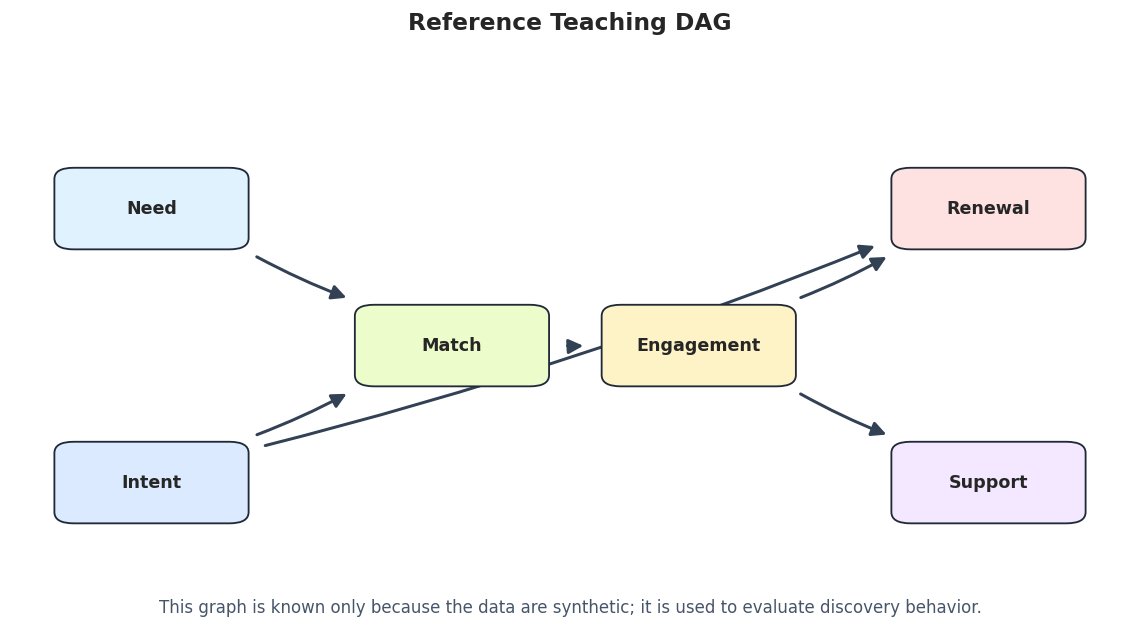
Draw The Reference Graph
The reference graph is the synthetic data-generating structure. It is included for teaching evaluation, not because real causal discovery work would know the answer in advance.
# Draw the reference teaching graph.true_edge_table = truth_as_edge_table(true_edges, label="true_graph")true_graph_path = FIGURE_DIR /f"{NOTEBOOK_PREFIX}_true_dag.png"draw_box_graph( true_edge_table, title="Reference Teaching DAG", path=true_graph_path, note="This graph is known only because the data are synthetic; it is used to evaluate discovery behavior.",)
The reference graph gives us a visual target for the score-based runs. BIC-GES should perform best on the linear Gaussian dataset because that is the closest match to the score assumptions.
Continuous Data Audit
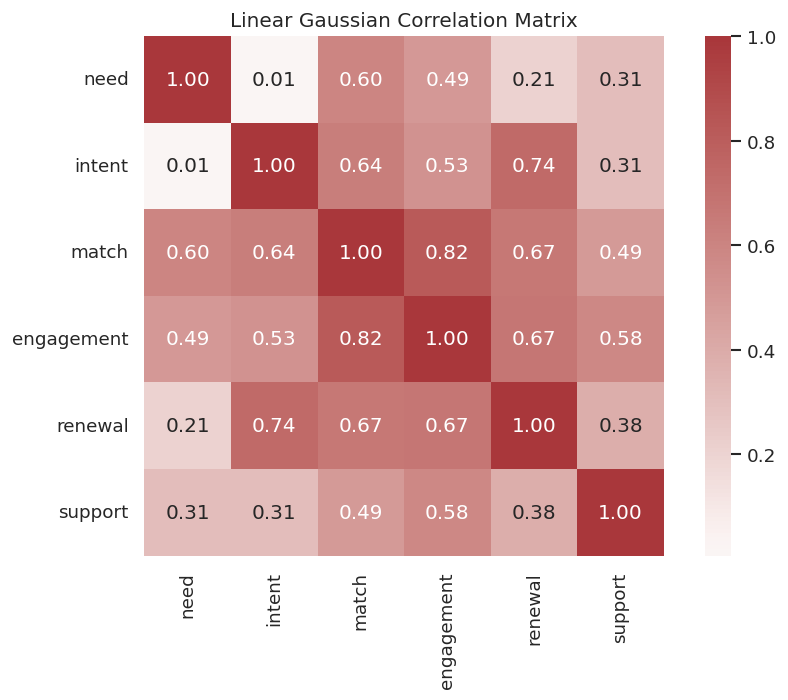
Before running a linear Gaussian score, we audit the linear Gaussian dataset. The BIC score uses covariance and local linear regressions, so the correlation structure is especially relevant.
# Summarize the continuous baseline data and save its correlation matrix.linear_df = datasets["linear_gaussian"]linear_audit = pd.DataFrame( {"variable": VARIABLES,"missing_rate": linear_df.isna().mean().reindex(VARIABLES).to_numpy(),"mean": linear_df.mean().reindex(VARIABLES).to_numpy(),"std": linear_df.std().reindex(VARIABLES).to_numpy(),"min": linear_df.min().reindex(VARIABLES).to_numpy(),"max": linear_df.max().reindex(VARIABLES).to_numpy(), })linear_corr = linear_df.corr()linear_audit.to_csv(TABLE_DIR /f"{NOTEBOOK_PREFIX}_linear_gaussian_data_audit.csv", index=False)linear_corr.to_csv(TABLE_DIR /f"{NOTEBOOK_PREFIX}_linear_gaussian_correlation_matrix.csv")display(linear_audit)display(linear_corr.round(3))
variable
missing_rate
mean
std
min
max
0
need
0.0
3.552714e-18
1.0002
-3.371900
3.316358
1
intent
0.0
-9.947598e-18
1.0002
-3.467962
3.389982
2
match
0.0
-3.552714e-19
1.0002
-3.596272
3.917631
3
engagement
0.0
-1.776357e-18
1.0002
-3.404627
3.469112
4
renewal
0.0
-8.526513e-18
1.0002
-3.418065
3.122549
5
support
0.0
1.563194e-17
1.0002
-3.250120
3.174916
need
intent
match
engagement
renewal
support
need
1.000
0.007
0.595
0.494
0.211
0.311
intent
0.007
1.000
0.638
0.529
0.735
0.307
match
0.595
0.638
1.000
0.821
0.665
0.489
engagement
0.494
0.529
0.821
1.000
0.670
0.582
renewal
0.211
0.735
0.665
0.670
1.000
0.384
support
0.311
0.307
0.489
0.582
0.384
1.000
The data are complete and centered enough for a clean tutorial example. The correlation matrix shows dependence structure, but GES will use a graph score rather than treating pairwise correlations as graph edges.
Plot The Correlation Matrix
The heatmap gives a visual sense of the dependence structure that the score-based search will try to explain through parent sets.
The heatmap is only a diagnostic. The next cell runs GES and asks which graph scores best under the local linear Gaussian BIC objective.
Baseline BIC-GES On Linear Gaussian Data
This is the main GES run. We use the standard BIC penalty coefficient lambda_value=0.5, which corresponds to the usual BIC-style complexity penalty in causal-learn’s implementation.
On the linear Gaussian teaching data, BIC-GES recovers the intended graph cleanly. This is the friendly case: the data-generating assumptions line up well with the score.
Draw The Baseline GES Graph
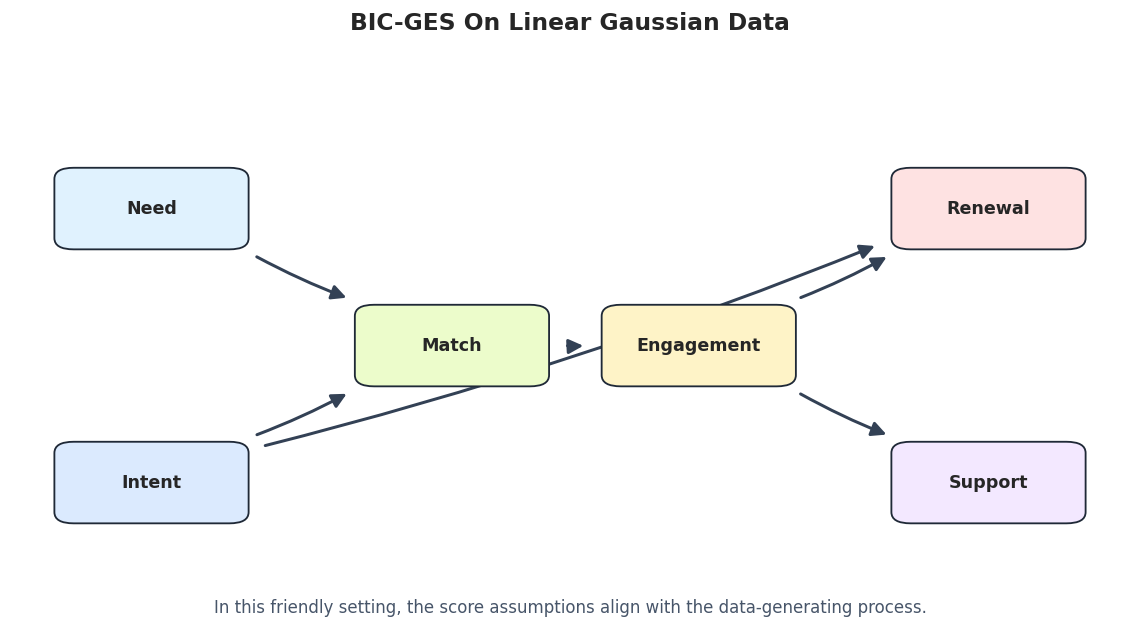
The graph below is the baseline score-based discovery result. It should look familiar from the PC notebook because this synthetic dataset was intentionally easy for both Fisher-Z PC and BIC-GES.
# Draw and save the baseline GES graph.baseline_ges_graph_path = FIGURE_DIR /f"{NOTEBOOK_PREFIX}_baseline_ges_graph.png"draw_box_graph( ges_edges, title="BIC-GES On Linear Gaussian Data", path=baseline_ges_graph_path, note="In this friendly setting, the score assumptions align with the data-generating process.",)
The graph is clean because the example is well matched to BIC-GES. The next section opens the search record so students can see that GES reached this graph through forward and backward operations.
GES Update History
GES is greedy: it records forward insert operations and backward delete operations. The raw update objects are index-based, so this cell maps them back to variable names.
# Summarize the forward and backward GES update history.ges_updates = operation_table(ges_record, VARIABLES)ges_updates.to_csv(TABLE_DIR /f"{NOTEBOOK_PREFIX}_baseline_ges_update_history.csv", index=False)display(ges_updates)
phase
step
source_index
target_index
source_variable
target_variable
conditioning_set
0
forward_insert
1
2
3
match
engagement
[]
1
forward_insert
2
4
1
renewal
intent
[]
2
forward_insert
3
4
3
renewal
engagement
[]
3
forward_insert
4
2
0
match
need
[]
4
forward_insert
5
1
0
intent
need
[match]
5
forward_insert
6
3
5
engagement
support
[]
6
forward_insert
7
1
2
intent
match
[engagement]
7
forward_insert
8
1
3
intent
engagement
[]
8
backward_delete
1
0
1
need
intent
[match]
9
backward_delete
2
1
3
intent
engagement
[]
The update table shows the search path rather than just the final graph. This is useful when debugging a score-based result because two final graphs can have similar scores but different search trajectories.
Compare GES With PC
Now we run PC on the same linear Gaussian dataset. This is not a contest to crown one method permanently better. It is a controlled comparison between constraint-based and score-based discovery under friendly assumptions.
# Run PC on the same linear Gaussian data and compare with GES.pc_edges = run_pc_baseline(linear_df, label="pc_fisherz_linear_gaussian")pc_metrics = summarize_against_truth(pc_edges, true_edges, "pc_fisherz_linear_gaussian")pc_classified = classify_edges(pc_edges, true_edges)pc_edges.to_csv(TABLE_DIR /f"{NOTEBOOK_PREFIX}_pc_baseline_edges.csv", index=False)pc_metrics.to_csv(TABLE_DIR /f"{NOTEBOOK_PREFIX}_pc_baseline_metrics.csv", index=False)pc_classified.to_csv(TABLE_DIR /f"{NOTEBOOK_PREFIX}_pc_baseline_edge_classification.csv", index=False)method_comparison = pd.concat([ges_metrics, pc_metrics], ignore_index=True)method_comparison.to_csv(TABLE_DIR /f"{NOTEBOOK_PREFIX}_ges_vs_pc_metrics.csv", index=False)display(pc_edges)display(method_comparison)
run
source
edge_type
target
0
pc_fisherz_linear_gaussian
need
-->
match
1
pc_fisherz_linear_gaussian
intent
-->
match
2
pc_fisherz_linear_gaussian
intent
-->
renewal
3
pc_fisherz_linear_gaussian
match
-->
engagement
4
pc_fisherz_linear_gaussian
engagement
-->
renewal
5
pc_fisherz_linear_gaussian
engagement
-->
support
run
learned_edges_total
definite_directed_edges
true_edges
correct_directed_edges
directed_precision
directed_recall
reversed_true_edges
unresolved_true_adjacencies
missing_true_adjacencies
extra_adjacencies
0
bic_ges_linear_gaussian
6
6
6
6
1.0
1.0
0
0
0
0
1
pc_fisherz_linear_gaussian
6
6
6
6
1.0
1.0
0
0
0
0
In this controlled case, both methods recover the graph well. That agreement is useful: when methods with different search logic agree under plausible assumptions, the candidate structure is easier to trust.
Plot GES Versus PC Metrics
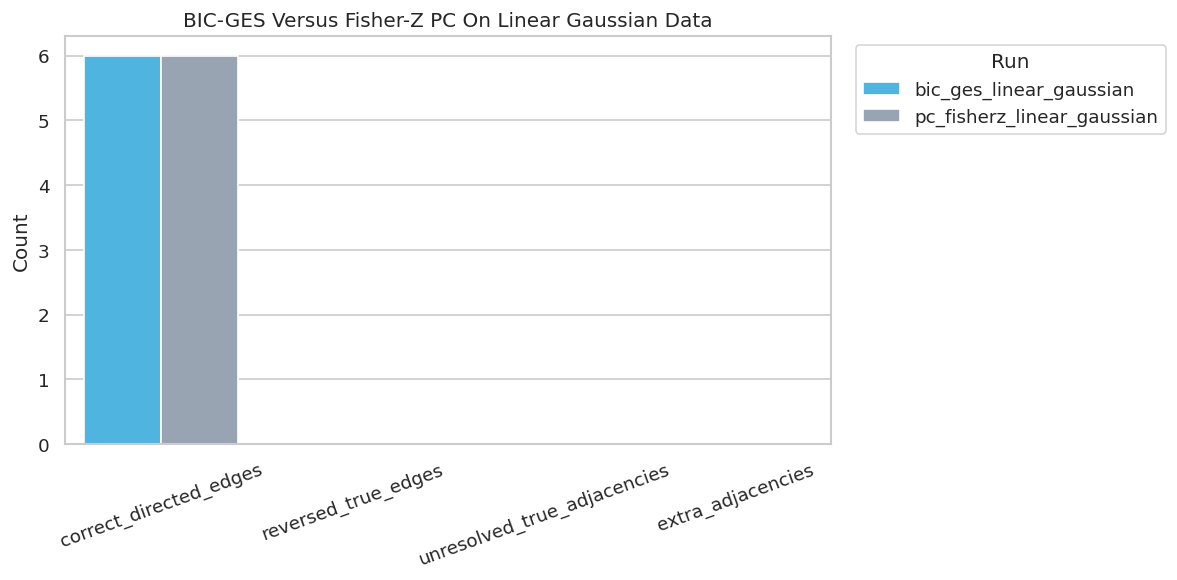
A compact plot makes the method comparison easier to scan. We focus on correct directed edges, reversed true edges, unresolved true adjacencies, and extra adjacencies.
# Plot GES and PC metric comparison.fig, ax = plt.subplots(figsize=(10, 5))plot_df = method_comparison.melt( id_vars="run", value_vars=["correct_directed_edges", "reversed_true_edges", "unresolved_true_adjacencies", "extra_adjacencies"], var_name="metric", value_name="count",)sns.barplot(data=plot_df, x="metric", y="count", hue="run", ax=ax, palette=["#38bdf8", "#94a3b8"])ax.set_title("BIC-GES Versus Fisher-Z PC On Linear Gaussian Data")ax.set_xlabel("")ax.set_ylabel("Count")ax.tick_params(axis="x", rotation=20)ax.legend(title="Run", bbox_to_anchor=(1.02, 1), loc="upper left")plt.tight_layout()fig.savefig(FIGURE_DIR /f"{NOTEBOOK_PREFIX}_ges_vs_pc_metrics.png", dpi=160, bbox_inches="tight")plt.show()
The plot reinforces the friendly-case message. The next sections make the notebook more realistic by changing penalty strength, sample size, and data-generating assumptions.
BIC Penalty Sensitivity
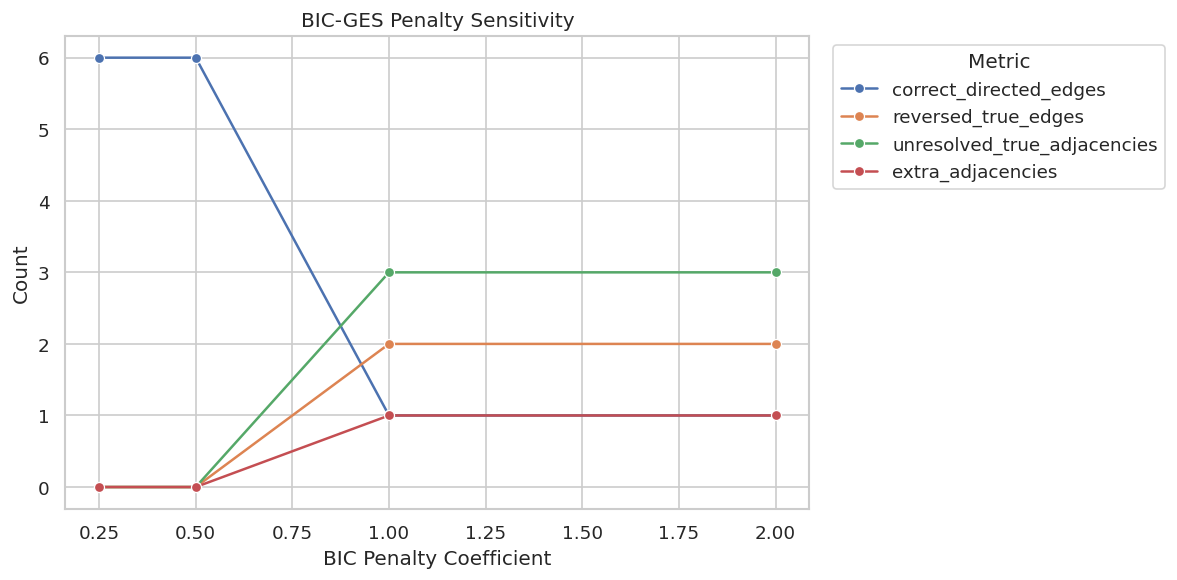
The BIC penalty controls how much complexity is punished. A lower penalty can allow denser graphs; a higher penalty can prefer simpler graphs. This cell runs BIC-GES across several lambda_value choices.
The penalty sensitivity table shows that the standard penalty works well here, while stronger penalties can change the discovered structure. This is why score-based results should report tuning choices rather than presenting the graph as automatic truth.
Plot Penalty Sensitivity
The plot tracks graph quality metrics across BIC penalty strengths. It helps students see when a score penalty starts changing the graph materially.
The sensitivity curve makes tuning visible. If a graph only appears for one penalty value, the report should treat it as less stable than a graph that persists across nearby choices.
Sample-Size Sensitivity
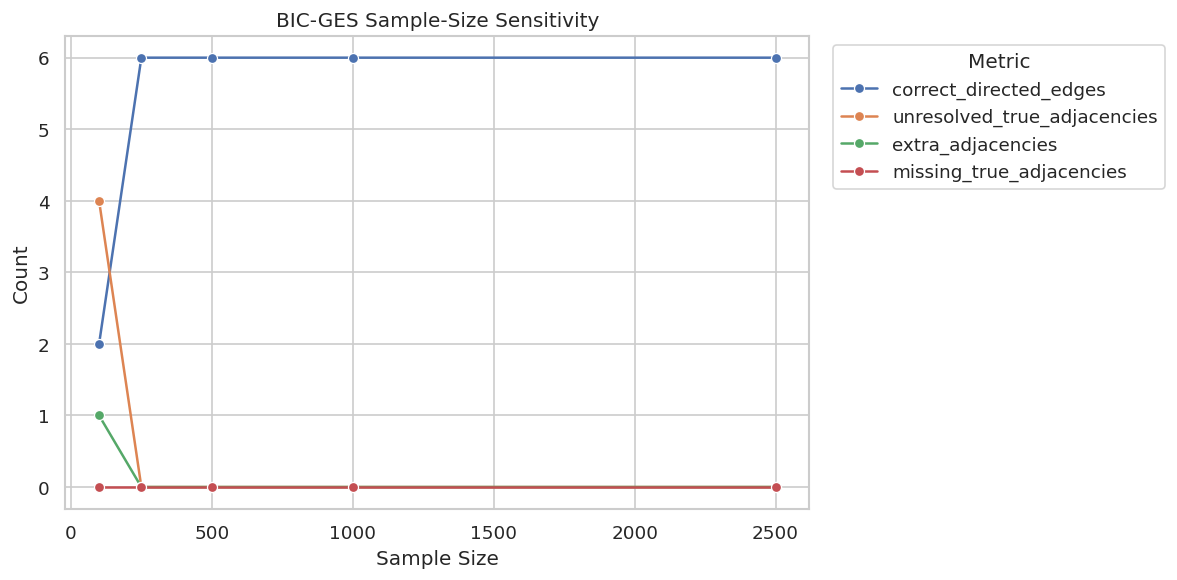
Score-based search can be unstable with small samples because local score differences are harder to estimate. This cell reruns BIC-GES on subsamples of increasing size.
Small samples can leave edges unoriented or add extra adjacencies. By a few hundred rows in this synthetic setup, BIC-GES becomes much more stable, which is exactly the kind of sample-size story a good report should include.
Plot Sample-Size Sensitivity
This plot makes the sample-size pattern easier to read. It tracks correct directed edges, unresolved true adjacencies, and extra adjacencies as the available data grow.
The sample-size plot is a useful diagnostic for any score-based discovery workflow. Stable graph recovery at larger samples is more reassuring than a graph that only appears in one small subsample.
Model-Mismatch Stress Test
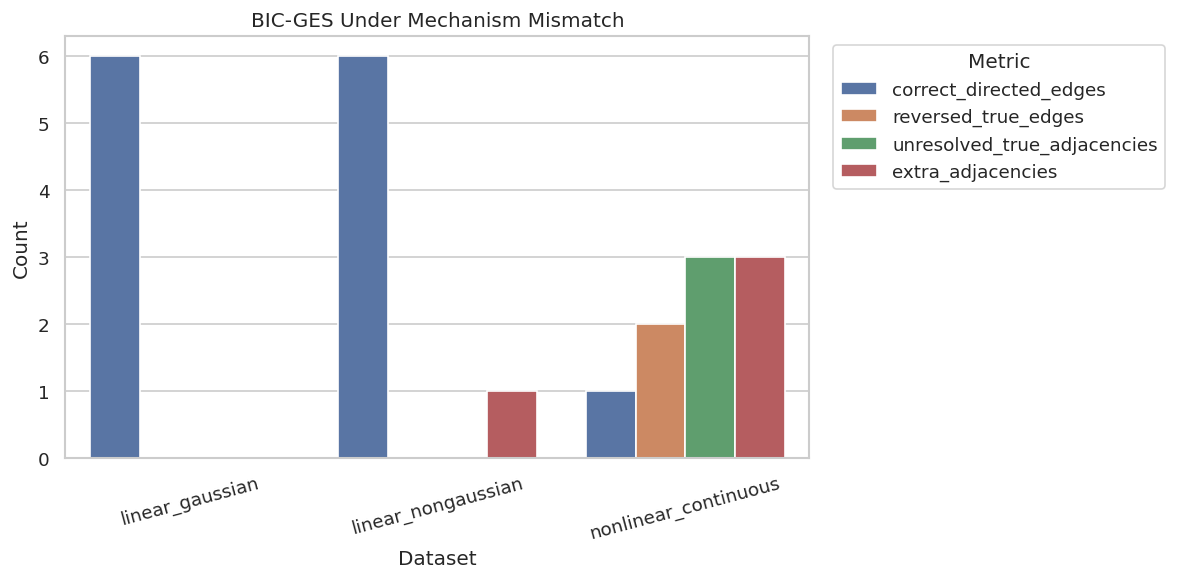
BIC-GES is a linear Gaussian score. This section runs the same method on three datasets with different mechanisms. The purpose is not to say BIC-GES is bad; it is to show that score assumptions matter.
The stress test shows the main limitation of a score: when the score is mismatched to the data-generating process, the discovered graph can deteriorate. The nonlinear dataset is especially hard for a linear Gaussian score.
Plot Model-Mismatch Results
The plot compares graph recovery across the three mechanism regimes. It is a quick way to see where BIC-GES is reliable and where its assumptions start to fray.
The plot is the cautionary center of the notebook. Score-based discovery is only as credible as the score family and the data representation that support it.
Draw The Nonlinear Stress-Test Graph
The nonlinear graph is worth drawing because it shows what model mismatch looks like visually: extra arrows, reversed directions, and less faithful structure.
# Draw the BIC-GES result on nonlinear continuous data.nonlinear_edges = regime_edges[regime_edges["dataset"] =="nonlinear_continuous"].drop(columns=["dataset"])nonlinear_graph_path = FIGURE_DIR /f"{NOTEBOOK_PREFIX}_nonlinear_bic_ges_graph.png"draw_box_graph( nonlinear_edges, title="BIC-GES On Nonlinear Continuous Data", path=nonlinear_graph_path, note="A linear Gaussian score can misread nonlinear dependence structure.",)
The nonlinear graph is less trustworthy than the baseline graph. This is where a report should consider nonlinear scores, transformations, or a different discovery method rather than forcing BIC-GES to carry the whole analysis.
Discrete Score Example: BDeu-GES
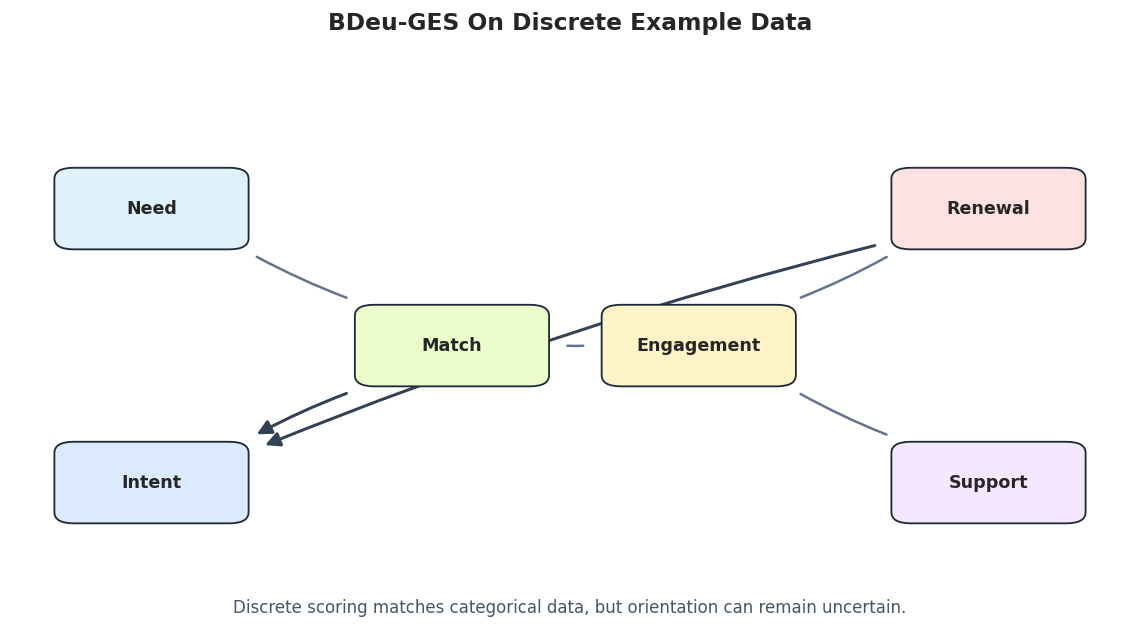
BIC is not the only score. For discrete data, causal-learn supports BDeu-style scoring. This section runs GES on the discrete teaching dataset to show how the score family changes with data type.
The BDeu example is intentionally more modest than the BIC baseline. It shows how to switch score families for discrete data, while also showing that discretization and prior choices can make orientation recovery harder.
Draw The BDeu-GES Graph
The discrete graph is drawn with the same layout so it can be compared against the continuous BIC-GES graph. Undirected edges are shown as plain lines because GES can leave equivalence-class uncertainty.
# Draw the BDeu-GES graph on discrete data.bdeu_graph_path = FIGURE_DIR /f"{NOTEBOOK_PREFIX}_bdeu_ges_graph.png"draw_box_graph( bdeu_edges, title="BDeu-GES On Discrete Teaching Data", path=bdeu_graph_path, note="Discrete scoring matches categorical data, but orientation can remain uncertain.",)
The BDeu graph is a good reminder that matching score type to data type is necessary but not sufficient. A score can be appropriate and still leave several edges uncertain.
Score Function Runtime And Use Cases
The next table summarizes score functions you may encounter in causal-learn. The notebook runs the fast, stable choices by default and leaves the slower kernel/CV scores as optional experiments.
# Summarize score choices and approximate runtime expectations for this tutorial setup.score_function_guide = pd.DataFrame( [ {"score_function": "local_score_BIC","data_type": "continuous","main_assumption": "linear Gaussian local models","run_by_default": True,"approx_runtime_on_this_dataset": "seconds","when_to_try": "baseline score-based discovery for continuous data", }, {"score_function": "local_score_BDeu","data_type": "discrete","main_assumption": "categorical Bayesian-network score with documented priors","run_by_default": True,"approx_runtime_on_this_dataset": "seconds","when_to_try": "discrete variables with a clear state space", }, {"score_function": "local_score_CV_general","data_type": "continuous","main_assumption": "kernel regression with cross-validated likelihood","run_by_default": False,"approx_runtime_on_this_dataset": "5-15+ minutes","when_to_try": "nonlinear relationships when longer runtime is acceptable", }, {"score_function": "local_score_marginal_general","data_type": "continuous","main_assumption": "kernel marginal likelihood style score","run_by_default": False,"approx_runtime_on_this_dataset": "5-15+ minutes or more","when_to_try": "nonlinear sensitivity checks on smaller samples first", }, ])score_function_guide.to_csv(TABLE_DIR /f"{NOTEBOOK_PREFIX}_score_function_guide.csv", index=False)display(score_function_guide)
score_function
data_type
main_assumption
run_by_default
approx_runtime_on_this_dataset
when_to_try
0
local_score_BIC
continuous
linear Gaussian local models
True
seconds
baseline score-based discovery for continuous ...
1
local_score_BDeu
discrete
categorical Bayesian-network score with docume...
True
seconds
discrete variables with a clear state space
2
local_score_CV_general
continuous
kernel regression with cross-validated likelihood
False
5-15+ minutes
nonlinear relationships when longer runtime is...
3
local_score_marginal_general
continuous
kernel marginal likelihood style score
False
5-15+ minutes or more
nonlinear sensitivity checks on smaller sample...
This guide is included because score choice is both statistical and computational. A slower nonlinear score should usually be tested on a smaller sample or reduced variable set before it becomes part of a default notebook pipeline.
Combined Scenario Summary
This table gathers the main runs into one place: baseline BIC-GES, PC, selected penalty runs, sample-size runs, mechanism stress tests, and BDeu-GES. It becomes the compact summary for the notebook.
# Combine the most important metric tables into one scenario summary.scenario_summary = pd.concat( [ ges_metrics.assign(section="baseline_bic_ges"), pc_metrics.assign(section="constraint_based_comparison"), lambda_metrics.assign(section="bic_penalty_sensitivity"), sample_metrics.assign(section="sample_size_sensitivity"), regime_metrics.assign(section="mechanism_stress_test"), bdeu_metrics.assign(section="discrete_bdeu_example"), ], ignore_index=True, sort=False,)scenario_summary = scenario_summary[["section"] + [col for col in scenario_summary.columns if col !="section"]]scenario_summary.to_csv(TABLE_DIR /f"{NOTEBOOK_PREFIX}_scenario_summary_metrics.csv", index=False)display(scenario_summary)
section
run
learned_edges_total
definite_directed_edges
true_edges
correct_directed_edges
directed_precision
directed_recall
reversed_true_edges
unresolved_true_adjacencies
missing_true_adjacencies
extra_adjacencies
lambda_value
sample_size
dataset
0
baseline_bic_ges
bic_ges_linear_gaussian
6
6
6
6
1.000000
1.000000
0
0
0
0
NaN
NaN
NaN
1
constraint_based_comparison
pc_fisherz_linear_gaussian
6
6
6
6
1.000000
1.000000
0
0
0
0
NaN
NaN
NaN
2
bic_penalty_sensitivity
bic_ges_lambda_0.25
6
6
6
6
1.000000
1.000000
0
0
0
0
0.25
NaN
NaN
3
bic_penalty_sensitivity
bic_ges_lambda_0.5
6
6
6
6
1.000000
1.000000
0
0
0
0
0.50
NaN
NaN
4
bic_penalty_sensitivity
bic_ges_lambda_1
7
4
6
1
0.250000
0.166667
2
3
0
1
1.00
NaN
NaN
5
bic_penalty_sensitivity
bic_ges_lambda_2
7
4
6
1
0.250000
0.166667
2
3
0
1
2.00
NaN
NaN
6
sample_size_sensitivity
bic_ges_n_100
7
2
6
2
1.000000
0.333333
0
4
0
1
NaN
100.0
NaN
7
sample_size_sensitivity
bic_ges_n_250
6
6
6
6
1.000000
1.000000
0
0
0
0
NaN
250.0
NaN
8
sample_size_sensitivity
bic_ges_n_500
6
6
6
6
1.000000
1.000000
0
0
0
0
NaN
500.0
NaN
9
sample_size_sensitivity
bic_ges_n_1000
6
6
6
6
1.000000
1.000000
0
0
0
0
NaN
1000.0
NaN
10
sample_size_sensitivity
bic_ges_n_2500
6
6
6
6
1.000000
1.000000
0
0
0
0
NaN
2500.0
NaN
11
mechanism_stress_test
bic_ges_linear_gaussian
6
6
6
6
1.000000
1.000000
0
0
0
0
NaN
NaN
linear_gaussian
12
mechanism_stress_test
bic_ges_linear_nongaussian
7
7
6
6
0.857143
1.000000
0
0
0
1
NaN
NaN
linear_nongaussian
13
mechanism_stress_test
bic_ges_nonlinear_continuous
9
6
6
1
0.166667
0.166667
2
3
0
3
NaN
NaN
nonlinear_continuous
14
discrete_bdeu_example
bdeu_ges_discrete_mixed
6
2
6
0
0.000000
0.000000
2
4
0
0
NaN
NaN
NaN
The scenario summary is the main audit table. It shows where score-based discovery works cleanly and where the result becomes sensitive to penalty, sample size, or model mismatch.
GES Reporting Checklist
A score-based discovery report should document more than the final graph. The checklist below captures the key details that make a GES result easier to evaluate.
# Save a practical checklist for reporting score-based discovery results.reporting_checklist = pd.DataFrame( [ {"topic": "score choice","question_to_answer": "Which score was used, and why does it match the data type and mechanism assumptions?","reporting_note": "BIC, BDeu, and kernel scores answer different modeling questions.", }, {"topic": "penalty or priors","question_to_answer": "What penalty coefficient or score prior was used?","reporting_note": "Graph density can change when the complexity penalty changes.", }, {"topic": "search path","question_to_answer": "How many forward and backward updates occurred?","reporting_note": "The final graph is easier to debug when the search path is visible.", }, {"topic": "sample-size sensitivity","question_to_answer": "Does the graph stabilize as sample size increases?","reporting_note": "Small-sample score differences can be noisy.", }, {"topic": "model mismatch","question_to_answer": "What happens when the same score is run on data with different mechanisms?","reporting_note": "A score can be fast and elegant but still wrong for nonlinear data.", }, {"topic": "claim strength","question_to_answer": "Which edges are stable candidate structure rather than confirmed causal directions?","reporting_note": "GES returns a discovered graph under assumptions, not a final causal proof.", }, ])reporting_checklist.to_csv(TABLE_DIR /f"{NOTEBOOK_PREFIX}_ges_reporting_checklist.csv", index=False)display(reporting_checklist)
topic
question_to_answer
reporting_note
0
score choice
Which score was used, and why does it match th...
BIC, BDeu, and kernel scores answer different ...
1
penalty or priors
What penalty coefficient or score prior was used?
Graph density can change when the complexity p...
2
search path
How many forward and backward updates occurred?
The final graph is easier to debug when the se...
3
sample-size sensitivity
Does the graph stabilize as sample size increa...
Small-sample score differences can be noisy.
4
model mismatch
What happens when the same score is run on dat...
A score can be fast and elegant but still wron...
5
claim strength
Which edges are stable candidate structure rat...
GES returns a discovered graph under assumptio...
The checklist turns the notebook into reusable practice. Score-based discovery is most useful when the score assumptions, tuning choices, and stability checks are all visible.
Artifact Manifest
The final code cell lists the generated figures and tables. This makes the notebook outputs easy to find later.
This notebook now has a complete score-based discovery workflow: BIC-GES, PC comparison, search history, penalty sensitivity, sample-size sensitivity, mechanism mismatch, discrete BDeu scoring, runtime guidance, and reporting artifacts. The next tutorial can go deeper into exact search and score functions on smaller graphs.