Constraint-based causal discovery is built on a repeated question:
Are variables X and Y independent after conditioning on a set of variables Z?
If the answer is yes, algorithms such as PC and FCI can remove or mark edges. If the answer is no, the variables remain connected under the current conditioning set. This makes conditional independence tests one of the most important pieces of the causal discovery workflow.
We use the synthetic datasets created in lesson 02. Because those datasets have known structural equations and known true graphs, we can connect each p-value to a causal pattern:
a true direct edge should usually look dependent;
an indirect path may become independent after conditioning on the right mediators;
a collider can create dependence after conditioning;
a test that matches the data type can behave very differently from a mismatched test.
The point is to learn how conditional independence tests become graph-editing decisions.
Dataset and Experiment Setup
We use synthetic graph-discovery datasets with known structural equations and known graph truth to study Independence Tests. Known graph truth lets us see when an algorithm recovers edges, misses edges, or invents edges under violated assumptions.
Read each row as a draw from a structural causal system. Columns are observed variables, and in some lessons omitted latent variables, environments, time ordering, or non-Gaussian mechanisms are deliberately introduced. The experiment studies conditional independence decisions. P-values are interpreted as graph-search evidence within the discovery workflow.
The goal is to learn what each discovery method assumes and how its output should be audited.
Mathematical Foundation
Constraint-based discovery depends on conditional independence testing. In the Gaussian case, testing \(X_i \perp\!\!\!\perp X_j \mid S\) is equivalent to testing
A retained edge means the test did not find a separating set at the tested level. It is not proof of a direct causal effect.
We will build the independence-testing workflow step by step:
Set up imports, paths, and causal-learn’s CIT interface.
Load the synthetic datasets and true edge tables from lesson 02.
Review which test belongs to which data regime.
Run Fisher-Z tests on the linear Gaussian dataset.
Study path blocking, collider opening, alpha sensitivity, sample size, and conditioning-set size.
Compare Fisher-Z with KCI on nonlinear dependence.
Run chi-square and G-square tests on the discrete dataset.
Use missing-value Fisher-Z on a controlled missingness example.
Save results and close with practical reporting guidance.
Later PC and FCI lessons will use these same test families inside graph-search algorithms.
Tutorial Workflow
Setup
The code below imports the scientific stack, prepares output folders, loads causal-learn’s conditional independence test factory, and defines a few display helpers. The MPLCONFIGDIR line is set before importing matplotlib so execution does not try to write cache files outside the workspace.
# Define reusable helpers for the Setup section.from pathlib import Pathfrom importlib.metadata import PackageNotFoundError, versionimport osimport warningsos.environ.setdefault("MPLCONFIGDIR", str(Path.cwd() /".matplotlib_cache"))import numpy as npimport pandas as pdimport matplotlib.pyplot as pltimport seaborn as snsfrom causallearn.utils.cit import CITwarnings.filterwarnings("ignore", category=FutureWarning)sns.set_theme(style="whitegrid", context="notebook")pd.set_option("display.max_columns", 120)pd.set_option("display.width", 0)pd.set_option("display.max_colwidth", 140)NOTEBOOK_DIR = Path.cwd()if NOTEBOOK_DIR.name !="causal_learn": NOTEBOOK_DIR = Path("notebooks/tutorials/causal_learn").resolve()else: NOTEBOOK_DIR = NOTEBOOK_DIR.resolve()OUTPUT_DIR = NOTEBOOK_DIR /"outputs"FIGURE_DIR = OUTPUT_DIR /"figures"TABLE_DIR = OUTPUT_DIR /"tables"DATASET_DIR = OUTPUT_DIR /"datasets"for directory in [OUTPUT_DIR, FIGURE_DIR, TABLE_DIR, DATASET_DIR]: directory.mkdir(parents=True, exist_ok=True)NOTEBOOK_PREFIX ="03"RANDOM_SEED =42ALPHA =0.05def pkg_version(package_name: str) ->str:""" Return a package version string without failing if package metadata is unavailable. Parameters ---------- package_name : str Package name to look up in Python package metadata. Returns ------- str Installed package version, or `not installed` when the package cannot be found. """try:return version(package_name)except PackageNotFoundError:return"not installed"version_table = pd.DataFrame( [ {"package": "causal-learn", "version": pkg_version("causal-learn")}, {"package": "numpy", "version": pkg_version("numpy")}, {"package": "pandas", "version": pkg_version("pandas")}, {"package": "matplotlib", "version": pkg_version("matplotlib")}, {"package": "seaborn", "version": pkg_version("seaborn")}, ])version_table
package
version
0
causal-learn
0.1.4.5
1
numpy
2.4.4
2
pandas
3.0.2
3
matplotlib
3.10.9
4
seaborn
0.13.2
The version table anchors the test behavior to a concrete environment. Conditional independence tests can have implementation details such as caching, numerical tolerances, and kernel defaults, so recording versions is a small but valuable reproducibility habit.
Load the Synthetic Datasets
Lesson 02 generated several datasets under outputs/datasets. This lesson loads the ones needed for independence-test examples:
linear_gaussian: friendly baseline for Fisher-Z.
nonlinear_continuous: nonlinear mechanisms where linear tests can be limited.
discrete_mixed: binary and ordinal variables for chi-square and G-square tests.
hidden_confounder_observed: observed-only data with an omitted common cause.
If this step fails because a file is missing, run lesson 02 first.
dataset_paths = {"linear_gaussian": DATASET_DIR /"02_linear_gaussian.csv","nonlinear_continuous": DATASET_DIR /"02_nonlinear_continuous.csv","discrete_mixed": DATASET_DIR /"02_discrete_mixed.csv","hidden_confounder_observed": DATASET_DIR /"02_hidden_confounder_observed.csv",}missing_files = [str(path) for path in dataset_paths.values() ifnot path.exists()]if missing_files:raiseFileNotFoundError("Synthetic datasets are missing. Run notebook 02 first. Missing files: "+", ".join(missing_files) )datasets = {name: pd.read_csv(path) for name, path in dataset_paths.items()}base_edge_table = pd.read_csv(TABLE_DIR /"02_base_true_dag_edges.csv")variable_dictionary = pd.read_csv(TABLE_DIR /"02_variable_dictionary.csv")base_nodes = ["need", "intent", "match", "engagement", "renewal", "support"]loaded_summary = pd.DataFrame( [ {"dataset_name": name,"rows": data.shape[0],"columns": data.shape[1],"column_list": ", ".join(data.columns), }for name, data in datasets.items() ])loaded_summary.to_csv(TABLE_DIR /f"{NOTEBOOK_PREFIX}_loaded_dataset_summary.csv", index=False)loaded_summary
dataset_name
rows
columns
column_list
0
linear_gaussian
2500
6
need, intent, match, engagement, renewal, support
1
nonlinear_continuous
2500
6
need, intent, match, engagement, renewal, support
2
discrete_mixed
2500
6
need, intent, match, engagement, renewal, support
3
hidden_confounder_observed
2500
6
need, intent, match, engagement, renewal, support
The loaded datasets all have the expected observed variables. The discrete dataset uses integer-valued columns, while the continuous datasets are standardized numeric signals.
The later estimates should be read in light of this sample construction, since data quality and composition set the boundary for any causal claim.
Test Selection Guide
causal-learn exposes conditional independence tests through CIT(data, method). The method choice should match the data and assumptions. A mismatched test can produce confident-looking p-values for the wrong question.
method_name
data_type
main_assumption
typical_use
caution
fisherz
continuous
Approximately linear Gaussian relationships after conditioning.
PC on continuous Gaussian-style tabular data.
Can miss nonlinear dependence and can be sensitive to conditioning-set size.
mv_fisherz
continuous with missing values
Fisher-Z style test with missing-value handling.
PC-style workflows when data have missing entries.
Missingness assumptions still matter; the correction only addresses the missingness pattern it is designed for.
chisq
discrete
Counts in contingency tables are informative enough for chi-square approximations.
Binary or categorical discovery examples.
Sparse categories and large conditioning sets can make the approximation weak.
gsq
discrete
Likelihood-ratio version of a discrete conditional independence test.
Alternative to chi-square for categorical data.
Still depends on enough observations per conditioned cell.
kci
continuous or mixed numeric
Kernel-based dependence test can detect nonlinear relationships.
Nonlinear discovery examples and robustness checks.
More computationally expensive; kernel choices and sample size matter.
This table is the decision layer before any algorithm call. For example, using Fisher-Z on binary variables may run, but it does not mean the resulting p-values answer the intended discrete conditional-independence question.
Helper Functions for Running Tests
The CIT object expects numeric column indices, not column names. The helper below lets us write tests using variable names and conditioning-set names. It returns p-values and a plain decision at a chosen alpha level.
# Define reusable helpers for the Helper Functions For Running Tests section.def make_ci_runner(dataframe, columns, method):""" Create a named-column wrapper around causal-learn's CIT interface. Parameters ---------- dataframe : pd.DataFrame Rows and variables used by the current test or estimator. columns : list[str] Column names included in the test, transformation, or model input. method : str Method name passed to the estimator, test, or graph algorithm. Returns ------- callable Conditional-independence test runner with the data matrix and selected test method already bound. """ matrix = dataframe[columns].to_numpy() column_to_index = {column: position for position, column inenumerate(columns)} ci_test = CIT(matrix, method)def run_test(x, y, conditioning_set=()):""" Idea: Run one conditional independence test by variable name and return the p-value with a decision label. Parameters ---------- x : str or array-like First variable, column name, or numeric input in the comparison. y : str or array-like Outcome, second variable, or numeric input in the comparison. conditioning_set : object Variables conditioned on in the independence test. Returns ------- dict[str, object] Conditional-independence test row with variables, conditioning set, p-value, and decision. """ conditioning_set =tuple(conditioning_set) x_idx = column_to_index[x] y_idx = column_to_index[y] z_idx =tuple(column_to_index[z] for z in conditioning_set) p_value =float(ci_test(x_idx, y_idx, z_idx))return p_valuereturn run_testdef decision_from_p_value(p_value, alpha=ALPHA):""" Translate a p-value into the graph-search decision language. Parameters ---------- p_value : float P-value returned by an independence test. alpha : float Significance level for an independence test or transparency level for plotting. Returns ------- str Decision label for the independence test at the chosen alpha level. """return"reject independence"if p_value < alpha else"do not reject independence"def p_value_label(p_value):""" Format tiny p-values without losing the fact that they are very small. Parameters ---------- p_value : float P-value returned by an independence test. Returns ------- str Readable text representation produced by p value label. """if p_value ==0:return"<1e-300"if p_value <0.001:returnf"{p_value:.2e}"returnf"{p_value:.3f}"PLOT_LOG_CAP =20def capped_minus_log10(values, cap=PLOT_LOG_CAP):""" Convert p-values to -log10 scale while capping extremes for readable plots. Parameters ---------- values : array-like Numeric values transformed, standardized, summarized, or plotted by the helper. cap : float Maximum plotted value after the transformation. Returns ------- pd.Series or np.ndarray Capped negative log10 transform used to make small p-values plottable. """ transformed =-np.log10(pd.Series(values).replace(0, np.nextafter(0, 1)))return transformed.clip(upper=cap)"helpers ready"
'helpers ready'
The decision phrase mirrors constraint-based discovery. A very small p-value means the test rejects the null of conditional independence, so an algorithm would usually keep the variables connected for that conditioning set. A large p-value means the test does not reject independence, so an algorithm may remove an edge or record a separating set.
The True Edge Table
Before testing, we inspect the base true graph again. The most important thing to remember is that pairwise association does not equal a direct edge. Variables can be associated through chains, forks, or opened colliders.
Engagement creates more chances for support contact.
The true edges define what later graph algorithms should recover. Independence tests are the local evidence used to remove impossible adjacencies and orient some structures, but each individual test only answers one local question.
Fisher-Z on Linear Gaussian Data
Fisher-Z is the friendly baseline for this tutorial because linear_gaussian was generated from linear additive equations with Gaussian noise. The test checks whether the partial correlation between two variables is zero after conditioning on a set of variables.
The cases below cover four teaching patterns:
a direct edge that should be dependent;
an indirect association that becomes independent after blocking paths;
two independent roots;
a collider that creates dependence after conditioning.
linear_runner = make_ci_runner(datasets["linear_gaussian"], base_nodes, "fisherz")fisherz_cases = [ {"case": "direct edge","x": "need","y": "match","conditioning_set": (),"expected_pattern": "dependent because need directly causes match", }, {"case": "indirect path before blocking","x": "need","y": "renewal","conditioning_set": (),"expected_pattern": "dependent through downstream paths", }, {"case": "indirect path after blocking","x": "need","y": "renewal","conditioning_set": ("intent", "match", "engagement"),"expected_pattern": "approximately independent after relevant paths are blocked", }, {"case": "two root causes marginally","x": "need","y": "intent","conditioning_set": (),"expected_pattern": "approximately independent because both are generated as roots", }, {"case": "collider opened by conditioning","x": "need","y": "intent","conditioning_set": ("match",),"expected_pattern": "dependent after conditioning on their shared child match", }, {"case": "non-edge after blocking","x": "need","y": "support","conditioning_set": ("intent", "match", "engagement"),"expected_pattern": "approximately independent after paths through match and engagement are blocked", },]fisherz_results = []for case in fisherz_cases: p_value = linear_runner(case["x"], case["y"], case["conditioning_set"]) fisherz_results.append( {**case,"conditioning_set": ", ".join(case["conditioning_set"]) or"none","p_value": p_value,"p_value_display": p_value_label(p_value),"decision_at_0_05": decision_from_p_value(p_value), } )fisherz_results = pd.DataFrame(fisherz_results)fisherz_results.to_csv(TABLE_DIR /f"{NOTEBOOK_PREFIX}_fisherz_linear_gaussian_cases.csv", index=False)fisherz_results
case
x
y
conditioning_set
expected_pattern
p_value
p_value_display
decision_at_0_05
0
direct edge
need
match
none
dependent because need directly causes match
0.000000
<1e-300
reject independence
1
indirect path before blocking
need
renewal
none
dependent through downstream paths
0.000000
<1e-300
reject independence
2
indirect path after blocking
need
renewal
intent, match, engagement
approximately independent after relevant paths are blocked
0.308830
0.309
do not reject independence
3
two root causes marginally
need
intent
none
approximately independent because both are generated as roots
0.742852
0.743
do not reject independence
4
collider opened by conditioning
need
intent
match
dependent after conditioning on their shared child match
0.000000
<1e-300
reject independence
5
non-edge after blocking
need
support
intent, match, engagement
approximately independent after paths through match and engagement are blocked
0.215881
0.216
do not reject independence
The table shows why conditioning matters. need and renewal are strongly associated marginally, but the dependence weakens once we condition on variables that block the relevant paths. The collider example goes the other way: need and intent are independent as roots, but conditioning on match creates dependence.
Diagnostics and Interpretation
Visualize Fisher-Z Decisions
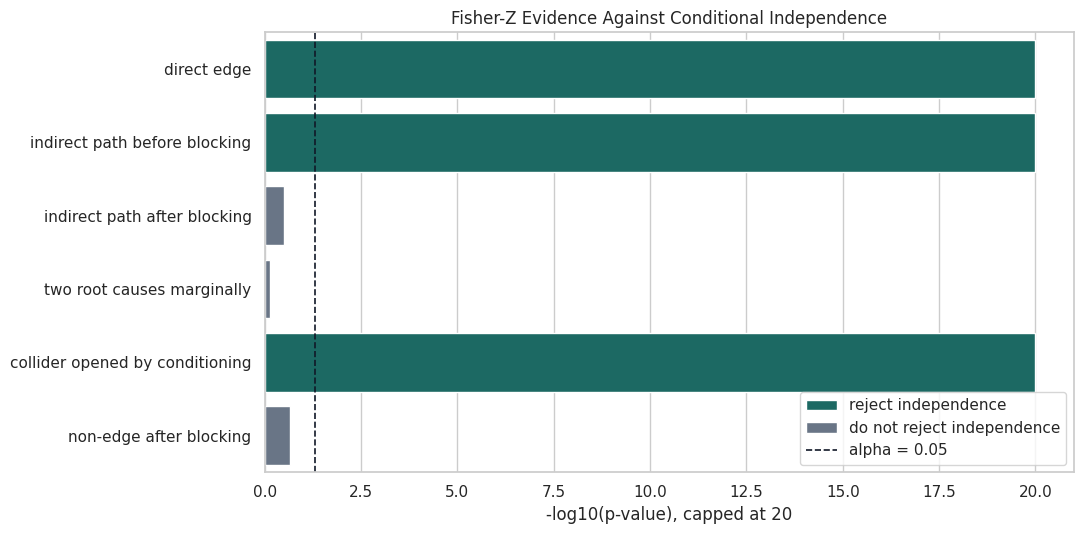
The next plot turns the previous p-values into capped -log10(p). Larger bars mean stronger evidence against independence. The dashed line marks the usual alpha level of 0.05. This visual form is useful because p-values can span many orders of magnitude; exact values remain in the table.
The visual split is clean: direct or opened paths have very large evidence against independence, while blocked paths and independent roots stay below the decision line. This is the local testing behavior PC-style algorithms depend on.
Conditioning-Set Size and Path Blocking
A conditioning set can block a path, open a collider, or add noise to the test. The next table follows one pair, need and renewal, as we add conditioning variables. This pair starts associated because there are directed and backdoor-style paths through the graph.
The p-value changes as we block more of the relevant paths. The final conditioning set includes intent, match, and engagement, which blocks the main ways need and renewal are connected in the base graph.
Plot the Conditioning Progression
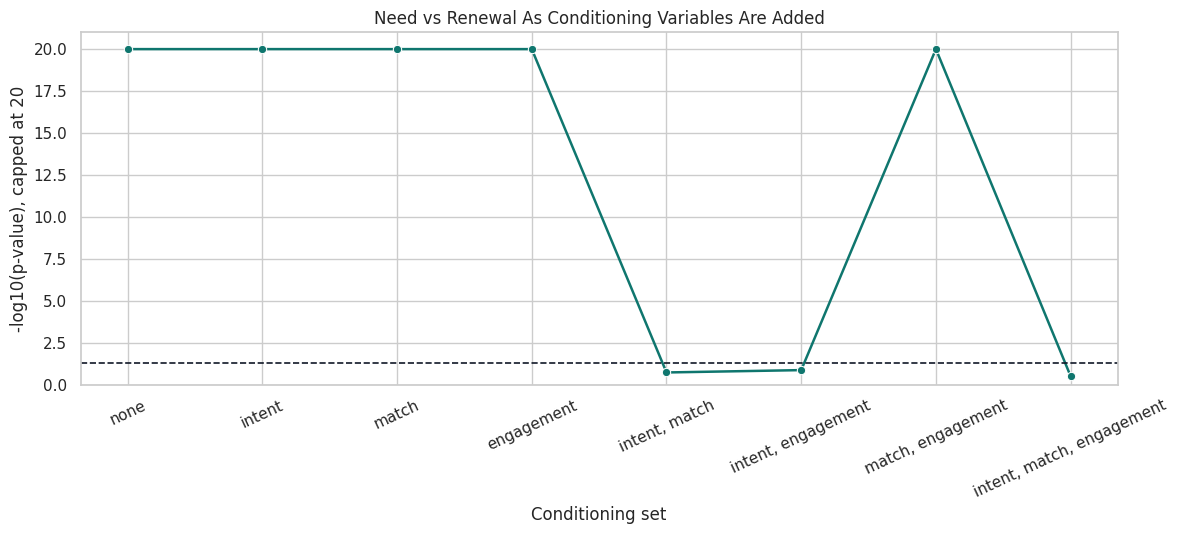
This plot shows the same progression in decision-space. It reinforces a practical point: conditioning is more than “adding controls.” In graphical terms, each variable can block or open a path depending on where it sits in the DAG.
progression_plot = conditioning_path_table.copy()progression_plot["minus_log10_p"] = capped_minus_log10(progression_plot["p_value"])fig, ax = plt.subplots(figsize=(12, 5.5))sns.lineplot( data=progression_plot, x="conditioning_set", y="minus_log10_p", marker="o", linewidth=1.8, color="#0f766e", ax=ax,)ax.axhline(-np.log10(ALPHA), color="#111827", linestyle="--", linewidth=1.2)ax.set_title("Need vs Renewal As Conditioning Variables Are Added")ax.set_xlabel("Conditioning set")ax.set_ylabel("-log10(p-value), capped at 20")ax.set_ylim(0, PLOT_LOG_CAP +1)ax.tick_params(axis="x", rotation=25)plt.tight_layout()conditioning_plot_path = FIGURE_DIR /f"{NOTEBOOK_PREFIX}_conditioning_set_progression.png"fig.savefig(conditioning_plot_path, dpi=160, bbox_inches="tight")plt.show()
The line drops below the alpha threshold only when the conditioning set blocks enough of the graph. This is why PC searches over many conditioning sets and uses marginal associations only as a starting point.
Alpha Sensitivity
The alpha threshold controls how easily a test rejects independence. A larger alpha keeps more edges because it rejects independence more often. A smaller alpha removes edges more aggressively. The next step shows decisions for the same Fisher-Z cases under several alpha values.
Most clear cases are stable across alpha values, but borderline cases can flip. This is why later graph lessons include alpha sensitivity and report how the graph changes across thresholds.
Sample Size Sensitivity
Conditional independence tests need enough data. Small samples can fail to detect real dependence or can produce unstable p-values. The code below repeats three Fisher-Z checks across several sample sizes.
The strongest dependence patterns are usually detected even with smaller samples. The blocked case is more variable because the expected result is “do not reject independence,” which is always harder to prove from finite data.
Plot Sample Size Sensitivity
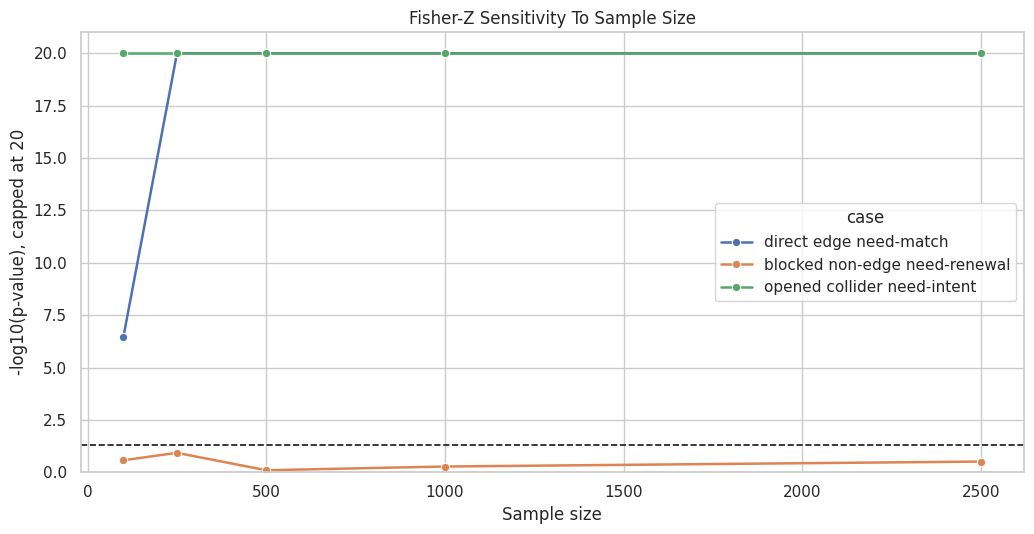
The next plot shows how evidence against independence changes with sample size. The y-axis again uses capped -log10(p) so small p-values are visible without letting underflow dominate the scale.
The plot makes the practical lesson visible: p-values reflect both graph structure and sample size. A discovery graph learned from 100 rows can differ from one learned from 2,500 rows even if the data-generating DAG is identical.
Marginal P-Value Matrix
Before running a full algorithm, it is useful to inspect all pairwise marginal tests. This matrix serves a different role than a graph. It reveals which variable pairs are strongly associated before conditioning.
# Define reusable helpers for the Marginal P-Value Matrix section.def marginal_p_value_matrix(dataframe, columns, method):""" Idea: Compute pairwise marginal independence-test p-values for a selected set of variables. Parameters ---------- dataframe : pd.DataFrame Rows used by this helper. columns : list[str] Column names included in the transformation, test, or display. method : str Estimator, test, or algorithm name being run. Returns ------- pd.DataFrame Square matrix of pairwise marginal independence-test p-values. """ runner = make_ci_runner(dataframe, columns, method) matrix = pd.DataFrame(np.ones((len(columns), len(columns))), index=columns, columns=columns)for i, x inenumerate(columns):for j, y inenumerate(columns):if i >= j:continue p_value = runner(x, y, ()) matrix.loc[x, y] = p_value matrix.loc[y, x] = p_valuereturn matrixfisherz_marginal_p = marginal_p_value_matrix(datasets["linear_gaussian"], base_nodes, "fisherz")fisherz_marginal_p.to_csv(TABLE_DIR /f"{NOTEBOOK_PREFIX}_fisherz_marginal_p_matrix.csv")fisherz_marginal_p
need
intent
match
engagement
renewal
support
need
1.000000
0.742852
0.0
0.0
0.0
0.0
intent
0.742852
1.000000
0.0
0.0
0.0
0.0
match
0.000000
0.000000
1.0
0.0
0.0
0.0
engagement
0.000000
0.000000
0.0
1.0
0.0
0.0
renewal
0.000000
0.000000
0.0
0.0
1.0
0.0
support
0.000000
0.000000
0.0
0.0
0.0
1.0
Many non-adjacent pairs have very small marginal p-values because they are connected through paths in the DAG. This is the reason causal discovery cannot stop at pairwise testing.
Heatmap of Marginal Evidence
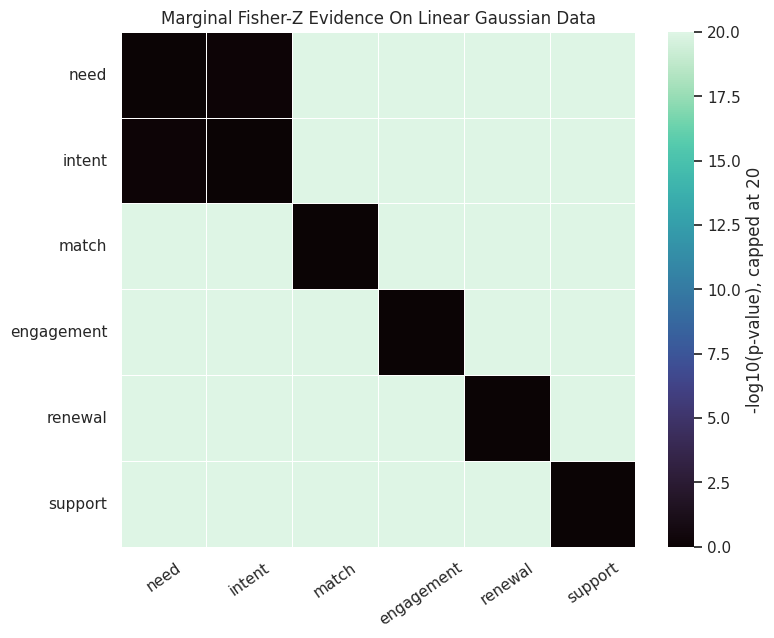
The heatmap shows the same p-value matrix as capped -log10(p). Bright cells are strong pairwise associations. The diagonal is set to zero because a variable is not tested against itself.
The heatmap is dense because marginal dependence travels along causal paths. PC-style algorithms become useful because they search for conditioning sets that explain away indirect associations.
Nonlinear Dependence: Fisher-Z vs KCI
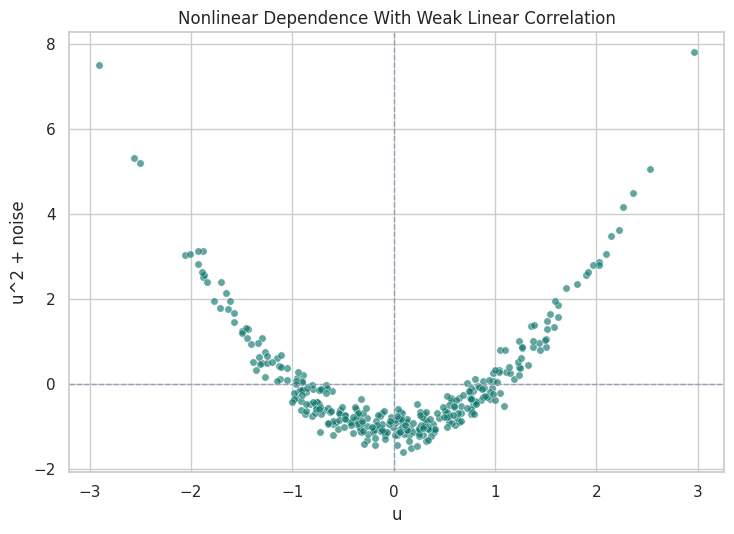
Fisher-Z is based on partial correlation, so it is naturally tuned to linear dependence. Kernel conditional independence tests can detect broader nonlinear relationships, but they are more expensive. The next demo creates a deliberately simple nonlinear pair: v = u^2 + noise. The correlation can be close to zero even though the variables are dependent.
The Fisher-Z p-value does not reject independence because the linear correlation is weak. KCI rejects independence because the nonlinear relationship is real. This is the cleanest reminder that test choice encodes assumptions.
Visualize the Nonlinear Pair
The scatterplot makes the previous table obvious. A straight-line correlation test is looking for the wrong shape, while a nonlinear test can detect the curved relationship.
The curved pattern is visually clear. A future nonlinear-discovery lesson can use this same lesson at graph scale: if the relationship is nonlinear, a linear test may produce misleading local decisions.
KCI on the Nonlinear Synthetic Dataset
Now we use KCI on a subset of the nonlinear continuous dataset from lesson 02. KCI is more expensive than Fisher-Z, so this example samples a few hundred rows and tests only a small number of relationships.
The nonlinear dataset is less tidy than the two-variable demo, but the same caution applies. KCI can detect nonlinear dependence, while Fisher-Z is faster and simpler when its assumptions are reasonable.
Discrete Data: Chi-Square and G-Square
For discrete variables, causal-learn provides chi-square and G-square conditional independence tests. We use the discrete_mixed dataset from lesson 02. The cases mirror the Fisher-Z section, but the method now matches categorical data.
discrete_columns = base_nodesdiscrete_chisq_runner = make_ci_runner(datasets["discrete_mixed"], discrete_columns, "chisq")discrete_gsq_runner = make_ci_runner(datasets["discrete_mixed"], discrete_columns, "gsq")discrete_cases = [ {"case": "direct edge","x": "need","y": "match","conditioning_set": (),"expected_pattern": "dependent because need affects match probability", }, {"case": "indirect path before blocking","x": "need","y": "renewal","conditioning_set": (),"expected_pattern": "dependent through downstream paths", }, {"case": "indirect path after blocking","x": "need","y": "renewal","conditioning_set": ("intent", "match", "engagement"),"expected_pattern": "weaker after blocking observed paths", }, {"case": "blocked non-edge","x": "need","y": "support","conditioning_set": ("intent", "match", "engagement"),"expected_pattern": "approximately independent after blocking paths through engagement", },]discrete_rows = []for case in discrete_cases:for method_name, runner in [("chisq", discrete_chisq_runner), ("gsq", discrete_gsq_runner)]: p_value = runner(case["x"], case["y"], case["conditioning_set"]) discrete_rows.append( {**case,"test": method_name,"conditioning_set": ", ".join(case["conditioning_set"]) or"none","p_value": p_value,"p_value_display": p_value_label(p_value),"decision_at_0_05": decision_from_p_value(p_value), } )discrete_test_results = pd.DataFrame(discrete_rows)discrete_test_results.to_csv(TABLE_DIR /f"{NOTEBOOK_PREFIX}_discrete_chisq_gsq_results.csv", index=False)discrete_test_results
case
x
y
conditioning_set
expected_pattern
test
p_value
p_value_display
decision_at_0_05
0
direct edge
need
match
none
dependent because need affects match probability
chisq
1.807196e-40
1.81e-40
reject independence
1
direct edge
need
match
none
dependent because need affects match probability
gsq
4.869422e-41
4.87e-41
reject independence
2
indirect path before blocking
need
renewal
none
dependent through downstream paths
chisq
1.784279e-06
1.78e-06
reject independence
3
indirect path before blocking
need
renewal
none
dependent through downstream paths
gsq
1.749210e-06
1.75e-06
reject independence
4
indirect path after blocking
need
renewal
intent, match, engagement
weaker after blocking observed paths
chisq
1.751088e-01
0.175
do not reject independence
5
indirect path after blocking
need
renewal
intent, match, engagement
weaker after blocking observed paths
gsq
1.736190e-01
0.174
do not reject independence
6
blocked non-edge
need
support
intent, match, engagement
approximately independent after blocking paths through engagement
chisq
4.495724e-01
0.450
do not reject independence
7
blocked non-edge
need
support
intent, match, engagement
approximately independent after blocking paths through engagement
gsq
4.407588e-01
0.441
do not reject independence
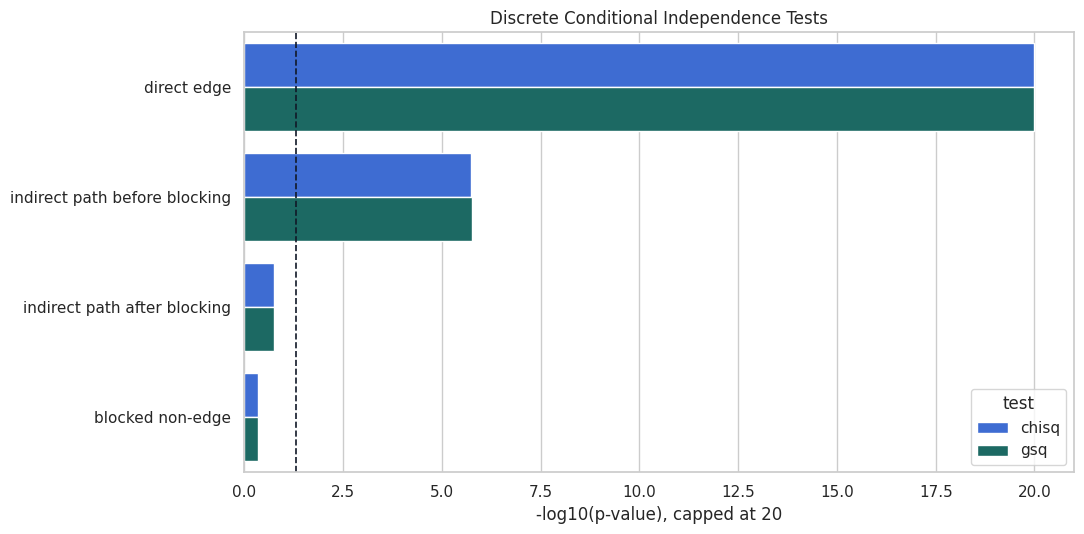
Chi-square and G-square tell the same broad story here. Direct and unblocked paths show dependence, while blocked non-edges are less likely to reject independence. In sparse categorical problems, these two tests can differ more, so both are worth understanding.
Discrete Test Decisions Side by Side
This plot compares chi-square and G-square p-values for the discrete cases. It is useful to see whether the two tests agree before using either one inside a full graph search.
The paired bars are close, which is reassuring for this synthetic dataset. The bigger lesson is that the discrete tests are designed for count data, while Fisher-Z is designed for continuous partial correlations.
Missing Values and mv_fisherz
Real datasets often have missing values. This section creates controlled missingness in the linear Gaussian data and compares two approaches:
complete-case Fisher-Z, which drops rows with missing values in the variables involved in the test;
causal-learn’s mv_fisherz, which is designed for missing-value settings.
This is a worked example, not a universal missing-data solution. Missingness mechanisms still need their own causal thinking.
The missing rates are close to the designed 8 percent level. Because the missingness was injected randomly here, it is much simpler than the missingness patterns we would worry about in real data.
Compare Complete-Case Fisher-Z and Missing-Value Fisher-Z
The next step runs the same cases under complete-case Fisher-Z and mv_fisherz. For complete-case testing, each row must be observed for the pair and conditioning variables in that specific test.
# Define reusable helpers for the Compare Complete-Case Fisher-Z And Missing-Value Fisher-Z section.def complete_case_fisherz(dataframe, x, y, conditioning_set=()):""" Run Fisher-Z after dropping rows missing any variable needed for this test. Parameters ---------- dataframe : pd.DataFrame Rows and variables used by the current test or estimator. x : str or array-like First variable, column name, or numeric input in the local calculation. y : str or array-like Second variable, outcome, or numeric input in the local calculation. conditioning_set : list[str] Variables conditioned on in the independence test. Returns ------- tuple Tuple containing runner(x, y, conditioning_set), len(complete). """ required_columns = [x, y, *conditioning_set] complete = dataframe[required_columns].dropna() runner = make_ci_runner(complete, required_columns, "fisherz")return runner(x, y, conditioning_set), len(complete)mv_runner = make_ci_runner(missing_data, base_nodes, "mv_fisherz")missing_cases = [ {"case": "direct edge need-match", "x": "need", "y": "match", "conditioning_set": ()}, {"case": "blocked need-renewal", "x": "need", "y": "renewal", "conditioning_set": ("intent", "match", "engagement")}, {"case": "opened collider need-intent", "x": "need", "y": "intent", "conditioning_set": ("match",)},]missing_test_rows = []for case in missing_cases: cc_p_value, cc_rows = complete_case_fisherz(missing_data, case["x"], case["y"], case["conditioning_set"]) mv_p_value = mv_runner(case["x"], case["y"], case["conditioning_set"]) missing_test_rows.extend( [ {"case": case["case"],"approach": "complete_case_fisherz","rows_used": cc_rows,"conditioning_set": ", ".join(case["conditioning_set"]) or"none","p_value": cc_p_value,"p_value_display": p_value_label(cc_p_value),"decision_at_0_05": decision_from_p_value(cc_p_value), }, {"case": case["case"],"approach": "mv_fisherz","rows_used": len(missing_data),"conditioning_set": ", ".join(case["conditioning_set"]) or"none","p_value": mv_p_value,"p_value_display": p_value_label(mv_p_value),"decision_at_0_05": decision_from_p_value(mv_p_value), }, ] )missing_test_comparison = pd.DataFrame(missing_test_rows)missing_test_comparison.to_csv(TABLE_DIR /f"{NOTEBOOK_PREFIX}_missing_value_fisherz_comparison.csv", index=False)missing_test_comparison
case
approach
rows_used
conditioning_set
p_value
p_value_display
decision_at_0_05
0
direct edge need-match
complete_case_fisherz
2101
none
0.000000
<1e-300
reject independence
1
direct edge need-match
mv_fisherz
2500
none
0.000000
<1e-300
reject independence
2
blocked need-renewal
complete_case_fisherz
1659
intent, match, engagement
0.113165
0.113
do not reject independence
3
blocked need-renewal
mv_fisherz
2500
intent, match, engagement
0.113165
0.113
do not reject independence
4
opened collider need-intent
complete_case_fisherz
1940
match
0.000000
<1e-300
reject independence
5
opened collider need-intent
mv_fisherz
2500
match
0.000000
<1e-300
reject independence
The two approaches agree on the broad teaching patterns here. The complete-case row count drops most when the conditioning set is larger, which is one reason missingness can become more damaging in high-dimensional discovery.
Conditioning Set Size and Data Requirements
The number of possible conditioning sets grows quickly with the number of variables. Even before running PC, we can count how many candidate sets exist at each size for a pair of variables. This shows why constraint-based discovery can become expensive as graphs grow.
from math import combn_variables =len(base_nodes)conditioning_count_rows = []for conditioning_size inrange(n_variables -1): available_variables = n_variables -2 count_for_one_pair = comb(available_variables, conditioning_size) if conditioning_size <= available_variables else0 conditioning_count_rows.append( {"conditioning_set_size": conditioning_size,"candidate_sets_for_one_pair": count_for_one_pair,"why_it_matters": "More sets mean more tests and more chances for finite-sample instability.", } )conditioning_set_counts = pd.DataFrame(conditioning_count_rows)conditioning_set_counts.to_csv(TABLE_DIR /f"{NOTEBOOK_PREFIX}_conditioning_set_counts.csv", index=False)conditioning_set_counts
conditioning_set_size
candidate_sets_for_one_pair
why_it_matters
0
0
1
More sets mean more tests and more chances for finite-sample instability.
1
1
4
More sets mean more tests and more chances for finite-sample instability.
2
2
6
More sets mean more tests and more chances for finite-sample instability.
3
3
4
More sets mean more tests and more chances for finite-sample instability.
4
4
1
More sets mean more tests and more chances for finite-sample instability.
With six variables this is still tiny. With dozens or hundreds of variables, the search space becomes a real computational and statistical problem. This is why practical discovery workflows often use prior knowledge, variable screening, or stability checks.
Reporting and Takeaways
What to Report with Independence Tests
This final guide summarizes what should be reported when conditional independence tests support a causal discovery graph. It is not enough to say “we ran PC.” A useful report should name the test, data type, alpha level, conditioning strategy, and sensitivity checks.
report_item
example
why_it_matters
Test family
Fisher-Z for continuous linear Gaussian-style data
The test defines what kind of independence claim is being evaluated.
Data type match
Chi-square or G-square for discrete variables
A mismatched test can produce misleading graph edits.
Alpha threshold
alpha = 0.01, 0.05, and 0.10 sensitivity
Graph structure can change when the rejection threshold changes.
Conditioning-set limits
Maximum conditioning size used by the algorithm
Larger sets require more data and more tests.
Missing-data handling
Complete-case Fisher-Z versus mv_fisherz
Missingness can change sample size and induce bias.
Nonlinear robustness
KCI check on suspected nonlinear relationships
Linear tests can miss nonlinear dependence.
This guide turns the technical test calls into a reporting checklist. A graph is easier to trust when the independence-test assumptions and sensitivity checks are visible.
Summary
With the independence-test layer in place, the PC workflow can run on continuous data and show why edges are removed, why some directions remain unresolved, and why alpha sensitivity matters.