This notebook turns the randomized promotion estimates into a formal interference decomposition.
The central lesson is that an item-level treatment effect is incomplete when recommendation items compete for attention. Promoting one movie can increase that movie’s outcome while reducing outcomes for other movies in the same slate. A causal analysis under interference therefore needs more than one number:
Direct effect: the gain for the promoted focal item.
Indirect effect / spillover effect: the loss or gain for other items affected by the promotion.
Total effect: the net change for the full slate after direct and spillover components are combined.
The previous notebook estimated each contrast separately. This notebook makes the accounting explicit so the components add up to the slate-level total. It also compares alternative spillover definitions, because the answer can change depending on whether we define competitors as all non-focal items, same-cluster substitutes, displaced items, or stricter same-cluster displaced substitutes.
The practical question asks how to combine these components.
Did the promotion create new engagement, or did it mostly move attention from one item to another?
Dataset and Simulation Design Context
This project uses MovieLens 32M as a realistic user-item preference source. MovieLens contains ratings and movie metadata, but it lacks production recommendation impressions, randomized promotions, and observed slate outcomes.
Because the public data lack a real experiment, the project builds a transparent simulation. It constructs recommendation slates, selects lower-ranked focal movies, randomizes focal promotion at the slate level, and generates outcomes through an explicit competition model.
The simulated experiment is designed to teach interference. Promoting one item can increase that item’s engagement while reducing attention for substitutes and neighboring items. The estimands are direct focal effects, spillover effects, and total slate value, so the project emphasizes experiment design and measurement logic as a teaching workflow.
Role of this notebook. This notebook decomposes promoted-item gains, substitute spillovers, displaced-item effects, and total slate value.
Mathematical Setup
With interference, total impact can be decomposed into direct and spillover components. Using potential outcomes (Y_i(d,s)), one direct contrast is
These definitions keep the notebook from treating all lift as a single number when marketplace exposure can shift across connected items.
1. Environment and Paths
This cell imports the libraries used for decomposition, uncertainty estimates, and plotting. It locates the repository root by searching for the processed exposure mapping file, which keeps the notebook runnable from JupyterLab or from command-line execution.
# Set up environment and paths.from pathlib import Pathimport matplotlib.pyplot as pltimport numpy as npimport pandas as pdimport seaborn as snsimport statsmodels.api as smfrom IPython.display import displaysns.set_theme(style="whitegrid", context="notebook")pd.set_option("display.max_columns", 140)pd.set_option("display.max_rows", 100)pd.set_option("display.float_format", lambda value: f"{value:,.4f}")candidate_roots = [Path.cwd(), *Path.cwd().parents]PROJECT_DIR =next( root for root in candidate_rootsif (root /"data"/"processed"/"movielens_interference_exposure_mapping.parquet").exists())PROCESSED_DIR = PROJECT_DIR /"data"/"processed"NOTEBOOK_DIR = PROJECT_DIR /"notebooks"/"interference_spillover_effects"EXPOSURE_PATH = PROCESSED_DIR /"movielens_interference_exposure_mapping.parquet"SLATE_OUTCOME_PATH = PROCESSED_DIR /"movielens_interference_slate_outcomes.parquet"OBSERVED_EFFECTS_PATH = PROCESSED_DIR /"movielens_interference_observed_effects.csv"EXPOSURE_PATH.exists(), SLATE_OUTCOME_PATH.exists(), OBSERVED_EFFECTS_PATH.exists()
(True, True, True)
All checks should be True. This notebook depends on the item-row exposure mapping, the slate-level outcomes, and the observed effect estimates created in earlier notebooks. This keeps the analysis auditable: a reader can trace the final claim back to the exact table, figure, or markdown artifact that produced it.
2. Load the Analysis Tables
This cell loads the exposure mapping and prior observed-effect summary. The exposure table is the main input because it has one row per slate item and includes focal-item flags, spillover flags, final positions, simulated outcomes, and known probability lifts.
The prior observed estimates are useful context. This notebook rebuilds the component accounting directly from item rows, which makes the decomposition transparent.
Effect Decomposition Workflow
Formalize the Effect Components
This cell assigns every item row to exactly one slate-accounting component:
direct_focal: the selected focal item, whether promoted or control.
same_cluster_competitor: non-focal items in the same spillover cluster as the focal item.
other_competitor: all remaining non-focal items.
This partition is important because these three components add up to the full slate. If we estimate each component at the slate level, direct plus indirect equals total by construction.
The component table shows the support for each part of the accounting identity. The focal component has one item per slate. The competitor components have many more rows, which is why a small per-item spillover can outweigh a large focal-item gain at the slate level.
4. Aggregate Components to the Slate Level
This cell creates a one-row-per-slate table where each outcome component is stored as a separate column. This is the main decomposition table.
For each slate, we compute:
focal simulated clicks,
same-cluster competitor simulated clicks,
other competitor simulated clicks,
total simulated clicks,
expected click probabilities for each component,
known probability lift for each component.
Because every row belongs to exactly one component, the component sums should equal the total slate outcome.
The component checks should be zero or extremely close to zero. That confirms the accounting table is internally consistent: focal plus same-cluster competitors plus other competitors equals the full slate.
5. Define Decomposition Estimation Helpers
This cell defines a simple slate-level difference-in-means helper. Because the table now has one row per randomized slate, the treatment-control difference is a cluster-level estimator by construction. The helper returns the estimate, standard error, confidence interval, and arm means.
# Define decomposition estimation helpers.def slate_difference(data, outcome, treatment="promotion_applied", label=None, family=None):""" Estimate a slate-level treatment contrast. Idea ---- The helper compares promoted and control slates for a selected outcome component so direct, indirect, and total effects can be decomposed. Parameters ---------- data : object Input analysis table for the current project step. outcome : object Outcome column used in the contrast. treatment : object Treatment indicator column or treatment values. label : object Readable label for the contrast. family : object Effect-component family label. Returns ------- dict Slate-level difference estimate and group summaries. """ work = data[[outcome, treatment]].dropna().copy() work[outcome] = work[outcome].astype(float) work[treatment] = work[treatment].astype(float) treated = work.loc[work[treatment] ==1, outcome] control = work.loc[work[treatment] ==0, outcome] x = sm.add_constant(work[treatment], has_constant="add") fit = sm.OLS(work[outcome], x).fit() estimate =float(fit.params[treatment]) se =float(fit.bse[treatment])return {"effect_family": family or label or outcome,"component": label or outcome,"outcome_column": outcome,"estimate_per_slate": estimate,"se": se,"ci_95_lower": estimate -1.96* se,"ci_95_upper": estimate +1.96* se,"treated_mean": treated.mean(),"control_mean": control.mean(),"treated_slates": len(treated),"control_slates": len(control), }def cluster_bootstrap_slate_difference(data, outcome, treatment="promotion_applied", n_bootstrap=500, seed=20260428):""" Bootstrap a slate-level treatment contrast. Idea ---- The function resamples slates to quantify uncertainty for total or component-level interference effects. Parameters ---------- data : object Input analysis table for the current project step. outcome : object Outcome column used in the contrast. treatment : object Treatment indicator column or treatment values. n_bootstrap : object Number of bootstrap resamples. seed : object Random seed for reproducible modeling or resampling. Returns ------- pandas.DataFrame Bootstrap distribution or summary for the slate contrast. """ work = data[[outcome, treatment]].dropna().reset_index(drop=True).copy() rng = np.random.default_rng(seed) estimates = [] row_ids = np.arange(len(work))for _ inrange(n_bootstrap): sampled = work.iloc[rng.choice(row_ids, size=len(row_ids), replace=True)] treated = sampled.loc[sampled[treatment] ==1, outcome] control = sampled.loc[sampled[treatment] ==0, outcome]if treated.empty or control.empty: estimates.append(np.nan)else: estimates.append(treated.mean() - control.mean())return np.asarray(estimates, dtype=float)
These functions are intentionally simple because the design is randomized at the slate level. The heavy causal work happened when we defined the randomized assignment and the component mapping. Here the estimator is a transparent treated-control difference.
Estimate Direct, Indirect, and Total Effects
This cell estimates component effects using observed simulated clicks, expected clicks, and known probability lift. The observed-click estimates are what we would see in a real experiment; the expected and known-lift estimates are simulation diagnostics.
This is the main decomposition table. The observed-click rows show the experiment-style result, while the expected and known-lift rows show the simulation mechanism. The per-1,000-promoted-slates column makes the effect sizes easier to explain in report or product language.
Check That Components Add Up
This cell verifies the decomposition identity at the estimate level. The direct estimate plus the two indirect component estimates should equal the total slate estimate for each outcome type, up to floating-point rounding.
additivity_checks = []for outcome_type, df in component_effects.groupby("outcome_type"): direct = df.query("effect_family == 'Direct'")["estimate_per_slate"].sum() indirect = df.query("effect_family == 'Indirect'")["estimate_per_slate"].sum() total = df.query("effect_family == 'Total'")["estimate_per_slate"].sum() additivity_checks.append( {"outcome_type": outcome_type,"direct_estimate": direct,"indirect_estimate": indirect,"direct_plus_indirect": direct + indirect,"total_estimate": total,"difference": (direct + indirect) - total, } )additivity_checks = pd.DataFrame(additivity_checks)display(additivity_checks)
outcome_type
direct_estimate
indirect_estimate
direct_plus_indirect
total_estimate
difference
0
expected_clicks
0.1777
-0.4945
-0.3168
-0.3168
-0.0000
1
known_lift
0.1794
-0.4974
-0.3180
-0.3180
-0.0000
2
observed_clicks
0.1716
-0.4794
-0.3078
-0.3078
0.0000
The differences should be essentially zero. This is the advantage of doing component accounting at the slate level: the direct and indirect pieces connect mathematically; they mathematically reconcile to the total effect.
8. Plot the Observed Direct, Indirect, and Total Effects
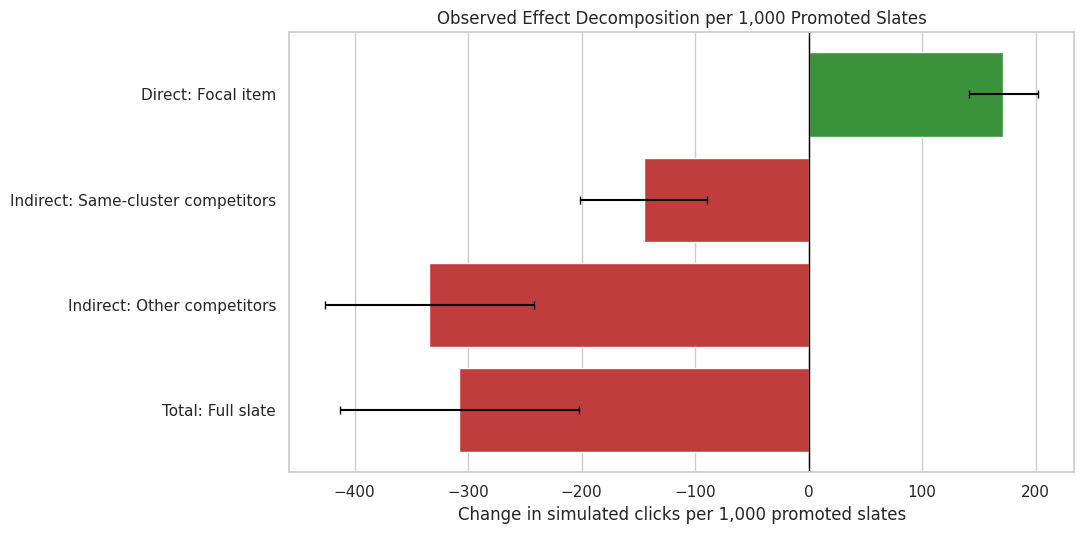
This plot shows the observed-click decomposition in clicks per 1,000 promoted slates. Positive bars represent gains and negative bars represent losses. This is the cleanest way to communicate whether promotion created new engagement or mostly shifted attention.
# Plot the observed direct, indirect, and total effects.observed_component_plot = component_effects.query("outcome_type == 'observed_clicks'").copy()observed_component_plot["component_label"] = observed_component_plot["effect_family"] +": "+ observed_component_plot["component"]component_order = ["Direct: Focal item","Indirect: Same-cluster competitors","Indirect: Other competitors","Total: Full slate",]fig, ax = plt.subplots(figsize=(11, 5.5))colors = ["tab:green"if value >=0else"tab:red"for value in observed_component_plot["estimate_per_1000_promoted_slates"]]sns.barplot( data=observed_component_plot, x="estimate_per_1000_promoted_slates", y="component_label", order=component_order, hue="component_label", palette=dict(zip(observed_component_plot["component_label"], colors)), legend=False, ax=ax,)for y_pos, (_, row) inenumerate(observed_component_plot.set_index("component_label").loc[component_order].reset_index().iterrows()): ax.errorbar( x=row["estimate_per_1000_promoted_slates"], y=y_pos, xerr=[ [row["estimate_per_1000_promoted_slates"] - row["ci_95_lower_per_1000"]], [row["ci_95_upper_per_1000"] - row["estimate_per_1000_promoted_slates"]], ], fmt="none", color="black", capsize=3, )ax.axvline(0, color="black", linewidth=1)ax.set_title("Observed Effect Decomposition per 1,000 Promoted Slates")ax.set_xlabel("Change in simulated clicks per 1,000 promoted slates")ax.set_ylabel("")plt.tight_layout()plt.show()
The plot makes the product tradeoff immediate. The focal item gains clicks, but the same-cluster and other competitor components lose clicks. The total bar tells us whether the slate as a whole improved after accounting for those losses.
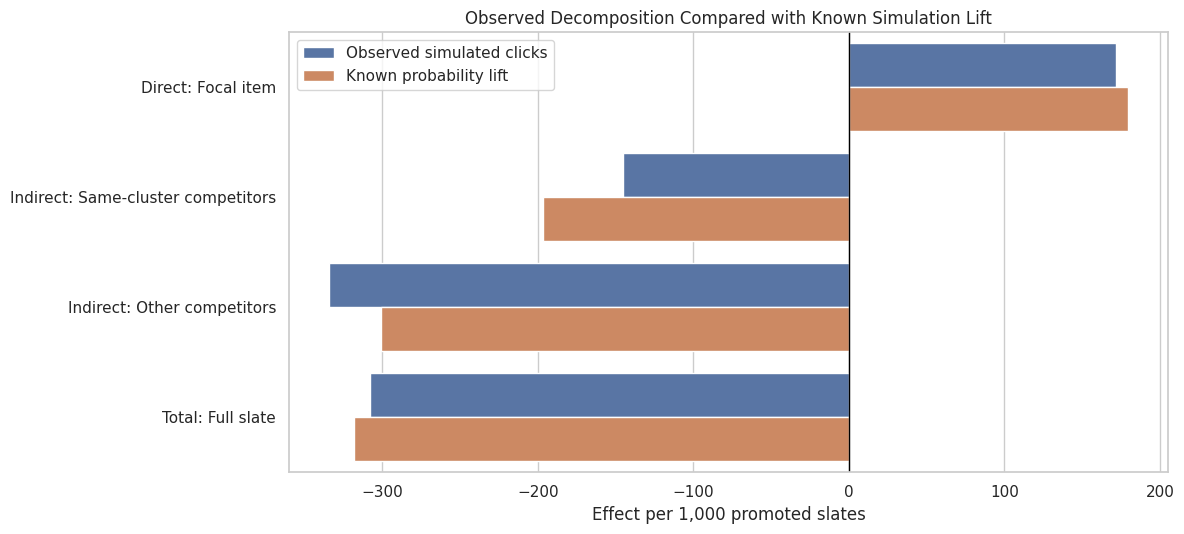
9. Compare Observed and Known Decomposition
This cell places the observed-click decomposition next to the known simulation lift. The observed result includes random click noise, while the known-lift result shows the mechanism that the simulation injected.
decomposition_compare = component_effects.query("outcome_type in ['observed_clicks', 'known_lift']").copy()decomposition_compare["component_label"] = decomposition_compare["effect_family"] +": "+ decomposition_compare["component"]decomposition_compare["outcome_type_label"] = decomposition_compare["outcome_type"].map( {"observed_clicks": "Observed simulated clicks", "known_lift": "Known probability lift"})fig, ax = plt.subplots(figsize=(12, 5.5))sns.barplot( data=decomposition_compare, x="estimate_per_1000_promoted_slates", y="component_label", hue="outcome_type_label", order=component_order, ax=ax,)ax.axvline(0, color="black", linewidth=1)ax.set_title("Observed Decomposition Compared with Known Simulation Lift")ax.set_xlabel("Effect per 1,000 promoted slates")ax.set_ylabel("")ax.legend(title="")plt.tight_layout()plt.show()
The observed and known bars should tell the same directional story. They can differ because observed clicks include Bernoulli noise. The comparison is useful because it shows that the estimated decomposition is recovering the intended simulation pattern.
Spillover Definitions for Sensitivity Analysis
The decomposition above used a mutually exclusive accounting partition. This cell creates several alternative spillover definitions for sensitivity:
all non-focal items in promoted slates,
same-cluster competitors,
displaced items originally above the focal item,
strict same-cluster displaced substitutes,
near-position displaced items close to the focal item.
These definitions answer slightly different questions, so comparing them keeps the conclusion from depending on one arbitrary spillover definition.
# Spillover definitions for sensitivity analysis.near_position_window =3spillover_definitions = [ {"definition": "All non-focal items","mask": exposure["is_focal_item"].eq(0),"description": "Every non-focal item in the slate.", }, {"definition": "Same-cluster competitors","mask": exposure["is_focal_item"].eq(0)& exposure["spillover_cluster"].eq(exposure["focal_spillover_cluster"]),"description": "Non-focal items with the same primary-genre cluster as the focal item.", }, {"definition": "Displaced items","mask": exposure["is_focal_item"].eq(0)& exposure["slate_position_seed"].lt(exposure["focal_seed_position"]),"description": "Non-focal items above the focal item that shift down when promotion happens.", }, {"definition": "Same-cluster displaced substitutes","mask": exposure["is_focal_item"].eq(0)& exposure["spillover_cluster"].eq(exposure["focal_spillover_cluster"])& exposure["slate_position_seed"].lt(exposure["focal_seed_position"]),"description": "Same-cluster competitors that are also mechanically displaced.", }, {"definition": "Near-position displaced items","mask": exposure["is_focal_item"].eq(0)& exposure["slate_position_seed"].lt(exposure["focal_seed_position"])& (exposure["focal_seed_position"] - exposure["slate_position_seed"]).le(near_position_window),"description": "Displaced items within three positions above the focal item.", },]spillover_support_rows = []for spec in spillover_definitions: df = exposure.loc[spec["mask"]].copy() spillover_support_rows.append( {"definition": spec["definition"],"rows": len(df),"slates": df["slate_id"].nunique(),"treated_rows": int(df["promotion_applied"].sum()),"control_rows": int((1- df["promotion_applied"]).sum()),"description": spec["description"], } )spillover_support = pd.DataFrame(spillover_support_rows)display(spillover_support)
definition
rows
slates
treated_rows
control_rows
description
0
All non-focal items
33000
3000
16555
16445
Every non-focal item in the slate.
1
Same-cluster competitors
8448
2456
4309
4139
Non-focal items with the same primary-genre cl...
2
Displaced items
22410
3000
11277
11133
Non-focal items above the focal item that shif...
3
Same-cluster displaced substitutes
5746
2182
2937
2809
Same-cluster competitors that are also mechani...
4
Near-position displaced items
9000
3000
4515
4485
Displaced items within three positions above t...
The support table shows the tradeoff between conceptual precision and sample size. The stricter definitions are more targeted, but they have fewer rows. The broader definitions are more stable, but they mix several mechanisms together.
11. Estimate Effects Under Alternative Spillover Definitions
This cell estimates row-level spillover effects under each definition. The outcome is the simulated click indicator, and uncertainty is clustered by slate because slate assignment drives spillover exposure.
# Estimate effects under alternative spillover definitions.def row_level_cluster_difference(data, outcome="simulated_click", treatment="promotion_applied", cluster_col="slate_id"):""" Estimate row-level spillover differences within item clusters. Idea ---- The helper compares outcomes for exposed and unexposed non-focal items to study substitute or displaced-item spillovers. Parameters ---------- data : object Input analysis table for the current project step. outcome : object Outcome column used in the contrast. treatment : object Treatment indicator column or treatment values. cluster_col : object Cluster identifier used for grouped bootstrap or summaries. Returns ------- pandas.DataFrame Cluster-level spillover estimates. """ work = data[[outcome, treatment, cluster_col]].dropna().copy() work[outcome] = work[outcome].astype(float) work[treatment] = work[treatment].astype(float) treated = work.loc[work[treatment] ==1, outcome] control = work.loc[work[treatment] ==0, outcome] x = sm.add_constant(work[treatment], has_constant="add") fit = sm.OLS(work[outcome], x).fit(cov_type="cluster", cov_kwds={"groups": work[cluster_col]}) estimate =float(fit.params[treatment]) se =float(fit.bse[treatment])return {"estimate": estimate,"cluster_se": se,"ci_95_lower": estimate -1.96* se,"ci_95_upper": estimate +1.96* se,"treated_mean": treated.mean(),"control_mean": control.mean(),"treated_n": len(treated),"control_n": len(control),"clusters": work[cluster_col].nunique(), }spillover_sensitivity_rows = []for spec in spillover_definitions: df = exposure.loc[spec["mask"]].copy() result = row_level_cluster_difference(df) result["definition"] = spec["definition"] result["description"] = spec["description"] spillover_sensitivity_rows.append(result)spillover_sensitivity = pd.DataFrame(spillover_sensitivity_rows)spillover_sensitivity = spillover_sensitivity[ ["definition","estimate","cluster_se","ci_95_lower","ci_95_upper","treated_mean","control_mean","treated_n","control_n","clusters","description", ]]display(spillover_sensitivity)
definition
estimate
cluster_se
ci_95_lower
ci_95_upper
treated_mean
control_mean
treated_n
control_n
clusters
description
0
All non-focal items
-0.0436
0.0046
-0.0526
-0.0346
0.1705
0.2141
16555
16445
3000
Every non-focal item in the slate.
1
Same-cluster competitors
-0.0577
0.0084
-0.0743
-0.0412
0.1522
0.2100
4309
4139
2456
Non-focal items with the same primary-genre cl...
2
Displaced items
-0.0568
0.0057
-0.0679
-0.0457
0.1818
0.2386
11277
11133
3000
Non-focal items above the focal item that shif...
3
Same-cluster displaced substitutes
-0.0657
0.0104
-0.0860
-0.0454
0.1610
0.2268
2937
2809
2182
Same-cluster competitors that are also mechani...
4
Near-position displaced items
-0.0330
0.0082
-0.0491
-0.0168
0.1604
0.1933
4515
4485
3000
Displaced items within three positions above t...
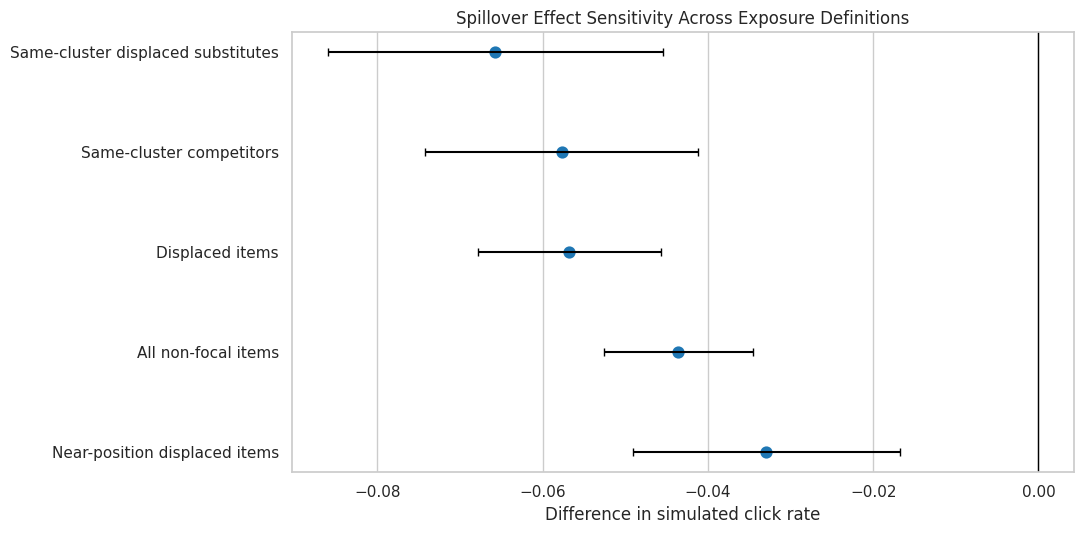
The sensitivity table shows whether the spillover conclusion depends on the exposure definition. If every definition is negative, the evidence for displacement is stronger. If only one narrow definition is negative, the claim should be framed more cautiously.
12. Plot Spillover Definition Sensitivity
This plot compares the estimated spillover effect under each exposure definition. The intervals use slate-clustered standard errors.
The plot makes the robustness of the spillover story easier to see. Definitions that focus on displaced or same-cluster items should usually show stronger negative effects than broad all-non-focal definitions if substitute displacement is the mechanism.
Translate the Decomposition into Product Units
This cell converts the observed decomposition into clicks per 1,000 promoted slates and computes how much of the focal gain is offset by competitor losses. Concrete units make the summary easier to interpret.
# Translate the decomposition into product units.observed_components = component_effects.query("outcome_type == 'observed_clicks'").copy()summary_lookup = observed_components.set_index(["effect_family", "component"])["estimate_per_1000_promoted_slates"]direct_gain_1000 = summary_lookup.loc[("Direct", "Focal item")]same_cluster_loss_1000 = summary_lookup.loc[("Indirect", "Same-cluster competitors")]other_loss_1000 = summary_lookup.loc[("Indirect", "Other competitors")]total_effect_1000 = summary_lookup.loc[("Total", "Full slate")]competitor_offset_1000 = same_cluster_loss_1000 + other_loss_1000offset_ratio = competitor_offset_1000 /abs(direct_gain_1000)product_summary = pd.DataFrame( [ {"metric": "Focal gain per 1,000 promoted slates","value": direct_gain_1000,"plain_language": "Additional simulated clicks on the promoted focal item.", }, {"metric": "Same-cluster competitor change per 1,000 promoted slates","value": same_cluster_loss_1000,"plain_language": "Change among substitute movies in the same genre cluster.", }, {"metric": "Other competitor change per 1,000 promoted slates","value": other_loss_1000,"plain_language": "Change among other non-focal movies in the slate.", }, {"metric": "Total slate change per 1,000 promoted slates","value": total_effect_1000,"plain_language": "Net change after adding focal and competitor components.", }, {"metric": "Competitor offset as share of direct gain magnitude","value": offset_ratio,"plain_language": "Negative values mean competitor losses more than offset focal gains.", }, ])display(product_summary)
metric
value
plain_language
0
Focal gain per 1,000 promoted slates
171.6152
Additional simulated clicks on the promoted fo...
1
Same-cluster competitor change per 1,000 promo...
-145.3905
Change among substitute movies in the same gen...
2
Other competitor change per 1,000 promoted slates
-334.0459
Change among other non-focal movies in the slate.
3
Total slate change per 1,000 promoted slates
-307.8212
Net change after adding focal and competitor c...
4
Competitor offset as share of direct gain magn...
-2.7937
Negative values mean competitor losses more th...
This table is the narrative payoff. It shows whether promotion is value-creating or attention-shifting. In this simulation, the focal gain alone leaves out displaced-item effects; we need the total slate row to decide whether the intervention improves the recommendation surface.
Identify When Promotion Is Most Risky
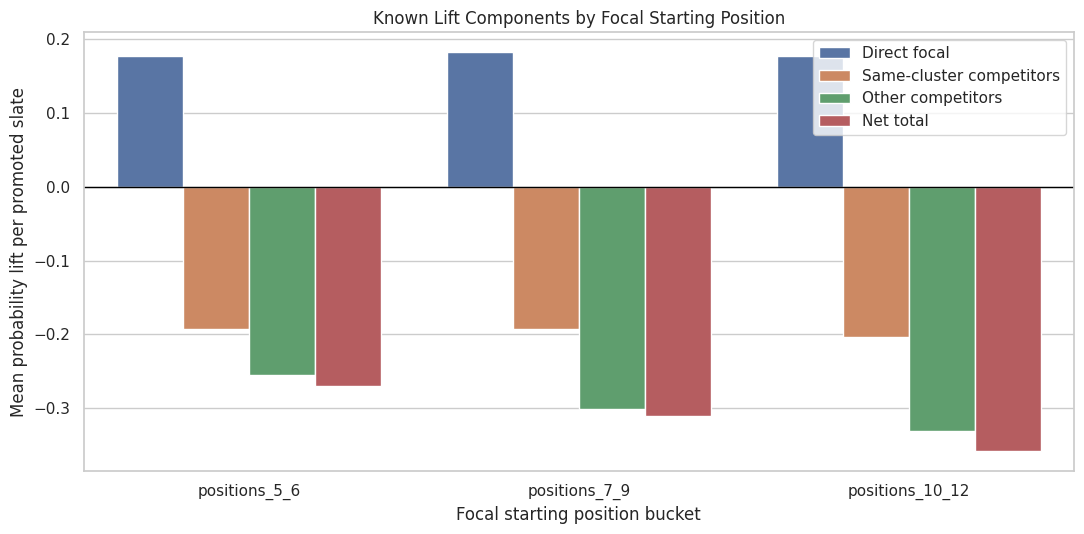
This cell groups promoted slates by focal seed position and focal cluster. The goal is to see whether net losses are larger when the focal item starts deeper in the slate or when certain clusters are promoted.
These risk summaries are exploratory, but they give useful product intuition. Deeper promotions can create larger reordering changes, and some content clusters may have more same-cluster competitors to displace.
15. Plot Net Lift by Focal Position Bucket
This plot shows how known net slate lift changes depending on where the promoted focal item started. It helps connect the causal result back to ranking mechanics.
The position-bucket view shows whether the harm is worse when the promoted item starts deeper. If deeper promotions create larger competitor losses, then promotion policies should consider the cost of jumping over many high-ranked items.
Final Decomposition Statements
This cell creates a compact recommendation table. It translates the technical decomposition into decision-oriented statements for the project conclusion.
# Build final decomposition statements.net_sign ="positive"if total_effect_1000 >0else"negative"offset_text ="more than offsets"ifabs(competitor_offset_1000) >abs(direct_gain_1000) else"partially offsets"recommendation_table = pd.DataFrame( [ {"decision_area": "Item-level reporting","recommendation": "Do not report promoted-item gain alone as the product impact.","evidence": f"The focal item gains {direct_gain_1000:,.1f} clicks per 1,000 promoted slates, but competitor changes sum to {competitor_offset_1000:,.1f}.", }, {"decision_area": "Slate-level metric","recommendation": "Use total slate effect as the primary decision metric under interference.","evidence": f"The net observed slate effect is {total_effect_1000:,.1f} simulated clicks per 1,000 promoted slates, which is {net_sign} in this simulation.", }, {"decision_area": "Spillover monitoring","recommendation": "Track same-cluster and displaced-item outcomes whenever an item is promoted.","evidence": f"Competitor movement {offset_text} the direct focal gain in the decomposition.", }, {"decision_area": "Policy design","recommendation": "Treat large rank jumps as higher-risk interventions unless slate-level value is measured.","evidence": "Promotion changes final positions for multiple items, so the intervention reallocates scarce attention.", }, ])display(recommendation_table)
decision_area
recommendation
evidence
0
Item-level reporting
Do not report promoted-item gain alone as the ...
The focal item gains 171.6 clicks per 1,000 pr...
1
Slate-level metric
Use total slate effect as the primary decision...
The net observed slate effect is -307.8 simula...
2
Spillover monitoring
Track same-cluster and displaced-item outcomes...
Competitor movement more than offsets the dire...
3
Policy design
Treat large rank jumps as higher-risk interven...
Promotion changes final positions for multiple...
The recommendation table is intentionally direct. A reader should be able to see the methodological point and the product implication: under interference, item gains need slate-level accounting; slate-level net value is the safer decision target.
The saved outputs are the main evidence record for the decomposition. The most important files are the direct-indirect-total effect table, the spillover definition sensitivity table, and the recommendation table.
Takeaways and Next Step
This notebook formalized the interference story:
The direct focal gain is positive and represents one part of the product effect.
Same-cluster and other competitor losses can more than offset the focal gain.
The component estimates add up exactly to the total slate estimate when accounting is done at the slate level.
Spillover conclusions are robust across several exposure definitions in this simulation.
The safest decision metric under item competition is the total slate effect because it accounts for displaced items and spillovers.
The next notebook adds advanced spillover models and sensitivity checks, then compares whether the model-assisted evidence agrees with the transparent slate-level decomposition.