from pathlib import Path
import warnings

import lightgbm as lgb
import matplotlib.pyplot as plt
import numpy as np
import pandas as pd
import seaborn as sns
from sklearn.compose import ColumnTransformer
from sklearn.linear_model import LogisticRegression
from sklearn.metrics import average_precision_score, brier_score_loss, log_loss, roc_auc_score
from sklearn.pipeline import Pipeline
from sklearn.preprocessing import OneHotEncoder, StandardScaler

pd.set_option("display.max_columns", 140)
pd.set_option("display.max_rows", 140)
pd.set_option("display.float_format", "{:.6f}".format)

sns.set_theme(style="whitegrid", context="notebook")

warnings.filterwarnings(
    "ignore",
    message="X does not have valid feature names, but LGBMClassifier was fitted with feature names",
    category=UserWarning,
)05: Policy Comparison And Sensitivity
This notebook is the final technical notebook for Off-Policy Evaluation of Recommendation Systems.
Notebook 3 introduced IPS and SNIPS. Notebook 4 added direct method and doubly robust OPE. Those estimates are useful, but a good offline policy recommendation should be stable across reasonable modeling choices.
This notebook asks the decision-quality question:
Are the policy conclusions stable enough to recommend a policy for online A/B testing?
We stress-test the conclusions across three dimensions:
- weight clipping sensitivity: do estimates change when extreme weights are capped?
- reward model sensitivity: do DR estimates agree across logistic regression and LightGBM?
- time split sensitivity: does the same policy look good across different train/evaluation windows?
The goal is to identify the most credible candidate for online experimentation and document the remaining risks. The goal is to identify the most credible candidate for online experimentation and document the remaining risks.
Dataset and Experiment Context
This project uses the Open Bandit Dataset from a fashion e-commerce recommendation setting. Each row is a logged recommendation event with context features, the item action chosen by the behavior policy, a binary click reward, and the behavior-policy propensity for the chosen action.
The main analysis uses the random/men campaign because randomized logging gives broad action support and known propensities. Open Bandit also contains adaptive Bernoulli Thompson Sampling logs, but random logging is the cleanest starting point for off-policy evaluation.
The offline experiment asks which candidate recommendation policy deserves online validation. IPS, SNIPS, direct method, doubly robust estimates, effective sample size, clipping sensitivity, and reward-model diagnostics are treated as launch-readiness evidence for later online testing.
Role of this notebook. This notebook compares fixed policies under clipping, support, reward-model, and split-sensitivity checks to identify stable online-test candidates.
Mathematical Setup
Policy comparison ranks a finite set of candidate policies (={_1,,_K}). Each policy gets an estimated value and uncertainty interval,
\[ \widehat V(\pi_k) \pm 1.96\,\widehat{\operatorname{SE}}\{\widehat V(\pi_k)\}. \]
The comparison is decision-oriented, so the notebook also looks at risk diagnostics such as effective sample size and large-weight exposure. A conservative improvement check compares a candidate policy against a baseline policy (_0):
\[ \widehat\Delta_k=\widehat V(\pi_k)-\widehat V(\pi_0). \]
A policy with high estimated value but weak support should be treated differently from a policy with high value and stable diagnostics.
Project Recap
The causal setup is a logged contextual bandit problem.
For each recommendation event, we observe context X, logged action A, reward Y, and behavior-policy propensity pi_b(A|X). We define candidate evaluation policies pi_e and estimate their values offline.
The estimators so far are:
- IPS: averages
pi_e / pi_b * Y - SNIPS: normalizes IPS weights by total weight
- Direct Method: averages reward model predictions under each policy
- Doubly Robust: direct method plus an importance-weighted residual correction
This notebook compares those estimators through the lens of stability. A policy with a slightly lower estimate but much stronger support may be a better A/B-test candidate than a policy with a high but fragile offline estimate.
Setup
This cell imports the libraries needed for sensitivity analysis. It also suppresses one known LightGBM/sklearn feature-name metadata warning so repeated model scoring stays clean.
The notebook uses the same modeling stack as Notebook 4, including logistic regression and LightGBM reward models. We keep implementation explicit so every estimate can be traced back to the formula.
This cell prepares the notebook environment for policy comparison and sensitivity analysis. There is no estimator output yet; the main value is that the imports, display settings, and plotting defaults are ready for the OPE diagnostics that follow.
Load The Random Open Bandit Sample
This cell loads the cached random/men sample used throughout the off-policy evaluation notebooks.
We keep the random log as the primary source for policy comparison because earlier notebooks showed that it has broad action support and stable logged propensities. That makes it the cleanest log for comparing evaluation policies.
RANDOM_SAMPLE_RELATIVE_PATH = Path("data/processed/open_bandit_random_men_sample.parquet")
PROJECT_ROOT = next(
    path
    for path in [Path.cwd(), *Path.cwd().parents]
    if (path / RANDOM_SAMPLE_RELATIVE_PATH).exists()
)

RANDOM_SAMPLE_PATH = PROJECT_ROOT / RANDOM_SAMPLE_RELATIVE_PATH
random_df = pd.read_parquet(RANDOM_SAMPLE_PATH).sort_values("timestamp").reset_index(drop=True)

pd.Series(
    {
        "project_root": PROJECT_ROOT,
        "random_sample_path": RANDOM_SAMPLE_PATH,
        "rows": len(random_df),
        "columns": random_df.shape[1],
        "observed_click_rate": random_df["click"].mean(),
    }
).to_frame("value")
The loaded table shape and preview confirm that the expected cached data is available. This check matters because all later OPE estimates depend on using the correct logged actions, rewards, contexts, and behavior propensities.
Define Reusable Feature Builders
This cell defines helper functions for reward-model feature construction.
make_logged_feature_frame creates features for the action that was actually logged. make_candidate_feature_frame creates features for every candidate action in each context row. The second function is what makes direct method and doubly robust OPE possible: it lets the reward model predict outcomes for unlogged actions in that row.
# Define reusable feature builders.
def make_logged_feature_frame(df):
    """
    Create reward-model features for logged Open Bandit actions.

    Idea
    ----
    Each row keeps the observed context and the action actually chosen by the behavior policy, which is the training target for reward-model nuisance fits.

    Parameters
    ----------
    df : object
        Input data frame for the current helper.

    Returns
    -------
    pandas.DataFrame
        Feature frame aligned with the logged reward rows.
    """
    frame = df.copy()
    affinity_matrix = frame[affinity_cols_by_action].to_numpy()
    item_positions = frame["item_id"].map({item_id: idx for idx, item_id in enumerate(action_space)}).to_numpy()
    frame["selected_affinity"] = affinity_matrix[np.arange(len(frame)), item_positions]
    return frame[feature_cols]


def make_candidate_feature_frame(context_df):
    """
    Create reward-model features for every candidate action in each context.

    Idea
    ----
    This expands each context across the action space so direct-method and contextual-policy predictions can evaluate actions that were not logged on that row.

    Parameters
    ----------
    context_df : object
        Context rows for which candidate actions are evaluated.

    Returns
    -------
    pandas.DataFrame
        Long feature frame containing one row per context-action pair.
    """
    n_contexts = len(context_df)
    tiled_actions = np.tile(action_space, n_contexts)

    frame = pd.DataFrame(
        {
            "position": np.repeat(context_df["position"].to_numpy(), n_actions),
            "hour": np.repeat(context_df["hour"].to_numpy(), n_actions),
            "item_id": tiled_actions,
        }
    )

    for col in user_feature_cols:
        frame[col] = np.repeat(context_df[col].to_numpy(), n_actions)

    affinity_matrix = context_df[affinity_cols_by_action].to_numpy()
    frame["selected_affinity"] = affinity_matrix.reshape(-1)

    repeated_item_context = item_context.loc[tiled_actions, item_feature_cols].reset_index(drop=True)
    frame = pd.concat([frame, repeated_item_context], axis=1)

    return frame[feature_cols]

make_logged_feature_frame(random_df.head(3))| position | hour | item_id | user_feature_0 | user_feature_1 | user_feature_2 | user_feature_3 | item_feature_1 | item_feature_2 | item_feature_3 | selected_affinity | item_feature_0 | |
|---|---|---|---|---|---|---|---|---|---|---|---|---|
| 0 | 1 | 0 | 0 | cef3390ed299c09874189c387777674a | 03a5648a76832f83c859d46bc06cb64a | 2723d2eb8bba04e0362098011fa3997b | c39b0c7dd5d4eb9a18e7db6ba2f258f8 | ce58bf66d7e62186e6ce01bafeea9d39 | 7c5498711d69681385d21c0e26923e7e | bbf748c6c978938bc63d432efa60191c | 0.000000 | -0.677183 |
| 1 | 3 | 0 | 25 | cef3390ed299c09874189c387777674a | 03a5648a76832f83c859d46bc06cb64a | 2723d2eb8bba04e0362098011fa3997b | c39b0c7dd5d4eb9a18e7db6ba2f258f8 | 9874ffb54e9b0a269e29bbb2f5328735 | 7c5498711d69681385d21c0e26923e7e | bbf748c6c978938bc63d432efa60191c | 0.000000 | -0.461600 |
| 2 | 2 | 0 | 23 | cef3390ed299c09874189c387777674a | 03a5648a76832f83c859d46bc06cb64a | 2723d2eb8bba04e0362098011fa3997b | c39b0c7dd5d4eb9a18e7db6ba2f258f8 | 55fe518d85813954c7d9b8a875ff2453 | cc75031396a5aa830885915aa93f49d0 | b61cfaadd526b816e3aeb9b7be4b4759 | 0.000000 | -0.569392 |
These feature-building cells define the context used by reward models. Reward models need both user context and candidate item context so they can predict counterfactual rewards for unlogged actions.
Define Evaluation Policy Builder
This helper recreates the candidate policies from Notebooks 3 and 4 using only the training split.
The candidate policies are intentionally simple:
uniform: equal probability across itemsexposure_popularity: probability proportional to training exposurectr_weighted: probability proportional to smoothed training CTRepsilon_greedy_top_ctr: most probability on the top smoothed-CTR item, with exploration mass elsewhere
Using the same policies keeps the notebook sequence coherent and lets us focus on sensitivity analysis with a fixed policy set.
# Define evaluation policy builder.
def normalize_probabilities(values):
    """
    Normalize nonnegative scores into action probabilities.

    Idea
    ----
    The helper turns item scores into a valid evaluation-policy distribution and protects OPE estimators from zero-sum or invalid probability vectors.

    Parameters
    ----------
    values : object
        Numeric values to summarize.

    Returns
    -------
    numpy.ndarray
        Probability vector that sums to one.
    """
    values = np.asarray(values, dtype=float)
    values = np.clip(values, 0, None)
    total = values.sum()
    if total <= 0:
        raise ValueError("Policy scores must have positive total mass.")
    return values / total


def build_policy_probabilities(train_df, smoothing_alpha=50, epsilon=0.15):
    """
    Build fixed evaluation-policy probabilities from training logs.

    Idea
    ----
    The function converts empirical item performance into smoothed fixed policies so they can be evaluated on held-out Open Bandit logs.

    Parameters
    ----------
    train_df : object
        Training rows used to learn policies or reward models.
    smoothing_alpha : object
        Smoothing strength for empirical policy probabilities.
    epsilon : object
        Exploration probability for epsilon-greedy policies.

    Returns
    -------
    pandas.DataFrame
        Policy-probability table indexed by item action.
    """
    train_global_ctr = train_df["click"].mean()
    item_stats = (
        train_df.groupby("item_id")
        .agg(train_impressions=("click", "size"), train_clicks=("click", "sum"), train_ctr=("click", "mean"))
        .reindex(action_space, fill_value=0)
        .rename_axis("item_id")
        .reset_index()
    )
    item_stats["smoothed_ctr"] = (
        item_stats["train_clicks"] + smoothing_alpha * train_global_ctr
    ) / (item_stats["train_impressions"] + smoothing_alpha)
    item_stats["train_exposure_share"] = item_stats["train_impressions"] / item_stats["train_impressions"].sum()

    uniform_probs = np.full(n_actions, 1 / n_actions)
    exposure_popularity_probs = normalize_probabilities(item_stats["train_exposure_share"].to_numpy())
    ctr_weighted_probs = normalize_probabilities(item_stats["smoothed_ctr"].to_numpy())

    epsilon_greedy_probs = np.full(n_actions, epsilon / n_actions)
    top_ctr_index = int(item_stats["smoothed_ctr"].to_numpy().argmax())
    epsilon_greedy_probs[top_ctr_index] += 1 - epsilon

    policy_probability_df = pd.DataFrame(
        {
            "item_id": action_space,
            "uniform": uniform_probs,
            "exposure_popularity": exposure_popularity_probs,
            "ctr_weighted": ctr_weighted_probs,
            "epsilon_greedy_top_ctr": epsilon_greedy_probs,
        }
    )
    return item_stats, policy_probability_df
The policy definitions create several offline candidates with different levels of targeting. Comparing simple policies first makes it easier to understand IPS, SNIPS, and DR behavior before moving to contextual policies.
Define Reward Model Builders
This helper returns a fresh reward-model pipeline for each sensitivity run.
A fresh pipeline matters because each split should be independent. Reusing fitted preprocessors or fitted models across splits would leak information and make the sensitivity analysis less trustworthy.
# Define reward model builders.
def build_preprocessor():
    """
    Build the Open Bandit reward-model preprocessor.

    Idea
    ----
    The preprocessor handles numeric context, action, and position features so reward models receive a stable design matrix across policy comparisons.

    Parameters
    ----------
    None
        The function reads the project-level categorical and numeric feature lists used by the reward-model pipeline.

    Returns
    -------
    sklearn.compose.ColumnTransformer
        Configured preprocessing transformer for reward-model features.
    """
    return ColumnTransformer(
        transformers=[
            ("categorical", OneHotEncoder(handle_unknown="ignore"), categorical_features),
            ("numeric", StandardScaler(), numeric_features),
        ],
        remainder="drop",
    )


def build_reward_model(model_name):
    """
    Build a reward model for Open Bandit policy evaluation.

    Idea
    ----
    The helper chooses a learner family and wraps it with preprocessing so click-reward predictions can feed direct and doubly robust estimators.

    Parameters
    ----------
    model_name : object
        Label identifying the model family or specification.

    Returns
    -------
    sklearn.pipeline.Pipeline
        Reward-model pipeline for the requested model family.
    """
    if model_name == "logistic":
        model = LogisticRegression(max_iter=500, solver="lbfgs")
    elif model_name == "lightgbm":
        model = lgb.LGBMClassifier(
            n_estimators=180,
            learning_rate=0.05,
            num_leaves=31,
            min_child_samples=100,
            subsample=0.85,
            colsample_bytree=0.85,
            random_state=42,
            verbose=-1,
        )
    elif model_name == "lightgbm_shallow":
        model = lgb.LGBMClassifier(
            n_estimators=120,
            learning_rate=0.06,
            num_leaves=15,
            min_child_samples=200,
            subsample=0.85,
            colsample_bytree=0.85,
            random_state=42,
            verbose=-1,
        )
    else:
        raise ValueError(f"Unknown reward model: {model_name}")

    return Pipeline(steps=[("preprocess", build_preprocessor()), ("model", model)])
The preprocessing and model-builder definitions make reward modeling reusable across policies, splits, and sensitivity checks. This helps ensure that estimator differences come from policy or model choices.
Define OPE Helper Functions
This cell defines the estimator machinery used throughout the notebook.
The helper functions compute effective sample size, large-sample confidence intervals, IPS, SNIPS, direct method, and doubly robust estimates. They also support weight clipping for sensitivity analysis. Clipping is applied only to the importance-weighted terms. The direct-method prediction remains unchanged.
# Define OPE helper functions.
def effective_sample_size(weights):
    """
    Compute the effective sample size implied by importance weights.

    Idea
    ----
    Large or unstable weights can make an estimator behave as if it had far fewer observations; this diagnostic turns weight concentration into a readable sample-size number.

    Parameters
    ----------
    weights : object
        Observation weights aligned with the values.

    Returns
    -------
    float
        Effective sample size computed as squared total weight divided by total squared weight.
    """
    weights = np.asarray(weights, dtype=float)
    return weights.sum() ** 2 / np.square(weights).sum()


def summarize_signal(signal):
    """
    Summarize the distribution of an OPE diagnostic signal.

    Idea
    ----
    The helper reports quantiles and extremes for weights, propensities, or residual terms so unstable policies are easy to spot.

    Parameters
    ----------
    signal : object
        Diagnostic vector to summarize.

    Returns
    -------
    dict
        Summary statistics for the supplied diagnostic vector.
    """
    signal = np.asarray(signal, dtype=float)
    estimate = signal.mean()
    se = signal.std(ddof=1) / np.sqrt(len(signal))
    return estimate, se, estimate - 1.96 * se, estimate + 1.96 * se


def estimate_policy_values(reward, weight, q_logged, direct_component, clip=None):
    """
    Estimate several OPE values for one policy and clipping rule.

    Idea
    ----
    The helper computes IPS, SNIPS, direct-method, and doubly robust estimates so candidate policies can be compared with consistent diagnostics.

    Parameters
    ----------
    reward : object
        Observed logged reward values.
    weight : object
        Importance weights for the evaluation policy.
    q_logged : object
        Reward-model prediction for the logged action.
    direct_component : object
        Direct-method value component for the evaluation policy.
    clip : object
        Optional upper bound for importance weights.

    Returns
    -------
    pandas.DataFrame
        Policy-value estimates for the requested clipping configuration.
    """
    reward = np.asarray(reward, dtype=float)
    raw_weight = np.asarray(weight, dtype=float)
    weight = raw_weight if clip is None else np.minimum(raw_weight, clip)
    q_logged = np.asarray(q_logged, dtype=float)
    direct_component = np.asarray(direct_component, dtype=float)

    ips_signal = weight * reward
    ips = summarize_signal(ips_signal)

    snips_estimate = ips_signal.sum() / weight.sum()
    snips_influence = weight * (reward - snips_estimate) / weight.mean()
    snips_se = snips_influence.std(ddof=1) / np.sqrt(len(snips_influence))
    snips = (snips_estimate, snips_se, snips_estimate - 1.96 * snips_se, snips_estimate + 1.96 * snips_se)

    dm = summarize_signal(direct_component)
    correction = weight * (reward - q_logged)
    dr_signal = direct_component + correction
    dr = summarize_signal(dr_signal)

    return {
        "IPS": ips,
        "SNIPS": snips,
        "DM": dm,
        "DR": dr,
        "ess_share": effective_sample_size(weight) / len(weight),
        "mean_weight": weight.mean(),
        "max_weight": weight.max(),
        "p99_weight": np.percentile(weight, 99),
        "mean_abs_correction": np.abs(correction).mean(),
        "mean_correction": correction.mean(),
    }
The helper functions encode the estimator formulas and diagnostics used repeatedly in the notebook. Defining them once keeps the later policy comparisons consistent and easier to audit.
Define Candidate-Action Scoring Helper
This helper computes direct-method components for every policy in batches.
For each evaluation context, it predicts q_hat(x, a) for all candidate actions. It then multiplies those predictions by each policy’s action probabilities. The output is one direct-method component per context and policy.
# Define candidate-action scoring helper.
def compute_direct_components(model, contexts_df, policy_probability_df, batch_size=12_000):
    """
    Compute direct-method value components for candidate policies.

    Idea
    ----
    The function predicts rewards for every context-action pair, weights those predictions by policy probabilities, and returns one model-based value component per context.

    Parameters
    ----------
    model : object
        Fitted or unfitted model used in the helper.
    contexts_df : object
        Context rows for which candidate actions are evaluated.
    policy_probability_df : object
        Candidate policy probabilities for each action.
    batch_size : object
        Number of rows to score in each prediction batch.

    Returns
    -------
    pandas.DataFrame
        Direct-method components aligned with evaluation contexts and policies.
    """
    policy_cols = [col for col in policy_probability_df.columns if col != "item_id"]
    policy_probability_matrix = policy_probability_df[policy_cols].to_numpy()
    component_batches = []

    for start in range(0, len(contexts_df), batch_size):
        context_batch = contexts_df.iloc[start : start + batch_size]
        candidate_features = make_candidate_feature_frame(context_batch)
        q_hat = model.predict_proba(candidate_features)[:, 1].reshape(len(context_batch), n_actions)
        component_batches.append(q_hat @ policy_probability_matrix)

    components = np.vstack(component_batches)
    return pd.DataFrame(components, columns=policy_cols, index=contexts_df.index)
These cells score candidate actions under the reward model, which is what lets the direct method estimate values for policies that choose actions different from the logged one. This is the model-based complement to importance weighting.
Define One End-To-End Evaluation Function
This cell defines the core analysis function used by the sensitivity sections.
For a given train/evaluation split and reward model, it:
- builds evaluation policies from the training split
- trains a reward model on logged training rows
- scores logged evaluation rows
- scores all candidate actions for direct method
- computes IPS, SNIPS, DM, and DR estimates
- returns policy estimates, reward-model metrics, and policy probabilities
Having this in one function reduces copy-paste risk across the sensitivity analysis.
# Define one end-to-end evaluation function.
def run_ope_for_split(train_df, eval_df, model_name="lightgbm", split_name="main", clip=None):
    """
    Run the full OPE workflow on one train/evaluation split.

    Idea
    ----
    The function trains reward models, builds fixed policy probabilities, computes direct components, and returns OPE estimates for a held-out split.

    Parameters
    ----------
    train_df : object
        Training rows used to learn policies or reward models.
    eval_df : object
        Evaluation rows used for held-out OPE.
    model_name : object
        Label identifying the model family or specification.
    split_name : object
        Label for the current train/evaluation split.
    clip : object
        Optional upper bound for importance weights.

    Returns
    -------
    pandas.DataFrame
        Policy-value estimates and diagnostics for the requested split.
    """
    item_stats, policy_probability_df = build_policy_probabilities(train_df)
    policy_cols = [col for col in policy_probability_df.columns if col != "item_id"]

    X_train = make_logged_feature_frame(train_df)
    y_train = train_df["click"].astype(int)
    X_eval_logged = make_logged_feature_frame(eval_df)
    y_eval = eval_df["click"].astype(int)

    model = build_reward_model(model_name)
    model.fit(X_train, y_train)

    q_logged = model.predict_proba(X_eval_logged)[:, 1]
    direct_components = compute_direct_components(model, eval_df, policy_probability_df)

    model_metrics = {
        "split_name": split_name,
        "reward_model": model_name,
        "train_rows": len(train_df),
        "eval_rows": len(eval_df),
        "auc": roc_auc_score(y_eval, q_logged),
        "average_precision": average_precision_score(y_eval, q_logged),
        "log_loss": log_loss(y_eval, q_logged, labels=[0, 1]),
        "brier_score": brier_score_loss(y_eval, q_logged),
        "mean_prediction": q_logged.mean(),
        "observed_click_rate": y_eval.mean(),
    }

    eval_scored = eval_df[["timestamp", "item_id", "position", "click", "propensity_score"]].copy()
    result_rows = []
    reward = eval_scored["click"].to_numpy()

    for policy in policy_cols:
        probability_map = policy_probability_df.set_index("item_id")[policy]
        pi_e = eval_scored["item_id"].map(probability_map).to_numpy()
        weight = pi_e / eval_scored["propensity_score"].to_numpy()
        estimates = estimate_policy_values(
            reward=reward,
            weight=weight,
            q_logged=q_logged,
            direct_component=direct_components[policy].to_numpy(),
            clip=clip,
        )

        for estimator in ["IPS", "SNIPS", "DM", "DR"]:
            estimate, se, lower, upper = estimates[estimator]
            result_rows.append(
                {
                    "split_name": split_name,
                    "reward_model": model_name,
                    "policy": policy,
                    "estimator": estimator,
                    "clip": "none" if clip is None else clip,
                    "estimate": estimate,
                    "se": se,
                    "ci_95_lower": lower,
                    "ci_95_upper": upper,
                    "ess_share": estimates["ess_share"],
                    "mean_weight": estimates["mean_weight"],
                    "max_weight": estimates["max_weight"],
                    "p99_weight": estimates["p99_weight"],
                    "mean_abs_correction": estimates["mean_abs_correction"],
                    "mean_correction": estimates["mean_correction"],
                    "eval_observed_click_rate": y_eval.mean(),
                }
            )

    return pd.DataFrame(result_rows), pd.DataFrame([model_metrics]), policy_probability_df, item_stats
The end-to-end evaluation function packages splitting, reward modeling, policy scoring, and OPE estimation into one repeatable workflow. This makes sensitivity analysis possible without rewriting estimator logic each time.
Create The Main Split
This cell recreates the primary 50/50 time split from Notebooks 3 and 4.
The main split is used for detailed clipping and reward-model sensitivity. Later, split sensitivity uses several shorter evaluation windows to test whether conclusions hold across time.
MAIN_SPLIT_FRACTION = 0.50
main_split_idx = int(len(random_df) * MAIN_SPLIT_FRACTION)

main_train_df = random_df.iloc[:main_split_idx].copy()
main_eval_df = random_df.iloc[main_split_idx:].copy()

main_split_summary = pd.DataFrame(
    {
        "split": ["train", "evaluation"],
        "rows": [len(main_train_df), len(main_eval_df)],
        "min_timestamp": [main_train_df["timestamp"].min(), main_eval_df["timestamp"].min()],
        "max_timestamp": [main_train_df["timestamp"].max(), main_eval_df["timestamp"].max()],
        "click_rate": [main_train_df["click"].mean(), main_eval_df["click"].mean()],
    }
)

main_split_summary| split | rows | min_timestamp | max_timestamp | click_rate | |
|---|---|---|---|---|---|
| 0 | train | 100000 | 2019-11-24 00:00:03.800821+00:00 | 2019-11-25 10:01:18.392921+00:00 | 0.005400 |
| 1 | evaluation | 100000 | 2019-11-25 10:01:18.393450+00:00 | 2019-11-27 02:50:16.027289+00:00 | 0.004980 |
The split separates policy construction from policy evaluation. This prevents using the same rows to design a policy and evaluate it, which would make the offline result too optimistic.
Main LightGBM OPE Estimates
This cell runs the main OPE estimate using the LightGBM reward model and no weight clipping.
This is the baseline result that the sensitivity sections will stress-test. It includes IPS, SNIPS, direct method, and doubly robust estimates for every candidate policy.
main_lgbm_estimates, main_lgbm_metrics, main_policy_probability_df, main_item_stats = run_ope_for_split(
    main_train_df,
    main_eval_df,
    model_name="lightgbm",
    split_name="main_50_50",
    clip=None,
)

main_lgbm_metrics| split_name | reward_model | train_rows | eval_rows | auc | average_precision | log_loss | brier_score | mean_prediction | observed_click_rate | |
|---|---|---|---|---|---|---|---|---|---|---|
| 0 | main_50_50 | lightgbm | 100000 | 100000 | 0.534265 | 0.005821 | 0.034100 | 0.005096 | 0.004932 | 0.004980 |
The main LightGBM OPE estimates serve as the reference result for policy comparison. Later sensitivity checks ask whether the same policy ranking survives changes in clipping, reward model, and time split.
Main Estimate Table
This cell displays the main LightGBM estimates. The table is sorted by estimator and estimated value so the strongest policies under each estimator are easy to inspect.
The main comparison to watch is between IPS/SNIPS and DR. If they agree directionally, that strengthens confidence. If they disagree, the final recommendation should be more cautious.
main_lgbm_table = main_lgbm_estimates.copy()
main_lgbm_table["lift_pp"] = 100 * (main_lgbm_table["estimate"] - main_lgbm_table["eval_observed_click_rate"])
main_lgbm_table["relative_lift_pct"] = 100 * (
    main_lgbm_table["estimate"] / main_lgbm_table["eval_observed_click_rate"] - 1
)

main_lgbm_table.sort_values(["estimator", "estimate"], ascending=[True, False])| split_name | reward_model | policy | estimator | clip | estimate | se | ci_95_lower | ci_95_upper | ess_share | mean_weight | max_weight | p99_weight | mean_abs_correction | mean_correction | eval_observed_click_rate | lift_pp | relative_lift_pct | |
|---|---|---|---|---|---|---|---|---|---|---|---|---|---|---|---|---|---|---|
| 14 | main_50_50 | lightgbm | epsilon_greedy_top_ctr | DM | none | 0.011638 | 0.000065 | 0.011510 | 0.011765 | 0.040290 | 1.001105 | 29.050000 | 29.050000 | 0.017369 | -0.005016 | 0.004980 | 0.665769 | 133.688460 |
| 10 | main_50_50 | lightgbm | ctr_weighted | DM | none | 0.006048 | 0.000016 | 0.006017 | 0.006078 | 0.790628 | 0.996987 | 2.740842 | 2.740842 | 0.011042 | -0.000766 | 0.004980 | 0.106781 | 21.441995 |
| 2 | main_50_50 | lightgbm | uniform | DM | none | 0.004986 | 0.000013 | 0.004961 | 0.005010 | 1.000000 | 1.000000 | 1.000000 | 1.000000 | 0.009856 | 0.000048 | 0.004980 | 0.000564 | 0.113302 |
| 6 | main_50_50 | lightgbm | exposure_popularity | DM | none | 0.004956 | 0.000013 | 0.004931 | 0.004980 | 0.996399 | 1.000591 | 1.132200 | 1.132200 | 0.009821 | 0.000064 | 0.004980 | -0.002441 | -0.490126 |
| 15 | main_50_50 | lightgbm | epsilon_greedy_top_ctr | DR | none | 0.006622 | 0.001320 | 0.004035 | 0.009209 | 0.040290 | 1.001105 | 29.050000 | 29.050000 | 0.017369 | -0.005016 | 0.004980 | 0.164171 | 32.966042 |
| 11 | main_50_50 | lightgbm | ctr_weighted | DR | none | 0.005282 | 0.000267 | 0.004759 | 0.005805 | 0.790628 | 0.996987 | 2.740842 | 2.740842 | 0.011042 | -0.000766 | 0.004980 | 0.030172 | 6.058681 |
| 3 | main_50_50 | lightgbm | uniform | DR | none | 0.005034 | 0.000226 | 0.004592 | 0.005476 | 1.000000 | 1.000000 | 1.000000 | 1.000000 | 0.009856 | 0.000048 | 0.004980 | 0.005411 | 1.086540 |
| 7 | main_50_50 | lightgbm | exposure_popularity | DR | none | 0.005020 | 0.000226 | 0.004578 | 0.005462 | 0.996399 | 1.000591 | 1.132200 | 1.132200 | 0.009821 | 0.000064 | 0.004980 | 0.003997 | 0.802658 |
| 12 | main_50_50 | lightgbm | epsilon_greedy_top_ctr | IPS | none | 0.006238 | 0.001267 | 0.003756 | 0.008720 | 0.040290 | 1.001105 | 29.050000 | 29.050000 | 0.017369 | -0.005016 | 0.004980 | 0.125800 | 25.261044 |
| 8 | main_50_50 | lightgbm | ctr_weighted | IPS | none | 0.005172 | 0.000261 | 0.004660 | 0.005685 | 0.790628 | 0.996987 | 2.740842 | 2.740842 | 0.011042 | -0.000766 | 0.004980 | 0.019244 | 3.864167 |
| 0 | main_50_50 | lightgbm | uniform | IPS | none | 0.004980 | 0.000223 | 0.004544 | 0.005416 | 1.000000 | 1.000000 | 1.000000 | 1.000000 | 0.009856 | 0.000048 | 0.004980 | 0.000000 | 0.000000 |
| 4 | main_50_50 | lightgbm | exposure_popularity | IPS | none | 0.004971 | 0.000223 | 0.004535 | 0.005407 | 0.996399 | 1.000591 | 1.132200 | 1.132200 | 0.009821 | 0.000064 | 0.004980 | -0.000904 | -0.181598 |
| 13 | main_50_50 | lightgbm | epsilon_greedy_top_ctr | SNIPS | none | 0.006231 | 0.001261 | 0.003759 | 0.008703 | 0.040290 | 1.001105 | 29.050000 | 29.050000 | 0.017369 | -0.005016 | 0.004980 | 0.125111 | 25.122784 |
| 9 | main_50_50 | lightgbm | ctr_weighted | SNIPS | none | 0.005188 | 0.000262 | 0.004675 | 0.005701 | 0.790628 | 0.996987 | 2.740842 | 2.740842 | 0.011042 | -0.000766 | 0.004980 | 0.020806 | 4.178004 |
| 1 | main_50_50 | lightgbm | uniform | SNIPS | none | 0.004980 | 0.000223 | 0.004544 | 0.005416 | 1.000000 | 1.000000 | 1.000000 | 1.000000 | 0.009856 | 0.000048 | 0.004980 | 0.000000 | 0.000000 |
| 5 | main_50_50 | lightgbm | exposure_popularity | SNIPS | none | 0.004968 | 0.000223 | 0.004532 | 0.005404 | 0.996399 | 1.000591 | 1.132200 | 1.132200 | 0.009821 | 0.000064 | 0.004980 | -0.001198 | -0.240522 |
The reshaped table puts policy values, uncertainty, and diagnostics into a comparison-friendly format. This is the table that later plots and recommendation decisions build from. The important comparison is which policy remains credible after support, uncertainty, and operational constraints are considered.
Plot Main Policy Estimates
This plot compares IPS, SNIPS, and DR estimates from the main split. Direct method is omitted from this plot so the visual stays focused on estimators that use logged propensities.
The confidence intervals are approximate large-sample intervals. They should be read as uncertainty diagnostics that feed a product decision together with support and robustness.
# Plot main policy estimates.
main_plot = main_lgbm_table.query("estimator in ['IPS', 'SNIPS', 'DR']").copy()
main_plot["lower_error"] = main_plot["estimate"] - main_plot["ci_95_lower"]
main_plot["upper_error"] = main_plot["ci_95_upper"] - main_plot["estimate"]

policy_order = main_plot["policy"].drop_duplicates().tolist()
estimator_order = ["IPS", "SNIPS", "DR"]
offsets = {"IPS": -0.22, "SNIPS": 0.0, "DR": 0.22}
colors = {"IPS": "#F58518", "SNIPS": "#54A24B", "DR": "#B279A2"}

fig, ax = plt.subplots(figsize=(11, 5))
for estimator in estimator_order:
    subset = main_plot[main_plot["estimator"] == estimator]
    for _, row in subset.iterrows():
        x_base = policy_order.index(row["policy"])
        x = x_base + offsets[estimator]
        ax.errorbar(
            x=x,
            y=row["estimate"],
            yerr=[[row["lower_error"]], [row["upper_error"]]],
            fmt="o",
            color=colors[estimator],
            ecolor=colors[estimator],
            capsize=4,
            linewidth=1.4,
            markersize=6,
            label=estimator if row["policy"] == subset["policy"].iloc[0] else None,
        )

ax.axhline(main_eval_df["click"].mean(), color="black", linestyle="--", linewidth=1, label="Observed random")
ax.set_xticks(range(len(policy_order)))
ax.set_xticklabels(policy_order, rotation=25, ha="right")
ax.set_title("Main Policy Value Estimates")
ax.set_xlabel("Evaluation Policy")
ax.set_ylabel("Estimated Click Rate")
ax.yaxis.set_major_formatter(lambda y, _: f"{y:.2%}")
ax.legend(title="Estimator")
plt.tight_layout()
plt.show()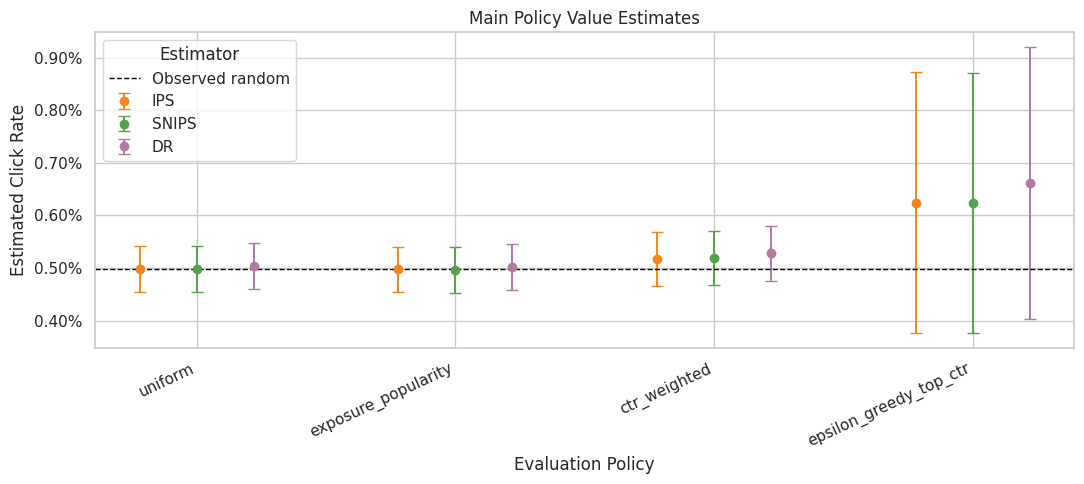
The estimate plot compares policies on the same offline value scale. Error bars and estimator differences are just as important as the ranking, because high-variance estimates need guardrails before product decisions.
Weight Clipping Sensitivity
This section checks whether conclusions depend on extreme importance weights.
We estimate the same policies with no clipping and with weight caps at 5, 10, and 20. Clipping can reduce variance, but it also changes the estimand by shrinking the influence of rare high-weight rows. A robust policy conclusion should remain stable across reasonable clipping thresholds.
clip_values = [None, 5, 10, 20]
clipping_frames = []
for clip in clip_values:
    estimates, metrics, _, _ = run_ope_for_split(
        main_train_df,
        main_eval_df,
        model_name="lightgbm",
        split_name="main_50_50",
        clip=clip,
    )
    clipping_frames.append(estimates)

clipping_sensitivity = pd.concat(clipping_frames, ignore_index=True)
clipping_sensitivity["lift_pp"] = 100 * (
    clipping_sensitivity["estimate"] - clipping_sensitivity["eval_observed_click_rate"]
)

clipping_sensitivity.query("estimator in ['IPS', 'SNIPS', 'DR']").head(12)| split_name | reward_model | policy | estimator | clip | estimate | se | ci_95_lower | ci_95_upper | ess_share | mean_weight | max_weight | p99_weight | mean_abs_correction | mean_correction | eval_observed_click_rate | lift_pp | |
|---|---|---|---|---|---|---|---|---|---|---|---|---|---|---|---|---|---|
| 0 | main_50_50 | lightgbm | uniform | IPS | none | 0.004980 | 0.000223 | 0.004544 | 0.005416 | 1.000000 | 1.000000 | 1.000000 | 1.000000 | 0.009856 | 0.000048 | 0.004980 | 0.000000 |
| 1 | main_50_50 | lightgbm | uniform | SNIPS | none | 0.004980 | 0.000223 | 0.004544 | 0.005416 | 1.000000 | 1.000000 | 1.000000 | 1.000000 | 0.009856 | 0.000048 | 0.004980 | 0.000000 |
| 3 | main_50_50 | lightgbm | uniform | DR | none | 0.005034 | 0.000226 | 0.004592 | 0.005476 | 1.000000 | 1.000000 | 1.000000 | 1.000000 | 0.009856 | 0.000048 | 0.004980 | 0.005411 |
| 4 | main_50_50 | lightgbm | exposure_popularity | IPS | none | 0.004971 | 0.000223 | 0.004535 | 0.005407 | 0.996399 | 1.000591 | 1.132200 | 1.132200 | 0.009821 | 0.000064 | 0.004980 | -0.000904 |
| 5 | main_50_50 | lightgbm | exposure_popularity | SNIPS | none | 0.004968 | 0.000223 | 0.004532 | 0.005404 | 0.996399 | 1.000591 | 1.132200 | 1.132200 | 0.009821 | 0.000064 | 0.004980 | -0.001198 |
| 7 | main_50_50 | lightgbm | exposure_popularity | DR | none | 0.005020 | 0.000226 | 0.004578 | 0.005462 | 0.996399 | 1.000591 | 1.132200 | 1.132200 | 0.009821 | 0.000064 | 0.004980 | 0.003997 |
| 8 | main_50_50 | lightgbm | ctr_weighted | IPS | none | 0.005172 | 0.000261 | 0.004660 | 0.005685 | 0.790628 | 0.996987 | 2.740842 | 2.740842 | 0.011042 | -0.000766 | 0.004980 | 0.019244 |
| 9 | main_50_50 | lightgbm | ctr_weighted | SNIPS | none | 0.005188 | 0.000262 | 0.004675 | 0.005701 | 0.790628 | 0.996987 | 2.740842 | 2.740842 | 0.011042 | -0.000766 | 0.004980 | 0.020806 |
| 11 | main_50_50 | lightgbm | ctr_weighted | DR | none | 0.005282 | 0.000267 | 0.004759 | 0.005805 | 0.790628 | 0.996987 | 2.740842 | 2.740842 | 0.011042 | -0.000766 | 0.004980 | 0.030172 |
| 12 | main_50_50 | lightgbm | epsilon_greedy_top_ctr | IPS | none | 0.006238 | 0.001267 | 0.003756 | 0.008720 | 0.040290 | 1.001105 | 29.050000 | 29.050000 | 0.017369 | -0.005016 | 0.004980 | 0.125800 |
| 13 | main_50_50 | lightgbm | epsilon_greedy_top_ctr | SNIPS | none | 0.006231 | 0.001261 | 0.003759 | 0.008703 | 0.040290 | 1.001105 | 29.050000 | 29.050000 | 0.017369 | -0.005016 | 0.004980 | 0.125111 |
| 15 | main_50_50 | lightgbm | epsilon_greedy_top_ctr | DR | none | 0.006622 | 0.001320 | 0.004035 | 0.009209 | 0.040290 | 1.001105 | 29.050000 | 29.050000 | 0.017369 | -0.005016 | 0.004980 | 0.164171 |
The clipping sensitivity check shows how estimates change when extreme weights are capped. Stable estimates across clipping thresholds are more reassuring than estimates that depend strongly on a few high-weight rows.
Plot Clipping Sensitivity
This plot shows how the estimated policy value changes as the clipping threshold changes.
The most important line is the DR line, because DR is the preferred estimator after Notebook 4. IPS is included to show why clipping matters more for pure importance weighting. SNIPS is included as a stabilizing benchmark.
clipping_plot = clipping_sensitivity.query("estimator in ['IPS', 'SNIPS', 'DR']").copy()
clipping_plot["clip_label"] = clipping_plot["clip"].astype(str)

fig, ax = plt.subplots(figsize=(11, 5))
sns.lineplot(
    data=clipping_plot,
    x="clip_label",
    y="estimate",
    hue="policy",
    style="estimator",
    marker="o",
    ax=ax,
)
ax.set_title("Policy Value Sensitivity To Weight Clipping")
ax.set_xlabel("Weight Clip")
ax.set_ylabel("Estimated Click Rate")
ax.yaxis.set_major_formatter(lambda y, _: f"{y:.2%}")
plt.tight_layout()
plt.show()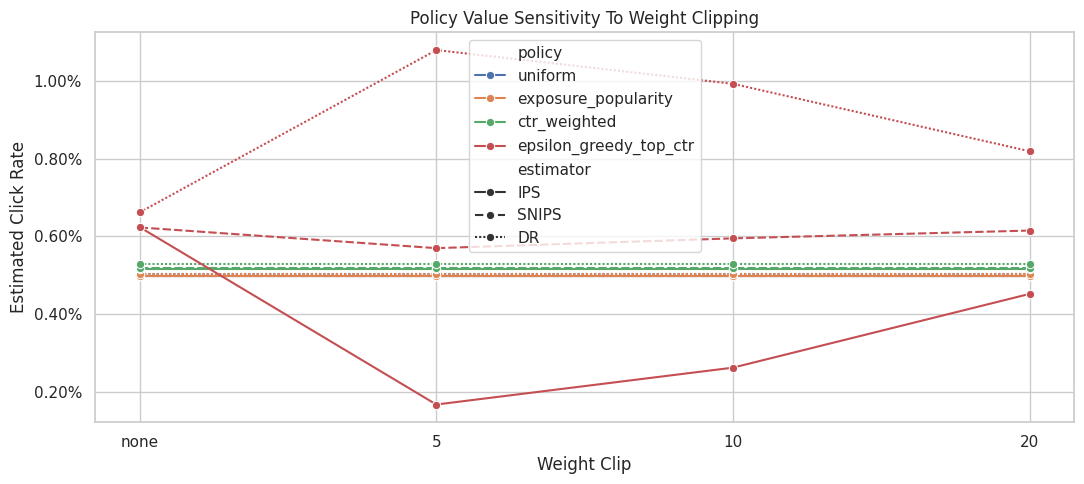
The clipping sensitivity check shows how estimates change when extreme weights are capped. Stable estimates across clipping thresholds are more reassuring than estimates that depend strongly on a few high-weight rows.
Clipping Stability Summary
This cell summarizes how much each policy-estimator estimate moves across clipping thresholds.
estimate_range is the difference between the largest and smallest estimate across the clipping settings. Smaller ranges indicate more stable estimates. Large ranges indicate that extreme weights are influencing the result.
clipping_stability = (
    clipping_sensitivity.query("estimator in ['IPS', 'SNIPS', 'DR']")
    .groupby(["policy", "estimator"])
    .agg(
        min_estimate=("estimate", "min"),
        max_estimate=("estimate", "max"),
        estimate_range=("estimate", lambda x: x.max() - x.min()),
        min_ess_share=("ess_share", "min"),
        max_weight=("max_weight", "max"),
    )
    .reset_index()
    .sort_values("estimate_range", ascending=False)
)

clipping_stability| policy | estimator | min_estimate | max_estimate | estimate_range | min_ess_share | max_weight | |
|---|---|---|---|---|---|---|---|
| 4 | epsilon_greedy_top_ctr | IPS | 0.001669 | 0.006238 | 0.004570 | 0.040290 | 29.050000 |
| 3 | epsilon_greedy_top_ctr | DR | 0.006622 | 0.010802 | 0.004180 | 0.040290 | 29.050000 |
| 5 | epsilon_greedy_top_ctr | SNIPS | 0.005698 | 0.006231 | 0.000533 | 0.040290 | 29.050000 |
| 0 | ctr_weighted | DR | 0.005282 | 0.005282 | 0.000000 | 0.790628 | 2.740842 |
| 2 | ctr_weighted | SNIPS | 0.005188 | 0.005188 | 0.000000 | 0.790628 | 2.740842 |
| 1 | ctr_weighted | IPS | 0.005172 | 0.005172 | 0.000000 | 0.790628 | 2.740842 |
| 6 | exposure_popularity | DR | 0.005020 | 0.005020 | 0.000000 | 0.996399 | 1.132200 |
| 7 | exposure_popularity | IPS | 0.004971 | 0.004971 | 0.000000 | 0.996399 | 1.132200 |
| 8 | exposure_popularity | SNIPS | 0.004968 | 0.004968 | 0.000000 | 0.996399 | 1.132200 |
| 9 | uniform | DR | 0.005034 | 0.005034 | 0.000000 | 1.000000 | 1.000000 |
| 10 | uniform | IPS | 0.004980 | 0.004980 | 0.000000 | 1.000000 | 1.000000 |
| 11 | uniform | SNIPS | 0.004980 | 0.004980 | 0.000000 | 1.000000 | 1.000000 |
The clipping sensitivity check shows how estimates change when extreme weights are capped. Stable estimates across clipping thresholds are more reassuring than estimates that depend strongly on a few high-weight rows.
Reward Model Sensitivity
This section checks whether doubly robust estimates depend heavily on the reward model.
We compare three reward-model specifications:
- logistic regression
- a shallow LightGBM model
- the main LightGBM model
If DR estimates are broadly consistent across these models, that supports the policy conclusion. If rankings change sharply, the final recommendation should be framed as more tentative.
reward_model_names = ["logistic", "lightgbm_shallow", "lightgbm"]
reward_model_estimate_frames = []
reward_model_metric_frames = []

for model_name in reward_model_names:
    estimates, metrics, _, _ = run_ope_for_split(
        main_train_df,
        main_eval_df,
        model_name=model_name,
        split_name="main_50_50",
        clip=None,
    )
    reward_model_estimate_frames.append(estimates)
    reward_model_metric_frames.append(metrics)

reward_model_sensitivity = pd.concat(reward_model_estimate_frames, ignore_index=True)
reward_model_metrics = pd.concat(reward_model_metric_frames, ignore_index=True)

reward_model_metrics.sort_values("log_loss")| split_name | reward_model | train_rows | eval_rows | auc | average_precision | log_loss | brier_score | mean_prediction | observed_click_rate | |
|---|---|---|---|---|---|---|---|---|---|---|
| 0 | main_50_50 | logistic | 100000 | 100000 | 0.539928 | 0.006395 | 0.032528 | 0.005081 | 0.005774 | 0.004980 |
| 1 | main_50_50 | lightgbm_shallow | 100000 | 100000 | 0.541724 | 0.006571 | 0.032535 | 0.005020 | 0.005315 | 0.004980 |
| 2 | main_50_50 | lightgbm | 100000 | 100000 | 0.534265 | 0.005821 | 0.034100 | 0.005096 | 0.004932 | 0.004980 |
Reward-model sensitivity checks whether DR conclusions depend on a particular predictive model. Stable rankings across model classes make the recommendation more credible. In OPE, this diagnostic determines whether a target policy is being evaluated from real logged support or from a few high-leverage coincidences.
Plot Reward Model Sensitivity For DR
This plot compares DR estimates across reward models.
The DR estimator still uses the same logged propensities and the same evaluation policies. The only changing ingredient is the reward model used for the direct component and residual prediction. Stable DR estimates across models are a good sign.
dr_model_plot = reward_model_sensitivity.query("estimator == 'DR'").copy()

fig, ax = plt.subplots(figsize=(10, 5))
sns.pointplot(
    data=dr_model_plot,
    x="policy",
    y="estimate",
    hue="reward_model",
    dodge=0.35,
    errorbar=None,
    ax=ax,
)
ax.axhline(main_eval_df["click"].mean(), color="black", linestyle="--", linewidth=1, label="Observed random")
ax.set_title("DR Estimate Sensitivity To Reward Model")
ax.set_xlabel("Evaluation Policy")
ax.set_ylabel("Estimated Click Rate")
ax.tick_params(axis="x", rotation=25)
ax.yaxis.set_major_formatter(lambda y, _: f"{y:.2%}")
plt.tight_layout()
plt.show()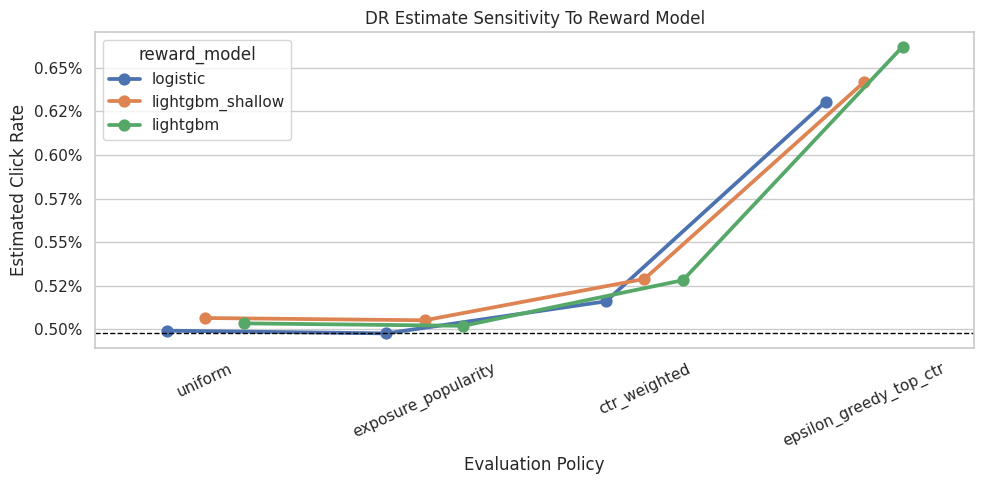
Reward-model sensitivity checks whether DR conclusions depend on a particular predictive model. Stable rankings across model classes make the recommendation more credible. The important comparison is which policy remains credible after support, uncertainty, and operational constraints are considered.
Reward Model Ranking Stability
This cell converts reward-model sensitivity into policy ranks.
Rank 1 is the highest DR estimate within a reward model. If the same policy remains near the top across reward models, the recommendation is more robust. If the top policy changes completely, we should be cautious.
reward_model_rank_stability = dr_model_plot.copy()
reward_model_rank_stability["rank_within_model"] = reward_model_rank_stability.groupby("reward_model")["estimate"].rank(
    ascending=False, method="min"
)

reward_model_rank_summary = (
    reward_model_rank_stability.groupby("policy")
    .agg(
        avg_rank_across_models=("rank_within_model", "mean"),
        best_rank_across_models=("rank_within_model", "min"),
        worst_rank_across_models=("rank_within_model", "max"),
        estimate_range_across_models=("estimate", lambda x: x.max() - x.min()),
    )
    .reset_index()
    .sort_values(["avg_rank_across_models", "estimate_range_across_models"])
)

reward_model_rank_summary| policy | avg_rank_across_models | best_rank_across_models | worst_rank_across_models | estimate_range_across_models | |
|---|---|---|---|---|---|
| 1 | epsilon_greedy_top_ctr | 1.000000 | 1.000000 | 1.000000 | 0.000315 |
| 0 | ctr_weighted | 2.000000 | 2.000000 | 2.000000 | 0.000128 |
| 3 | uniform | 3.000000 | 3.000000 | 3.000000 | 0.000073 |
| 2 | exposure_popularity | 4.000000 | 4.000000 | 4.000000 | 0.000075 |
The stability summary focuses on whether policy rankings change under reasonable analysis choices. A policy that remains near the top across checks is a stronger offline candidate than one that wins only under one specification.
Time Split Sensitivity
This section repeats the DR analysis across different time windows.
Each split uses an earlier block of data for training and a later block for evaluation. This tests whether the best policy is stable across time or whether it only looks good in one particular held-out window.
To keep runtime reasonable, the evaluation windows are shorter than the main 50/50 evaluation split.
split_specs = [
    {"split_name": "early_window", "train_start": 0.00, "train_end": 0.40, "eval_start": 0.40, "eval_end": 0.55},
    {"split_name": "middle_window", "train_start": 0.00, "train_end": 0.50, "eval_start": 0.50, "eval_end": 0.65},
    {"split_name": "late_window", "train_start": 0.00, "train_end": 0.60, "eval_start": 0.60, "eval_end": 0.75},
]

split_plan = []
for spec in split_specs:
    n = len(random_df)
    train_start = int(n * spec["train_start"])
    train_end = int(n * spec["train_end"])
    eval_start = int(n * spec["eval_start"])
    eval_end = int(n * spec["eval_end"])
    split_plan.append(
        {
            "split_name": spec["split_name"],
            "train_rows": train_end - train_start,
            "eval_rows": eval_end - eval_start,
            "train_start_time": random_df.iloc[train_start]["timestamp"],
            "train_end_time": random_df.iloc[train_end - 1]["timestamp"],
            "eval_start_time": random_df.iloc[eval_start]["timestamp"],
            "eval_end_time": random_df.iloc[eval_end - 1]["timestamp"],
        }
    )

pd.DataFrame(split_plan)| split_name | train_rows | eval_rows | train_start_time | train_end_time | eval_start_time | eval_end_time | |
|---|---|---|---|---|---|---|---|
| 0 | early_window | 80000 | 30000 | 2019-11-24 00:00:03.800821+00:00 | 2019-11-25 01:13:20.340362+00:00 | 2019-11-25 01:13:23.467887+00:00 | 2019-11-25 12:31:38.942417+00:00 |
| 1 | middle_window | 100000 | 30000 | 2019-11-24 00:00:03.800821+00:00 | 2019-11-25 10:01:18.392921+00:00 | 2019-11-25 10:01:18.393450+00:00 | 2019-11-25 19:24:35.095071+00:00 |
| 2 | late_window | 120000 | 30000 | 2019-11-24 00:00:03.800821+00:00 | 2019-11-25 14:22:22.600427+00:00 | 2019-11-25 14:22:22.600570+00:00 | 2019-11-26 06:51:42.575935+00:00 |
Time-split sensitivity checks whether the offline conclusion changes across different train/evaluation windows. This is important because recommendation environments can drift over time. The result should be read together with support diagnostics because a good reward model cannot fully rescue evaluation when the logging policy rarely explored the relevant actions.
Split Sensitivity Estimates
This cell runs LightGBM DR estimates for each time split.
The split loop rebuilds policies and retrains the reward model inside each time window. That is intentional because it tests the full workflow.
split_estimate_frames = []
split_metric_frames = []

for spec in split_specs:
    n = len(random_df)
    train_df = random_df.iloc[int(n * spec["train_start"]) : int(n * spec["train_end"])].copy()
    eval_df = random_df.iloc[int(n * spec["eval_start"]) : int(n * spec["eval_end"])].copy()

    estimates, metrics, _, _ = run_ope_for_split(
        train_df,
        eval_df,
        model_name="lightgbm",
        split_name=spec["split_name"],
        clip=None,
    )
    split_estimate_frames.append(estimates)
    split_metric_frames.append(metrics)

split_sensitivity = pd.concat(split_estimate_frames, ignore_index=True)
split_model_metrics = pd.concat(split_metric_frames, ignore_index=True)

split_model_metrics| split_name | reward_model | train_rows | eval_rows | auc | average_precision | log_loss | brier_score | mean_prediction | observed_click_rate | |
|---|---|---|---|---|---|---|---|---|---|---|
| 0 | early_window | lightgbm | 80000 | 30000 | 0.540994 | 0.004299 | 0.027959 | 0.004138 | 0.004624 | 0.003967 |
| 1 | middle_window | lightgbm | 100000 | 30000 | 0.572556 | 0.009731 | 0.034497 | 0.005294 | 0.005305 | 0.005167 |
| 2 | late_window | lightgbm | 120000 | 30000 | 0.507023 | 0.006752 | 0.036425 | 0.005458 | 0.004942 | 0.005367 |
Time-split sensitivity checks whether the offline conclusion changes across different train/evaluation windows. This is important because recommendation environments can drift over time. In OPE, this diagnostic determines whether a target policy is being evaluated from real logged support or from a few high-leverage coincidences.
Plot Split Sensitivity For DR
This plot shows DR estimates across time windows.
A stable policy should remain competitive across early, middle, and late windows. A policy that only wins in one split may still be interesting, but it is a weaker candidate for a confident offline recommendation.
split_dr_plot = split_sensitivity.query("estimator == 'DR'").copy()

fig, ax = plt.subplots(figsize=(10, 5))
sns.lineplot(
    data=split_dr_plot,
    x="split_name",
    y="estimate",
    hue="policy",
    marker="o",
    ax=ax,
)
ax.set_title("DR Estimate Stability Across Time Splits")
ax.set_xlabel("Time Split")
ax.set_ylabel("Estimated Click Rate")
ax.yaxis.set_major_formatter(lambda y, _: f"{y:.2%}")
plt.tight_layout()
plt.show()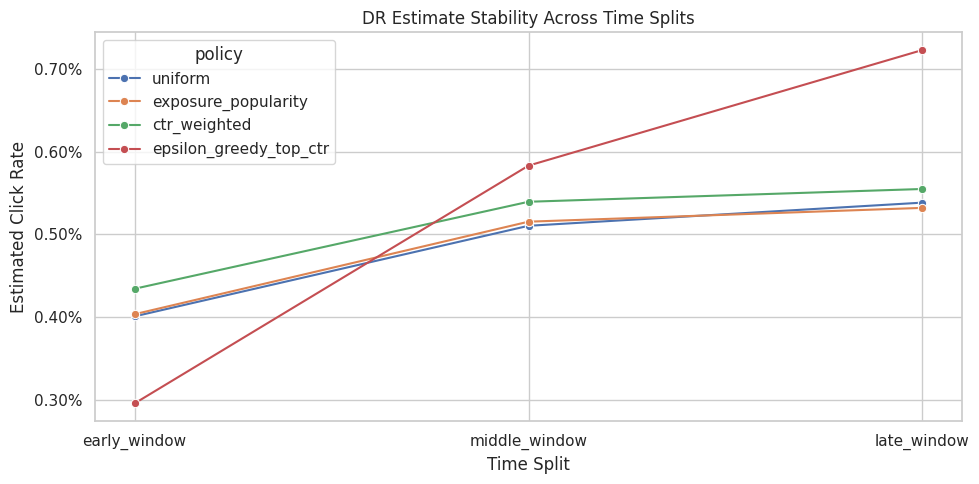
Time-split sensitivity checks whether the offline conclusion changes across different train/evaluation windows. This is important because recommendation environments can drift over time. The important comparison is which policy remains credible after support, uncertainty, and operational constraints are considered.
Split Ranking Stability
This cell ranks policies within each time split using the LightGBM DR estimate.
The rank summary is more robust than staring only at point estimates. A policy with average rank near 1 and low rank standard deviation is a stable offline winner.
split_rank_table = split_dr_plot.copy()
split_rank_table["rank_within_split"] = split_rank_table.groupby("split_name")["estimate"].rank(
    ascending=False, method="min"
)

split_rank_summary = (
    split_rank_table.groupby("policy")
    .agg(
        avg_rank_across_splits=("rank_within_split", "mean"),
        rank_std_across_splits=("rank_within_split", "std"),
        best_rank_across_splits=("rank_within_split", "min"),
        worst_rank_across_splits=("rank_within_split", "max"),
        mean_dr_estimate_across_splits=("estimate", "mean"),
        dr_estimate_range_across_splits=("estimate", lambda x: x.max() - x.min()),
    )
    .reset_index()
    .sort_values(["avg_rank_across_splits", "dr_estimate_range_across_splits"])
)

split_rank_summary| policy | avg_rank_across_splits | rank_std_across_splits | best_rank_across_splits | worst_rank_across_splits | mean_dr_estimate_across_splits | dr_estimate_range_across_splits | |
|---|---|---|---|---|---|---|---|
| 0 | ctr_weighted | 1.666667 | 0.577350 | 1.000000 | 2.000000 | 0.005094 | 0.001205 |
| 1 | epsilon_greedy_top_ctr | 2.000000 | 1.732051 | 1.000000 | 4.000000 | 0.005338 | 0.004269 |
| 2 | exposure_popularity | 3.000000 | 1.000000 | 2.000000 | 4.000000 | 0.004836 | 0.001285 |
| 3 | uniform | 3.333333 | 0.577350 | 3.000000 | 4.000000 | 0.004831 | 0.001374 |
The split separates policy construction from policy evaluation. This prevents using the same rows to design a policy and evaluate it, which would make the offline result too optimistic.
Policy Risk Table
This cell combines the main LightGBM DR estimate with support, clipping stability, reward-model stability, and split stability.
This is the most decision-oriented table in the notebook. It tries to answer: which policy has strong estimated value and enough stability to justify an online experiment?
# Build a policy risk table.
main_dr = main_lgbm_table.query("estimator == 'DR'").copy()
main_dr = main_dr[
    [
        "policy",
        "estimate",
        "ci_95_lower",
        "ci_95_upper",
        "lift_pp",
        "relative_lift_pct",
        "ess_share",
        "mean_weight",
        "max_weight",
        "p99_weight",
        "mean_abs_correction",
    ]
]

clip_dr_stability = clipping_stability.query("estimator == 'DR'")[["policy", "estimate_range"]].rename(
    columns={"estimate_range": "dr_clip_estimate_range"}
)

policy_risk_table = (
    main_dr.merge(clip_dr_stability, on="policy", how="left")
    .merge(reward_model_rank_summary, on="policy", how="left")
    .merge(split_rank_summary, on="policy", how="left")
)

policy_risk_table["decision_score"] = (
    policy_risk_table["lift_pp"]
    - 0.25 * policy_risk_table["avg_rank_across_splits"]
    - 100 * policy_risk_table["dr_clip_estimate_range"]
    - 0.10 * policy_risk_table["max_weight"]
)

policy_risk_table.sort_values("decision_score", ascending=False)| policy | estimate | ci_95_lower | ci_95_upper | lift_pp | relative_lift_pct | ess_share | mean_weight | max_weight | p99_weight | mean_abs_correction | dr_clip_estimate_range | avg_rank_across_models | best_rank_across_models | worst_rank_across_models | estimate_range_across_models | avg_rank_across_splits | rank_std_across_splits | best_rank_across_splits | worst_rank_across_splits | mean_dr_estimate_across_splits | dr_estimate_range_across_splits | decision_score | |
|---|---|---|---|---|---|---|---|---|---|---|---|---|---|---|---|---|---|---|---|---|---|---|---|
| 2 | ctr_weighted | 0.005282 | 0.004759 | 0.005805 | 0.030172 | 6.058681 | 0.790628 | 0.996987 | 2.740842 | 2.740842 | 0.011042 | 0.000000 | 2.000000 | 2.000000 | 2.000000 | 0.000128 | 1.666667 | 0.577350 | 1.000000 | 2.000000 | 0.005094 | 0.001205 | -0.660579 |
| 1 | exposure_popularity | 0.005020 | 0.004578 | 0.005462 | 0.003997 | 0.802658 | 0.996399 | 1.000591 | 1.132200 | 1.132200 | 0.009821 | 0.000000 | 4.000000 | 4.000000 | 4.000000 | 0.000075 | 3.000000 | 1.000000 | 2.000000 | 4.000000 | 0.004836 | 0.001285 | -0.859223 |
| 0 | uniform | 0.005034 | 0.004592 | 0.005476 | 0.005411 | 1.086540 | 1.000000 | 1.000000 | 1.000000 | 1.000000 | 0.009856 | 0.000000 | 3.000000 | 3.000000 | 3.000000 | 0.000073 | 3.333333 | 0.577350 | 3.000000 | 4.000000 | 0.004831 | 0.001374 | -0.927922 |
| 3 | epsilon_greedy_top_ctr | 0.006622 | 0.004035 | 0.009209 | 0.164171 | 32.966042 | 0.040290 | 1.001105 | 29.050000 | 29.050000 | 0.017369 | 0.004180 | 1.000000 | 1.000000 | 1.000000 | 0.000315 | 2.000000 | 1.732051 | 1.000000 | 4.000000 | 0.005338 | 0.004269 | -3.658854 |
The policy-risk table combines value, lift, support, and stability into a decision-oriented view. This is closer to how an experimentation team would decide what is safe enough to test online.
Choose An Offline Candidate For A/B Testing
This cell selects a candidate policy using the policy risk table.
The selection is intentionally conservative. It combines point estimate, uncertainty, support, and sensitivity. It sorts by a decision score that rewards estimated lift and penalizes poor split rank, clipping instability, and large maximum weights.
This is an audit table for human decision review. It is a transparent way to make the offline recommendation auditable.
recommended_policy_row = policy_risk_table.sort_values("decision_score", ascending=False).iloc[0]
recommended_policy = recommended_policy_row["policy"]

recommendation_summary = pd.Series(
    {
        "recommended_policy_for_ab_test": recommended_policy,
        "dr_estimated_click_rate": recommended_policy_row["estimate"],
        "lift_pp_vs_random_behavior": recommended_policy_row["lift_pp"],
        "relative_lift_pct_vs_random_behavior": recommended_policy_row["relative_lift_pct"],
        "ess_share": recommended_policy_row["ess_share"],
        "max_weight": recommended_policy_row["max_weight"],
        "avg_rank_across_splits": recommended_policy_row["avg_rank_across_splits"],
        "avg_rank_across_reward_models": recommended_policy_row["avg_rank_across_models"],
        "decision_score": recommended_policy_row["decision_score"],
    }
).to_frame("value")

recommendation_summary| value | |
|---|---|
| recommended_policy_for_ab_test | ctr_weighted |
| dr_estimated_click_rate | 0.005282 |
| lift_pp_vs_random_behavior | 0.030172 |
| relative_lift_pct_vs_random_behavior | 6.058681 |
| ess_share | 0.790628 |
| max_weight | 2.740842 |
| avg_rank_across_splits | 1.666667 |
| avg_rank_across_reward_models | 2.000000 |
| decision_score | -0.660579 |
The recommended candidate is selected from offline evidence that combines value, support risk, uncertainty, and robustness. The decision should balance estimated improvement against support risk, uncertainty, and robustness. The teaching point is that weighting can reduce bias while also reducing usable information, so stability matters as much as the point estimate.
Claim Boundaries
Offline policy evaluation can identify candidate policies that deserve further testing, but it cannot prove that a policy will win after deployment. The strongest recommendation is a supported shortlist: policies with favorable estimated value, adequate logged support, acceptable weight risk, and stable conclusions across reward models and time splits.
Policies with high estimated value but poor support should remain unresolved. They may be worth collecting more data for, but they deserve more data before launch-readiness claims.
interpretation_text = f"""
Recommended offline candidate: {recommended_policy}

Why this policy is credible:
- It has a competitive LightGBM doubly robust estimate on the main held-out split.
- Its effective sample size and maximum weight are part of the decision table, so the recommendation is not based on point estimate alone.
- It was compared across clipping thresholds, reward-model choices, and time windows.

Boundary of this evidence:
- It identifies a policy candidate for production testing.
- Long-term user effects, novelty fatigue, marketplace effects, and item interference remain outside this offline estimate.
- It assumes the Open Bandit logged propensities are correct and that the random log has support for the evaluation policies.

Operational recommendation:
Use this policy as the strongest offline candidate for an online A/B test, with guardrail metrics for click quality, downstream engagement, and user experience.
""".strip()

print(interpretation_text)
Recommended offline candidate: ctr_weighted
Why this policy is credible:
- It has a competitive LightGBM doubly robust estimate on the main held-out split.
- Its effective sample size and maximum weight are part of the decision table, so the recommendation is not based on point estimate alone.
- It was compared across clipping thresholds, reward-model choices, and time windows.
Boundary of this evidence:
- It identifies a policy candidate for production testing.
- Long-term user effects, novelty fatigue, marketplace effects, and item interference remain outside this offline estimate.
- It assumes the Open Bandit logged propensities are correct and that the random log has support for the evaluation policies.
Operational recommendation:
Use this policy as the strongest offline candidate for an online A/B test, with guardrail metrics for click quality, downstream engagement, and user experience.This text cell states the boundary of the offline evidence. Offline evaluation can recommend candidates for online testing, but it cannot replace an A/B test when business-critical deployment decisions are at stake.
Takeaways and Next Step
This notebook stress-tested the policy recommendation across estimators and sensitivity checks.
The decision process now includes:
- main LightGBM DR estimates
- IPS and SNIPS benchmarks
- clipping sensitivity
- reward-model sensitivity
- time-split sensitivity
- policy support diagnostics
- a policy risk table
The final offline output should be framed as which policy is most justified for an online A/B test, with production decisions reserved for live validation.
The next lab step moves from fixed policy comparison to contextual policy learning, where each user context can change which item policy looks most promising.