from pathlib import Path

import matplotlib.pyplot as plt
import numpy as np
import pandas as pd
import seaborn as sns
from sklearn.base import clone
from sklearn.compose import ColumnTransformer
from sklearn.impute import SimpleImputer
from sklearn.linear_model import LogisticRegression
from sklearn.metrics import average_precision_score, brier_score_loss, roc_auc_score
from sklearn.model_selection import StratifiedKFold
from sklearn.pipeline import Pipeline
from sklearn.preprocessing import OneHotEncoder, StandardScaler

sns.set_theme(style="whitegrid")
pd.set_option("display.max_columns", 100)
pd.set_option("display.float_format", "{:.4f}".format)05: Policy Simulation
The goal is to translate causal estimates into a product decision.
The previous notebooks estimated the effect of top-3 ranking exposure on clicks. This notebook asks the next product question:
If top-3 exposure has different incremental value across segments, how should a ranking team prioritize scarce top positions?
This is an offline decision-sizing exercise that uses doubly robust estimates to identify promising policy directions for online testing. It is an offline decision-sizing exercise that uses doubly robust estimates to identify promising policy directions.
Dataset and Design Context
This project uses the Microsoft News Dataset (MIND) impression logs. The working table is an impression-item panel: each row is one news item displayed inside a user impression slate.
The data come from a real observational ranking log. Top-3 exposure was created by a production ranker, so assignment must be treated as confounded. The treatment is top-3 exposure, the outcome is click-through, and the main causal risk is that the production ranker likely used relevance, freshness, and intent signals that remain only partly observed in the public data.
The project should therefore be read as an offline causal measurement and experiment-prioritization workflow. Naive rank-position click differences are descriptive. Adjusted estimates, overlap checks, heterogeneous effects, and policy simulations are used to decide what would be credible enough to test online.
Role of this notebook. This notebook turns segment-level effect estimates into budgeted promotion simulations and separates point-estimate targeting from conservative lower-bound targeting.
Mathematical Setup
Policy simulation turns estimated segment effects into a constrained decision problem. Let (s) index product segments, (c_s) be the number of candidate items in that segment, and (_s) be the estimated incremental click lift from promotion. A simple budgeted policy value is
\[ \widehat V(\pi)=\sum_s \pi_s c_s\widehat\tau_s, \]
where (_s{0,1}) indicates whether the segment is selected for promotion. If only (B) candidates can be promoted, the policy must satisfy
\[ \sum_s \pi_s c_s \le B. \]
The optimistic policy ranks segments by estimated lift. The conservative policy discounts unstable estimates using uncertainty or support checks. The goal is to prioritize segments with meaningful estimated value and enough support for follow-up testing.
Important Caveat
Logged recommendation data gives an incomplete view of what would happen under a new ranking policy. Moving one item into the top 3 necessarily moves another item out, users may respond differently to a changed slate, and some segments overlap with each other.
This notebook uses a deliberately simple policy simulation:
- Estimate segment-level doubly robust top-3 lift.
- Treat lower-ranked rows as possible promotion opportunities.
- Allocate a limited promotion budget to segments with high estimated lift.
- Compare optimistic and conservative prioritization rules.
The output should be read as a prioritization and sizing tool for follow-up online validation.
Setup
This cell imports the libraries used for modeling, segment summaries, and policy simulation. The modeling imports mirror notebooks 3 and 4 because this notebook recomputes doubly robust scores independently. That makes it runnable on its own with no hidden notebook state.
This cell prepares the notebook environment for policy simulation using segment-level causal lift estimates. There is no substantive model result yet; the important outcome is that the imports and display settings are ready so the next cells can focus on the data and causal question.
Load The Processed Impression Table
This cell loads the processed MIND-small parquet file. Each row is one displayed item inside an impression. The table includes the treatment (is_top_3), outcome (clicked), item metadata, and context features needed for causal adjustment and policy simulation.
DATA_RELATIVE_PATH = Path("data/processed/mind_small_impressions_train_sample.parquet")
PROJECT_ROOT = next(
    path
    for path in [Path.cwd(), *Path.cwd().parents]
    if (path / DATA_RELATIVE_PATH).exists()
)

DATA_PATH = PROJECT_ROOT / DATA_RELATIVE_PATH
df = pd.read_parquet(DATA_PATH)

df.shape
(737762, 20)The loaded table preview and shape confirm that the notebook is using the expected processed dataset. This check anchors the rest of the analysis, because all treatment, outcome, and covariate definitions depend on these columns being present and correctly typed.
Workflow
The notebook has five parts:
- Recompute cross-fitted AIPW scores.
- Estimate segment-level lift for product-relevant segment definitions.
- Create policy candidates from those segment estimates.
- Simulate budgeted promotion policies.
- Produce a product-facing recommendation table.
This repeats some logic from notebook 4 intentionally. Project notebooks are easier to review when each major analysis can run independently.
Create A Modeling Sample
This cell creates the analysis sample and basic modeling columns. MODEL_SAMPLE_SIZE keeps the notebook responsive. The sample_to_processed_scale value later lets us roughly scale simulated incremental clicks from the modeling sample back to the processed parquet sample size.
MODEL_SAMPLE_SIZE = 150_000
RANDOM_STATE = 42

model_df = (
    df.sample(n=min(len(df), MODEL_SAMPLE_SIZE), random_state=RANDOM_STATE)
    .reset_index(drop=True)
    .copy()
)

model_df["treatment"] = model_df["is_top_3"].astype(int)
model_df["outcome"] = model_df["clicked"].astype(int)
model_df["log_item_exposures"] = np.log1p(model_df["item_exposures"])
model_df["treatment_label"] = np.where(model_df["treatment"] == 1, "top_3", "rank_4_plus")

sample_to_processed_scale = len(df) / len(model_df)

pd.Series(
    {
        "processed_rows": len(df),
        "model_rows": len(model_df),
        "sample_to_processed_scale": sample_to_processed_scale,
        "treatment_rate_top_3": model_df["treatment"].mean(),
        "click_rate": model_df["outcome"].mean(),
    }
)
processed_rows 737762.0000
model_rows 150000.0000
sample_to_processed_scale 4.9184
treatment_rate_top_3 0.0801
click_rate 0.0396
dtype: float64This cell defines the working analysis sample and standardizes treatment/outcome columns. Fixing this sample early keeps later model comparisons fair because each estimator works on the same rows and target definition.
Causal Adjustment Setup
The policy simulation depends on estimated segment effects, and those segment effects depend on causal adjustment. We use the same doubly robust approach as notebooks 3 and 4:
- Propensity model: predicts whether a row appears in the top 3.
- Outcome model: predicts click probability from treatment and covariates.
- AIPW score: combines both models into one per-row treatment-effect contribution.
The policy simulation then averages those AIPW scores within segments.
Define Features For Nuisance Models
This cell defines covariates for the propensity and outcome models. We use user-history, slate-size, text-length, time, exposure, and content metadata features. We avoid item_clicks and item_ctr as model inputs because they are computed from click outcomes in the same sample and can leak outcome information.
numeric_features = [
    "history_len",
    "candidate_set_size",
    "title_length",
    "abstract_length",
    "hour",
    "day_of_week",
    "log_item_exposures",
]
categorical_features = ["category", "subcategory"]

propensity_features = numeric_features + categorical_features
outcome_numeric_features = numeric_features + ["treatment"]
outcome_features = outcome_numeric_features + categorical_features

X = model_df[propensity_features]
t = model_df["treatment"]

pd.Series(
    {
        "propensity_feature_count": len(propensity_features),
        "outcome_feature_count": len(outcome_features),
        "numeric_feature_count": len(numeric_features),
        "categorical_feature_count": len(categorical_features),
    }
)
propensity_feature_count 9
outcome_feature_count 10
numeric_feature_count 7
categorical_feature_count 2
dtype: int64The feature lists define what information is allowed into the adjustment models. These are pre-treatment or contextual variables intended to reduce confounding without using the outcome itself as an input.
Build Logistic Model Pipelines
This cell creates reusable sklearn pipelines. Numeric features are imputed and scaled. Categorical features are imputed and one-hot encoded. Logistic regression is used because it is transparent, fast, and outputs probabilities directly, which is exactly what AIPW needs.
# Build logistic model pipelines.
def make_preprocessor(numeric_cols, categorical_cols):
    """
    Build the shared preprocessing transformer for causal nuisance models.

    Idea
    ----
    Numeric columns are imputed and scaled when appropriate, while categorical columns are imputed and one-hot encoded so downstream propensity and outcome models receive a consistent design matrix.

    Parameters
    ----------
    numeric_cols : object
        Numeric covariate columns used by the model.
    categorical_cols : object
        Categorical covariate columns used by the model.

    Returns
    -------
    sklearn.compose.ColumnTransformer
        Configured preprocessing transformer for the specified numeric and categorical columns.
    """
    numeric_pipeline = Pipeline(
        steps=[
            ("imputer", SimpleImputer(strategy="median")),
            ("scaler", StandardScaler()),
        ]
    )
    categorical_pipeline = Pipeline(
        steps=[
            ("imputer", SimpleImputer(strategy="most_frequent")),
            (
                "onehot",
                OneHotEncoder(
                    handle_unknown="infrequent_if_exist",
                    min_frequency=50,
                    sparse_output=True,
                ),
            ),
        ]
    )
    return ColumnTransformer(
        transformers=[
            ("num", numeric_pipeline, numeric_cols),
            ("cat", categorical_pipeline, categorical_cols),
        ]
    )


def make_logistic_pipeline(numeric_cols, categorical_cols):
    """
    Build a logistic-regression propensity pipeline.

    Idea
    ----
    The pipeline combines project-specific preprocessing with a logistic model so top-rank exposure or treatment assignment can be estimated from observed covariates.

    Parameters
    ----------
    numeric_cols : object
        Numeric covariate columns used by the model.
    categorical_cols : object
        Categorical covariate columns used by the model.

    Returns
    -------
    sklearn.pipeline.Pipeline
        Pipeline that preprocesses covariates and fits a logistic treatment model.
    """
    return Pipeline(
        steps=[
            ("preprocess", make_preprocessor(numeric_cols, categorical_cols)),
            (
                "model",
                LogisticRegression(
                    max_iter=500,
                    solver="lbfgs",
                    n_jobs=-1,
                    random_state=RANDOM_STATE,
                ),
            ),
        ]
    )


base_propensity_model = make_logistic_pipeline(numeric_features, categorical_features)
base_outcome_model = make_logistic_pipeline(outcome_numeric_features, categorical_features)
This cell creates reusable modeling machinery for later estimates. The value is consistency. The same preprocessing and helper functions can be applied across folds, estimators, and sensitivity checks.
Cross-Fitted Doubly Robust Scores
The next cells create out-of-fold nuisance predictions. Cross-fitting keeps each row’s prediction honest: the row is scored by models trained on other rows.
For each row we need:
e_hat: estimated probability of top-3 exposure.mu1_hat: estimated click probability if the row were top-3.mu0_hat: estimated click probability if the row were lower-ranked.
These feed into the AIPW score.
Train Cross-Fitted Propensity And Outcome Models
This cell performs 3-fold cross-fitting. In each fold, it trains models on two-thirds of the sample and predicts the held-out third. The outcome model is used twice on held-out rows: once with treatment forced to 1 and once with treatment forced to 0.
# Train cross-fitted propensity and outcome models.
N_FOLDS = 3
skf = StratifiedKFold(n_splits=N_FOLDS, shuffle=True, random_state=RANDOM_STATE)

e_hat = np.zeros(len(model_df))
mu1_hat = np.zeros(len(model_df))
mu0_hat = np.zeros(len(model_df))

propensity_metrics = []
outcome_metrics = []

for fold, (train_idx, valid_idx) in enumerate(skf.split(X, t), start=1):
    train_df = model_df.iloc[train_idx]
    valid_df = model_df.iloc[valid_idx]

    propensity_model = clone(base_propensity_model)
    propensity_model.fit(train_df[propensity_features], train_df["treatment"])
    e_valid = propensity_model.predict_proba(valid_df[propensity_features])[:, 1]
    e_hat[valid_idx] = e_valid

    outcome_model = clone(base_outcome_model)
    outcome_model.fit(train_df[outcome_features], train_df["outcome"])

    valid_actual = valid_df[outcome_features]
    y_valid_hat = outcome_model.predict_proba(valid_actual)[:, 1]

    valid_treated = valid_df[propensity_features].copy()
    valid_treated["treatment"] = 1
    valid_treated = valid_treated[outcome_features]

    valid_control = valid_df[propensity_features].copy()
    valid_control["treatment"] = 0
    valid_control = valid_control[outcome_features]

    mu1_hat[valid_idx] = outcome_model.predict_proba(valid_treated)[:, 1]
    mu0_hat[valid_idx] = outcome_model.predict_proba(valid_control)[:, 1]

    propensity_metrics.append(
        {
            "fold": fold,
            "roc_auc": roc_auc_score(valid_df["treatment"], e_valid),
            "average_precision": average_precision_score(valid_df["treatment"], e_valid),
            "brier_score": brier_score_loss(valid_df["treatment"], e_valid),
        }
    )
    outcome_metrics.append(
        {
            "fold": fold,
            "roc_auc": roc_auc_score(valid_df["outcome"], y_valid_hat),
            "average_precision": average_precision_score(valid_df["outcome"], y_valid_hat),
            "brier_score": brier_score_loss(valid_df["outcome"], y_valid_hat),
        }
    )

model_df["e_hat"] = e_hat
model_df["mu1_hat"] = mu1_hat
model_df["mu0_hat"] = mu0_hat
model_df["mu_diff_hat"] = model_df["mu1_hat"] - model_df["mu0_hat"]

pd.DataFrame(propensity_metrics)| fold | roc_auc | average_precision | brier_score | |
|---|---|---|---|---|
| 0 | 1 | 0.7769 | 0.3407 | 0.0660 |
| 1 | 2 | 0.7622 | 0.3058 | 0.0668 |
| 2 | 3 | 0.7661 | 0.3205 | 0.0665 |
Cross-fitting creates out-of-sample nuisance predictions for treatment and outcome models. This reduces overfitting bias and makes the later doubly robust scores more credible. Poor overlap or extreme propensity scores would still make the adjusted estimate depend on a narrow slice of comparable observations.
Inspect Outcome Model Metrics
This cell displays fold-level metrics for the click outcome model. These are nuisance-model diagnostics that check whether the policy simulation has a reasonable predictive foundation. They help us verify that the click model has some signal before using it in the doubly robust score.
pd.DataFrame(outcome_metrics)| fold | roc_auc | average_precision | brier_score | |
|---|---|---|---|---|
| 0 | 1 | 0.7119 | 0.1232 | 0.0363 |
| 1 | 2 | 0.6934 | 0.1111 | 0.0371 |
| 2 | 3 | 0.7098 | 0.1132 | 0.0368 |
The nuisance-model metrics show how well the supporting prediction models perform. Weak nuisance models can make IPW, DR, and policy estimates less reliable, so these diagnostics help judge the stability of the causal workflow.
Compute AIPW Scores
This cell computes one AIPW score per row. The average score is the global doubly robust lift. Segment averages of this score become the segment-level estimated lift used for policy prioritization.
EPS = 0.01

e = model_df["e_hat"].clip(EPS, 1 - EPS).to_numpy()
mu1 = model_df["mu1_hat"].to_numpy()
mu0 = model_df["mu0_hat"].to_numpy()
t_np = model_df["treatment"].to_numpy()
y_np = model_df["outcome"].to_numpy()

model_df["aipw_score"] = (mu1 - mu0) + t_np * (y_np - mu1) / e - (1 - t_np) * (y_np - mu0) / (1 - e)

global_dr_lift = model_df["aipw_score"].mean()
global_dr_se = model_df["aipw_score"].std(ddof=1) / np.sqrt(len(model_df))

pd.Series(
    {
        "global_dr_lift": global_dr_lift,
        "standard_error": global_dr_se,
        "ci_95_lower": global_dr_lift - 1.96 * global_dr_se,
        "ci_95_upper": global_dr_lift + 1.96 * global_dr_se,
    }
)
global_dr_lift 0.0111
standard_error 0.0025
ci_95_lower 0.0062
ci_95_upper 0.0161
dtype: float64The AIPW score combines outcome-model predictions with propensity-weighted residual corrections. This is the key doubly robust object: it can remain consistent if either the propensity model or the outcome model is correctly specified.
Segment Effects
Policy simulation needs estimated value by segment. We define several non-overlapping segment dimensions, but we simulate policies one dimension at a time. That avoids double-counting rows across overlapping segment definitions.
Create Product-Relevant Segment Columns
This cell creates bucketed segment columns. Buckets turn continuous features into interpretable groups. The policy simulation later can allocate budget to segments such as sports, low-history users, or high-exposure items.
# Create product-relevant segment columns.
model_df["history_bucket"] = pd.cut(
    model_df["history_len"],
    bins=[-1, 0, 10, 30, 100, np.inf],
    labels=["0", "1-10", "11-30", "31-100", "101+"],
)

model_df["candidate_set_bucket"] = pd.cut(
    model_df["candidate_set_size"],
    bins=[0, 10, 25, 50, 100, np.inf],
    labels=["1-10", "11-25", "26-50", "51-100", "101+"],
    include_lowest=True,
)

model_df["item_exposure_quartile"] = pd.qcut(
    model_df["item_exposures"].rank(method="first"),
    q=4,
    labels=["Q1 lowest", "Q2", "Q3", "Q4 highest"],
)

model_df["time_of_day"] = pd.cut(
    model_df["hour"],
    bins=[-1, 5, 11, 16, 20, 23],
    labels=["overnight", "morning", "afternoon", "evening", "late_evening"],
)

segment_columns = [
    "category",
    "subcategory",
    "history_bucket",
    "candidate_set_bucket",
    "item_exposure_quartile",
    "time_of_day",
]

model_df[segment_columns].head()| category | subcategory | history_bucket | candidate_set_bucket | item_exposure_quartile | time_of_day | |
|---|---|---|---|---|---|---|
| 0 | news | newsworld | 31-100 | 26-50 | Q2 | afternoon |
| 1 | sports | football_ncaa | 31-100 | 51-100 | Q2 | overnight |
| 2 | news | elections-2020-us | 31-100 | 51-100 | Q2 | afternoon |
| 3 | travel | traveltripideas | 31-100 | 51-100 | Q3 | morning |
| 4 | news | newsworld | 31-100 | 51-100 | Q2 | morning |
The segment columns translate raw covariates into product-readable groups. This prepares the analysis for heterogeneity and policy simulation, where segment-level effects are easier to act on than row-level scores.
Define Segment-Effect Function
This cell defines a helper that estimates segment-level lift. For each segment, it reports row counts, treated/control counts, naive lift, doubly robust lift, confidence intervals, and lower-ranked control rows that could be considered promotion opportunities.
# Define segment-effect function.
def segment_effects(data, segment_col, min_rows=1_000, min_treated=50, min_control=500):
    """
    Estimate treatment effects within candidate policy segments.

    Idea
    ----
    The function filters segments with enough treated and control observations, then computes naive and adjusted segment effects used for targeting and experiment-prioritization.

    Parameters
    ----------
    data : object
        Input analysis table for the current project step.
    segment_col : object
        Column defining the segment to summarize.
    min_rows : object
        Minimum rows required to keep a segment.
    min_treated : object
        Minimum treated rows required to keep a segment.
    min_control : object
        Minimum control rows required to keep a segment.

    Returns
    -------
    pandas.DataFrame
        Segment-level effect table with counts, estimates, uncertainty, and candidate opportunities.
    """
    rows = []
    for segment_value, group in data.groupby(segment_col, observed=True, dropna=False):
        n_rows = len(group)
        treated_rows = int(group["treatment"].sum())
        control_rows = n_rows - treated_rows

        if n_rows < min_rows or treated_rows < min_treated or control_rows < min_control:
            continue

        treated_ctr = group.loc[group["treatment"] == 1, "outcome"].mean()
        control_ctr = group.loc[group["treatment"] == 0, "outcome"].mean()
        naive_lift = treated_ctr - control_ctr

        scores = group["aipw_score"].to_numpy()
        dr_lift = scores.mean()
        standard_error = scores.std(ddof=1) / np.sqrt(n_rows)

        rows.append(
            {
                "segment_col": segment_col,
                "segment": str(segment_value),
                "rows": n_rows,
                "treated_rows": treated_rows,
                "control_rows": control_rows,
                "treated_ctr": treated_ctr,
                "control_ctr": control_ctr,
                "naive_lift": naive_lift,
                "dr_lift": dr_lift,
                "standard_error": standard_error,
                "ci_95_lower": dr_lift - 1.96 * standard_error,
                "ci_95_upper": dr_lift + 1.96 * standard_error,
                "promotion_opportunities": control_rows,
            }
        )

    return pd.DataFrame(rows).sort_values("dr_lift", ascending=False).reset_index(drop=True)


effect_tables = {
    "category": segment_effects(model_df, "category", min_rows=1_000, min_treated=50, min_control=500),
    "subcategory": segment_effects(model_df, "subcategory", min_rows=1_500, min_treated=75, min_control=750),
    "history_bucket": segment_effects(model_df, "history_bucket", min_rows=1_000, min_treated=50, min_control=500),
    "candidate_set_bucket": segment_effects(model_df, "candidate_set_bucket", min_rows=1_000, min_treated=50, min_control=500),
    "item_exposure_quartile": segment_effects(model_df, "item_exposure_quartile", min_rows=1_000, min_treated=50, min_control=500),
    "time_of_day": segment_effects(model_df, "time_of_day", min_rows=1_000, min_treated=50, min_control=500),
}

pd.Series({name: len(table) for name, table in effect_tables.items()}).rename("segments_available")
category 14
subcategory 31
history_bucket 5
candidate_set_bucket 5
item_exposure_quartile 4
time_of_day 5
Name: segments_available, dtype: int64This helper defines how segment-level effects will be computed and filtered. Minimum row, treatment, and control counts keep the segment results from being driven by tiny groups.
Build A Combined Candidate Table
This cell stacks all segment tables into a single candidate table. expected_clicks_if_all_opportunities is a rough sizing calculation: lower-ranked opportunity rows multiplied by estimated segment lift. This says, approximately, how many incremental clicks we would expect if every lower-ranked row in that segment were promoted, ignoring slot competition.
all_candidates = pd.concat(effect_tables.values(), ignore_index=True)
all_candidates["expected_clicks_if_all_opportunities"] = (
    all_candidates["promotion_opportunities"] * all_candidates["dr_lift"].clip(lower=0)
)
all_candidates["conservative_clicks_if_all_opportunities"] = (
    all_candidates["promotion_opportunities"] * all_candidates["ci_95_lower"].clip(lower=0)
)

display_cols = [
    "segment_col",
    "segment",
    "rows",
    "treated_rows",
    "control_rows",
    "dr_lift",
    "ci_95_lower",
    "ci_95_upper",
    "expected_clicks_if_all_opportunities",
    "conservative_clicks_if_all_opportunities",
]

all_candidates[display_cols].sort_values("expected_clicks_if_all_opportunities", ascending=False).head(20)| segment_col | segment | rows | treated_rows | control_rows | dr_lift | ci_95_lower | ci_95_upper | expected_clicks_if_all_opportunities | conservative_clicks_if_all_opportunities | |
|---|---|---|---|---|---|---|---|---|---|---|
| 61 | time_of_day | morning | 65442 | 5396 | 60046 | 0.0108 | 0.0032 | 0.0184 | 645.8516 | 189.1933 |
| 50 | candidate_set_bucket | 1-10 | 5865 | 3068 | 2797 | 0.2275 | 0.1959 | 0.2591 | 636.3183 | 548.0366 |
| 55 | item_exposure_quartile | Q4 highest | 37500 | 4525 | 32975 | 0.0190 | 0.0128 | 0.0253 | 627.1300 | 421.3091 |
| 45 | history_bucket | 1-10 | 39649 | 3573 | 36076 | 0.0168 | 0.0088 | 0.0247 | 605.2458 | 319.1465 |
| 59 | time_of_day | afternoon | 41771 | 3354 | 38417 | 0.0145 | 0.0049 | 0.0242 | 558.8974 | 188.9355 |
| 47 | history_bucket | 11-30 | 49100 | 3896 | 45204 | 0.0102 | 0.0025 | 0.0179 | 459.4557 | 110.8350 |
| 51 | candidate_set_bucket | 26-50 | 35116 | 3030 | 32086 | 0.0142 | 0.0083 | 0.0202 | 457.1046 | 265.4101 |
| 56 | item_exposure_quartile | Q3 | 37500 | 3248 | 34252 | 0.0121 | 0.0018 | 0.0223 | 413.3941 | 62.4486 |
| 7 | category | news | 40583 | 3685 | 36898 | 0.0100 | 0.0036 | 0.0165 | 370.2252 | 131.3427 |
| 48 | history_bucket | 31-100 | 47750 | 3606 | 44144 | 0.0080 | -0.0020 | 0.0180 | 352.1427 | 0.0000 |
| 57 | item_exposure_quartile | Q2 | 37500 | 2327 | 35173 | 0.0080 | -0.0019 | 0.0179 | 280.6447 | 0.0000 |
| 5 | category | sports | 15075 | 1323 | 13752 | 0.0192 | 0.0046 | 0.0338 | 264.3652 | 63.2867 |
| 60 | time_of_day | overnight | 21507 | 1552 | 19955 | 0.0130 | 0.0010 | 0.0250 | 259.0621 | 19.8955 |
| 3 | category | health | 7739 | 442 | 7297 | 0.0303 | -0.0158 | 0.0764 | 221.3077 | 0.0000 |
| 1 | category | tv | 6458 | 594 | 5864 | 0.0341 | 0.0168 | 0.0515 | 200.1637 | 98.5791 |
| 27 | subcategory | newsus | 12301 | 1194 | 11107 | 0.0176 | 0.0066 | 0.0287 | 195.9587 | 73.3562 |
| 58 | item_exposure_quartile | Q1 lowest | 37500 | 1913 | 35587 | 0.0055 | -0.0066 | 0.0176 | 194.6669 | 0.0000 |
| 6 | category | foodanddrink | 9425 | 508 | 8917 | 0.0180 | -0.0081 | 0.0441 | 160.5375 | 0.0000 |
| 4 | category | music | 6949 | 740 | 6209 | 0.0232 | -0.0079 | 0.0542 | 143.7790 | 0.0000 |
| 22 | subcategory | football_nfl | 6235 | 674 | 5561 | 0.0251 | 0.0099 | 0.0402 | 139.3570 | 55.0005 |
The candidate table gathers segment-level opportunities into one policy input. This is the bridge from causal estimation to a simulated product decision. The implication is that heterogeneity should guide follow-up experimentation or guardrails and should be interpreted alongside segment size, uncertainty, and overlap.
Budgeted Promotion Simulation
Top-3 slots are scarce. A useful policy question asks which segments should receive a limited promotion budget for lower-ranked items.
We simulate budget allocation within one segmentation dimension at a time. For example, a category policy allocates promotions across categories. A subcategory policy allocates across subcategories. We keep each allocation within one dimension because a row can belong to many segment types, which would create double-counting.
Define Greedy Budget Allocation
This cell defines a simple greedy allocator. It sorts segments by an estimated value column, then allocates promotions to the highest-value positive segments until the budget runs out. The expected incremental clicks are allocated_promotions * estimated_lift.
# Define greedy budget allocation.
def allocate_budget(effect_df, budget, value_col="dr_lift", min_value=0.0):
    """
    Allocate a limited promotion budget across candidate segments.

    Idea
    ----
    The helper ranks segment opportunities by an effect-value column and assigns promotions only where the estimated value clears the requested threshold.

    Parameters
    ----------
    effect_df : object
        Segment effect table used for ranking or allocation.
    budget : object
        Number of promotion opportunities available.
    value_col : object
        Column used to rank candidate promotions.
    min_value : object
        Minimum effect value required for selection.

    Returns
    -------
    pandas.DataFrame
        Budget-allocation table with selected segments and expected incremental clicks.
    """
    candidates = effect_df.copy()
    candidates = candidates[candidates[value_col] > min_value].sort_values(value_col, ascending=False)

    remaining = int(budget)
    rows = []

    for _, row in candidates.iterrows():
        if remaining <= 0:
            break

        available = int(row["promotion_opportunities"])
        allocated = min(remaining, available)
        if allocated <= 0:
            continue

        rows.append(
            {
                "segment_col": row["segment_col"],
                "segment": row["segment"],
                "allocated_promotions": allocated,
                "value_used": row[value_col],
                "dr_lift": row["dr_lift"],
                "ci_95_lower": row["ci_95_lower"],
                "expected_incremental_clicks": allocated * row[value_col],
            }
        )
        remaining -= allocated

    return pd.DataFrame(rows)
The allocation helper turns estimated segment lift into a budgeted promotion rule. It is deliberately simple and transparent, which makes the later simulation easier to explain. The implication is that heterogeneity should guide follow-up experimentation or guardrails and should be interpreted alongside segment size, uncertainty, and overlap.
Define Promotion Budgets
This cell defines a few budget sizes as percentages of lower-ranked rows in the modeling sample. A 1% budget means we imagine promoting 1% of lower-ranked displayed items into scarce high-visibility positions. These budgets are illustrative knobs used to compare policy capacity levels.
control_rows = int((model_df["treatment"] == 0).sum())
budget_rates = [0.01, 0.03, 0.05]
budgets = {f"{rate:.0%}_of_lower_ranked_rows": int(control_rows * rate) for rate in budget_rates}

pd.Series(budgets).rename("promotion_budget")
1%_of_lower_ranked_rows 1379
3%_of_lower_ranked_rows 4139
5%_of_lower_ranked_rows 6899
Name: promotion_budget, dtype: int64The budget definitions set the scale of the simulated intervention. Comparing multiple budgets shows whether expected gains grow smoothly or depend on only a few high-lift segments.
Simulate Optimistic And Conservative Policies
This cell simulates policies across each segmentation dimension and budget size. There are two value rules:
dr_lift: optimistic expected value, using the point estimate.ci_95_lower: conservative expected value, using the lower confidence bound.
The conservative rule favors segments where the estimated effect is high and statistically more stable.
# Simulate optimistic and conservative policies.
policy_rows = []
allocation_tables = {}

for budget_name, budget in budgets.items():
    for segment_name, effect_df in effect_tables.items():
        for value_col in ["dr_lift", "ci_95_lower"]:
            allocation = allocate_budget(effect_df, budget=budget, value_col=value_col, min_value=0.0)
            policy_name = f"{segment_name}_{value_col}_{budget_name}"
            allocation_tables[policy_name] = allocation

            expected_clicks = allocation["expected_incremental_clicks"].sum() if len(allocation) else 0.0
            allocated_promotions = allocation["allocated_promotions"].sum() if len(allocation) else 0

            policy_rows.append(
                {
                    "policy_name": policy_name,
                    "segment_dimension": segment_name,
                    "value_rule": value_col,
                    "budget_name": budget_name,
                    "budget": budget,
                    "allocated_promotions": allocated_promotions,
                    "expected_incremental_clicks_model_sample": expected_clicks,
                    "expected_incremental_clicks_processed_sample": expected_clicks * sample_to_processed_scale,
                    "avg_incremental_click_prob_per_promotion": expected_clicks / allocated_promotions if allocated_promotions else 0.0,
                }
            )

policy_summary = pd.DataFrame(policy_rows).sort_values(
    "expected_incremental_clicks_model_sample",
    ascending=False,
)

policy_summary.head(20)| policy_name | segment_dimension | value_rule | budget_name | budget | allocated_promotions | expected_incremental_clicks_model_sample | expected_incremental_clicks_processed_sample | avg_incremental_click_prob_per_promotion | |
|---|---|---|---|---|---|---|---|---|---|
| 30 | candidate_set_bucket_dr_lift_5%_of_lower_ranke... | candidate_set_bucket | dr_lift | 5%_of_lower_ranked_rows | 6899 | 6899 | 694.7564 | 3417.0990 | 0.1007 |
| 18 | candidate_set_bucket_dr_lift_3%_of_lower_ranke... | candidate_set_bucket | dr_lift | 3%_of_lower_ranked_rows | 4139 | 4139 | 655.4368 | 3223.7090 | 0.1584 |
| 31 | candidate_set_bucket_ci_95_lower_5%_of_lower_r... | candidate_set_bucket | ci_95_lower | 5%_of_lower_ranked_rows | 6899 | 6899 | 581.9677 | 2862.3576 | 0.0844 |
| 19 | candidate_set_bucket_ci_95_lower_3%_of_lower_r... | candidate_set_bucket | ci_95_lower | 3%_of_lower_ranked_rows | 4139 | 4139 | 559.1374 | 2750.0690 | 0.1351 |
| 26 | subcategory_dr_lift_5%_of_lower_ranked_rows | subcategory | dr_lift | 5%_of_lower_ranked_rows | 6899 | 6899 | 363.9210 | 1789.9138 | 0.0527 |
| 6 | candidate_set_bucket_dr_lift_1%_of_lower_ranke... | candidate_set_bucket | dr_lift | 1%_of_lower_ranked_rows | 1379 | 1379 | 313.7229 | 1543.0190 | 0.2275 |
| 7 | candidate_set_bucket_ci_95_lower_1%_of_lower_r... | candidate_set_bucket | ci_95_lower | 1%_of_lower_ranked_rows | 1379 | 1379 | 270.1975 | 1328.9432 | 0.1959 |
| 24 | category_dr_lift_5%_of_lower_ranked_rows | category | dr_lift | 5%_of_lower_ranked_rows | 6899 | 6899 | 266.6530 | 1311.5095 | 0.0387 |
| 14 | subcategory_dr_lift_3%_of_lower_ranked_rows | subcategory | dr_lift | 3%_of_lower_ranked_rows | 4139 | 4139 | 233.6357 | 1149.1169 | 0.0564 |
| 12 | category_dr_lift_3%_of_lower_ranked_rows | category | dr_lift | 3%_of_lower_ranked_rows | 4139 | 4139 | 172.4422 | 848.1421 | 0.0417 |
| 27 | subcategory_ci_95_lower_5%_of_lower_ranked_rows | subcategory | ci_95_lower | 5%_of_lower_ranked_rows | 6899 | 6899 | 154.1985 | 758.4119 | 0.0224 |
| 25 | category_ci_95_lower_5%_of_lower_ranked_rows | category | ci_95_lower | 5%_of_lower_ranked_rows | 6899 | 6899 | 134.1387 | 659.7495 | 0.0194 |
| 32 | item_exposure_quartile_dr_lift_5%_of_lower_ran... | item_exposure_quartile | dr_lift | 5%_of_lower_ranked_rows | 6899 | 6899 | 131.2076 | 645.3331 | 0.0190 |
| 15 | subcategory_ci_95_lower_3%_of_lower_ranked_rows | subcategory | ci_95_lower | 3%_of_lower_ranked_rows | 4139 | 4139 | 117.0282 | 575.5928 | 0.0283 |
| 28 | history_bucket_dr_lift_5%_of_lower_ranked_rows | history_bucket | dr_lift | 5%_of_lower_ranked_rows | 6899 | 6899 | 115.7443 | 569.2782 | 0.0168 |
| 34 | time_of_day_dr_lift_5%_of_lower_ranked_rows | time_of_day | dr_lift | 5%_of_lower_ranked_rows | 6899 | 6899 | 100.3679 | 493.6507 | 0.0145 |
| 2 | subcategory_dr_lift_1%_of_lower_ranked_rows | subcategory | dr_lift | 1%_of_lower_ranked_rows | 1379 | 1379 | 90.3164 | 444.2131 | 0.0655 |
| 33 | item_exposure_quartile_ci_95_lower_5%_of_lower... | item_exposure_quartile | ci_95_lower | 5%_of_lower_ranked_rows | 6899 | 6899 | 88.1459 | 433.5381 | 0.0128 |
| 13 | category_ci_95_lower_3%_of_lower_ranked_rows | category | ci_95_lower | 3%_of_lower_ranked_rows | 4139 | 4139 | 87.7406 | 431.5445 | 0.0212 |
| 20 | item_exposure_quartile_dr_lift_3%_of_lower_ran... | item_exposure_quartile | dr_lift | 3%_of_lower_ranked_rows | 4139 | 4139 | 78.7169 | 387.1625 | 0.0190 |
The policy table compares how different decision rules convert segment effects into expected incremental clicks. The conservative version is especially useful because it discounts noisy or uncertain segment estimates.
Add A Global-Lift Baseline
This cell builds a simple baseline: allocate the same number of promotions without segment targeting and value each promotion at the global doubly robust lift. Segment-targeted policies should beat this baseline to justify extra policy complexity.
baseline_rows = []
for budget_name, budget in budgets.items():
    expected_clicks = budget * max(global_dr_lift, 0)
    baseline_rows.append(
        {
            "policy_name": f"global_dr_lift_baseline_{budget_name}",
            "segment_dimension": "global",
            "value_rule": "global_dr_lift",
            "budget_name": budget_name,
            "budget": budget,
            "allocated_promotions": budget,
            "expected_incremental_clicks_model_sample": expected_clicks,
            "expected_incremental_clicks_processed_sample": expected_clicks * sample_to_processed_scale,
            "avg_incremental_click_prob_per_promotion": expected_clicks / budget if budget else 0.0,
        }
    )

policy_summary_with_baseline = pd.concat(
    [policy_summary, pd.DataFrame(baseline_rows)],
    ignore_index=True,
).sort_values("expected_incremental_clicks_model_sample", ascending=False)

policy_summary_with_baseline.head(20)| policy_name | segment_dimension | value_rule | budget_name | budget | allocated_promotions | expected_incremental_clicks_model_sample | expected_incremental_clicks_processed_sample | avg_incremental_click_prob_per_promotion | |
|---|---|---|---|---|---|---|---|---|---|
| 0 | candidate_set_bucket_dr_lift_5%_of_lower_ranke... | candidate_set_bucket | dr_lift | 5%_of_lower_ranked_rows | 6899 | 6899 | 694.7564 | 3417.0990 | 0.1007 |
| 1 | candidate_set_bucket_dr_lift_3%_of_lower_ranke... | candidate_set_bucket | dr_lift | 3%_of_lower_ranked_rows | 4139 | 4139 | 655.4368 | 3223.7090 | 0.1584 |
| 2 | candidate_set_bucket_ci_95_lower_5%_of_lower_r... | candidate_set_bucket | ci_95_lower | 5%_of_lower_ranked_rows | 6899 | 6899 | 581.9677 | 2862.3576 | 0.0844 |
| 3 | candidate_set_bucket_ci_95_lower_3%_of_lower_r... | candidate_set_bucket | ci_95_lower | 3%_of_lower_ranked_rows | 4139 | 4139 | 559.1374 | 2750.0690 | 0.1351 |
| 4 | subcategory_dr_lift_5%_of_lower_ranked_rows | subcategory | dr_lift | 5%_of_lower_ranked_rows | 6899 | 6899 | 363.9210 | 1789.9138 | 0.0527 |
| 5 | candidate_set_bucket_dr_lift_1%_of_lower_ranke... | candidate_set_bucket | dr_lift | 1%_of_lower_ranked_rows | 1379 | 1379 | 313.7229 | 1543.0190 | 0.2275 |
| 6 | candidate_set_bucket_ci_95_lower_1%_of_lower_r... | candidate_set_bucket | ci_95_lower | 1%_of_lower_ranked_rows | 1379 | 1379 | 270.1975 | 1328.9432 | 0.1959 |
| 7 | category_dr_lift_5%_of_lower_ranked_rows | category | dr_lift | 5%_of_lower_ranked_rows | 6899 | 6899 | 266.6530 | 1311.5095 | 0.0387 |
| 8 | subcategory_dr_lift_3%_of_lower_ranked_rows | subcategory | dr_lift | 3%_of_lower_ranked_rows | 4139 | 4139 | 233.6357 | 1149.1169 | 0.0564 |
| 9 | category_dr_lift_3%_of_lower_ranked_rows | category | dr_lift | 3%_of_lower_ranked_rows | 4139 | 4139 | 172.4422 | 848.1421 | 0.0417 |
| 10 | subcategory_ci_95_lower_5%_of_lower_ranked_rows | subcategory | ci_95_lower | 5%_of_lower_ranked_rows | 6899 | 6899 | 154.1985 | 758.4119 | 0.0224 |
| 11 | category_ci_95_lower_5%_of_lower_ranked_rows | category | ci_95_lower | 5%_of_lower_ranked_rows | 6899 | 6899 | 134.1387 | 659.7495 | 0.0194 |
| 12 | item_exposure_quartile_dr_lift_5%_of_lower_ran... | item_exposure_quartile | dr_lift | 5%_of_lower_ranked_rows | 6899 | 6899 | 131.2076 | 645.3331 | 0.0190 |
| 13 | subcategory_ci_95_lower_3%_of_lower_ranked_rows | subcategory | ci_95_lower | 3%_of_lower_ranked_rows | 4139 | 4139 | 117.0282 | 575.5928 | 0.0283 |
| 14 | history_bucket_dr_lift_5%_of_lower_ranked_rows | history_bucket | dr_lift | 5%_of_lower_ranked_rows | 6899 | 6899 | 115.7443 | 569.2782 | 0.0168 |
| 15 | time_of_day_dr_lift_5%_of_lower_ranked_rows | time_of_day | dr_lift | 5%_of_lower_ranked_rows | 6899 | 6899 | 100.3679 | 493.6507 | 0.0145 |
| 16 | subcategory_dr_lift_1%_of_lower_ranked_rows | subcategory | dr_lift | 1%_of_lower_ranked_rows | 1379 | 1379 | 90.3164 | 444.2131 | 0.0655 |
| 17 | item_exposure_quartile_ci_95_lower_5%_of_lower... | item_exposure_quartile | ci_95_lower | 5%_of_lower_ranked_rows | 6899 | 6899 | 88.1459 | 433.5381 | 0.0128 |
| 18 | category_ci_95_lower_3%_of_lower_ranked_rows | category | ci_95_lower | 3%_of_lower_ranked_rows | 4139 | 4139 | 87.7406 | 431.5445 | 0.0212 |
| 19 | item_exposure_quartile_dr_lift_3%_of_lower_ran... | item_exposure_quartile | dr_lift | 3%_of_lower_ranked_rows | 4139 | 4139 | 78.7169 | 387.1625 | 0.0190 |
The global baseline provides a simple benchmark: promote lower-ranked rows without segment targeting. Segment policies are only compelling if they improve on this easier baseline. The teaching point is that weighting can reduce bias while also reducing usable information, so stability matters as much as the point estimate.
Plot Policy Comparison
This cell plots expected incremental clicks for the top policies under the 5% promotion budget. This chart makes the policy comparison easier to read than the full table.
plot_budget = "5%_of_lower_ranked_rows"
plot_df = (
    policy_summary_with_baseline.query("budget_name == @plot_budget")
    .head(12)
    .sort_values("expected_incremental_clicks_model_sample")
)

plt.figure(figsize=(11, 6))
sns.barplot(
    data=plot_df,
    x="expected_incremental_clicks_model_sample",
    y="policy_name",
    hue="value_rule",
    dodge=False,
)
plt.title("Expected Incremental Clicks By Policy: 5% Promotion Budget")
plt.xlabel("Expected incremental clicks in modeling sample")
plt.ylabel("Policy")
plt.tight_layout()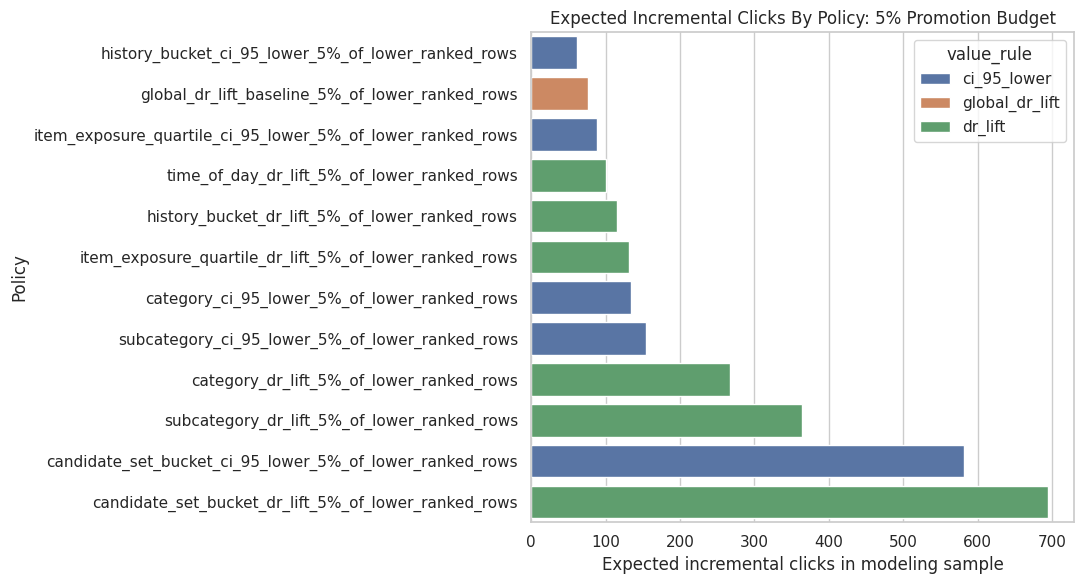
The policy plot summarizes the simulated product value of targeted promotion. It helps translate causal lift estimates into the kind of incremental-click story a recommender-system team can evaluate.
Inspect the Best Policy Allocation
A policy summary tells us which strategy scores best, but we also need to know what that strategy actually allocates to. The next cells inspect the top policy’s segment-level allocation.
Select And Inspect The Best Policy
This cell selects the highest-scoring policy for the 5% budget and displays its allocation table. The allocation table shows which segments receive promotions, how many promotions they receive, and the expected incremental clicks from each segment.
best_policy_row = (
    policy_summary.query("budget_name == @plot_budget")
    .sort_values("expected_incremental_clicks_model_sample", ascending=False)
    .iloc[0]
)
best_policy_name = best_policy_row["policy_name"]
best_allocation = allocation_tables[best_policy_name]

best_policy_row.to_frame().T| policy_name | segment_dimension | value_rule | budget_name | budget | allocated_promotions | expected_incremental_clicks_model_sample | expected_incremental_clicks_processed_sample | avg_incremental_click_prob_per_promotion | |
|---|---|---|---|---|---|---|---|---|---|
| 30 | candidate_set_bucket_dr_lift_5%_of_lower_ranke... | candidate_set_bucket | dr_lift | 5%_of_lower_ranked_rows | 6899 | 6899 | 694.7564 | 3417.0990 | 0.1007 |
The selected allocation table shows which segments the simulated policy would prioritize. This makes the recommendation actionable and also exposes whether the policy is overly concentrated in a small number of segments.
Show Best Policy Segment Allocation
This cell displays the segments selected by the best policy. If the policy allocates to only a few segments, that means the estimated value is concentrated. If it spreads across many segments, the value is more diffuse.
best_allocation.head(20)| segment_col | segment | allocated_promotions | value_used | dr_lift | ci_95_lower | expected_incremental_clicks | |
|---|---|---|---|---|---|---|---|
| 0 | candidate_set_bucket | 1-10 | 2797 | 0.2275 | 0.2275 | 0.1959 | 636.3183 |
| 1 | candidate_set_bucket | 26-50 | 4102 | 0.0142 | 0.0142 | 0.0083 | 58.4380 |
The selected allocation table shows which segments the simulated policy would prioritize. This makes the recommendation actionable and also exposes whether the policy is overly concentrated in a small number of segments.
Inspect The Best Conservative Policy
This cell finds the highest-scoring policy that uses ci_95_lower as the value rule. This is a more risk-aware strategy because it prioritizes segments whose lower confidence bounds are positive and large.
best_conservative_row = (
    policy_summary.query("budget_name == @plot_budget and value_rule == 'ci_95_lower'")
    .sort_values("expected_incremental_clicks_model_sample", ascending=False)
    .iloc[0]
)
best_conservative_name = best_conservative_row["policy_name"]
best_conservative_allocation = allocation_tables[best_conservative_name]

best_conservative_row.to_frame().T| policy_name | segment_dimension | value_rule | budget_name | budget | allocated_promotions | expected_incremental_clicks_model_sample | expected_incremental_clicks_processed_sample | avg_incremental_click_prob_per_promotion | |
|---|---|---|---|---|---|---|---|---|---|
| 31 | candidate_set_bucket_ci_95_lower_5%_of_lower_r... | candidate_set_bucket | ci_95_lower | 5%_of_lower_ranked_rows | 6899 | 6899 | 581.9677 | 2862.3576 | 0.0844 |
The selected allocation table shows which segments the simulated policy would prioritize. This makes the recommendation actionable and also exposes whether the policy is overly concentrated in a small number of segments.
Show Conservative Allocation
This cell displays the segment allocation for the best conservative policy. This is often the better risk-aware recommendation because it is less likely to chase noisy high point estimates.
best_conservative_allocation.head(20)| segment_col | segment | allocated_promotions | value_used | dr_lift | ci_95_lower | expected_incremental_clicks | |
|---|---|---|---|---|---|---|---|
| 0 | candidate_set_bucket | 1-10 | 2797 | 0.1959 | 0.2275 | 0.1959 | 548.0366 |
| 1 | candidate_set_bucket | 26-50 | 4102 | 0.0083 | 0.0142 | 0.0083 | 33.9311 |
The selected allocation table shows which segments the simulated policy would prioritize. This makes the recommendation actionable and also exposes whether the policy is overly concentrated in a small number of segments.
Budget Sensitivity
A good policy recommendation should be stable across plausible budgets. The next cells compare how policy performance changes as the promotion budget increases from 1% to 5% of lower-ranked rows.
Plot Expected Clicks Across Budgets
This cell plots the best policy from each segment dimension across budget sizes. It shows whether a policy remains attractive as the available promotion budget grows.
best_by_dimension_budget = (
    policy_summary_with_baseline.sort_values("expected_incremental_clicks_model_sample", ascending=False)
    .groupby(["budget_name", "segment_dimension"], as_index=False)
    .head(1)
)

plt.figure(figsize=(10, 6))
sns.lineplot(
    data=best_by_dimension_budget,
    x="budget_name",
    y="expected_incremental_clicks_model_sample",
    hue="segment_dimension",
    marker="o",
)
plt.title("Best Policy Performance Across Promotion Budgets")
plt.xlabel("Promotion budget")
plt.ylabel("Expected incremental clicks in modeling sample")
plt.xticks(rotation=20, ha="right")
plt.tight_layout()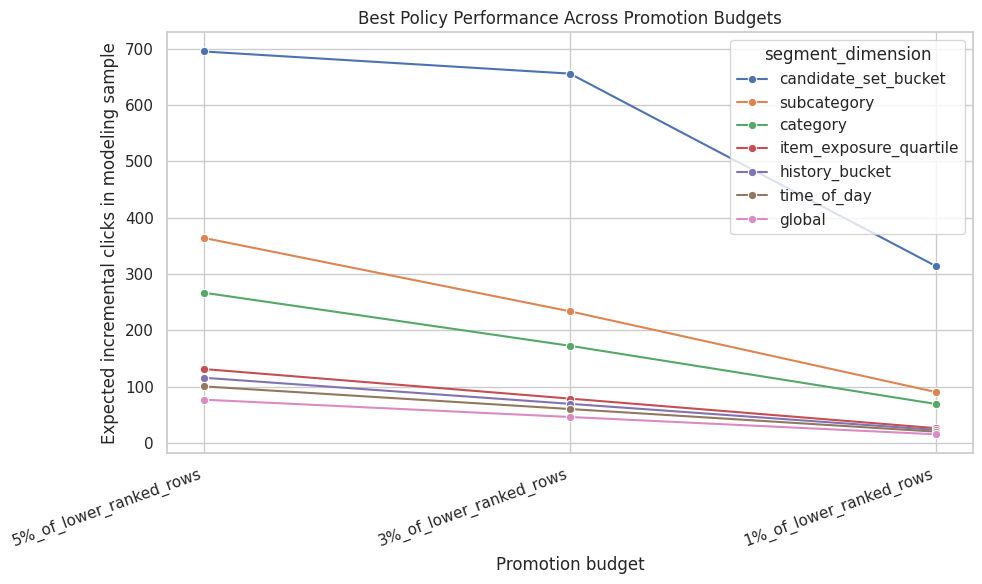
The policy plot summarizes the simulated product value of targeted promotion. It helps translate causal lift estimates into the kind of incremental-click story a recommender-system team can evaluate.
Product Recommendation Table
This cell creates a compact table suitable for a product-facing memo. It shows the best policies under the largest budget, their expected incremental clicks, and the scaled estimate for the processed parquet sample.
recommendation_table = (
    policy_summary_with_baseline.query("budget_name == @plot_budget")
    .sort_values("expected_incremental_clicks_model_sample", ascending=False)
    .head(10)
    [[
        "policy_name",
        "segment_dimension",
        "value_rule",
        "budget",
        "allocated_promotions",
        "avg_incremental_click_prob_per_promotion",
        "expected_incremental_clicks_model_sample",
        "expected_incremental_clicks_processed_sample",
    ]]
)

recommendation_table| policy_name | segment_dimension | value_rule | budget | allocated_promotions | avg_incremental_click_prob_per_promotion | expected_incremental_clicks_model_sample | expected_incremental_clicks_processed_sample | |
|---|---|---|---|---|---|---|---|---|
| 0 | candidate_set_bucket_dr_lift_5%_of_lower_ranke... | candidate_set_bucket | dr_lift | 6899 | 6899 | 0.1007 | 694.7564 | 3417.0990 |
| 2 | candidate_set_bucket_ci_95_lower_5%_of_lower_r... | candidate_set_bucket | ci_95_lower | 6899 | 6899 | 0.0844 | 581.9677 | 2862.3576 |
| 4 | subcategory_dr_lift_5%_of_lower_ranked_rows | subcategory | dr_lift | 6899 | 6899 | 0.0527 | 363.9210 | 1789.9138 |
| 7 | category_dr_lift_5%_of_lower_ranked_rows | category | dr_lift | 6899 | 6899 | 0.0387 | 266.6530 | 1311.5095 |
| 10 | subcategory_ci_95_lower_5%_of_lower_ranked_rows | subcategory | ci_95_lower | 6899 | 6899 | 0.0224 | 154.1985 | 758.4119 |
| 11 | category_ci_95_lower_5%_of_lower_ranked_rows | category | ci_95_lower | 6899 | 6899 | 0.0194 | 134.1387 | 659.7495 |
| 12 | item_exposure_quartile_dr_lift_5%_of_lower_ran... | item_exposure_quartile | dr_lift | 6899 | 6899 | 0.0190 | 131.2076 | 645.3331 |
| 14 | history_bucket_dr_lift_5%_of_lower_ranked_rows | history_bucket | dr_lift | 6899 | 6899 | 0.0168 | 115.7443 | 569.2782 |
| 15 | time_of_day_dr_lift_5%_of_lower_ranked_rows | time_of_day | dr_lift | 6899 | 6899 | 0.0145 | 100.3679 | 493.6507 |
| 17 | item_exposure_quartile_ci_95_lower_5%_of_lower... | item_exposure_quartile | ci_95_lower | 6899 | 6899 | 0.0128 | 88.1459 | 433.5381 |
The recommendation table turns the simulation into product language: which segments to prioritize, what lift is expected, and how much volume is affected. This is the bridge from notebook analysis to stakeholder communication.
Final Takeaways
The simulation translates segment-level causal estimates into a constrained promotion decision. The optimistic policy asks what would happen if the largest estimated lifts were trusted directly, while the conservative policy discounts noisy segments and treats uncertainty as part of the decision.
The useful output is a shortlist of candidate segments for online testing. A targeted policy becomes more compelling when it improves on the global-lift baseline, uses segments large enough to matter operationally, and remains credible under conservative ranking.